

編輯:關於 Android 開發
xUtils3 是 xUtils 的升級版本,提供注解、網路請求、圖片加載與資料庫操作四大模組,適合需要快速整合常用功能的 Android 專案。
在 Application 中呼叫 x.Ext.init(this),即可使用 @ContentView、@ViewInject、@Event 等注解簡化 Activity 與 Fragment 的初始化。
@ContentView(R.layout.fragment_demo)
public class DemoFragment extends Fragment {
    @ViewInject(R.id.btn_fragment)
    private Button button;

    @Override
    public View onCreateView(LayoutInflater inflater, ViewGroup container, Bundle savedInstanceState) {
        return x.view().inject(this, inflater, container);
    }
}
支援 GET、POST、檔案下載與大檔案上傳,並可設定保存路徑、斷點續傳與自訂執行緒池。
RequestParams params = new RequestParams("https://api.m.mtime.cn/PageSubArea/TrailerList.api");
x.http().post(params, new Callback.CommonCallback<String>() {
    @Override
    public void onSuccess(String result) {
        textView.setText(result);
    }
});
RequestParams params = new RequestParams(url);
params.setSaveFilePath(Environment.getExternalStorageDirectory() + "/atguigu/480.mp4");
params.setAutoResume(true);
x.http().get(params, new Callback.ProgressCallback<File>() {
    @Override
    public void onLoading(long total, long current, boolean isDownloading) {
        progressbar.setMax((int) total);
        progressbar.setProgress((int) current);
    }
});
RequestParams params = new RequestParams(url);
params.setMultipart(true);
params.addBodyParameter("File", new File(path), null, "oppo.mp4");
x.http().post(params, new Callback.ProgressCallback<File>() {
    @Override
    public void onSuccess(File file) {
        Toast.makeText(context, "上傳成功", Toast.LENGTH_SHORT).show();
    }
});
xUtils3 的 API 設計較為簡潔,適合中小型專案快速完成網路與資料處理。
 高仿 360 手機衛士應用源碼:炫酷左右滑動效果
 這份 Android 源碼高仿了 360 手機衛士的介面,最大的亮點在於流暢的左右滑動切換效果,視覺體驗相當炫酷,很適合
 完整專案實作:木子記事本 App(原創,轉載請註明出處)
 這是一個較為完整的記事本 App,具備記錄、儲存到資料庫、編輯與保存等功能。以下是它的架構與各個模組的程式碼。
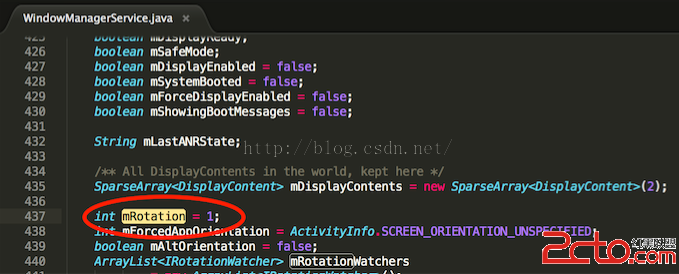 Android 4.4.2 將豎屏強制改為橫屏的修改方案
 某些客製化設備需要將系統預設的豎屏方向改為橫屏。本文以 Android 4.4.2 為例,說明如何從 Frame
 ListView 實現圖文並列與自定義分割線(仿微信聯繫人)
ListView 實現圖文並列與自定義分割線 在上一篇《Android 中 Fragment 和 ViewPager 那點事兒》裡,我們用 Fragment 與 View