

編輯:關於 Android 開發
在 Android 中,Activity 主要負責前台畫面,Service 則適合處理不需要使用者持續操作的背景任務,例如播放音樂、下載檔案或維持連線。
非綁定:透過 startService() 啟動。服務啟動後會在背景執行,直到呼叫 stopService() 或服務自行呼叫 stopSelf()。這適合下載、上傳等不需要回傳結果的任務。
綁定:透過 bindService() 建立客戶端與服務的連線。客戶端可透過 IBinder 呼叫服務方法,適合需要與服務互動的場景。多個元件可綁定同一個服務,所有綁定解除後,服務才會被銷毀。
若任務需要在背景執行且不需與 UI 頻繁互動,可使用 IntentService。它會使用獨立工作執行緒處理每個 Intent,適合耗時工作。
public class MyIntentService extends IntentService {
    public MyIntentService() {
        super("MyIntentService");
    }

    @Override
    protected void onHandleIntent(Intent intent) {
        // 在這裡執行耗時任務,例如檔案下載
    }
}
Activity 中可透過 startService() 啟動:
startService(new Intent(this, MyIntentService.class));別忘了在 AndroidManifest.xml 中註冊這個 Service。
綁定服務通常需要自訂 Binder,讓客戶端取得 Service 實例。
public class LocalService extends Service {
    private final IBinder mBinder = new LocalBinder();

    public class LocalBinder extends Binder {
        LocalService getService() {
            return LocalService.this;
        }
    }

    @Override
    public IBinder onBind(Intent intent) {
        return mBinder;
    }

    public int getRandomNumber() {
        return new Random().nextInt(100);
    }
}
Activity 端使用 ServiceConnection 接收回呼:
Intent intent = new Intent(this, LocalService.class);
bindService(intent, mConnection, Context.BIND_AUTO_CREATE);
在 onServiceConnected() 中取得 Binder,並轉型呼叫服務方法:
LocalBinder binder = (LocalBinder) service;
mService = binder.getService();
mBound = true;若使用 startService(),流程通常是 onCreate() → onStartCommand() → onDestroy()。若使用 bindService(),流程是 onCreate() → onBind() → onUnbind() → onDestroy()。
若先 startService() 再 bindService(),服務會同時處於啟動與綁定狀態。此時只呼叫 stopService() 或只 unbindService() 都不足以銷毀服務,必須兩者都解除,服務才會真正停止。
Service 不是執行緒。Service 本身執行在應用程式的主執行緒,因此不能直接在 Service 中執行長時間耗時工作,否則可能阻塞 UI。Service 的價值在於它可以在 Activity 銷毀後繼續存活,適合需要與 UI 分離的任務。
若需要耗時運算,可在 Service 中建立背景執行緒,或使用 IntentService、WorkManager、Foreground Service 等現代方案。理解 Service 的生命週期與綁定機制,才能避免記憶體洩漏並做出穩定的背景功能。
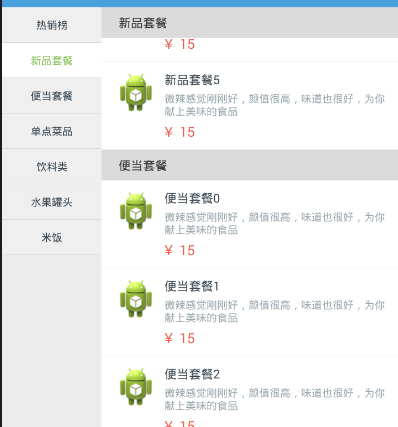 仿餓了么點餐界面:兩個 ListView 聯動實現
點餐類應用的經典交互是左右聯動:左側是分類菜單,右側是菜品列表,點左側切換右側內容,滑右側則左側高亮跟隨。本文記錄一個實現思路,同時也留下了一個尚未解決的問題,歡迎一起探
 Android 如何自學:從 Java 基礎到進階主題的路線圖
Java 與 UI 基礎自學 Android 前,建議先鞏固 Java 基礎,再理解常用控制項與版面配置。官方文件與範例是很好的起點。四大元件與布局Activity、Se
 以 Adapter 模式重構 Android 圓形菜單
 圓形菜單這類自訂 UI 很能吸引注意,但真正可維護的關鍵,在於如何隔離變化。本文以重構圓形菜單為例,說明如何透過
 Android 斷點續傳下載原理與實作要點
斷點續傳的核心是把下載任務分段,並記錄已完成的位置。若網路中斷,下次可從上次位置繼續,而不必從頭下載。多執行緒下載還可把檔案拆成