

編輯:關於 Android 開發
Android 採用單執行緒模型,介面(UI)的繪製只能發生在主執行緒中。如果在主執行緒裡執行耗時操作,就會拖慢 UI 繪製與事件響應,甚至觸發「應用無回應」(ANR)問題。因此 Android 明確規定不可在主執行緒進行耗時任務,正解是另開新執行緒來處理。
開啟新執行緒可以透過 new Thread(),或實作 Runnable 介面。那麼,為什麼要特別使用 AsyncTask 呢?
如果直接用 Thread 的 run() 方法,run() 結束後並沒有回傳值,你必須自己建立一套執行緒間的通訊機制。而 AsyncTask 把所有執行緒通訊都封裝成了回呼函式,讓呼叫邏輯更好寫,尤其在異步處理結束後,能透過回呼函式優雅地收尾——畢竟程式設計師都喜歡省事。
除此之外還有一個關鍵原因:Android 4.0 之後禁止在 UI 執行緒中執行網路操作,否則會拋出 android.os.NetworkOnMainThreadException。
AsyncTask 正是 Android 提供的一個輕量級異步任務類,簡單好用,自然是不二之選。
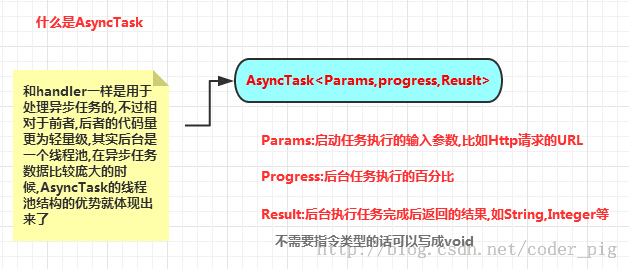
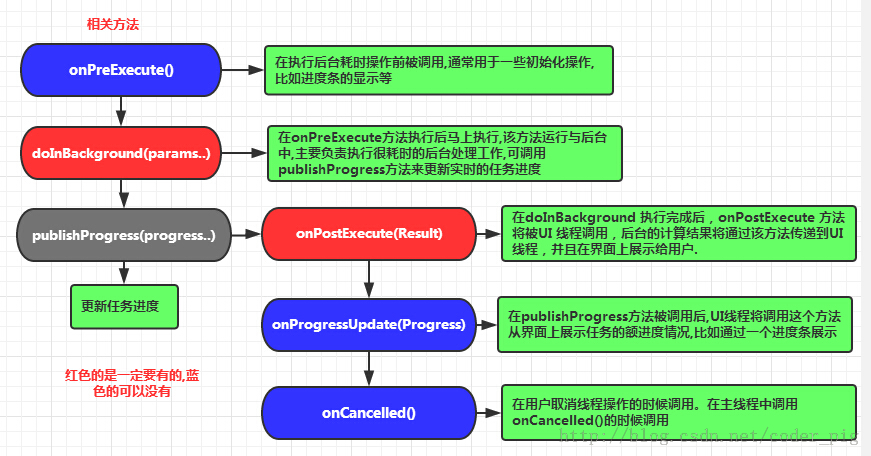
使用時需特別注意:
Task 的實例必須在 UI Thread 中建立;execute 方法也必須在 UI Thread 中呼叫;同一個 Task 只能執行一次,重複呼叫會拋出異常。
所謂「通用 AsyncTask」,指的是要能處理不同型別的請求並回傳不同型別的資料。難不成每種型別都要寫一個 AsyncTask?那也未免太麻煩了。
還有一種常見困惑:我們透過異步任務取得一個物件,然後在下一行立刻使用它,邏輯看似沒問題,運行後卻拋出空指標異常。原因在於 AsyncTask 開啟了新執行緒,但主執行緒並未停下,它會繼續往下跑,而新執行緒此刻可能還在訪問網路、物件尚未就緒。由於網路速度不定,你根本無法確定資料何時到來,網快時一瞬就好,網慢時則要等上一會兒。
下面是一個簡潔的範例。首先,把 Http 類的型別參數(第三個參數即回傳值型別)設為泛型,這樣無論什麼型別的資料都能通用。接著定義一個作為屬性的介面,在 onPostExecute 方法中呼叫其中的 onResponse 方法,再由使用方實作該介面。
這個介面的作用,完全可以理解為一個監聽事件:好比 checkbox 的變更監聽以「是否選中」為觸發條件,這裡則以「是否有資料」為觸發條件,當網路訪問完成並取得資料時便呼叫。由於我們在主執行緒中完成了介面實作,回傳的資料自然任你取用。
public class Http<T> extends AsyncTask<String,Void,T> {
    private OnResponseListener<T> listener;
    public void setListener(OnResponseListener<T> listener) { this.listener = listener; }
    @Override protected T doInBackground(String... params) { return null; }
    @Override protected void onPostExecute(T t) {
        super.onPostExecute(t);
        if (listener!=null){ listener.onResponse(t); }
    }
    // 介面,類似一個監聽事件
    public interface OnResponseListener<T>{ void onResponse(T t); }
}

// 取得資料的測試類
public class Test {
    private User user1=null;
    public void get(){
        Http<User> http=new Http<User>();
        http.setListener(new Http.OnResponseListener<User>() {
            @Override public void onResponse(User user) { user1=user; }
        });
        http.execute("xxx.balabala.com");
    }
}
發送請求時,參數很容易帶上,請求方式無非 GET 與 POST 兩種。用白話說:GET 相對不安全,參數直接暴露在 URL 上;POST 則相對安全,參數會做編碼處理。下面分別貼出 AsyncTask 在兩種請求下的核心程式碼——doInBackground 方法。
GET
protected T doInBackground(String... params) {
    HttpURLConnection connection=null;
    InputStream is=null;
    ByteArrayOutputStream bos=null;
    try {
        connection=(HttpURLConnection) new URL(params[0]).openConnection();
        connection.setRequestMethod("GET");
        int code=connection.getResponseCode();
        if(code==200){
            is=connection.getInputStream();
            byte [] b=new byte[1024];
            int len=-1;
            bos=new ByteArrayOutputStream();
            while ((len=is.read(b))!=-1){ bos.write(b,0,len); }
            String json=bos.toString("utf-8");
            T t=JSON.parseObject(json,type);
            return t;
        }else{ Log.e("error","網絡訪問失敗==========="+code); }
    } catch (IOException e) { e.printStackTrace(); }
    finally {
        try { if (bos!=null){ bos.close(); } if (is!=null){ is.close(); } }
        catch (IOException e) { e.printStackTrace(); }
        if (connection!=null){ connection.disconnect(); }
    }
    return null;
}
POST — 與 GET 相比,POST 只是多了一段處理參數輸出的程式碼。
protected T doInBackground(String... params) {
    String[] strArr=params[0].split("\\?");
    HttpURLConnection connection=null;
    OutputStream os=null;
    InputStream is=null;
    ByteArrayOutputStream bos=null;
    try {
        connection=(HttpURLConnection) new URL(strArr[0]).openConnection();
        connection.setRequestMethod("POST");
        connection.setDoOutput(true);
        connection.setDoInput(true);
        os=connection.getOutputStream();
        os.write(strArr[1].getBytes("utf-8"));
        os.close();
        int code=connection.getResponseCode();
        if(code==200){
            is=connection.getInputStream();
            byte [] b=new byte[1024];
            int len=-1;
            bos=new ByteArrayOutputStream();
            while ((len=is.read(b))!=-1){ bos.write(b,0,len); }
            String json=bos.toString("utf-8");
            T t=JSON.parseObject(json,type);
            return t;
        }else{ Log.e("error","網絡訪問失敗==========="+code); }
    } catch (IOException e) { e.printStackTrace(); }
    finally {
        try { if (bos!=null){ bos.close(); } if (is!=null){ is.close(); } }
        catch (IOException e) { e.printStackTrace(); }
        if (connection!=null){ connection.disconnect(); }
    }
    return null;
}
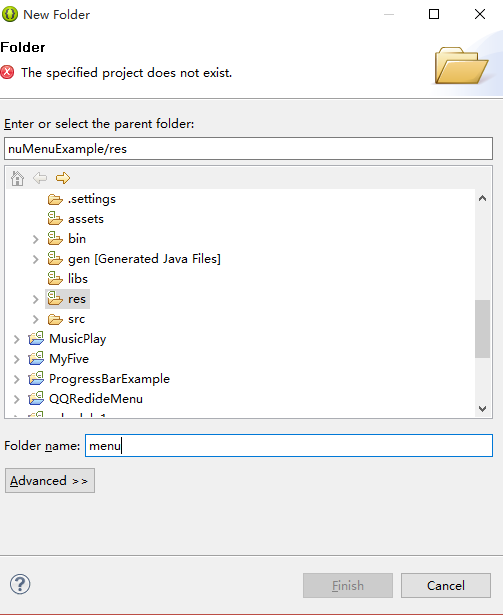 Android 為 Activity 加入選單的完整步驟
在 Android 中為 Activity 加入選單,主要可以分成建立選單資源、載入選單、處理點擊事件三個步驟。這
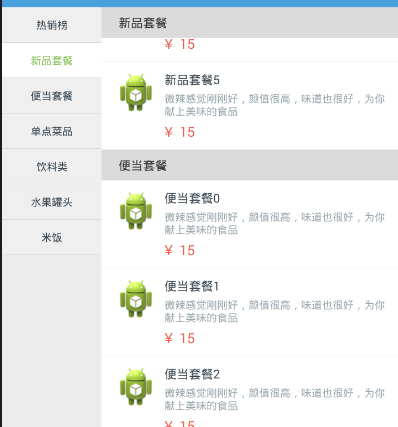 仿餓了么點餐界面:兩個 ListView 聯動實現
點餐類應用的經典交互是左右聯動:左側是分類菜單,右側是菜品列表,點左側切換右側內容,滑右側則左側高亮跟隨。本文記錄一個實現思路,同時也留下了一個尚未解決的問題,歡迎一起探
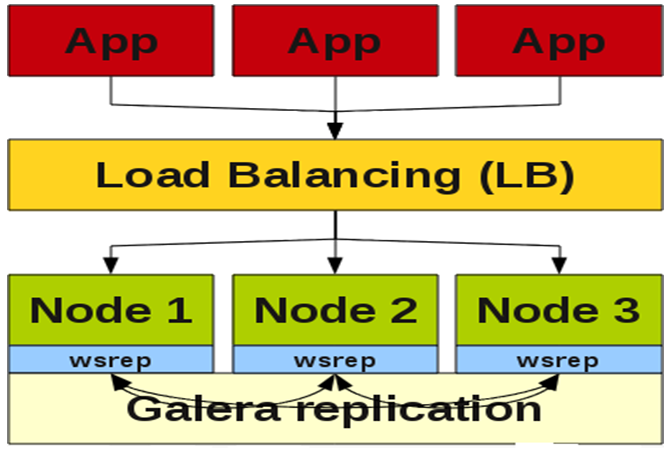 OLTP 應用下的 MySQL 高可用架構選型對比
OLTP 應用下的 MySQL 高可用架構選型 在把企業核心應用從商用資料庫遷移到開源資料庫、以本地磁碟取代共享儲存之前,必須先回答幾個關鍵問題,否則遷移很難真正落地:
 Android Socket 通訊實戰:客戶端與伺服器雙向傳輸的完整實作
用 Socket 打通 Android 客戶端與伺服器 在 Android 開發裡,除了常見的 HTTP 介面請求,Socket 依然是許多即時通訊、長連線推送與自訂協議