

編輯:關於 Android 開發
Preference 是 Android SDK 從 API 1 就提供的基類,專門用來快速搭出「設定畫面」。它最大的好處是省掉一堆樣板:不用自己排版、不用自己做點擊回饋,寫一個 XML 就有一個可用的設定頁。
使用 Preference 顯示設定畫面時,Activity 必須繼承 PreferenceActivity,並在 onCreate 中呼叫 addPreferencesFromResource(R.xml.main) 載入布局。
這裡有個位置上的細節:這個布局檔要放在 res/xml 目錄下,而不是一般的 res/layout。如果 res 底下還沒有 xml 資料夾,需要自己新建。
PreferenceScreen:根節點,每個檔案只能有一個。PreferenceCategory:分類節點,用來把項目分組並加上小標題。Preference:子節點,也就是實際的設定項目。<?xml version="1.0" encoding="utf-8"?> <PreferenceScreen xmlns:android="https://schemas.android.com/apk/res/android" > <PreferenceCategory android:title="@string/general" > <Preference android:title="@string/properties" /> <Preference android:title="@string/attach" /> <Preference android:title="@string/left_and_right" /> <Preference android:title="@string/changing_fragments" /> <Preference android:title="@string/responsive_ui" /> <Preference android:title="@string/viewpager" /> </PreferenceCategory> <PreferenceCategory android:title="@string/title_bar" > <Preference android:title="@string/title_bar_slide" /> <Preference android:title="@string/title_bar_content" /> </PreferenceCategory> <PreferenceCategory android:title="@string/animations" > <Preference android:title="@string/anim_zoom" /> <Preference android:title="@string/anim_scale" /> <Preference android:title="@string/anim_slide" /> </PreferenceCategory> </PreferenceScreen>
除了最基本的 Preference,SDK 還提供了幾個現成的子類:SwitchPreference(開關)、CheckBoxPreference(核取方塊)、EditTextPreference(文字輸入)、ListPreference(清單選擇)、RingtonePreference(鈴聲選擇)。如果需求只是「讓使用者開個開關」,用這些內建類別就好,不必自己拉 Dialog。
設定項目的點擊事件統一透過這個方法處理,用標題文字或 key 來判斷點了哪一項,再跳轉到對應的 Activity:
@Override public boolean onPreferenceTreeClick(PreferenceScreen screen, Preference pref) { Class<?> cls = null; String title = pref.getTitle().toString(); if (title.equals(getString(R.string.properties))) { cls = PropertiesActivity.class; } else if (title.equals(getString(R.string.attach))) { cls = AttachExample.class; } else if (title.equals(getString(R.string.changing_fragments))) { cls = FragmentChangeActivity.class; } else if (title.equals(getString(R.string.left_and_right))) { cls = LeftAndRightActivity.class; } else if (title.equals(getString(R.string.responsive_ui))) { cls = ResponsiveUIActivity.class; } else if (title.equals(getString(R.string.viewpager))) { cls = ViewPagerActivity.class; } else if (title.equals(getString(R.string.title_bar_slide))) { cls = SlidingTitleBar.class; } else if (title.equals(getString(R.string.title_bar_content))) { cls = SlidingContent.class; } else if (title.equals(getString(R.string.anim_zoom))) { cls = CustomZoomAnimation.class; } else if (title.equals(getString(R.string.anim_scale))) { cls = CustomScaleAnimation.class; } else if (title.equals(getString(R.string.anim_slide))) { cls = CustomSlideAnimation.class; } Intent intent = new Intent(this, cls); startActivity(intent); return true; }
第一,用標題文字當判斷依據很危險。標題是給使用者看的,一旦做多語系或改文案,所有 if 都會失效。正確做法是給每個 Preference 加上 android:key,然後用 pref.getKey() 判斷。key 是程式識別用的,永遠不該跟著文案變動。
第二,這串 if-else 應該改成對照表。項目一多,這種寫法會长到幾百行。用一個 Map<String, Class<?>> 把 key 與 Activity 對應起來,一行 get 就解決。
第三,cls 可能為 null 卻直接 new Intent。使用者點到沒有對應設定的項目時會直接崩潰。加上 null 檢查再 return false 才是安全的。
設定頁的真正價值是「存下使用者的選擇」。Preference 框架會自動把值寫進 SharedPreferences,key 就是你在 XML 中設定的 android:key,預設檔案名稱是 <package_name>_preferences。讀取時:
SharedPreferences sp = PreferenceManager.getDefaultSharedPreferences(this);
boolean autoUpdate = sp.getBoolean("key_auto_update", false);
String nickname = sp.getString("key_nickname", "");
第二個參數是預設值,也就是「使用者從未設定過時」要用的值。這個參數不能省,否則第一次開啟 App 就會拿到 null。
PreferenceActivity 在 API 21 之後已被標記為 deprecated,addPreferencesFromResource() 也不建議再使用(因為它會在背景執行緒之外同步讀取 XML,設定項目多時會拖慢啟動)。新專案建議改用 AndroidX 的 Preference Library:讓 Activity 繼承 AppCompatActivity,透過 PreferenceFragmentCompat 載入 setPreferencesFromResource(R.xml.preferences, rootKey),並用 findPreference(key) 加上 setOnPreferenceChangeListener 做監聽。
這個新做法除了 API 現代化,還免費得到 Material Design 風格、Fragment 化後可放進 ViewPager、以及更好的主題自訂能力。遷移成本不高,但收益明顯。
 QQ 風格註冊頁實作:Spinner 下拉選單與 CheckBox 控制按鈕啟用
延續登入頁,再做一個註冊頁 還不到睡覺時間,於是又加做了一個註冊畫面。延續上一篇登入頁的視覺風格,這次的新課題是下拉選單、標題欄處理,以及用 CheckBox 控制按鈕的
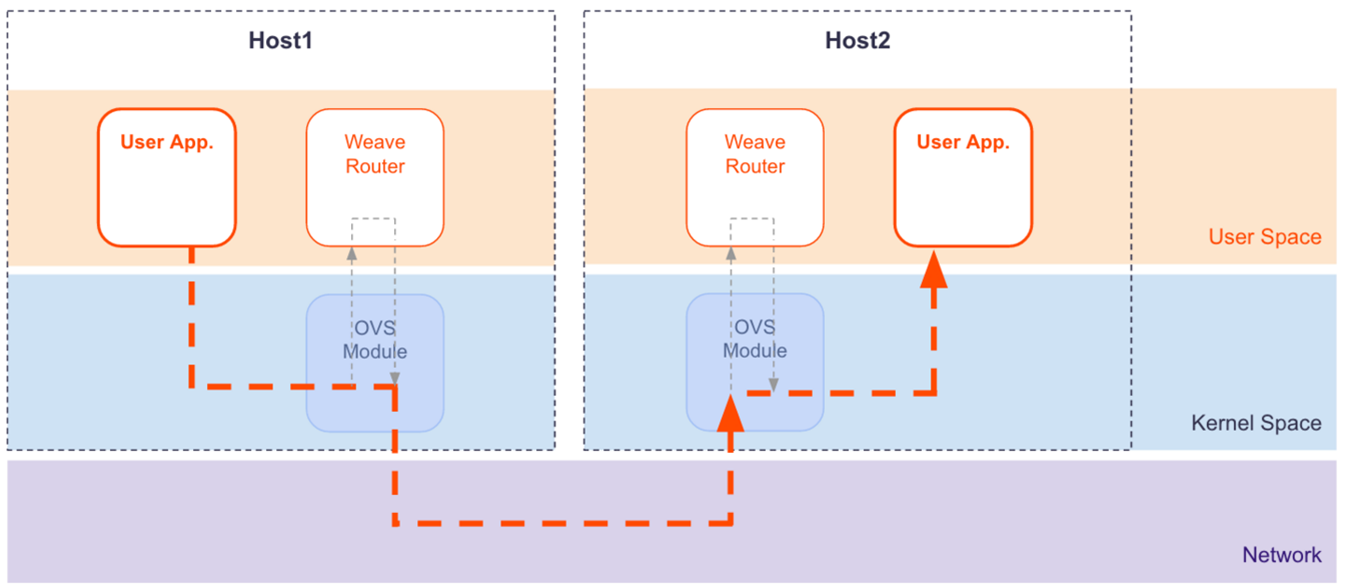 Docker 跨主機方案 Weave 的踩坑記錄:fastdp 與 virtio_net 相容性問題
問題背景 Weave 在 1.2 之後加入 fastdp 模式,預設使用核心的 Open vSwitch 與 VXLAN 進行封裝。若在特定核心版本的 CentOS 7
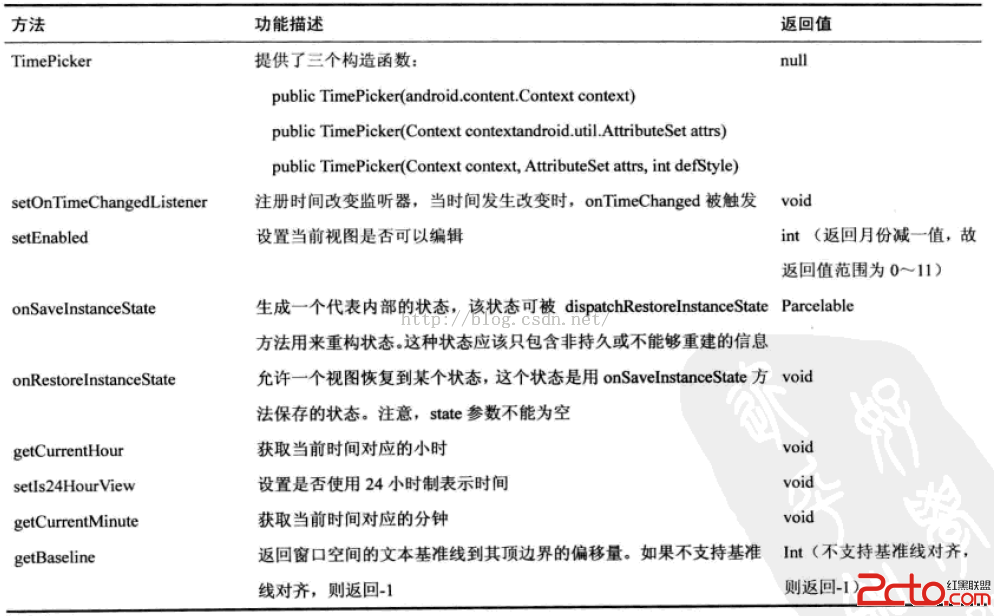 Android 時間選擇器 TimePicker 使用教學
 TimePicker 的類別繼承結構如下:java.lang.Object → android.view.Vi
 手機安全衛士實作:緩存清理功能解析
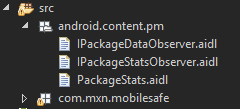
本文說明如何在 Android 中實作類似手機安全衛士的緩存清理功能,重點包含掃描應用程式快取、列出佔用空間,以及一鍵清除。核心思路實作時可先透過 PackageMana