

編輯:關於 Android 開發
當系統收到隱式 Intent,會依 action、category、data 比對各元件宣告的 intent-filter,找出可處理的 Activity、Service 或 BroadcastReceiver。
intent-filter 可包含多個 action。Intent 只要符合其中一項 action,即可通過動作測試。
category 用於描述元件可服務的情境。Intent 中所有 category 都必須與 filter 中至少一組 category 完全匹配。
data 可指定 scheme、host、port、path、mimeType。URI 與型別需與 filter 宣告相符。
建立自訂 action 與 data,並在目標 Activity 的 intent-filter 中接收:
Intent intent = new Intent();
intent.setAction("com.example.ACTION_VIEW");
intent.addCategory("android.intent.category.DEFAULT");
intent.setDataAndType(Uri.parse("example://data"), "vnd.android.cursor.item/example");
startActivity(intent);
目標 Activity 可在 onCreate 中以 getIntent().getData() 取得 URI。
清單檔中需為目標 Activity 加入對應 action、category 與 data 設定,才能被系統匹配。
 在真機上讀取 /data 目錄並導出 Android 數據庫文件
前提條件 要在真機上查看某個應用的數據庫文件,必須先取得 root 權限,這一步本文不再展開。不同機型與不同 Root 方案的結果可能不一致,筆者手上的設備獲取到的權限如
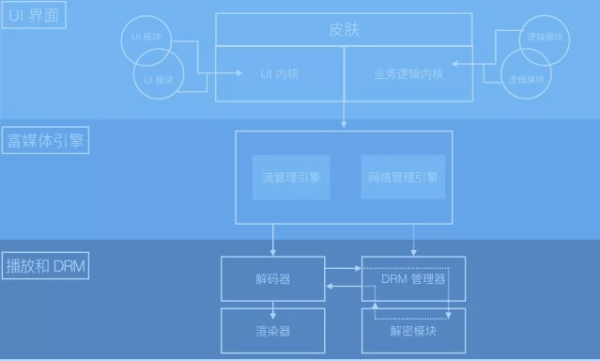 視頻直播技術詳解(六):現代播放器原理
 關於直播的技術文章不少,成體系的卻不多。我們將用七篇文章,更系統化地介紹當下大熱的視頻直播各環節的關鍵技術,幫助視頻直播創業者更全
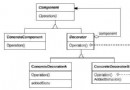 《Android 源碼設計模式解析與實戰》筆記(二十一):裝飾模式
第二十一章、裝飾模式 裝飾模式也稱為包裝模式,屬於結構型設計模式。它提供了一條替代繼承的方案,用來動態地為物件擴充職責。 一、定義 動態地為一個物件添加額外的職責。
 Unity 滑頁嵌套實作:解決 ScrollRect 巢狀事件衝突
做過 Unity UGUI 卷轴列表的人大概都遇過這個問題:橫向滑頁裡塞一個直向滑頁,滑起來總是互相搶事件。因為需求需要,加上不少網友詢問,我做了個「橫向滑頁 + 部分頁