

編輯:關於 Android 開發
這次要實作的是 NDK 範例中的 bitmap-plasma,也就是那個經典的動態水波紋效果。官方原始碼就在 NDK 的 samples 資料夾裡,可以直接翻出來對照。
先看一下成品長相:
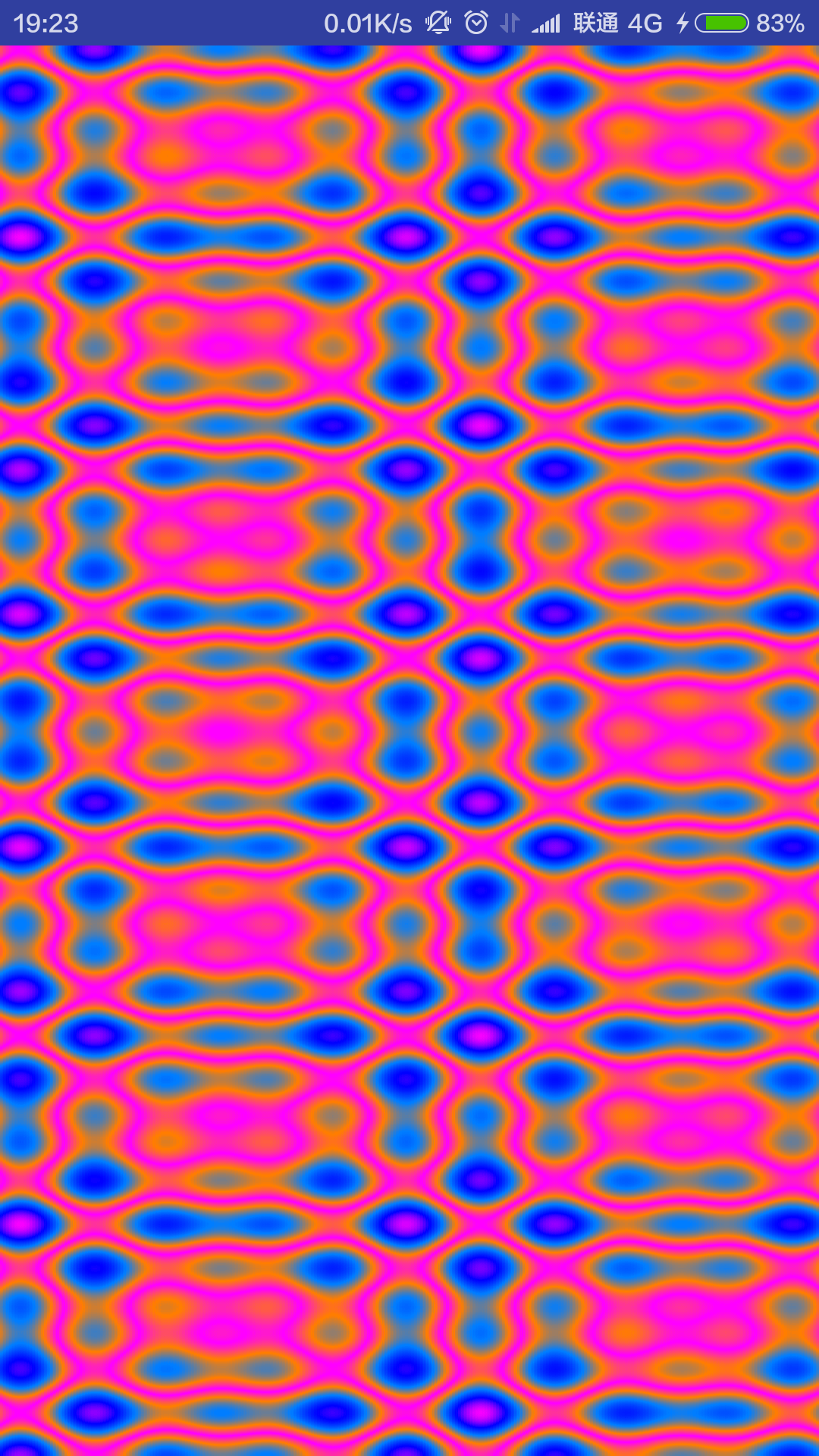
關於專案建立與環境組態,可以參考前置文章說明,這裡直接進入程式碼。
package example.user.plasmatest;

import android.os.Bundle;
import android.app.Activity;
import android.content.Context;
import android.view.View;
import android.graphics.Bitmap;
import android.graphics.Canvas;
import android.view.Display;

public class MainActivity extends Activity {

    /** Called when the activity is first created. */
    @Override
    public void onCreate(Bundle savedInstanceState) {
        super.onCreate(savedInstanceState);
        Display display = getWindowManager().getDefaultDisplay();
        setContentView(new PlasmaView(this, display.getWidth(), display.getHeight()));
    }

    /* 載入我們的 native library */
    static {
        System.loadLibrary("plasma");
    }
}

class PlasmaView extends View {

    private Bitmap mBitmap;
    private long mStartTime;

    /* 由 libplasma.so 實作 */
    private static native void renderPlasma(Bitmap bitmap, long time_ms);

    public PlasmaView(Context context, int width, int height) {
        super(context);
        mBitmap = Bitmap.createBitmap(width, height, Bitmap.Config.RGB_565);
        mStartTime = System.currentTimeMillis();
    }

    @Override
    protected void onDraw(Canvas canvas) {
        renderPlasma(mBitmap, System.currentTimeMillis() - mStartTime);
        canvas.drawBitmap(mBitmap, 0, 0, null);
        // 強制重繪,讓下一幀帶入不同的時間參數
        invalidate();
    }
}
這裡的關鍵是 Bitmap.Config.RGB_565——C 層直接往這塊記憶體寫像素,格式必須對得上,否則會拿到錯誤。而 invalidate() 在 onDraw 尾端自我觸發,形成持續刷新的動畫迴圈。
在專案根目錄執行 make project 後,用 javah 從編譯好的 class 產生 jni 目錄與對應的 .h 頭檔。方法名稱會被攪亂成 Java_example_user_plasmatest_PlasmaView_renderPlasma 這種長名稱,這是 JNI 的正常規則。
在 jni 目錄下建立 C 原始碼。這份程式有幾個值得學的設計:
用定點數取代浮點。ARMv5 上的浮點運算極慢,而每個像素都要算一次三角函數。因此程式自行定義了 Fixed(16.16 定點)與 Angle(9 位元角度)兩套型別,並預先算好正弦查表 angle_sin_tab,把昂貴的 sin() 換成一次陣列查表。
預建 565 色盤。init_palette() 預先算出 256 色漸變的 RGB565 值,畫的時候只需把定點值映射成索引取色。
最佳化記憶體寫入。定義 OPTIMIZE_WRITES 後,程式會先對齊位址,再以 32 位元一次寫入兩個像素,大幅減少寫入次數。
/*
 * Copyright (C) 2010 The Android Open Source Project
 *
 * Licensed under the Apache License, Version 2.0 (the "License");
 * you may not use this file except in compliance with the License.
 * You may obtain a copy of the License at
 *
 *      https://www.apache.org/licenses/LICENSE-2.0
 *
 * Unless required by applicable law or agreed to in writing, software
 * distributed under the License is distributed on an "AS IS" BASIS,
 * WITHOUT WARRANTIES OR CONDITIONS OF ANY KIND, either express or implied.
 * See the License for the specific language governing permissions and
 * limitations under the License.
 */

#include "example_user_plasmatest_PlasmaView.h"
#include <jni.h>
#include <time.h>
#include <android/log.h>
#include <android/bitmap.h>
#include <stdio.h>
#include <stdlib.h>
#include <math.h>

#define LOG_TAG "libplasma"
#define LOGI(...) __android_log_print(ANDROID_LOG_INFO,LOG_TAG,__VA_ARGS__)
#define LOGE(...) __android_log_print(ANDROID_LOG_ERROR,LOG_TAG,__VA_ARGS__)

/* Set to 1 to enable debug log traces. */
#define DEBUG 0

/* Set to 1 to optimize memory stores when generating plasma. */
#define OPTIMIZE_WRITES 1

/* Return current time in milliseconds */
static double now_ms(void)
{
    struct timeval tv;
    gettimeofday(&tv, NULL);
    return tv.tv_sec*1000. + tv.tv_usec/1000.;
}

/* We're going to perform computations for every pixel of the target
 * bitmap. floating-point operations are very slow on ARMv5, and not
 * too bad on ARMv7 with the exception of trigonometric functions.
 *
 * For better performance on all platforms, we're going to use fixed-point
 * arithmetic and all kinds of tricks
 */

typedef int32_t Fixed;

#define FIXED_BITS            16
#define FIXED_ONE             (1 << FIXED_BITS)
#define FIXED_AVERAGE(x,y)    (((x) + (y)) >> 1)
#define FIXED_FROM_INT(x)     ((x) << FIXED_BITS)
#define FIXED_TO_INT(x)       ((x) >> FIXED_BITS)
#define FIXED_FROM_FLOAT(x)   ((Fixed)((x)*FIXED_ONE))
#define FIXED_TO_FLOAT(x)     ((x)/(1.*FIXED_ONE))
#define FIXED_MUL(x,y)        (((int64_t)(x) * (y)) >> FIXED_BITS)
#define FIXED_DIV(x,y)        (((int64_t)(x) * FIXED_ONE) / (y))
#define FIXED_DIV2(x)         ((x) >> 1)
#define FIXED_FRAC(x)         ((x) & ((1 << FIXED_BITS)-1))
#define FIXED_TRUNC(x)        ((x) & ~((1 << FIXED_BITS)-1))
#define FIXED_FROM_INT_FLOAT(x,f) (Fixed)((x)*(FIXED_ONE*(f)))

typedef int32_t Angle;

#define ANGLE_BITS      9
#if ANGLE_BITS < 8
# error ANGLE_BITS must be at least 8
#endif

#define ANGLE_2PI       (1 << ANGLE_BITS)
#define ANGLE_PI        (1 << (ANGLE_BITS-1))
#define ANGLE_PI2       (1 << (ANGLE_BITS-2))
#define ANGLE_PI4       (1 << (ANGLE_BITS-3))

#define ANGLE_FROM_FLOAT(x) (Angle)((x)*ANGLE_PI/M_PI)
#define ANGLE_TO_FLOAT(x)   ((x)*M_PI/ANGLE_PI)

#if ANGLE_BITS <= FIXED_BITS
# define ANGLE_FROM_FIXED(x) (Angle)((x) >> (FIXED_BITS - ANGLE_BITS))
# define ANGLE_TO_FIXED(x)   (Fixed)((x) << (FIXED_BITS - ANGLE_BITS))
#else
# define ANGLE_FROM_FIXED(x) (Angle)((x) << (ANGLE_BITS - FIXED_BITS))
# define ANGLE_TO_FIXED(x)   (Fixed)((x) >> (ANGLE_BITS - FIXED_BITS))
#endif

static Fixed angle_sin_tab[ANGLE_2PI+1];

static void init_angles(void)
{
    int nn;
    for (nn = 0; nn < ANGLE_2PI+1; nn++) {
        double radians = nn*M_PI/ANGLE_PI;
        angle_sin_tab[nn] = FIXED_FROM_FLOAT(sin(radians));
    }
}

static __inline__ Fixed angle_sin( Angle a )
{
    return angle_sin_tab[(uint32_t)a & (ANGLE_2PI-1)];
}

static __inline__ Fixed angle_cos( Angle a )
{
    return angle_sin(a + ANGLE_PI2);
}

static __inline__ Fixed fixed_sin( Fixed f )
{
    return angle_sin(ANGLE_FROM_FIXED(f));
}

static __inline__ Fixed fixed_cos( Fixed f )
{
    return angle_cos(ANGLE_FROM_FIXED(f));
}

/* Color palette used for rendering the plasma */
#define PALETTE_BITS    8
#define PALETTE_SIZE    (1 << PALETTE_BITS)
#if PALETTE_BITS > FIXED_BITS
# error PALETTE_BITS must be smaller than FIXED_BITS
#endif

static uint16_t palette[PALETTE_SIZE];

static uint16_t make565(int red, int green, int blue)
{
    return (uint16_t)( ((red << 8) & 0xf800) | ((green << 2) & 0x03e0) | ((blue >> 3) & 0x001f) );
}

static void init_palette(void)
{
    int nn, mm = 0;
    /* fun with colors */
    for (nn = 0; nn < PALETTE_SIZE/4; nn++) {
        int jj = (nn-mm)*4*255/PALETTE_SIZE;
        palette[nn] = make565(255, jj, 255-jj);
    }
    for ( mm = nn; nn < PALETTE_SIZE/2; nn++ ) {
        int jj = (nn-mm)*4*255/PALETTE_SIZE;
        palette[nn] = make565(255-jj, 255, jj);
    }
    for ( mm = nn; nn < PALETTE_SIZE*3/4; nn++ ) {
        int jj = (nn-mm)*4*255/PALETTE_SIZE;
        palette[nn] = make565(0, 255-jj, 255);
    }
    for ( mm = nn; nn < PALETTE_SIZE; nn++ ) {
        int jj = (nn-mm)*4*255/PALETTE_SIZE;
        palette[nn] = make565(jj, 0, 255);
    }
}

static __inline__ uint16_t palette_from_fixed( Fixed x )
{
    if (x < 0) x = -x;
    if (x >= FIXED_ONE) x = FIXED_ONE-1;
    int idx = FIXED_FRAC(x) >> (FIXED_BITS - PALETTE_BITS);
    return palette[idx & (PALETTE_SIZE-1)];
}

/* Angles expressed as fixed point radians */

static void init_tables(void)
{
    init_palette();
    init_angles();
}

static void fill_plasma( AndroidBitmapInfo* info, void* pixels, double t )
{
    Fixed yt1 = FIXED_FROM_FLOAT(t/1230.);
    Fixed yt2 = yt1;
    Fixed xt10 = FIXED_FROM_FLOAT(t/3000.);
    Fixed xt20 = xt10;

#define YT1_INCR    FIXED_FROM_FLOAT(1/100.)
#define YT2_INCR    FIXED_FROM_FLOAT(1/163.)

    int yy;
    for (yy = 0; yy < info->height; yy++) {
        uint16_t* line = (uint16_t*)pixels;
        Fixed base = fixed_sin(yt1) + fixed_sin(yt2);
        Fixed xt1 = xt10;
        Fixed xt2 = xt20;

        yt1 += YT1_INCR;
        yt2 += YT2_INCR;

#define XT1_INCR    FIXED_FROM_FLOAT(1/173.)
#define XT2_INCR    FIXED_FROM_FLOAT(1/242.)

#if OPTIMIZE_WRITES
        /* optimize memory writes by generating one aligned 32-bit store
         * for every pair of pixels.
         */
        uint16_t* line_end = line + info->width;
        if (line < line_end) {
            if (((uint32_t)(uintptr_t)line & 3) != 0) {
                Fixed ii = base + fixed_sin(xt1) + fixed_sin(xt2);
                xt1 += XT1_INCR;
                xt2 += XT2_INCR;
                line[0] = palette_from_fixed(ii >> 2);
                line++;
            }
            while (line + 2 <= line_end) {
                Fixed i1 = base + fixed_sin(xt1) + fixed_sin(xt2);
                xt1 += XT1_INCR;
                xt2 += XT2_INCR;
                Fixed i2 = base + fixed_sin(xt1) + fixed_sin(xt2);
                xt1 += XT1_INCR;
                xt2 += XT2_INCR;
                uint32_t pixel = ((uint32_t)palette_from_fixed(i1 >> 2) << 16)
                               | (uint32_t)palette_from_fixed(i2 >> 2);
                ((uint32_t*)line)[0] = pixel;
                line += 2;
            }
            if (line < line_end) {
                Fixed ii = base + fixed_sin(xt1) + fixed_sin(xt2);
                line[0] = palette_from_fixed(ii >> 2);
                line++;
            }
        }
#else  /* !OPTIMIZE_WRITES */
        int xx;
        for (xx = 0; xx < info->width; xx++) {
            Fixed ii = base + fixed_sin(xt1) + fixed_sin(xt2);
            xt1 += XT1_INCR;
            xt2 += XT2_INCR;
            line[xx] = palette_from_fixed(ii / 4);
        }
#endif /* !OPTIMIZE_WRITES */

        // go to next line
        pixels = (char*)pixels + info->stride;
    }
}

/* simple stats management */
typedef struct {
    double renderTime;
    double frameTime;
} FrameStats;

#define MAX_FRAME_STATS     200
#define MAX_PERIOD_MS       1500

typedef struct {
    double firstTime;
    double lastTime;
    double frameTime;
    int firstFrame;
    int numFrames;
    FrameStats frames[ MAX_FRAME_STATS ];
} Stats;

static void stats_init( Stats* s )
{
    s->lastTime = now_ms();
    s->firstTime = 0.;
    s->firstFrame = 0;
    s->numFrames = 0;
}

static void stats_startFrame( Stats* s )
{
    s->frameTime = now_ms();
}

static void stats_endFrame( Stats* s )
{
    double now = now_ms();
    double renderTime = now - s->frameTime;
    double frameTime = now - s->lastTime;
    int nn;

    if (now - s->firstTime >= MAX_PERIOD_MS) {
        if (s->numFrames > 0) {
            double minRender, maxRender, avgRender;
            double minFrame, maxFrame, avgFrame;
            int count;

            nn = s->firstFrame;
            minRender = maxRender = avgRender = s->frames[nn].renderTime;
            minFrame  = maxFrame  = avgFrame  = s->frames[nn].frameTime;

            for (count = s->numFrames; count > 0; count-- ) {
                nn += 1;
                if (nn >= MAX_FRAME_STATS) nn -= MAX_FRAME_STATS;

                double render = s->frames[nn].renderTime;
                if (render < minRender) minRender = render;
                if (render > maxRender) maxRender = render;

                double frame = s->frames[nn].frameTime;
                if (frame < minFrame) minFrame = frame;
                if (frame > maxFrame) maxFrame = frame;

                avgRender += render;
                avgFrame  += frame;
            }
            avgRender /= s->numFrames;
            avgFrame  /= s->numFrames;

            LOGI("frame/s (avg,min,max) = (%.1f,%.1f,%.1f) "
                 "render time ms (avg,min,max) = (%.1f,%.1f,%.1f)\n",
                 1000./avgFrame, 1000./maxFrame, 1000./minFrame,
                 avgRender, minRender, maxRender);
        }
        s->numFrames = 0;
        s->firstFrame = 0;
        s->firstTime = now;
    }

    nn = s->firstFrame + s->numFrames;
    if (nn >= MAX_FRAME_STATS) nn -= MAX_FRAME_STATS;
    s->frames[nn].renderTime = renderTime;
    s->frames[nn].frameTime  = frameTime;

    if (s->numFrames < MAX_FRAME_STATS) {
        s->numFrames += 1;
    } else {
        s->firstFrame += 1;
        if (s->firstFrame >= MAX_FRAME_STATS) s->firstFrame -= MAX_FRAME_STATS;
    }
    s->lastTime = now;
}

JNIEXPORT void JNICALL
Java_example_user_plasmatest_PlasmaView_renderPlasma(JNIEnv * env, jobject obj,
                                                     jobject bitmap, jlong time_ms)
{
    AndroidBitmapInfo info;
    void* pixels;
    int ret;
    static Stats stats;
    static int init;

    if (!init) {
        init_tables();
        stats_init(&stats);
        init = 1;
    }

    if ((ret = AndroidBitmap_getInfo(env, bitmap, &info)) < 0) {
        LOGE("AndroidBitmap_getInfo() failed ! error=%d", ret);
        return;
    }

    if (info.format != ANDROID_BITMAP_FORMAT_RGB_565) {
        LOGE("Bitmap format is not RGB_565 !");
        return;
    }

    if ((ret = AndroidBitmap_lockPixels(env, bitmap, &pixels)) < 0) {
        LOGE("AndroidBitmap_lockPixels() failed ! error=%d", ret);
    }

    stats_startFrame(&stats);

    /* Now fill the values with a nice little plasma */
    fill_plasma(&info, pixels, time_ms );

    AndroidBitmap_unlockPixels(env, bitmap);
    stats_endFrame(&stats);
}
這裡的三個 NDK 專屬 API 值得記住:AndroidBitmap_getInfo 取得位圖資訊、AndroidBitmap_lockPixels 取得像素記憶體指標、AndroidBitmap_unlockPixels 收尾。lock/unlock 之間就是你自由揮灑的 C 世界。
build.gradle 中要補上 ndk 區塊:
defaultConfig {
    applicationId "example.user.plasmatest"
    minSdkVersion 15
    targetSdkVersion 23
    versionCode 1
    versionName "1.0"
    ndk {
        moduleName "plasma"
        ldLibs "log"
        ldLibs "jnigraphics"   // 新增
    }
}
Android.mk 則要加上對應的連結旗標:
LOCAL_LDLIBS := -llog -ljnigraphics
完整範例:
LOCAL_PATH := $(call my-dir)

include $(CLEAR_VARS)

LOCAL_MODULE := plasma
LOCAL_LDFLAGS := -Wl,--build-id
LOCAL_LDLIBS := \
    -llog \
    -ljnigraphics \
    \

LOCAL_SRC_FILES := \
    D:\as_workspace\NDKDemo2\plasmatest\src\main\jni\plasma.c \
    D:\as_workspace\NDKDemo2\plasmatest\src\main\jni\util.c \

LOCAL_C_INCLUDES += D:\as_workspace\NDKDemo2\plasmatest\src\main\jni
LOCAL_C_INCLUDES += D:\as_workspace\NDKDemo2\plasmatest\src\debug\jni

include $(BUILD_SHARED_LIBRARY)
設定好之後執行專案即可。
原因很單純,沒連結 log 庫。在 Android.mk 補上:
LOCAL_LDLIBS := -llog
若使用 Android Studio,還要同步修改 gradle 腳本:
android {
    defaultConfig {
        ndk {
            moduleName "serial_port"
            ldLibs "log"
        }
    }
}
也就是多加一句 ldLibs "log"。
這次缺的是 jnigraphics 這個動態庫,處理方式完全一樣。Android.mk:
LOCAL_LDLIBS := -llog -ljnigraphics
gradle 腳本:
ndk {
    moduleName "webcam"
    ldLibs "log"
    ldLibs "jnigraphics"
}
加上 jnigraphics 的連結,問題就解決了。
如果你的 Activity 繼承自 AppCompatActivity,用 javah 產生頭檔時就會因為 classpath 缺少 support 庫而失敗。兩種解法:
方法一:把 Activity 改回繼承 Activity,避開依賴。
方法二:在 javah 的 classpath 中補上 appcompat 的 jar:
javah -d jni -classpath D:\ide\android-sdk\platforms\android-22\android.jar;D:\ide\android-sdk\extras\android\support\v7\appcompat\libs\android-support-v7-appcompat.jar;..\..\build\intermediates\classes\debug
那個 jar 就在 SDK 安裝目錄下一層層找就能看到。
幾個寫得相當完整的 NDK 學習來源,值得收藏:
 Android 設計模式:單例模式的七種寫法與適用場景
為什麼需要單例模式 單例模式大概是最常被使用、也最常被誤用的設計模式。很多人只要看到 getInstance() 就直覺認為這是單例,其實這個判斷並不精準。 一個典型的例
 Android ViewPager 使用詳解:頁面滑動與引導頁實作
 ViewPager 是 Android 中常見的頁面容器,可讓使用者以左右滑動的方式切換頁面。它常用於
 反編譯 APK 獲取源碼及防止 APK 被反編譯淺析
概述 本文記錄如何反編譯 APK 獲取其源碼,並簡單探討如何防止自己的 APK 被反編譯。內容要點包括: 1. 使用工具 apk 逆向助手; 2. 使用 dex2jar
 Android應用開發教程之八:四種本地數據儲存方案全解析
在 Android 應用開發中,數據的持久化儲存是每一個程式設計師都必須掌握的核心技能。本文將由淺入深地介紹四種常見的本地數據處理方式,分別是 SharedPrefere