

編輯:關於 Android 開發
在小米、三星、索尼等手機上,我們常能看到桌面快捷圖標右上角顯示提醒數字。眾所周知,原生 Android 系統並不支持 BadgeNumber,雖然第三方控件 BadgeView 可以實現應用內的數字提醒,但對於系統的啟動圖標——特別是 App 的 logo——卻很難實現數字標志。即便通過不斷繪圖修改的方式勉強實現,這種做法天生弊端明顯、實用性很差。所幸的是,某些 ROM 廠商提供了私有 API,但也因此帶來了難度:API 各不相同,意味著程式碼量增加,兼容性問題也愈加突出。
下面我們來實現桌面 logo(icon)右上角的角標。先看兩張圖,第一張來自網際網路,第二張來自個人實踐(由於實驗條件有限,只能測試小米,感興趣的同學可以測試其他機型)。
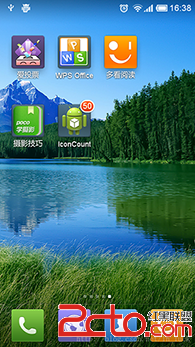
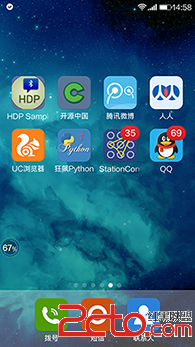
首先要明白:並非應用本身處理對啟動圖標的修改,圖標的動態修改過程主要是在 Launcher 中完成的。在應用安裝、更新、卸載時都會發出廣播,Launcher 在 LauncherApplication 中註冊廣播,並在 LauncherModel 中處理接收到的廣播消息,重新加載更新應用信息(如图標、文字等)。但原生 Android 系統並不支持該特性(即無法通過發送特定系統廣播達到動態修改啟動圖標的效果)。而在三星、小米等第三方廠商深度定製的系統源碼下,通過修改 Launcher 源碼、新增並註冊廣播接收器來接收應用發送的未讀消息數廣播,接收到後由 Launcher 調用相關方法重繪應用 icon,最終達到動態更新應用圖標的效果。
public class MainActivity extends Activity {
    // 必須使用 Activity 啟動頁
    private final static String lancherActivityClassName = Welcome.class.getName();

    @Override
    protected void onCreate(Bundle savedInstanceState) {
        super.onCreate(savedInstanceState);
        setContentView(R.layout.common_listview_layout);
    }

    @Override
    protected void onResume() {
        super.onResume();
        sendBadgeNumber();
    }

    private void sendBadgeNumber() {
        String number = "35";
        if (TextUtils.isEmpty(number)) {
            number = "0";
        } else {
            int numInt = Integer.valueOf(number);
            number = String.valueOf(Math.max(0, Math.min(numInt, 99)));
        }
        if (Build.MANUFACTURER.equalsIgnoreCase("Xiaomi")) {
            sendToXiaoMi(number);
        } else if (Build.MANUFACTURER.equalsIgnoreCase("samsung")) {
            sendToSony(number);
        } else if (Build.MANUFACTURER.toLowerCase().contains("sony")) {
            sendToSamsumg(number);
        } else {
            Toast.makeText(this, "Not Support", Toast.LENGTH_LONG).show();
        }
    }

    private void sendToXiaoMi(String number) {
        NotificationManager nm = (NotificationManager) getSystemService(Context.NOTIFICATION_SERVICE);
        Notification notification = null;
        boolean isMiUIV6 = true;
        try {
            NotificationCompat.Builder builder = new NotificationCompat.Builder(this);
            builder.setContentTitle("您有" + number + "未讀消息");
            builder.setTicker("您有" + number + "未讀消息");
            builder.setAutoCancel(true);
            builder.setSmallIcon(R.drawable.common_icon_lamp_light_red);
            builder.setDefaults(Notification.DEFAULT_LIGHTS);
            notification = builder.build();
            // miui 6 以上版本使用反射設置信息數
            Class miuiNotificationClass = Class.forName("android.app.MiuiNotification");
            Object miuiNotification = miuiNotificationClass.newInstance();
            Field field = miuiNotification.getClass().getDeclaredField("messageCount");
            field.setAccessible(true);
            field.set(miuiNotification, number);
            field = notification.getClass().getField("extraNotification");
            field.setAccessible(true);
            field.set(notification, miuiNotification);
        } catch (Exception e) {
            e.printStackTrace();
            isMiUIV6 = false;
            // miui 6 之前的版本發送廣播
            Intent localIntent = new Intent("android.intent.action.APPLICATION_MESSAGE_UPDATE");
            localIntent.putExtra("android.intent.extra.update_application_component_name", getPackageName() + "/" + lancherActivityClassName);
            localIntent.putExtra("android.intent.extra.update_application_message_text", number);
            sendBroadcast(localIntent);
        } finally {
            if (notification != null && isMiUIV6) {
                nm.notify(101010, notification);
            }
        }
    }

    private void sendToSony(String number) {
        boolean isShow = true;
        if ("0".equals(number)) { isShow = false; }
        Intent localIntent = new Intent();
        localIntent.putExtra("com.sonyericsson.home.intent.extra.badge.SHOW_MESSAGE", isShow);
        localIntent.setAction("com.sonyericsson.home.action.UPDATE_BADGE");
        localIntent.putExtra("com.sonyericsson.home.intent.extra.badge.ACTIVITY_NAME", lancherActivityClassName);
        localIntent.putExtra("com.sonyericsson.home.intent.extra.badge.MESSAGE", number);
        localIntent.putExtra("com.sonyericsson.home.intent.extra.badge.PACKAGE_NAME", getPackageName());
        sendBroadcast(localIntent);
    }

    private void sendToSamsumg(String number) {
        Intent localIntent = new Intent("android.intent.action.BADGE_COUNT_UPDATE");
        localIntent.putExtra("badge_count", number);
        localIntent.putExtra("badge_count_package_name", getPackageName());
        localIntent.putExtra("badge_count_class_name", lancherActivityClassName);
        sendBroadcast(localIntent);
    }
}
注意 lancherActivityClassName 必須被配置為啟動頁 android.intent.category.LAUNCHER:
MIUI 6 重新設計了桌面 app 圖標的角標顯示,基本規則如下:
默認情況:當 app 向通知欄發送一條通知(不帶進度條且用戶可刪除),桌面 icon 角標就會顯示 1。此時角標數與通知欄裡 app 發送的通知數對應。
自定義角標數:例如有 5 封未讀郵件,通知欄只顯示一條通知,但想讓角標顯示 5,可在發通知時加個標示。第三方 app 需用反射調用,參考程式碼:
NotificationManager mNotificationManager = (NotificationManager) this.getSystemService(Context.NOTIFICATION_SERVICE);
Notification.Builder builder = new Notification.Builder(this)
        .setContentTitle("title").setContentText("text").setSmallIcon(R.drawable.icon);
Notification notification = builder.build();
try {
    Field field = notification.getClass().getDeclaredField("extraNotification");
    Object extraNotification = field.get(notification);
    Method method = extraNotification.getClass().getDeclaredMethod("setMessageCount", int.class);
    method.invoke(extraNotification, mCount);
} catch (Exception e) {
    e.printStackTrace();
}
mNotificationManager.notify(0, notification);
注意:示例源代碼中 MIUI 系統的實現與官方介紹的方法不同,工具類採用的是官方介紹的方法。這個工具類支持小米、三星、索尼【其中小米、三星親測有效,索尼未驗證】。
package cn.hdnc.BadgeUtil;

import android.app.Notification;
import android.content.Context;
import android.content.Intent;
import android.content.pm.PackageManager;
import android.content.pm.ResolveInfo;
import android.os.Build;
import android.widget.Toast;
import java.lang.reflect.Field;
import java.lang.reflect.Method;

/**
 * 應用啟動圖標未讀消息數顯示工具類
 * 依賴於第三方手機廠商(如小米、三星)的 Launcher 定製,原生系統不支持該特性
 */
public class BadgeUtil {

    public static void setBadgeCount(Notification notification, Context context, int count) {
        if (count <= 0) {
            count = 0;
        } else {
            count = Math.max(0, Math.min(count, 99));
        }
        if (Build.MANUFACTURER.equalsIgnoreCase("Xiaomi")) {
            sendToXiaoMi(notification, context, count);
        } else if (Build.MANUFACTURER.equalsIgnoreCase("sony")) {
            sendToSony(context, count);
        } else if (Build.MANUFACTURER.toLowerCase().contains("samsung")) {
            sendToSamsumg(context, count);
        } else {
            Toast.makeText(context, "Not Support", Toast.LENGTH_LONG).show();
        }
    }

    private static void sendToXiaoMi(Notification notification, Context context, int count) {
        try {
            Field field = notification.getClass().getDeclaredField("extraNotification");
            Object extraNotification = field.get(notification);
            Method method = extraNotification.getClass().getDeclaredMethod("setMessageCount", int.class);
            method.invoke(extraNotification, count);
        } catch (Exception e) {
            e.printStackTrace();
            // miui 6 之前的版本
            Intent localIntent = new Intent("android.intent.action.APPLICATION_MESSAGE_UPDATE");
            localIntent.putExtra("android.intent.extra.update_application_component_name",
                    context.getPackageName() + "/" + getLauncherClassName(context));
            localIntent.putExtra("android.intent.extra.update_application_message_text",
                    String.valueOf(count == 0 ? "" : count));
            context.sendBroadcast(localIntent);
        }
    }

    private static void sendToSony(Context context, int count) {
        String launcherClassName = getLauncherClassName(context);
        if (launcherClassName == null) { return; }
        boolean isShow = true;
        if (count == 0) { isShow = false; }
        Intent localIntent = new Intent();
        localIntent.setAction("com.sonyericsson.home.action.UPDATE_BADGE");
        localIntent.putExtra("com.sonyericsson.home.intent.extra.badge.SHOW_MESSAGE", isShow);
        localIntent.putExtra("com.sonyericsson.home.intent.extra.badge.ACTIVITY_NAME", launcherClassName);
        localIntent.putExtra("com.sonyericsson.home.intent.extra.badge.MESSAGE", String.valueOf(count));
        localIntent.putExtra("com.sonyericsson.home.intent.extra.badge.PACKAGE_NAME", context.getPackageName());
        context.sendBroadcast(localIntent);
    }

    private static void sendToSamsumg(Context context, int count) {
        String launcherClassName = getLauncherClassName(context);
        if (launcherClassName == null) { return; }
        Intent intent = new Intent("android.intent.action.BADGE_COUNT_UPDATE");
        intent.putExtra("badge_count", count);
        intent.putExtra("badge_count_package_name", context.getPackageName());
        intent.putExtra("badge_count_class_name", launcherClassName);
        context.sendBroadcast(intent);
    }

    public static void resetBadgeCount(Notification notification, Context context) {
        setBadgeCount(notification, context, 0);
    }

    private static String getLauncherClassName(Context context) {
        PackageManager packageManager = context.getPackageManager();
        Intent intent = new Intent(Intent.ACTION_MAIN);
        intent.setPackage(context.getPackageName());
        intent.addCategory(Intent.CATEGORY_LAUNCHER);
        ResolveInfo info = packageManager.resolveActivity(intent, PackageManager.MATCH_DEFAULT_ONLY);
        if (info == null) {
            info = packageManager.resolveActivity(intent, 0);
        }
        return info.activityInfo.name;
    }
}
需要說明的是,由於原生 Android 並不支持桌面角標,本方案依賴各廠商的私有 API,因此存在兼容性限制。實際應用中建議結合具體機型做好判斷與降級處理。
 Android 基礎入門教程——9.4 使用 MediaRecord 錄音
 標簽(空格分隔):Android 基礎入門教程 本節引言 本節是 Android 多媒體基
 Android AIDL 深入解析:進程間通信的實現原理
 AIDL 與其他 IDL 語言類似,需要開發者做一些工作。它允許你定義客戶端與服務端共同遵守的程序接口,讓雙方通
 Android 圖標資源優化實戰:PNG、IconFont 與 SVG 全方位對比
用對圖標格式,讓 App 又小又清晰 做 Android 開發的人,大概都遇過這幾件惱人的事:一堆小圖標散落在各個 drawable 資料夾裡,為了適配不同 dpi 得反
 Android 介面設計基本功:布局屬性、LayoutInflater 與列表控制項
Android 介面設計基本知識 一個好的 App 不能只有好看的介面,還要有良好的效能與穩定性。身為開發人員,得理解介面設計的原則,並寫出可靠的布局程式碼。以下整理常用