

編輯:關於 Android 開發
TabHost 是 Android 自帶的選項卡(Tab)容器控件,能夠讓使用者在多個頁面之間靈活切換。下圖展示了其基本效果:
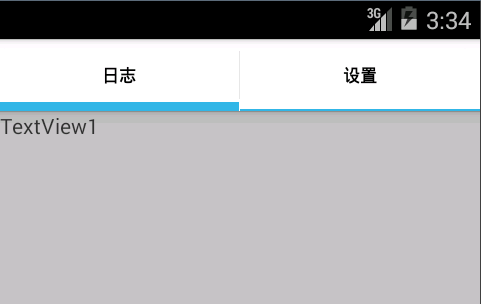
TabHost 內部通常需要搭配 TabWidget(負責顯示標籤)與 FrameLayout(負責承載各標籤對應的內容)。id 需分別指定為 @android:id/tabs 與 @android:id/tabcontent。
<RelativeLayout xmlns:android="https://schemas.android.com/apk/res/android"
    xmlns:tools="https://schemas.android.com/tools"
    android:layout_width="match_parent"
    android:layout_height="match_parent"
    tools:context=".MainActivity" >

    <TabHost android:id="@+id/tabhost"
        android:layout_width="match_parent"
        android:layout_height="match_parent"
        android:layout_alignParentLeft="true"
        android:layout_alignParentTop="true" >

        <LinearLayout android:layout_width="match_parent"
            android:layout_height="match_parent"
            android:orientation="vertical" >

            <TabWidget android:id="@android:id/tabs"
                android:layout_width="match_parent"
                android:layout_height="wrap_content" >
            </TabWidget>

            <FrameLayout android:id="@android:id/tabcontent"
                android:layout_width="match_parent"
                android:layout_height="match_parent"
                android:orientation="vertical" >

                <LinearLayout android:id="@+id/tab1"
                    android:layout_width="match_parent"
                    android:layout_height="match_parent"
                    android:orientation="vertical" >
                </LinearLayout>

                <LinearLayout android:id="@+id/tab2"
                    android:layout_width="match_parent"
                    android:layout_height="match_parent"
                    android:orientation="vertical">
                </LinearLayout>

                <LinearLayout android:id="@+id/tab3"
                    android:layout_width="match_parent"
                    android:layout_height="match_parent"
                    android:orientation="vertical" >
                </LinearLayout>

            </FrameLayout>
        </LinearLayout>
    </TabHost>
</RelativeLayout>
Activity 需繼承自 ActivityGroup,透過 getLocalActivityManager() 完成 TabHost 的初始化,並使用 newTabSpec 逐一添加標籤。setContent 中傳入 Intent 是讓每個標籤關聯獨立 Activity 的關鍵。
package com.tabhost;

import android.os.Bundle;
import android.app.ActivityGroup;
import android.content.Intent;
import android.view.Window;
import android.widget.TabHost;

public class MainActivity extends ActivityGroup {
    private TabHost mTabHost;

    protected void onCreate(Bundle savedInstanceState) {
        super.onCreate(savedInstanceState);
        this.requestWindowFeature(Window.FEATURE_NO_TITLE);
        setContentView(R.layout.activity_main);
        // 設置 TabHost
        initTabs();
    }

    private void initTabs() {
        mTabHost = (TabHost) findViewById(R.id.tabhost);
        mTabHost.setup(this.getLocalActivityManager());

        // 添加日誌列表的 tab,注意 setContent 中的代碼是實現關鍵
        mTabHost.addTab(mTabHost.newTabSpec("tab_log")
                .setIndicator("日誌", getResources().getDrawable(R.drawable.login_bg))
                .setContent(new Intent(this, LogActivity.class)));

        // 添加應用設置的 tab
        mTabHost.addTab(mTabHost.newTabSpec("tab_setting")
                .setIndicator("設置", getResources().getDrawable(R.drawable.ic_launcher))
                .setContent(new Intent(this, SettingActivity.class)));

        mTabHost.setCurrentTab(1);
    }
}
兩個子頁面各自對應一個 Activity 及其布局文件即可。透過 setIndicator 可以為標籤設置文字與圖標,透過 setCurrentTab 可指定默認顯示的標籤頁。
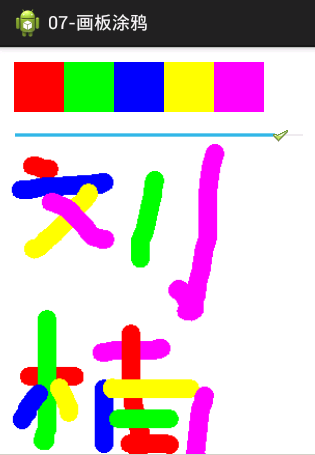 Android 圖形圖像處理入門:Bitmap、Matrix 與塗鴉
Android 圖形處理基礎Android 圖形處理常圍繞 Bitmap、Canvas、Paint 與 Matrix。理解解析度、記憶體與縮放,是避免 OutOfMemo
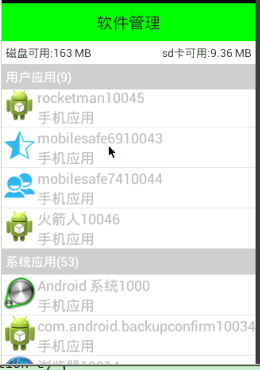 Android 手機衛士實作(十):應用管理器中的多類型列表與懸浮標題
應用管理器需要把「用戶應用」與「系統應用」分區展示,並在捲動時於頂部浮出一個標題提示目前所在分區。這兩個需求分別對應 ListView 的多條目類型機制與捲動監聽。
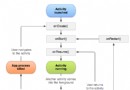 Android 四大組件之 Activity:生命週期、啟動模式與進階配置全解
幾乎每個 Android 開發者最早熟悉的元件就是 Activity。正因為太常見,反而容易忽略一些細節。本文把日常開發中不那麼常用、但一旦遇到就必須弄懂的知識點整理成一
 Android Studio 專案導入與設定修改指南
 從既有專案或範例程式進入 Android Studio 時,常需要調整 Gradle、SDK、模組結構與執行設定。以