

編輯:關於 Android 開發
本人初學,若有疏漏之處還請指正。Volley 是 Google 在 I/O 大會上推出的通訊框架,結合了 AsyncHttpClient 和 Universal-Image-Loader 的優點——既簡化了 HTTP 的使用,又具備非同步加載圖片的能力。Android 中的 HTTP 實作主要有 HttpUrlConnection 和 HttpClient 兩種,Google 官方建議在 API level 9(姜餅小人)及以上使用 HttpUrlConnection,之前的版本則使用 Apache 的 HttpClient,這一點在 Volley 中也有明確體現。
獲取 Volley
git clone https://android.googlesource.com/platform/frameworks/volley
將它編譯成 jar 檔後就能加入 libs 使用了。
一、簡單的請求(以 StringRequest 為例)
HTTP 通訊最核心的部分就是發出請求與接收響應,所以 Volley 最核心的類就是 RequestQueue(請求隊列),它負責管理工作執行緒、讀寫快取以及解析與分發響應。即將發出的 HTTP 請求都會先聚集在這裡等待工作執行緒處理。可以把 RequestQueue 想成一艘滿載 HTTP 請求的航空母艦,而工作執行緒就是彈射器。
因此,用 Volley 進行 HTTP 通訊的簡單步驟是:1. 取得 RequestQueue;2. 實例化一個 Request;3. 把 Request 加入 RequestQueue,等待工作執行緒發送。
發出 GET 請求時,第一步建立請求隊列,最簡單的方法是用 Volley.newRequestQueue(),這個靜態方法幫我們預設實作了所有需要的東西(網路、快取等),會回傳一個已開始運行的 RequestQueue。之後只要設定好響應監聽介面,把請求加入隊列即可。範例程式碼:

// 初始化一個請求隊列 RequestQueue queue = Volley.newRequestQueue(this); String url ="https://www.google.com"; // 根據給定的 URL 新建一個請求 StringRequest stringRequest = new StringRequest(Request.Method.GET, url, new Response.Listener() { @Override public void onResponse(String response) { // 在這裡操作 UI 組件是安全的,因為響應返回時這個函數會被 post 到 UI 線程來執行 } }, new Response.ErrorListener() { @Override public void onErrorResponse(VolleyError error) { // 出錯處理 } }); // 把這個請求加入請求隊列 queue.add(stringRequest);
StringRequest 是 Request 的具體實作之一,代表解析後的響應資料是字串,相似的還有 JsonRequest(含 JsonObjectRequest 和 JsonArrayRequest 兩個子類)與 ImageRequest,用法大同小異,主要是建構參數不同:
StringRequest(int method, String url, Listener<String> listener, ErrorListener errorListener):參數由左到右分別是請求方法、請求 URL、響應監聽介面、錯誤監聽介面。
JsonObjectRequest 有兩個建構子,若是 GET 請求,jsonRequest 傳 null 即可,否則在未指明請求方法時預設為 POST 請求。
JsonArrayRequest(String url, Listener<JSONArray> listener, ErrorListener errorListener)。
ImageRequest(String url, Response.Listener<Bitmap> listener, int maxWidth, int maxHeight, Config decodeConfig, Response.ErrorListener errorListener),其中 decodeConfig 是圖片的顏色屬性,可選值有 ALPHA_8、ARGB_4444(因質量低已被棄用,推薦 ARGB_8888)、ARGB_8888(每像素 4 byte)、RGB_565(每像素 2 byte)。
發出 POST 請求時,基本方式相同,但要提交資料。Volley 會在請求方法是 POST(還有 PUT 和 PATCH)時呼叫 Request 類的 getParams() 來取得參數。所以 POST 請求寫成這樣:
RequestQueue queue = Volley.newRequestQueue(this); String url ="https://www.google.com"; StringRequest stringRequest = new StringRequest(Request.Method.POST, url, new Response.Listener() { @Override public void onResponse(String response) { // 處理響應 } }, new Response.ErrorListener() { @Override public void onErrorResponse(VolleyError error) { // 出錯處理 } }) { @Override protected Map<String, String> getParams() throws AuthFailureError { Map<String, String> map = new HashMap<String, String>(); map.put("params1", "value1"); map.put("params2", "value2"); return map } }; queue.add(stringRequest);
取消請求時,Request 有一個 cancel() 方法,呼叫即可取消當前請求,Volley 能保證響應處理函數(onResponse() 和 onErrorResponse())不會被呼叫。還可以一次取消多個請求:在發出請求前呼叫 setTag() 為每個請求加標籤(參數是 Object,可用任何類型),之後呼叫 ReqiestQueue 的 cancelAll() 就能取消一群相同標籤的請求。常用做法是將發出請求的 Activity 或 Fragment 作為標籤,並在 onStop() 中呼叫 cancelAll()。
二、使用 ImageLoader 加載圖片
ImageLoader 是一個能實現圖片非同步加載的類,但已不再繼承自 Request。它必須在主線程中建立,否則會拋出 IllegalStateException,因為圖片返回時要直接操作 ImageView,在主線程操作 UI 才是安全的。用 ImageLoader 加載圖片分三步:1. 建立 ImageLoader;2. 取得一個 ImageListener 物件;3. 呼叫 get() 方法取得圖片。ImageLoader 的建構子為 public ImageLoader(RequestQueue queue, ImageCache imageCache),需要一個 RequestQueue 和一個 ImageCache(這是 ImageLoader 內部定義的介面,用來實作 L1 記憶體快取,而 RequestQueue 中已實作了 L2 檔案快取)。要注意 ImageLoader 並沒有對傳入的 ImageCache 判空,傳 null 會出錯,若不想做記憶體快取,實作一個空操作的 ImageCache 即可。程式碼如下:
ImageLoader imageLoader = new ImageLoader(mRequestQueue, new ImageCache() { @Override public void putBitmap(String url, Bitmap bitmap) { } @Override public Bitmap getBitmap(String url) { return null; } }); // default_image 是加載中占位圖,error_image 是加載失敗時顯示的圖片 ImageListener listener = ImageLoader.getImageListener(imageView, R.drawable.default_image, R.drawable.error_image); imageLoader.get("your image url", listener);
除了 ImageLoader,Volley 還有一個圖片加載利器 NetworkImageView,使用步驟如下:1. 在布局檔中加入控件並在 Java 中取得實例;2. 設定 default_image、error_image 與圖片 URL,以及一個 ImageLoader 物件。程式碼如下:
networkImageView = (NetworkImageView) findViewById(R.id.network_image_view); networkImageView.setDefaultImageResId(R.drawable.default_image); networkImageView.setErrorImageResId(R.drawable.error_image); networkImageView.setImageUrl("your image url", imageLoader);
三、Google 推薦的用法
上面就是 Volley 的基本用法。但如果一個 App 需要頻繁的網路通訊,建立多個 RequestQueue 顯然很奇怪,所以 Google 推薦我們只實例化一個 RequestQueue,並保證它的壽命和 App 一樣長。Google 建議不要直接在 Application.onCreate() 中實例化 RequestQueue,而是建立一個單例類,把所有 Volley 相關元件都放進去,顯得更模組化。最重要的是 RequestQueue 要用 Application 的 Context 實例化,否則會隨著 Activity 生命週期不斷重建。示例程式碼:
private static MySingleton mInstance; private RequestQueue mRequestQueue; private ImageLoader mImageLoader; private static Context mCtx; private MySingleton(Context context) { mCtx = context; mRequestQueue = getRequestQueue(); mImageLoader = new ImageLoader(mRequestQueue, new ImageLoader.ImageCache() { private final LruCache<String, Bitmap> cache = new LruCache<String, Bitmap>(20); @Override public Bitmap getBitmap(String url) { return cache.get(url); } @Override public void putBitmap(String url, Bitmap bitmap) { cache.put(url, bitmap); } }); } public static synchronized MySingleton getInstance(Context context) { if (mInstance == null) { mInstance = new MySingleton(context); } return mInstance; } public RequestQueue getRequestQueue() { if (mRequestQueue == null) { // getApplicationContext() 是關鍵,可避免 Activity 或 BroadcastReceiver 帶來的問題 mRequestQueue = Volley.newRequestQueue(mCtx.getApplicationContext()); } return mRequestQueue; } public <T> void addToRequestQueue(Request<T> req) { getRequestQueue().add(req); } public ImageLoader getImageLoader() { return mImageLoader; }
四、Volley 是怎麼管理請求的?
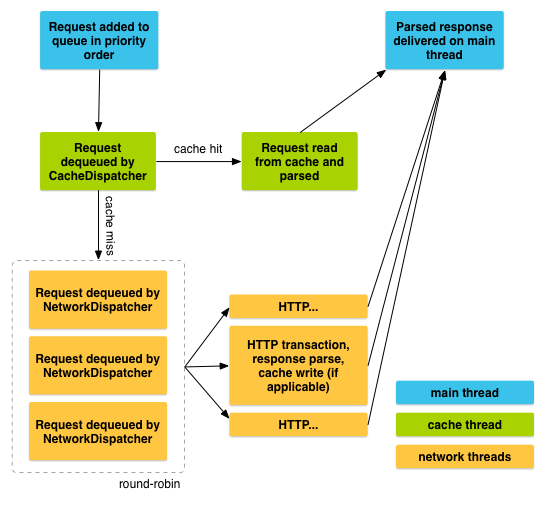
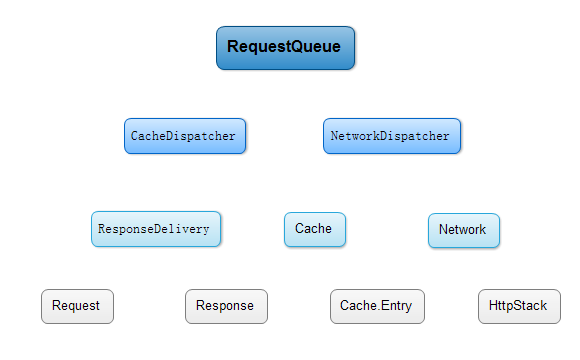
RequestQueue 會維護一個快取調度執行緒(cache 執行緒)和一個網路調度執行緒池(net 執行緒,注意這是一池子執行緒)。當一個 Request 被加入隊列時,cache 執行緒會先篩選:若內容能在快取中找到,cache 執行緒會親自解析並分發到主線程;若快取中沒有,這個 request 會被加入 NetworkQueue,第一個可用的 net 執行緒會把它扔向伺服器。當響應資料回來時,這個 net 執行緒會解析原始響應資料、寫入快取,並把解析後的結果返回主線程。因此讀原始碼時也可以分成四層,其餘的類都可歸到「方便的工具類」中,例如 ImageLoader、ClearCacheRequest 等。
 Android 繪圖 API 入門梳理:Bitmap、Canvas、Paint 與 Path
Android 繪圖 API 入門梳理 幾乎沒有哪個 App 能完全避開圖片與自繪。除了直接用 Drawable 資源庫,Android 還提供了 Bitmap、Pict
 解決Android打包時APK META-INF重複檔案錯誤
 在Android專案打包過程中,有時會遇到類似以下的錯誤訊息: * What went wrong: Exe
 淺談 Android 應用保護(一):逆向分析的幾條基本路徑
對一個沒有做任何防護的 Android 應用來說,取得內部程式碼、讀出資料、甚至直接改寫它的執行邏輯,並不需要什麼高深技巧。幾個公開工具下載回來、幾條指令敲下去,機密性與
 Android 登入客戶端實戰:驗證碼抓取、網頁資料解析與 HttpWatch 抓包入門
在行動網路無所不在的今天,一個不連網的 App 很難有長遠生命週期,因此網路程式設計是每個 Android 開發者的必修課。這篇以「模擬登入學校教務系統」為案例,完整走一