

編輯:關於 Android 開發
自定義 View 的過程中,Canvas 和 Paint 是使用頻率最高的一對搭檔:Canvas 是畫布,負責「畫在哪、畫什麼」;Paint 是畫筆,負責「用什麼樣式畫」。本文把兩者的常用 API 按功能分類整理,方便日常開發時快速查找。
裁剪時可以指定多個區域的組合方式,通過 Region.Op 枚舉控制:
INTERSECT:取兩者交集DIFFERENCE:第一次的區域減去與第二次的交集(默認方式)REPLACE:顯示第二次的區域REVERSE_DIFFERENCE:第二次的區域減去與第一次的交集UNION:取並集XOR:取補集,即並集減去交集的剩余部分clipPath(Path path) clipPath(Path path, Region.Op op) clipRect(Rect rect, Region.Op op) clipRect(RectF rect, Region.Op op) clipRect(int left, int top, int right, int bottom) clipRect(float left, float top, float right, float bottom) clipRect(RectF rect) clipRect(float left, float top, float right, float bottom, Region.Op op) clipRect(Rect rect) clipRegion(Region region) clipRegion(Region region, Region.Op op)
concat(Matrix matrix) // 拼接矩陣
圓弧:
drawArc(RectF oval, float startAngle, float sweepAngle, boolean useCenter, Paint paint)
drawArc(float left, float top, float right, float bottom, float startAngle, float sweepAngle, boolean useCenter, Paint paint)
Bitmap:
drawBitmap(int[] colors, int offset, int stride, float x, float y, int width, int height, boolean hasAlpha, Paint paint)
drawBitmap(Bitmap bitmap, Matrix matrix, Paint paint)
drawBitmap(int[] colors, int offset, int stride, int x, int y, int width, int height, boolean hasAlpha, Paint paint)
drawBitmap(Bitmap bitmap, Rect src, RectF dst, Paint paint)
drawBitmap(Bitmap bitmap, float left, float top, Paint paint)
drawBitmap(Bitmap bitmap, Rect src, Rect dst, Paint paint)
扭曲 Bitmap(網格變形):
drawBitmapMesh(Bitmap bitmap, int meshWidth, int meshHeight, float[] verts, int vertOffset, int[] colors, int colorOffset, Paint paint)
圓形:
drawCircle(float cx, float cy, float radius, Paint paint)
背景填充:
drawARGB(int a, int r, int g, int b)
drawColor(int color)
drawColor(int color, PorterDuff.Mode mode)
drawPaint(Paint paint)
drawRGB(int r, int g, int b)
線條:
drawLine(float startX, float startY, float stopX, float stopY, Paint paint)
drawLines(float[] pts, Paint paint)
drawLines(float[] pts, int offset, int count, Paint paint)
橢圓:
drawOval(float left, float top, float right, float bottom, Paint paint)
drawOval(RectF oval, Paint paint)
路徑(可繪制任意多邊形):
drawPath(Path path, Paint paint)
圖片:
drawPicture(Picture picture, RectF dst)
drawPicture(Picture picture)
drawPicture(Picture picture, Rect dst)
點:
drawPoint(float x, float y, Paint paint)
drawPoints(float[] pts, int offset, int count, Paint paint)
drawPoints(float[] pts, Paint paint)
矩形:
drawRect(float left, float top, float right, float bottom, Paint paint)
drawRect(RectF rect, Paint paint)
drawRect(Rect r, Paint paint)
圓角矩形:
drawRoundRect(float left, float top, float right, float bottom, float rx, float ry, Paint paint)
drawRoundRect(RectF rect, float rx, float ry, Paint paint)
文字:
drawText(String text, float x, float y, Paint paint)
drawText(CharSequence text, int start, int end, float x, float y, Paint paint)
drawText(char[] text, int index, int count, float x, float y, Paint paint)
drawText(String text, int start, int end, float x, float y, Paint paint)
指定每個字符的位置:
drawPosText(char[] text, int index, int count, float[] pos, Paint paint)
drawPosText(String text, float[] pos, Paint paint)
沿路徑繪制文字:
drawTextOnPath(String text, Path path, float hOffset, float vOffset, Paint paint)
drawTextOnPath(char[] text, int index, int count, Path path, float hOffset, float vOffset, Paint paint)
指定具體位置與大小的文本:
drawTextRun(CharSequence text, int start, int end, int contextStart, int contextEnd, float x, float y, boolean isRtl, Paint paint)
drawTextRun(char[] text, int index, int count, int contextIndex, int contextCount, float x, float y, boolean isRtl, Paint paint)
頂點數據(也可用於繪制扭曲圖片):
drawVertices(Canvas.VertexMode mode, int vertexCount, float[] verts, int vertOffset, float[] texs, int texOffset, int[] colors, int colorOffset, short[] indices, int indexOffset, int indexCount, Paint paint)
getClipBounds()                    // 獲取當前裁剪區域
getClipBounds(Rect bounds)
getDensity()                       // 像素密度
getDrawFilter()                    // 畫布過濾器
getHeight() / getWidth()           // 畫布寬高
getMatrix(Matrix ctm) / getMatrix()// 當前矩陣
getMaximumBitmapHeight()           // 允許繪制的 Bitmap 最大高度
getMaximumBitmapWidth()            // 允許繪制的 Bitmap 最大寬度
getSaveCount()                     // 私有堆棧狀態數量
isHardwareAccelerated()            // 是否硬件加速
isOpaque()                         // 是否不透明
這一組方法是自定義 View 的「神技」所在。所有變換(平移、旋轉、縮放、裁剪)都會影響後續繪制,而 save() 把當前狀態壓棧,restore() 則把狀態彈回。善用這對組合,可以在局部做變換而不污染整個畫布。
save()
save(int saveFlags)
restore()
restoreToCount(int saveCount)
圖層相關:在當前層之上新建一層,調用 restore 後恢復原狀態,常用於做透明度動畫。
saveLayer(RectF bounds, Paint paint, int saveFlags)
saveLayer(RectF bounds, Paint paint)
saveLayer(float left, float top, float right, float bottom, Paint paint)
saveLayer(float left, float top, float right, float bottom, Paint paint, int saveFlags)
saveLayerAlpha(RectF bounds, int alpha, int saveFlags)
saveLayerAlpha(RectF bounds, int alpha)
saveLayerAlpha(float left, float top, float right, float bottom, int alpha, int saveFlags)
saveLayerAlpha(float left, float top, float right, float bottom, int alpha)
translate(float dx, float dy)                        // 平移
rotate(float degrees)                                // 旋轉
rotate(float degrees, float px, float py)            // 繞指定點旋轉
scale(float sx, float sy)                            // 縮放
scale(float sx, float sy, float px, float py)        // 繞指定點縮放
skew(float sx, float sy)                             // 扭曲
setBitmap(Bitmap bitmap)                             // 關聯 Bitmap
setDensity(int density)                              // 設置像素密度
setDrawFilter(DrawFilter filter)                     // 設置過濾器
setMatrix(Matrix matrix)                             // 設置矩陣
setARGB(int a, int r, int g, int b)   // 設置顏色和透明度
setAlpha(int a)                       // 單獨設置透明度
setColor(int color)                   // 設置顏色
setAntiAlias(boolean aa)     // 抗鋸齒,邊緣更平滑
setDither(boolean dither)    // 圖像抖動,讓漸變色彩更平滑飽滿
setFilterBitmap(boolean filter) // 圖像在動畫中濾除 Bitmap 優化以加快顯示速度
setMaskFilter(MaskFilter maskfilter)      // 濾鏡效果
setColorFilter(ColorFilter colorfilter)   // 顏色過濾,實現非原始顏色的變換
setPathEffect(PathEffect effect)          // 路徑效果,如虛線、點畫線
setShader(Shader shader)                  // 圖像效果,可繪制各種漸變
setShadowLayer(float radius, float dx, float dy, int color) // 陰影層
setXfermode(Xfermode xfermode)            // 圖形重疊時的處理方式
setStyle(Paint.Style style)             // 畫筆樣式:填充、描邊或兩者
setStrokeCap(Paint.Cap cap)             // 線端圖形樣式
setStrokeJoin(Paint.Join join)          // 各圖形段的結合方式
setStrokeWidth(float width)             // 筆刷粗細
setFakeBoldText(boolean fakeBoldText)  // 粗體文字
setSubpixelText(boolean subpixelText)   // 有助於 LCD 屏幕上的文本顯示效果
setTextAlign(Paint.Align align)         // 繪制文字的對齊方向
setTextScaleX(float scaleX)             // 文字 x 軸縮放比例
setTextSize(float textSize)             // 字號大小
setTextSkewX(float skewX)               // 斜體,skewX 為傾斜弧度
setTypeface(Typeface typeface)          // 字體對象
setUnderlineText(boolean underlineText) // 下劃線
setStrikeThruText(boolean strikeThruText) // 刪除線
API 清單記住不代表能畫好圖。實踐中有幾點值得注意:Paint 對象可以在 onDraw 之外提前創建並復用,避免在繪制流程中頻繁 new 對象引發 GC;凡是涉及畫布變換的局部繪制,養成 save/restore 成對出現的習慣;自定義 View 一定要打開抗鋸齒,否則圓弧和斜線會出現明顯鋸齒。
 Android 音訊開發基礎:採樣率、位寬、聲道與音訊幀
音訊開發的價值 Android 本身只是平台,真正有趣的方向在於它與音訊、影音、智慧硬體、前端技術或安全領域的結合。音訊開發是其中非常重要的一塊,涵蓋播放器、錄音機、語音
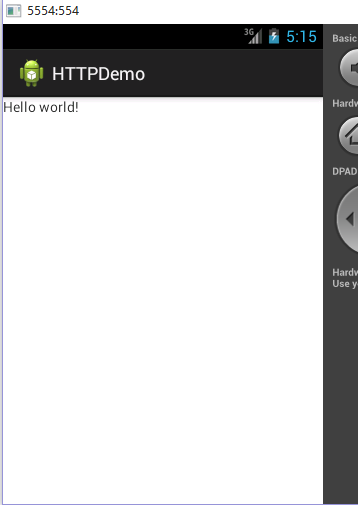 Android HTTP 通訊入門:用 GET 請求串接開放平台接口
用一個小 Demo 講透 Android 的 GET 請求 只要做過真實項目,幾乎不可能不跟伺服器打交道。本篇我用一個麻雀雖小五臟俱全的例子,把 HTTP 請求在 And
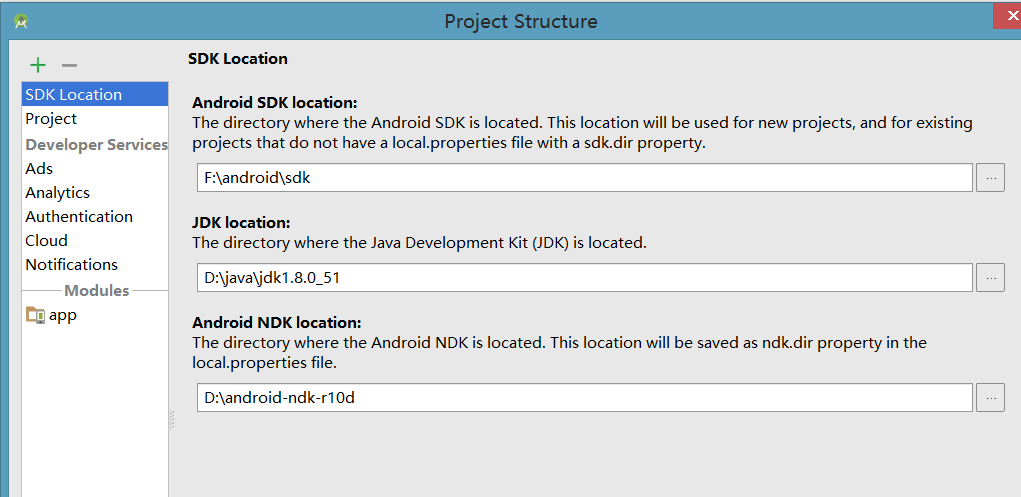 Android Studio 下 NDK 开发(一):从配置环境到 JNI 调用
 捣鼓了一天的 NDK,总结一下。在 Eclipse 下开发 NDK 似乎挺麻烦,书上的做
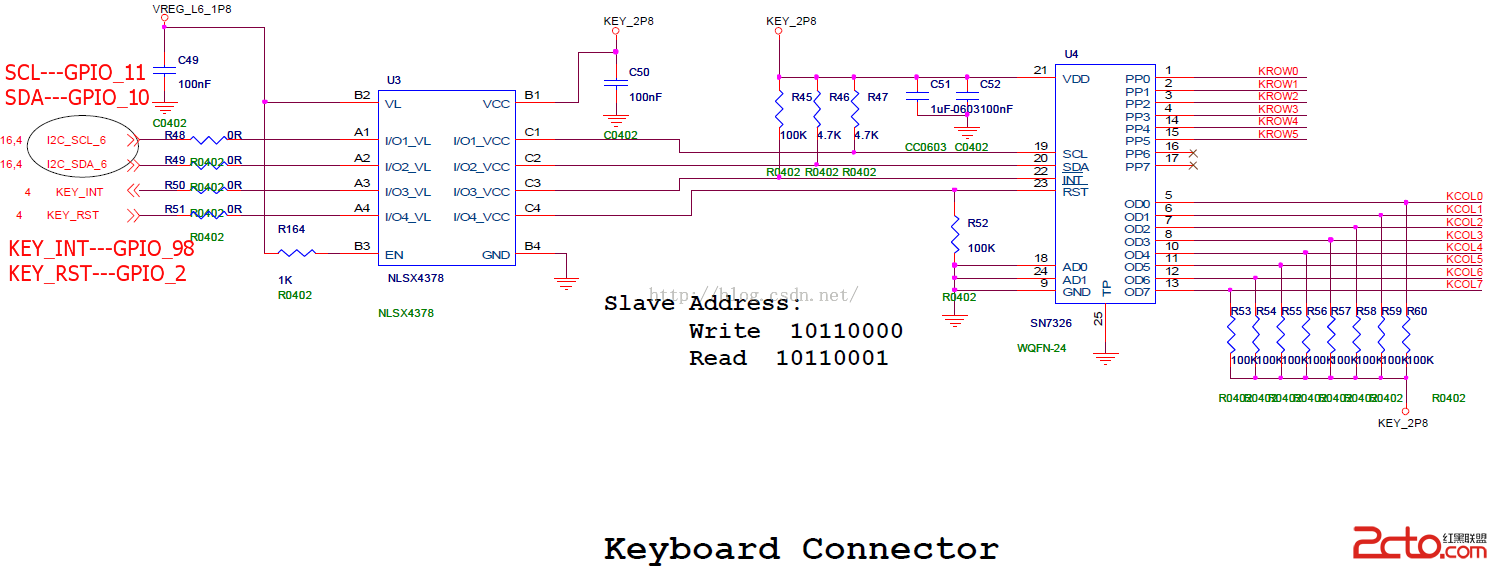 MSM8909 + Android 5.1.1 鍵盤驅動:SN7326 掃描芯片解析
 帶 QWERTY 物理鍵盤的設備,鍵盤矩陣通常不會直接接到 CPU 的 GPIO 上