

編輯:關於 Android 開發
上一篇(Android 之圖片變換)已大致介紹過 Bitmap 的用法,也稍微提到一點壓縮概念,但並未展開。本篇就來把 Android 中常用的圖片壓縮技術講清楚。
從壓縮方式來分,主要可分為「質量壓縮」與「尺寸壓縮」兩大類。
質量壓縮是在保持像素不變的前提下,調整圖片的位深與透明度等來縮小檔案。它的特點是:壓縮後檔案大小改變,但載入成 Bitmap 後所佔的記憶體並不變。由於要保持像素不變,它無法無限壓縮,降到某個值後就不再變小。因此這種方式並不適合縮圖,也不適用於「想藉壓縮來降低記憶體佔用」的場景,它真正適合的是「在維持畫質的前提下盡量縮小檔案體積」。
public Bitmap compressImage(Bitmap image, int imageSize) {
    ByteArrayOutputStream baos = new ByteArrayOutputStream();
    image.compress(Bitmap.CompressFormat.JPEG, 100, baos); // 100 表示不壓縮
    int options = 100;
    while (baos.toByteArray().length / 1024 > imageSize) { // 若壓縮後仍大於目標,繼續壓
        baos.reset(); // 清空緩衝區
        image.compress(Bitmap.CompressFormat.JPEG, options, baos);
        options -= 10; // 每次遞減 10
    }
    ByteArrayInputStream isBm = new ByteArrayInputStream(baos.toByteArray());
    return BitmapFactory.decodeStream(isBm, null, null);
}
尺寸壓縮則是直接壓縮圖片的像素。由於一張圖佔用的記憶體約為「圖片類型 × 寬 × 高」,透過改變這三個值來降低記憶體佔用,能有效防止 OOM,代價是可能使圖片失真。做法是先只讀取圖片邊界資訊,再計算合適的 inSampleSize 進行降採樣:
public void scalePic(int reqWidth, int reqHeight) {
    BitmapFactory.Options options = new BitmapFactory.Options();
    options.inJustDecodeBounds = true;  // 先只讀邊界,不載入像素
    BitmapFactory.decodeResource(getResources(), R.mipmap.demo, options);
    options.inSampleSize = PhotoUtil.calculateInSampleSize(options, reqWidth, reqHeight);
    options.inJustDecodeBounds = false;
    bitmap = BitmapFactory.decodeResource(getResources(), R.mipmap.demo, options);
    postInvalidate();
}
public static int calculateInSampleSize(BitmapFactory.Options options, int reqWidth, int reqHeight) {
    final int height = options.outHeight;
    final int width = options.outWidth;
    int inSampleSize = 1;
    if (height > reqHeight || width > reqWidth) {
        final int heightRatio = Math.round((float) height / (float) reqHeight);
        final int widthRatio = Math.round((float) width / (float) reqWidth);
        inSampleSize = heightRatio < widthRatio ? heightRatio : widthRatio;
    }
    return inSampleSize;
}
實務上,兩種壓縮方式常需要搭配使用:先用尺寸壓縮把記憶體佔用降下來防止 OOM,再用質量壓縮微調檔案大小,兼顧效能與畫質。
 Android 程式碼故事 第一回:那些等間距排列的按鈕
App 新做了一個放操作按鈕的畫面,老闆的要求是「簡潔美觀有內涵,按鈕要均勻分布」。設計 MM 給了一張圖,示意起來大概是這樣: |===================
 ListView 詳解:Android 列表控制項完整指南
 ListView 是 Android 開發中最常見的列表控制項之一,特別適合展示大量規則排列的資料。它具備記憶
 用 SurfaceView 播放影片,並搞懂它的生命週期與黑屏問題
 本文要利用 SurfaceView 來實作影片播放,並藉此理解 SurfaceView 的生命週期,解
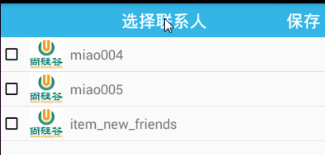 硅谷社交 14:選擇聯繫人頁面的實作(多選、回顯與結果回傳)
 「選擇聯繫人」頁面主要服務於兩個場景:拉人建群,以及從已有群成員中追加新成員。因此它必須支援多選、需要把已