

編輯:關於 Android 開發
系統預設的進度條樣式較為制式,若想讓介面更具個人風格,可以透過自訂 Drawable 來改造外觀。本文示範如何製作一個黑色虛線風格的水平進度條。

<ProgressBar
 android:id="@+id/progress_bar"
 ... />
核心在於使用 layer-list 搭配 shape 的 stroke 屬性,透過 dashWidth 與 dashGap 控制虛線的長度與間距:
<?xml version="1.0" encoding="utf-8"?>
<layer-list xmlns:android="https://schemas.android.com/apk/res/android">
 <!--item background 與 progress 順序不可顛倒-->
 <item android:id="@android:id/background">
 <shape android:shape="line">
 <stroke
 android:width="4dp"
 android:color="#666666"
 android:dashWidth="4dp"
 android:dashGap="1dp" />
 </shape>
 </item>
 <item android:id="@android:id/progress">
 <clip>
 <shape android:shape="line">
 <stroke
 android:width="4dp"
 android:color="#000000"
 android:dashWidth="4dp"
 android:dashGap="1dp" />
 </shape>
 </clip>
 </item>
</layer-list>
其中 background 定義進度條底色(灰色虛線),progress 則以 clip 包裹已完成部分(黑色虛線),兩者順序不可顛倒。調整 dashWidth 與 dashGap 即可改變虛線的疏密,讓進度條呈現俐落的科技感。
 Kotlin 變量有別於 Java:var 與 val 之爭(KAD 02)
 原文標題:Variables in Kotlin, differences with Jav
 Android 與 JS 跨平台异步互調,破解 WebView 跨域難題
 為什麼會碰到這個問題? 在開發瀏覽器時,我遇到了一個棘手的狀況,花了將近一整天才想出這個解法——
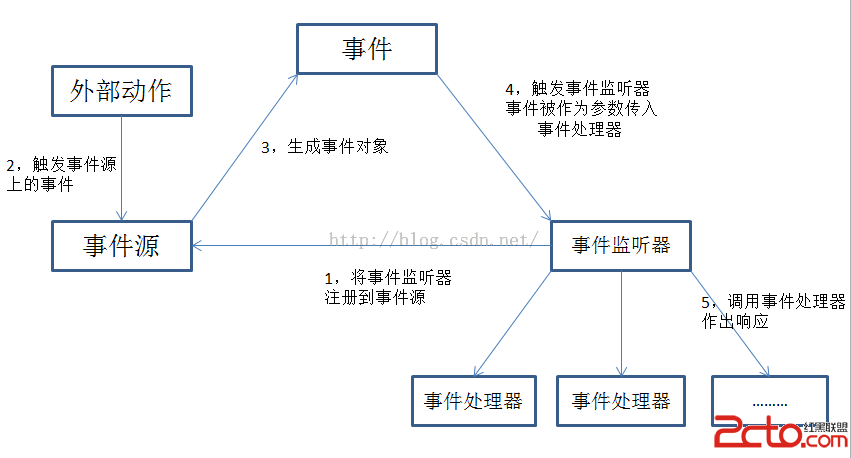 Android 基於監聽的事件處理機制
 Android 的事件處理機制中,監聽器模型是最常見的一種。它與 Java Swing 的委派式事件處理概念相似,將事件來源與事件
 Android 使用 setDataAndType 開啟各種檔案與 Intent 範例
Android 使用 setDataAndType 開啟各種檔案 Android 可透過 Intent 的 ACTION_VIEW 搭配 setDataAndType 開