

編輯:關於 Android 開發
版本信息:
Kafka 版本:kafka_2.11-0.9.0.0
Zookeeper 版本:zookeeper-3.4.7
Zookeeper 集群:bjrenrui0001、bjrenrui0002、bjrenrui0003(Zookeeper 集群搭建可參考相關文章)
物理環境(三台物理機):
192.168.100.200 bjrenrui0001(運行 3 個 Broker)
192.168.100.201 bjrenrui0002(運行 2 個 Broker)
192.168.100.202 bjrenrui0003(運行 2 個 Broker)
整個集群的搭建分為三步:單節點單 Broker、單節點多 Broker、多節點多 Broker。
以在 bjrenrui0001 上創建一個 Broker 為例。
下載 Kafka(下載地址:https://kafka.apache.org/downloads.html):
cd /mq/
wget https://mirrors.hust.edu.cn/apache/kafka/0.9.0.0/kafka_2.11-0.9.0.0.tgz
copyfiles.sh kafka_2.11-0.9.0.0.tgz bjyfnbserver /mq/
tar zxvf kafka_2.11-0.9.0.0.tgz -C /mq/
ln -s /mq/kafka_2.11-0.9.0.0 /mq/kafka
mkdir /mq/kafka/logs
修改配置 config/server.properties:
vi /mq/kafka/config/server.properties
broker.id=1
listeners=PLAINTEXT://:9092
port=9092
num.network.threads=3
num.io.threads=8
socket.send.buffer.bytes=1048576
socket.receive.buffer.bytes=1048576
socket.request.max.bytes=104857600
log.dirs=/mq/kafka/logs/kafka-logs
num.partitions=10
num.recovery.threads.per.data.dir=1
log.retention.hours=168
log.segment.bytes=1073741824
log.retention.check.interval.ms=300000
log.cleaner.enable=false
zookeeper.connect=bjrenrui0001:2181,bjrenrui0002:2181,bjrenrui0003:2181
zookeeper.connection.timeout.ms=6000
啟動 Kafka 服務:
cd /mq/kafka;sh bin/kafka-server-start.sh -daemon config/server.properties
或
sh /mq/kafka/bin/kafka-server-start.sh -daemon /mq/kafka/config/server.properties
檢查端口:
netstat -ntlp|grep -E '2181|9092'
創建 Topic:
sh /mq/kafka/bin/kafka-topics.sh --create --zookeeper bjrenrui0001:2181,bjrenrui0002:2181,bjrenrui0003:2181 --replication-factor 1 --partitions 1 --topic test
查看 Topic:
sh /mq/kafka/bin/kafka-topics.sh --list --zookeeper bjrenrui0001:2181,bjrenrui0002:2181,bjrenrui0003:2181
Producer 發送消息:
$ sh /mq/kafka/bin/kafka-console-producer.sh --broker-list bjrenrui0001:9092 --topic test
first
message
Consumer 接收消息:
$ sh bin/kafka-console-consumer.sh --zookeeper bjrenrui0001:2181,bjrenrui0002:2181,bjrenrui0003:2181 --topic test --from-beginning
first
message
(若只想獲取最新數據,可不帶 --from-beginning 參數。)
把上一節的文件夾再復制兩份,分別命名為 kafka_2、kafka_3:
cp -r /mq/kafka_2.11-0.9.0.0 /mq/kafka_2.11-0.9.0.0_2
cp -r /mq/kafka_2.11-0.9.0.0 /mq/kafka_2.11-0.9.0.0_3
ln -s /mq/kafka_2.11-0.9.0.0_2 /mq/kafka_2
ln -s /mq/kafka_2.11-0.9.0.0_3 /mq/kafka_3
分別修改 kafka_2、kafka_3 的 config/server.properties 中的 broker.id 與 port 屬性,確保唯一性。
vi /mq/kafka_2/config/server.properties
broker.id=2
listeners=PLAINTEXT://:9093
port=9093
host.name=bjrenrui0001
...(其餘參數同上)
log.dirs=/mq/kafka_2/logs/kafka-logs
zookeeper.connect=bjrenrui0001:2181,bjrenrui0002:2181,bjrenrui0003:2181
vi /mq/kafka_3/config/server.properties
broker.id=3
listeners=PLAINTEXT://:9094
port=9094
host.name=bjrenrui0001
...(其餘參數同上)
log.dirs=/mq/kafka_3/logs/kafka-logs
zookeeper.connect=bjrenrui0001:2181,bjrenrui0002:2181,bjrenrui0003:2181
啟動另外兩個 Broker:
sh /mq/kafka_2/bin/kafka-server-start.sh -daemon /mq/kafka_2/config/server.properties
sh /mq/kafka_3/bin/kafka-server-start.sh -daemon /mq/kafka_3/config/server.properties
檢查端口(應能看到 9092、9093、9094 均在監聽):
netstat -ntlp|grep -E '2181|909[2-9]'|sort -k3
創建一個 replication factor 為 3 的 Topic:
sh /mq/kafka/bin/kafka-topics.sh --create --zookeeper bjrenrui0001:2181,bjrenrui0002:2181,bjrenrui0003:2181 --replication-factor 3 --partitions 1 --topic my-replicated-topic
查看 Topic 狀態:
$ sh /mq/kafka/bin/kafka-topics.sh --describe -zookeeper bjrenrui0001:2181,bjrenrui0002:2181,bjrenrui0003:2181 --topic my-replicated-topic
Topic:my-replicated-topic PartitionCount:1 ReplicationFactor:3 Configs:
Topic: my-replicated-topic Partition: 0 Leader: 3 Replicas: 3,1,2 Isr: 3,1,2
由此可見,該 Topic 含 1 個 partition、replication factor 為 3,Node3 為 Leader。各字段含義如下:
"leader" is the node responsible for all reads and writes for the given partition. Each node will be the leader for a randomly selected portion of the partitions.
"replicas" is the list of nodes that replicate the log for this partition regardless of whether they are the leader or even if they are currently alive.
"isr" is the set of "in-sync" replicas. This is the subset of the replicas list that is currently alive and caught-up to the leader.
對比之下,之前創建的 test Topic 未做副本(ReplicationFactor 為 1):
$ sh /mq/kafka/bin/kafka-topics.sh --describe --zookeeper bjrenrui0001:2181,bjrenrui0002:2181,bjrenrui0003:2181 --topic test
Topic:test PartitionCount:1 ReplicationFactor:1 Configs:
Topic: test Partition: 0 Leader: 1 Replicas: 1 Isr: 1
在 bjrenrui0002、bjrenrui0003 上分別把安裝包解壓到 kafka_4、kafka_5、kafka_6 等文件夾,並把 bjrenrui0001 上的 server.properties 拷貝過去,再逐一修改 broker.id、port 與 host.name。示例:
vi /mq/kafka_4/config/server.properties
broker.id=4
listeners=PLAINTEXT://:9095
port=9095
host.name=bjrenrui0002
...
log.dirs=/mq/kafka_4/logs/kafka-logs
vi /mq/kafka_5/config/server.properties
broker.id=5
listeners=PLAINTEXT://:9096
port=9096
host.name=bjrenrui0002
...
log.dirs=/mq/kafka_5/logs/kafka-logs
vi /mq/kafka_6/config/server.properties
broker.id=6
listeners=PLAINTEXT://:9097
port=9097
host.name=bjrenrui0003
...
log.dirs=/mq/kafka_6/logs/kafka-logs
vi /mq/kafka_7/config/server.properties
broker.id=7
listeners=PLAINTEXT://:9098
port=9098
host.name=bjrenrui0003
...
log.dirs=/mq/kafka_7/logs/kafka-logs
依次啟動所有 Broker:
sh /mq/kafka/bin/kafka-server-start.sh -daemon /mq/kafka/config/server.properties
sh /mq/kafka_2/bin/kafka-server-start.sh -daemon /mq/kafka_2/config/server.properties
sh /mq/kafka_3/bin/kafka-server-start.sh -daemon /mq/kafka_3/config/server.properties
sh /mq/kafka_4/bin/kafka-server-start.sh -daemon /mq/kafka_4/config/server.properties
sh /mq/kafka_5/bin/kafka-server-start.sh -daemon /mq/kafka_5/config/server.properties
sh /mq/kafka_6/bin/kafka-server-start.sh -daemon /mq/kafka_6/config/server.properties
sh /mq/kafka_7/bin/kafka-server-start.sh -daemon /mq/kafka_7/config/server.properties
停止服務:
sh /mq/kafka/bin/kafka-server-stop.sh
注意:若使用腳本停止 Broker 服務,會把單節點上的多個 Broker 全部停掉,操作需慎重!也可通過如下方式按進程停止:
ps ax | grep -i 'kafka\.Kafka' | grep java | grep -v grep | awk '{print $1}' | xargs kill -SIGTERM
至此,三台物理機上的 7 個 Broker 已全部啟動完畢。分別在三台機器上執行 netstat -ntlp|grep -E '2181|909[2-9]' 檢查,可看到 bjrenrui0001 監聽 9092~9094、bjrenrui0002 監聽 9095~9096、bjrenrui0003 監聽 9097~9098,各節點的 2181(Zookeeper)端口也均在運行。
最後驗證一下跨集群的消息收發:
Producer 發送消息:
$ sh /mq/kafka/bin/kafka-console-producer.sh --broker-list bjrenrui0001:9092 --topic my-replicated-topic
Consumer 接收消息:
$ sh /mq/kafka_4/bin/kafka-console-consumer.sh --zookeeper bjrenrui0001:2181,bjrenrui0002:2181,bjrenrui0003:2181 --topic my-replicated-topic --from-beginning
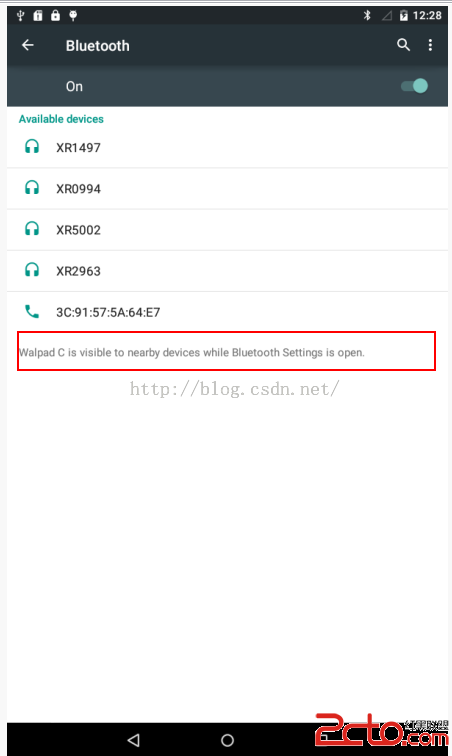 Android系統定制實戰(初識MTK):藍牙名稱、WiFi熱點、休眠選項與通知彈窗定製
Android系統之路(初識MTK):一組客戶定製需求的落地實錄 今天接到客戶的一份新訂單,足足四十多項定製需求。本篇先挑出其中幾個頗具代表性的改動,記錄一次完整的系統定
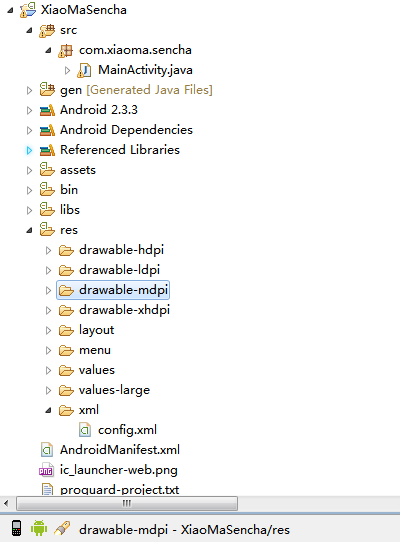 Android 開發實戰(二十七):用 Sencha 打造 APK 局部模組化更新
忙裡偷閒,想跟大家聊聊這段時間摸索出來、自己也頗為得意的成果——「Android APK 局部模組化更新」。做這主題前我上網翻了不少資料,可惜多半是輾轉複製、缺乏新意。剛
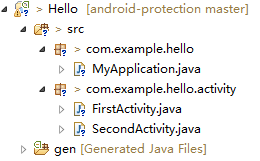 Android 加固系列(六):模仿愛加密的動態載入 Dex 防反編譯實作
 【版權所有,轉載請註明出處。出處:https://www.cnblogs.com/joey-h
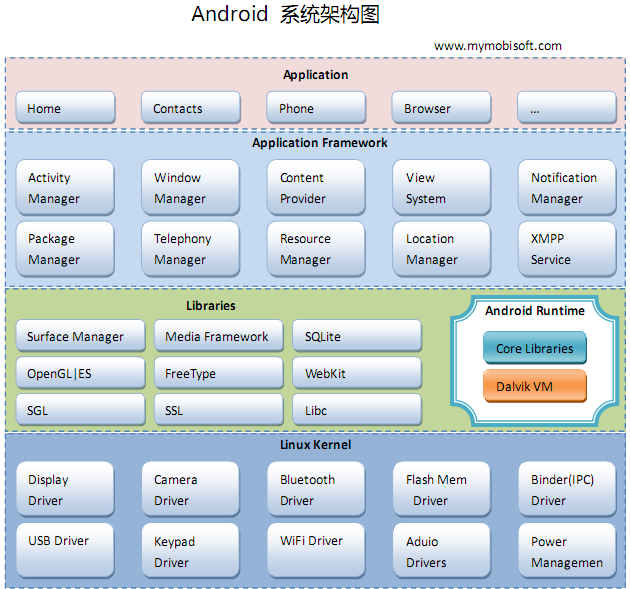 我的第一節 Android 課:從系統框架理解安卓
今天是我程序猿之路的第一節 Android 課程。安卓課程對我而言是個興趣班,本專業是 Java 開發,因為想親手做出一個屬於自己的手機 App,便多學了這項技能。十八般