

編輯:關於 Android 開發
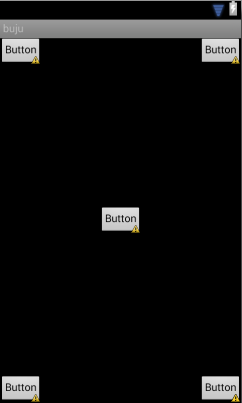
下面要實現的是一種頗為常用的布局效果:外層垂直排列,內部通過嵌套 LinearLayout 和 gravity 屬性,實現按鈕的左對齊、右對齊、居中以及底部對齊等多種排列方式。具體的 XML 代碼如下:
<LinearLayout xmlns:android="https://schemas.android.com/apk/res/android"
android:layout_width="fill_parent"
android:layout_height="fill_parent"
android:orientation="vertical" >
<!-- 第一行:左側一個按鈕,右側一個按鈕 -->
<LinearLayout
android:layout_width="match_parent"
android:layout_height="wrap_content"
android:orientation="horizontal"
android:layout_weight="1" >
<Button
android:id="@+id/button1"
android:layout_width="wrap_content"
android:layout_height="wrap_content"
android:text="Button" />
<LinearLayout
android:layout_width="fill_parent"
android:layout_height="match_parent"
android:gravity="right">
<Button
android:id="@+id/button2"
android:layout_width="wrap_content"
android:layout_height="wrap_content"
android:text="Button" />
</LinearLayout>
</LinearLayout>
<!-- 第二行:居中 -->
<LinearLayout
android:layout_width="match_parent"
android:layout_height="wrap_content"
android:gravity="center"
android:layout_weight="1">
<Button
android:id="@+id/button3"
android:layout_width="wrap_content"
android:layout_height="wrap_content"
android:text="Button" />
</LinearLayout>
<!-- 第三行:底部,內含左右兩個按鈕 -->
<LinearLayout
android:layout_width="match_parent"
android:layout_height="wrap_content"
android:layout_weight="1"
android:gravity="bottom"
>
<LinearLayout
android:layout_width="fill_parent"
android:layout_height="wrap_content"
android:orientation="horizontal"
>
<Button android:id="@+id/button4" android:layout_width="wrap_content" android:layout_height="wrap_content" android:text="Button" />
<LinearLayout
android:layout_width="fill_parent"
android:layout_height="match_parent"
android:gravity="right" >
<Button
android:id="@+id/button5"
android:layout_width="wrap_content"
android:layout_height="wrap_content"
android:text="Button" />
</LinearLayout>
</LinearLayout>
</LinearLayout>
</LinearLayout>
這個例子很好地說明了 LinearLayout 的兩個核心屬性:orientation 決定子元素是水平還是垂直排列,gravity 決定子元素在容器中的對齊方式;而 layout_weight 則用於按比例分配剩餘空間。通過靈活嵌套,就能輕鬆拼出各種常見的界面布局。
 Android 特效:仿微信雷達搜尋好友動畫
 雷達搜尋好友是許多即時通訊應用中常見的互動效果。它的視覺核心其實不複雜:中間放置一張圖片,周圍畫出同心圓,再搭配一個持續旋轉
 Kotlin 擴展函數:擴充 Android 框架(KAD 08)
作者:Antonio Leiva 時間:Jan 11, 2017 原文連結:https://antonioleiva.com/extension-functions-ko
 自課 WheelView:打造可循環滾動的滾輪選擇器
先看成果 生日、性別、城市選擇……滾輪式選擇器幾乎無所不在,風格近似系統的 DatePickerDialog。網路上開源的版本不少,但多數是照著某個專案的需求寫死的,客
 用開源框架 android-image-indicator 實作 Android 圖片輪播
先前的博文曾介紹過幾種圖片輪播的實作方式: 1.《Android 中使用 ViewFlipper 實現螢幕切換》 2.《Android 中使用 ViewPager 實現螢