

編輯:開發入門
很多/Android 新手都栽過這道題:明明設了 android:layout_gravity="right",元件卻還是乖乖待在左邊,完全不動。
先看一段會失效的寫法:
<?xml version="1.0" encoding="utf-8"?>
<LinearLayout
    xmlns:android="https://schemas.android.com/apk/res/android"
    android:gravity="bottom"
    android:layout_width="fill_parent"
    android:layout_height="fill_parent">

    <Button
        android:id="@+id/startDownload"
        android:layout_width="wrap_content"
        android:layout_height="wrap_content"
        android:text="button1">
    </Button>

    <Button
        android:layout_gravity="right"
        android:id="@+id/startDownload"
        android:layout_width="wrap_content"
        android:layout_height="wrap_content"
        android:text="button2">
    </Button>
</LinearLayout>
這段程式碼就是不生效。
當外層 LinearLayout 的 orientation="horizontal" 時,它排布內層 view 的方式是由左至右依序排列。所以對單一 view(例如 button)來說,在這個上下文裡根本沒有「左右」的概念,只剩下「上下」的概念——水平方向的位置早就被排列順序決定死了,layout_gravity 的水平設定自然無從作用。
換個角度說:gravity 管的是「元件內容在自己框框裡怎麼對齊」,layout_gravity 管的是「元件自己在父容器裡怎麼對齊」。而當父容器是水平 LinearLayout 時,子元件的水平位置由排列流程決定,layout_gravity 的水平屬性就被忽略了。
<?xml version="1.0" encoding="utf-8"?>
<LinearLayout
    xmlns:android="https://schemas.android.com/apk/res/android"
    android:gravity="bottom"
    android:layout_width="fill_parent"
    android:layout_height="fill_parent">

    <FrameLayout
        android:layout_width="fill_parent"
        android:layout_height="fill_parent">

        <Button
            android:id="@+id/startDownload"
            android:layout_width="wrap_content"
            android:layout_height="wrap_content"
            android:text="button1">
        </Button>

        <Button
            android:layout_gravity="right"
            android:id="@+id/startDownload"
            android:layout_width="wrap_content"
            android:layout_height="wrap_content"
            android:text="button2">
        </Button>
    </FrameLayout>
</LinearLayout>
FrameLayout 的子元素本來就是彼此堆疊、互不影響排列順序,因此在它裡面使用 layout_gravity 才能完整發揮九宮格定位的效果。這也是為什麼實務上想在同一個區域裡做「重疊+各自對齊」的版面時,FrameLayout 或 RelativeLayout 會比 LinearLayout 更好用的原因。
 Android 聯網應用(一):網路套件、HTTP 請求與簡訊傳送
Android 的網路能力 Android 以 Linux 核心為基礎,具備完整的網路協定支援。對 Java 開發者而言,許多熟悉的套件都能直接使用,例如 java.ne
 Android 自訂對話框:HelpDialog 與 ScrollView 排版
自訂對話框的需求 Android 的 AlertDialog 可以承載自訂版面,讓提示框不只是純文字,而能包含說明、圖示、版本資訊或可捲動內容。對於需要較長說明或較完整資
 Android 動畫框架詳解(二):實例篇
簡介:這是由兩部分組成的 Android 動畫框架詳解的第二部分——實例篇。閱讀本篇前,建議先讀過第一部分的原理篇,其中詳細介紹了動畫框架的實作原理,並示範了一個繞 Y
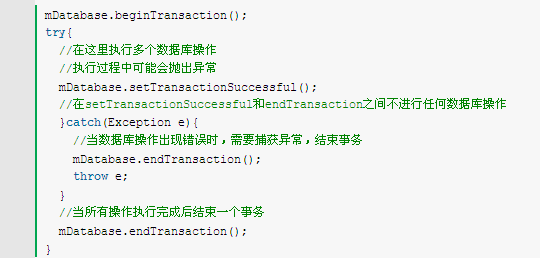 Android數據庫事務淺析
在Android應用開發中,數據庫操作時常出現,而數據庫事務的處理對應用的穩定性與效率提升至關重要。 首先,Android的數據庫操作——尤其是寫操作——非常慢,把所有操