編輯:關於android開發
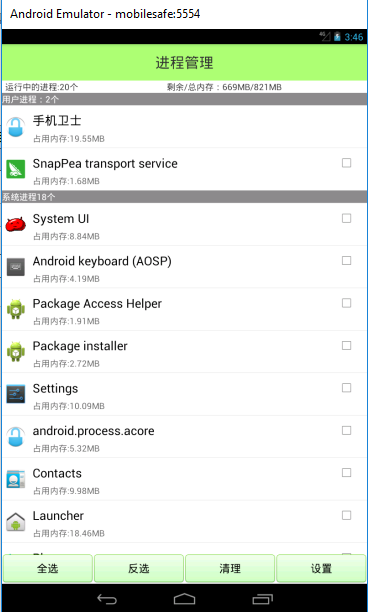
首先看一下界面:
TaskManagerActivity .java
//進程管理
public class TaskManagerActivity extends Activity {
    @ViewInject(R.id.tv_task_process_count)
    private TextView tv_task_process_count;
    @ViewInject(R.id.tv_task_memory)
    private TextView tv_task_memory;
    @ViewInject(R.id.list_view)
    private ListView list_view;
    private long totalMem;
    private List<TaskInfo> taskInfos;
    private List<TaskInfo> userTaskInfos;
    private List<TaskInfo> systemAppInfos;
    private TaskManagerAdapter adapter;
    private int processCount;
    private long availMem;


    @Override
    protected void onCreate(Bundle savedInstanceState) {
        // TODO Auto-generated method stub
        super.onCreate(savedInstanceState);
        initUI();
        initData();

    }

    @Override
    protected void onResume() {
        // TODO Auto-generated method stub
        super.onResume();
        if(adapter != null){
            adapter.notifyDataSetChanged();
        }
    }

    private class TaskManagerAdapter extends BaseAdapter {

        @Override
        public int getCount() {
            //判斷當前用戶是否需要顯示系統進程,需要就顯示,不需要就不顯示
            boolean result = SharedPreferencesUtils.getBoolean(TaskManagerActivity.this, "is_show_system", false);
            if(result){
                return userTaskInfos.size() + 1 + systemAppInfos.size() + 1;
            }else{
                return userTaskInfos.size() + 1;
            }
        }

        @Override
        public Object getItem(int position) {

            if (position == 0) {
                return null;
            } else if (position == userTaskInfos.size() + 1) {
                return null;
            }

            TaskInfo taskInfo;

            if (position < (userTaskInfos.size() + 1)) {
                //
                taskInfo = userTaskInfos.get(position - 1);

            } else {
                //
                int location = position - 1 - userTaskInfos.size() - 1;
                taskInfo = systemAppInfos.get(location);
            }
            return taskInfo;
        }

        @Override
        public long getItemId(int position) {
            // TODO Auto-generated method stub
            return position;
        }

        @Override
        public View getView(int position, View convertView, ViewGroup parent) {

            if (position == 0) {
                //
                TextView tv = new TextView(getApplicationContext());
                tv.setBackgroundColor(Color.GRAY);
                tv.setTextColor(Color.WHITE);
                tv.setText("用戶進程:" + userTaskInfos.size() + "個");
                return tv;
            } else if (position == (userTaskInfos.size() + 1)) {
                TextView tv = new TextView(getApplicationContext());
                tv.setBackgroundColor(Color.GRAY);
                tv.setTextColor(Color.WHITE);
                tv.setText("系統進程" + systemAppInfos.size() + "個");
                return tv;
            }
            ViewHolder holder;
            View view;
            if (convertView != null && convertView instanceof LinearLayout) {
                view = convertView;

                holder = (ViewHolder) view.getTag();

            } else {
                view = View.inflate(TaskManagerActivity.this,
                        R.layout.item_task_manager, null);

                holder = new ViewHolder();

                holder.iv_app_icon = (ImageView) view
                        .findViewById(R.id.iv_app_icon);

                holder.tv_app_name = (TextView) view
                        .findViewById(R.id.tv_app_name);

                holder.tv_app_memory_size = (TextView) view
                        .findViewById(R.id.tv_app_memory_size);

                holder.tv_app_status = (CheckBox) view
                        .findViewById(R.id.tv_app_status);

                view.setTag(holder);
            }

            TaskInfo taskInfo;

            if (position < (userTaskInfos.size() + 1)) {
                //
                taskInfo = userTaskInfos.get(position - 1);
                                                                        } else {
                //
                int location = position - 1 - userTaskInfos.size() - 1;
                taskInfo = systemAppInfos.get(location);
            }

            holder.iv_app_icon.setImageDrawable(taskInfo.getIcon());

            holder.tv_app_name.setText(taskInfo.getAppName());

            holder.tv_app_memory_size.setText("占用內存:"
                    + Formatter.formatFileSize(TaskManagerActivity.this,
                            taskInfo.getMemorySize()));

            if (taskInfo.isChecked()) {
                holder.tv_app_status.setChecked(true);
            } else {
                holder.tv_app_status.setChecked(false);
            }
            //
            if(taskInfo.getPackageName().equals(getPackageName())){
                //
                holder.tv_app_status.setVisibility(View.INVISIBLE);
            }else{
                //
                holder.tv_app_status.setVisibility(View.VISIBLE);
            }

            return view;
        }

    }

    static class ViewHolder {
        ImageView iv_app_icon;
        TextView tv_app_name;
        TextView tv_app_memory_size;
        CheckBox tv_app_status;
    }

    private void initData() {
        new Thread() {

            public void run() {
                taskInfos = TaskInfoParser
                        .getTaskInfos(TaskManagerActivity.this);

                userTaskInfos = new ArrayList<TaskInfo>();

                systemAppInfos = new ArrayList<TaskInfo>();

                for (TaskInfo taskInfo : taskInfos) {

                    if (taskInfo.isUserApp()) {
                        userTaskInfos.add(taskInfo);
                    } else {
                        systemAppInfos.add(taskInfo);
                    }

                }

                runOnUiThread(new Runnable() {

                    @Override
                    public void run() {
                        adapter = new TaskManagerAdapter();
                        list_view.setAdapter(adapter);
                    }
                });

            };
        }.start();

    }


    private void initUI() {
        setContentView(R.layout.activity_task_manager);
        ViewUtils.inject(this);
                //SystemInfoUtils下文定義
        processCount = SystemInfoUtils.getProcessCount(this);

        tv_task_process_count.setText("運行中進程:" + processCount + "個");

        availMem = SystemInfoUtils.getAvailMem(this);

        totalMem = SystemInfoUtils.getTotalMem(this);

        tv_task_memory.setText("剩余/總內存:"
                + Formatter.formatFileSize(TaskManagerActivity.this, availMem)
                + "/"
                + Formatter.formatFileSize(TaskManagerActivity.this, totalMem));

        list_view.setOnItemClickListener(new OnItemClickListener() {

            @Override
            public void onItemClick(AdapterView<?> parent, View view,
                    int position, long id) {
                //
                Object object = list_view.getItemAtPosition(position);


                if (object != null && object instanceof TaskInfo) {

                    TaskInfo taskInfo = (TaskInfo) object;

                    ViewHolder holder = (ViewHolder) view.getTag();

                    if(taskInfo.getPackageName().equals(getPackageName())){
                        return;
                    }


                    if (taskInfo.isChecked()) {
                        taskInfo.setChecked(false);
                        holder.tv_app_status.setChecked(false);
                    } else {
                        taskInfo.setChecked(true);
                        holder.tv_app_status.setChecked(true);
                    }

                }

            }

        });
    }

    /**
     * 全選
     *
     * @param view
     */

    public void selectAll(View view) {

        for (TaskInfo taskInfo : userTaskInfos) {

            if (taskInfo.getPackageName().equals(getPackageName())) {
                continue;
            }

            taskInfo.setChecked(true);
        }

        for (TaskInfo taskInfo : systemAppInfos) {
            taskInfo.setChecked(true);
        }
        // 數據發生變化,一定要更新
        adapter.notifyDataSetChanged();

    }

    /**
     * 反選
     *
     * @param view
     */
    public void selectOppsite(View view) {
        for (TaskInfo taskInfo : userTaskInfos) {

            if (taskInfo.getPackageName().equals(getPackageName())) {
                continue;
            }
            taskInfo.setChecked(!taskInfo.isChecked());
        }
        for (TaskInfo taskInfo : systemAppInfos) {
            taskInfo.setChecked(!taskInfo.isChecked());
        }
        adapter.notifyDataSetChanged();
    }

    /**
     * 清理
     *
     * @param view
     */
    public void killProcess(View view) {

        ActivityManager activityManager = (ActivityManager) getSystemService(ACTIVITY_SERVICE);

        List<TaskInfo> killLists = new ArrayList<TaskInfo>();

        //清理的總共進程個數
        int totalCount = 0;
        // 釋放多少內存
        int killMem = 0;
        for (TaskInfo taskInfo : userTaskInfos) {

            if (taskInfo.isChecked()) {
                killLists.add(taskInfo);
                // userTaskInfos.remove(taskInfo);
                totalCount++;
                killMem += taskInfo.getMemorySize();

            }
        }

        for (TaskInfo taskInfo : systemAppInfos) {

            if (taskInfo.isChecked()) {
                killLists.add(taskInfo);
                // systemAppInfos.remove(taskInfo);
                totalCount++;
                killMem += taskInfo.getMemorySize();
                //
                activityManager.killBackgroundProcesses(taskInfo
                        .getPackageName());
            }
        }
        /**
         * 當集合在迭代的時候,不能修改集合的大小
         */
        for (TaskInfo taskInfo : killLists) {
            //判斷是否是用戶app
            if (taskInfo.isUserApp()) {
                userTaskInfos.remove(taskInfo);
                //
                activityManager.killBackgroundProcesses(taskInfo
                        .getPackageName());
            } else {
                systemAppInfos.remove(taskInfo);
                //
                activityManager.killBackgroundProcesses(taskInfo
                        .getPackageName());
            }
        }

        UIUtils.showToast(
                TaskManagerActivity.this,
                "共清理"
                        + totalCount
                        + "個進程,釋放"
                        + Formatter.formatFileSize(TaskManagerActivity.this,
                                killMem) + "內存");
        //processCount
        //totalCount
        processCount -= totalCount;
        tv_task_process_count.setText("運行中的進程:"+ processCount +"個");
        //
        tv_task_memory.setText("剩余/總內存:"
                + Formatter.formatFileSize(TaskManagerActivity.this, availMem + killMem)
                + "/"
                + Formatter.formatFileSize(TaskManagerActivity.this, totalMem));

        // 刷新界面
        adapter.notifyDataSetChanged();

    }
    /**
     *設置
     * @param view
     */
    public void openSetting(View view){

        startActivity(new Intent(TaskManagerActivity.this,TaskManagerSettingActivity.class));
    }
}
TaskInfoParser.java
public class TaskInfoParser {

    public static List<TaskInfo> getTaskInfos(Context context) {

        PackageManager packageManager = context.getPackageManager();

        List<TaskInfo> TaskInfos = new ArrayList<TaskInfo>();
        //
        ActivityManager activityManager = (ActivityManager) context
                .getSystemService(context.ACTIVITY_SERVICE);
        //
        List<RunningAppProcessInfo> appProcesses = activityManager
                .getRunningAppProcesses();

        for (RunningAppProcessInfo runningAppProcessInfo : appProcesses) {

            TaskInfo taskInfo = new TaskInfo();

            //
            String processName = runningAppProcessInfo.processName;

            taskInfo.setPackageName(processName);

            try {

                MemoryInfo[] memoryInfo = activityManager
                        .getProcessMemoryInfo(new int[]{runningAppProcessInfo.pid});

                int totalPrivateDirty = memoryInfo[0].getTotalPrivateDirty() * 1024;


                taskInfo.setMemorySize(totalPrivateDirty);

                PackageInfo packageInfo = packageManager.getPackageInfo(
                        processName, 0);

                Drawable icon = packageInfo.applicationInfo
                        .loadIcon(packageManager);

                taskInfo.setIcon(icon);

                String appName = packageInfo.applicationInfo.loadLabel(
                        packageManager).toString();

                taskInfo.setAppName(appName);

                System.out.println("-------------------");
                System.out.println("processName="+processName);
                System.out.println("appName="+appName);
                ////packageInfo.applicationInfo.flags
                //ApplicationInfo.FLAG_SYSTEM
                int flags = packageInfo.applicationInfo.flags;
                //ApplicationInfo.FLAG_SYSTEM
                if((flags & ApplicationInfo.FLAG_SYSTEM) != 0 ){
                    //
                    taskInfo.setUserApp(false);
                }else{
//
                    taskInfo.setUserApp(true);

                }


            } catch (Exception e) {
                // TODO Auto-generated catch block
                e.printStackTrace();
                //

                taskInfo.setAppName(processName);
                taskInfo.setIcon(context.getResources().getDrawable(
                        R.drawable.ic_launcher));
            }

            TaskInfos.add(taskInfo);
        }

        return TaskInfos;
    }

}
UIUtils.java
public class UIUtils {
    public static void showToast(final Activity context,final String msg){
        if("main".equals(Thread.currentThread().getName())){
            Toast.makeText(context, msg, 1).show();
        }else{
            context.runOnUiThread(new Runnable() {
                @Override
                public void run() {
                    Toast.makeText(context, msg, 1).show();
                }
            });
        }
    }
}
SystemInfoUtils.java
public class SystemInfoUtils {

    public static boolean isServiceRunning(Context context, String className) {

         /** *都是管理器
          * * ActivityManager 活動(任務/進程)管理器
          * * packageManager 包管理器
            */
        ActivityManager am = (ActivityManager) context
                .getSystemService(Context.ACTIVITY_SERVICE);
         //獲取到手機上所有運行的進程
        List<RunningServiceInfo> infos = am.getRunningServices(200);
        for (RunningServiceInfo info : infos) {
            String serviceClassName = info.service.getClassName();
            if (className.equals(serviceClassName)) {
                return true;
            }
        }
        return false;
    }


    public static int getProcessCount(Context context) {
       //得到進程的個數        ActivityManager activityManager = (ActivityManager) context
                .getSystemService(context.ACTIVITY_SERVICE);
              List<RunningAppProcessInfo> runningAppProcesses = activityManager
                .getRunningAppProcesses();
        return runningAppProcesses.size();
    }

    public static long getAvailMem(Context context) {
        //剩余內存
        ActivityManager activityManager = (ActivityManager) context
                .getSystemService(context.ACTIVITY_SERVICE);
        MemoryInfo memoryInfo = new ActivityManager.MemoryInfo();

        //得到內存的基本信息
        activityManager.getMemoryInfo(memoryInfo);

        return memoryInfo.availMem;
    }

    public static long getTotalMem(Context context) {
        //總內存
        try {
            // /proc/meminfo
            FileInputStream fis = new FileInputStream(new File("/proc/meminfo"));

            BufferedReader reader = new BufferedReader(new InputStreamReader(
                    fis));

            String readLine = reader.readLine();

            StringBuffer sb = new StringBuffer();

            for (char c : readLine.toCharArray()) {
                if (c >= '0' && c <= '9') {
                    sb.append(c);
                }
            }
            return Long.parseLong(sb.toString()) * 1024;
        } catch (Exception e) {
            // TODO Auto-generated catch block
            e.printStackTrace();
        }
        return 0;

    }

}
TaskInfo.java javabean
public class TaskInfo {

    private Drawable icon;

    private String packageName;

    private String appName;

    private long memorySize;

    private boolean userApp;

    private boolean checked;

    public boolean isChecked() {
        return checked;
    }

    public void setChecked(boolean checked) {
        this.checked = checked;
    }

    public Drawable getIcon() {
        return icon;
    }

    public void setIcon(Drawable icon) {
        this.icon = icon;
    }

    public String getPackageName() {
        return packageName;
    }

    public void setPackageName(String packageName) {
        this.packageName = packageName;
    }

    public String getAppName() {
        return appName;
    }

    public void setAppName(String appName) {
        this.appName = appName;
    }

    public long getMemorySize() {
        return memorySize;
    }

    public void setMemorySize(long memorySize) {
        this.memorySize = memorySize;
    }

    public boolean isUserApp() {
        return userApp;
    }

    public void setUserApp(boolean userApp) {
        this.userApp = userApp;
    }

    @Override
    public String toString() {
        return "TaskInfo [packageName=" + packageName + ", appName=" + appName
                + ", memorySize=" + memorySize + ", userApp=" + userApp + "]";
    }
}
 Android Studio系列教程一下載與安裝 背景Android Studio VS Eclipse准備下載創建HelloWorld項目,androidhelloworld
Android Studio系列教程一下載與安裝 背景Android Studio VS Eclipse准備下載創建HelloWorld項目,androidhellowo
 sqlite的基本使用,sqlite使用
sqlite的基本使用,sqlite使用一:基本操作 1繼承SQLiteOpenHelper public class UserSqliteOpenHel
 我的Android進階之旅之Android自定義View來實現解析lrc歌詞同步滾動、上下拖動、縮放歌詞等功能
我的Android進階之旅之Android自定義View來實現解析lrc歌詞同步滾動、上下拖動、縮放歌詞等功能 前言 最近有個項目有關於播放音樂時候
 android入門系列- TextView EditText Button ImageView 的簡單應用,textviewedittext
android入門系列- TextView EditText Button ImageView 的簡單應用,textviewedittext 第一篇原創,其實