編輯:關於android開發
首先看一下界面:
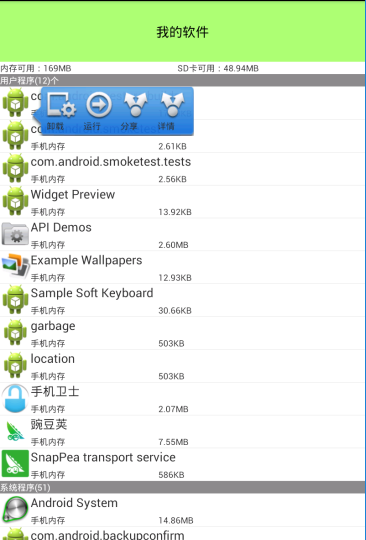
AppManagerActivity .java
//軟件管理
public class AppManagerActivity extends Activity implements View.OnClickListener{
    List<AppInfo> appinfos;
    ListView lv;

    private List<AppInfo> userAppInfos;
    private List<AppInfo> systemAppInfos;
    private TextView tv_app;
    private PopupWindow popupWindow;
    private AppInfo clickAppInfo;
    @Override
    protected void onCreate(Bundle savedInstanceState) {
        // TODO Auto-generated method stub
        super.onCreate(savedInstanceState);
        initUI();
        initData();
    }
     @Override
        public void onClick(View v) {
            switch (v.getId()) {
                //分享
                case R.id.ll_share:

                    Intent share_localIntent = new Intent("android.intent.action.SEND");
                    share_localIntent.setType("text/plain");
                    share_localIntent.putExtra("android.intent.extra.SUBJECT", "f分享");
                    share_localIntent.putExtra("android.intent.extra.TEXT",
                            "Hi!推薦您使用軟件:" + clickAppInfo.getApkname()+"下載地址:"+"https://play.google.com/store/apps/details?id="+clickAppInfo.getApkPackageName());
                    this.startActivity(Intent.createChooser(share_localIntent, "分享"));
                    popupWindowDismiss();

                    break;

                //運行
                case R.id.ll_start:

                    Intent start_localIntent = this.getPackageManager().getLaunchIntentForPackage(clickAppInfo.getApkPackageName());
                    this.startActivity(start_localIntent);
                    popupWindowDismiss();
                    break;
                //卸載
                case R.id.ll_uninstall:

                    Intent uninstall_localIntent = new Intent("android.intent.action.DELETE", Uri.parse("package:" + clickAppInfo.getApkPackageName()));
                    startActivity(uninstall_localIntent);
                    popupWindowDismiss();
                    break;
                 //詳情
                case R.id.ll_detail:
                    Intent detail_intent = new Intent();
                    detail_intent.setAction("android.settings.APPLICATION_DETAILS_SETTINGS");
                    detail_intent.addCategory(Intent.CATEGORY_DEFAULT);
                    detail_intent.setData(Uri.parse("package:" + clickAppInfo.getApkPackageName()));
                    startActivity(detail_intent);
                    break;
            }

        }


    private class AppManagerAdapter extends BaseAdapter{

        @Override
        public int getCount() {
            // TODO Auto-generated method stub
             return userAppInfos.size() + 1 + systemAppInfos.size() + 1;
        }

        @Override
        public Object getItem(int position) {
            // TODO Auto-generated method stub
             if (position == 0) {
                    return null;
                } else if (position == userAppInfos.size() + 1) {
                    return null;
                }
                AppInfo appInfo;

                if (position < userAppInfos.size() + 1) {
                    //把多出來的特殊的條目減掉
                    appInfo = userAppInfos.get(position - 1);

                } else {

                    int location = userAppInfos.size() + 2;

                    appInfo = systemAppInfos.get(position - location);
                }

                return appInfo;
        }

        @Override
        public long getItemId(int position) {
            return position;
        }

         @Override
            public View getView(int position, View convertView, ViewGroup parent) {
                 //特殊條目的處理
                //如果當前的position等於0 表示應用程序
                if (position == 0) {

                    TextView textView = new TextView(AppManagerActivity.this);

                    textView.setTextColor(Color.WHITE);

                    textView.setBackgroundColor(Color.GRAY);

                    textView.setText("用戶程序(" + userAppInfos.size() + ")");

                    return textView;
                    //表示系統程序
                } else if (position == userAppInfos.size() + 1) {


                    TextView textView = new TextView(AppManagerActivity.this);


                    textView.setTextColor(Color.WHITE);

                    textView.setBackgroundColor(Color.GRAY);

                    textView.setText("系統程序(" + systemAppInfos.size() + ")");

                    return textView;

                }

                AppInfo appInfo;

                if (position < userAppInfos.size() + 1) {
                    //把多出來的特殊的條目減掉
                    appInfo = userAppInfos.get(position - 1);

                } else {

                    int location = userAppInfos.size() + 2;

                    appInfo = systemAppInfos.get(position - location);
                }


                View view = null;
                ViewHolder holder;
                if (convertView != null && convertView instanceof LinearLayout) {
                    view = convertView;
                    holder = (ViewHolder) view.getTag();

                } else {


                    view = View.inflate(AppManagerActivity.this, R.layout.item_app_manager, null);
                    tv_app = (TextView) findViewById(R.id.tv_app);
                    holder = new ViewHolder();
                    holder.iv_icon = (ImageView) view.findViewById(R.id.iv_icon);
                    holder.tv_apk_size = (TextView) view.findViewById(R.id.tv_size);
                    holder.tv_location = (TextView) view.findViewById(R.id.tv_rom);
                    holder.tv_name = (TextView) view.findViewById(R.id.tv_name);

                    view.setTag(holder);
                }


                holder.iv_icon.setImageDrawable(appInfo.getIcon());
                holder.tv_apk_size.setText(Formatter.formatFileSize(AppManagerActivity.this, appInfo.getApksize()));

                holder.tv_name.setText(appInfo.getApkname());

                if (appInfo.isRom()) {
                    holder.tv_location.setText("手機內存");
                } else {
                    holder.tv_location.setText("外部存儲");
                }

                return view;
            }
        }

    static class ViewHolder{
        ImageView iv_icon;
        TextView tv_location;
        TextView tv_name ;
        TextView tv_apk_size;
    }


    private Handler handler = new Handler(){
        public void handleMessage(android.os.Message msg) {
            AppManagerAdapter adapter = new AppManagerAdapter();
            lv.setAdapter(adapter);
        };

    };

    private void initData() {
        // TODO Auto-generated method stub
        new Thread(){
            public void run(){
                //獲取到所有安裝到手機上面的應用程序
                appinfos = AppInfos.getAppInfos(AppManagerActivity.this);//AppInfos是一個可以復用的類
                //appInfos拆成 用戶程序的集合 + 系統程序的集合

                //用戶程序的集合
                userAppInfos = new ArrayList<AppInfo>();
                //系統程序的集合
                systemAppInfos = new ArrayList<AppInfo>();

                for (AppInfo appInfo : appinfos) {
                    //用戶程序
                    if (appInfo.isUserApp()) {
                        userAppInfos.add(appInfo);
                    } else {
                        systemAppInfos.add(appInfo);
                    }
                }

                handler.sendEmptyMessage(0);//這樣更方便
                //也可以這樣發消息
                //Message obtain = Message.Obtain();
                //handler.sendMessage(obtain);
            }
        }.start();

    }

    private void initUI() {
        // TODO Auto-generated method stub
        setContentView(R.layout.activity_app_manager);
        ViewUtils.inject(this);//ViewUtils下文說明
        lv = (ListView) findViewById(R.id.list_view);
        TextView tv_rom = (TextView) findViewById(R.id.tv_rom);
        TextView tv_sd = (TextView) findViewById(R.id.tv_sd);
        //得到ROM內存剩余空間,運行的大小
        long rom_freeSpace = Environment.getDataDirectory().getFreeSpace();
        //得到SD卡剩余空間,運行的大小
        long sd_freeSpace = Environment.getExternalStorageDirectory().getFreeSpace();
        //格式化大小
        tv_rom.setText("內存可用:"+Formatter.formatFileSize(this, rom_freeSpace));
        tv_sd.setText("SD卡可用:"+Formatter.formatFileSize(this, sd_freeSpace));
        //卸載的廣播
         UninstallReceiver receiver = new UninstallReceiver();
            IntentFilter intentFilter = new IntentFilter(Intent.ACTION_PACKAGE_REMOVED);
            intentFilter.addDataScheme("package");
            registerReceiver(receiver, intentFilter);

            //設置listview的滾動監聽
            lv.setOnScrollListener(new AbsListView.OnScrollListener() {
                @Override
                public void onScrollStateChanged(AbsListView view, int scrollState) {

                }

                /**
                 *
                 * @param view
                 * @param firstVisibleItem 第一個可見的條的位置
                 * @param visibleItemCount 一頁可以展示多少個條目
                 * @param totalItemCount   總共的item的個數
                 */
                @Override
                public void onScroll(AbsListView view, int firstVisibleItem, int visibleItemCount, int totalItemCount) {

                    popupWindowDismiss();

                    if (userAppInfos != null && systemAppInfos != null) {
                        if (firstVisibleItem > (userAppInfos.size() + 1)) {
                            //系統應用程序
                            tv_app.setText("系統程序(" + systemAppInfos.size() + ")個");
                        } else {
                            //用戶應用程序
                            tv_app.setText("用戶程序(" + userAppInfos.size() + ")個");
                        }
                    }

                }
            });
            //listview的點擊監聽
            lv.setOnItemClickListener(new AdapterView.OnItemClickListener() {
                @Override
                public void onItemClick(AdapterView<?> parent, View view, int position, long id) {
                    //獲取到當前點擊的item對象
                    Object obj = lv.getItemAtPosition(position);

                    if (obj != null && obj instanceof AppInfo) {

                        clickAppInfo = (AppInfo) obj;

                        View contentView = View.inflate(AppManagerActivity.this, R.layout.item_popup, null);


                        LinearLayout ll_uninstall = (LinearLayout) contentView.findViewById(R.id.ll_uninstall);

                        LinearLayout ll_share = (LinearLayout) contentView.findViewById(R.id.ll_share);

                        LinearLayout ll_start = (LinearLayout) contentView.findViewById(R.id.ll_start);

                        LinearLayout ll_detail = (LinearLayout) contentView.findViewById(R.id.ll_detail);

                        ll_uninstall.setOnClickListener(AppManagerActivity.this);

                        ll_share.setOnClickListener(AppManagerActivity.this);

                        ll_start.setOnClickListener(AppManagerActivity.this);

                        ll_detail.setOnClickListener(AppManagerActivity.this);


                        popupWindowDismiss();


                        // -2表示包裹內容
                        popupWindow = new PopupWindow(contentView, -2, -2);
                        //需要注意:使用PopupWindow 必須設置背景。不然沒有動畫
                        popupWindow.setBackgroundDrawable(new ColorDrawable(Color.TRANSPARENT));

                        int[] location = new int[2];
                        //獲取view展示到窗體上面的位置
                        view.getLocationInWindow(location);

                        popupWindow.showAtLocation(parent, Gravity.LEFT + Gravity.TOP, 70, location[1]);

                        //添加一個由小變大的動畫
                        ScaleAnimation sa = new ScaleAnimation(0.5f, 1.0f, 0.5f, 1.0f,
                                Animation.RELATIVE_TO_SELF, 0.5f, Animation.RELATIVE_TO_SELF, 0.5f);

                        sa.setDuration(3000);

                        contentView.startAnimation(sa);

                    }
                }
            });

    }

     private class UninstallReceiver extends BroadcastReceiver{

         @Override
         public void onReceive(Context context, Intent intent) {
             System.out.println("接收到卸載的廣播");
         }
     }

     private void popupWindowDismiss() {
         if (popupWindow != null && popupWindow.isShowing()) {
             popupWindow.dismiss();
             popupWindow = null;
         }
     }

     @Override
     protected void onDestroy() {
         popupWindowDismiss();

         super.onDestroy();
     }
}
AppInfo.java 這是一個javabean
public class AppInfo {
    private Drawable icon;//圖片的icon。Drawable適用的范圍更廣一點,可以是圖片,也可以是xml等
    private String apkname;//程序的名字
    private long apksize;//程序的大小
    private boolean userApp;//表示是用戶APP還是系統APP,true,用戶APP
    private boolean isRom;//放置的位置
    private String apkPackageName;//包名


    public Drawable getIcon() {
        return icon;
    }
    public void setIcon(Drawable icon) {
        this.icon = icon;
    }
    public String getApkname() {
        return apkname;
    }
    public void setApkname(String apkname) {
        this.apkname = apkname;
    }
    public long getApksize() {
        return apksize;
    }
    public void setApksize(long apksize) {
        this.apksize = apksize;
    }
    public boolean isUserApp() {
        return userApp;
    }
    public void setUserApp(boolean userApp) {
        this.userApp = userApp;
    }
    public boolean isRom() {
        return isRom;
    }
    public void setRom(boolean isRom) {
        this.isRom = isRom;
    }
    public String getApkPackageName() {
        return apkPackageName;
    }
    public void setApkPackageName(String apkPackageName) {
        this.apkPackageName = apkPackageName;
    }
    @Override
    public String toString() {
        return "AppInfo [icon=" + icon + ", apkname=" + apkname + ", apksize=" + apksize + ", userApp=" + userApp
                + ", isRom=" + isRom + ", apkPackageName=" + apkPackageName + "]";
    }

}
AppInfos .java 獲取當前手機上邊所有的應用程序的詳細信息
public class AppInfos {

    public static List<AppInfo> getAppInfos(Context context){

        List<AppInfo> packageAppinfos = new ArrayList<AppInfo>();

        PackageManager pm=context.getPackageManager();//獲取到包的管理者,即清單文件中的東西
        List<PackageInfo> installPackages = pm.getInstalledPackages(0);//獲取安裝到手機上邊的安裝包
        for(PackageInfo installPackage:installPackages){
            AppInfo appinfo = new AppInfo();//javabean

            //獲取到應用程序的圖標/名字/包名/資源路徑
            Drawable drawable = installPackage.applicationInfo.loadIcon(pm);
            appinfo.setIcon(drawable);
            String apkName = installPackage.applicationInfo.loadLabel(pm).toString();
            appinfo.setApkname(apkName);
            String packageName = installPackage.packageName;
            appinfo.setApkPackageName(packageName);
            String sourceDir = installPackage.applicationInfo.sourceDir;

            File file = new File(sourceDir);
            //apk的長度
            long apksize = file.length();
            appinfo.setApksize(apksize);
            System.out.println(apkName+";"+packageName+";"+apksize);

            //第三方應用放在data/data/app   系統應用放在system/app
            //獲取到安裝應用程序的標記,都是二進制
            int flags = installPackage.applicationInfo.flags;

            if((flags&ApplicationInfo.FLAG_SYSTEM)!=0){
                //系統應用
                appinfo.setUserApp(false);
            }else{//用戶app
                appinfo.setUserApp(true);
            }


            if((flags&ApplicationInfo.FLAG_EXTERNAL_STORAGE)!=0){
                //sd卡
                appinfo.setRom(false);
            }else{
                //表示內存
                appinfo.setRom(true);
            }

            packageAppinfos.add(appinfo);
        }


        return packageAppinfos;
    }

}
activity_app_manager.xml
<?xml version="1.0" encoding="utf-8"?>
<LinearLayout xmlns:android="http://schemas.android.com/apk/res/android"
    android:layout_width="match_parent"
    android:layout_height="match_parent"
    android:orientation="vertical" >

    <TextView
        style="@style/TitleStyle"
        android:text="我的軟件" />

    <LinearLayout
        android:layout_width="match_parent"
        android:layout_height="wrap_content"
        android:orientation="horizontal" >

        <TextView
            android:id="@+id/tv_rom"
            android:layout_width="wrap_content"
            android:layout_height="wrap_content"
            android:layout_weight="1"
            android:text="內存可用:XXX" />

        <TextView
            android:id="@+id/tv_sd"
            android:layout_width="wrap_content"
            android:layout_height="wrap_content"
            android:layout_weight="1"
            android:text="SD卡可用:XXX" />
    </LinearLayout>

    <FrameLayout
        android:layout_width="match_parent"
        android:layout_height="match_parent">

        <include
            android:id="@+id/list_view"
            layout="@layout/list_view"></include>

        <TextView
            android:id="@+id/tv_app"
            android:layout_width="match_parent"
            android:layout_height="wrap_content"
            android:textColor="#fff"
            android:background="#ff888888"
            android:text="用戶程序(5)個" />
    </FrameLayout>

</LinearLayout>
item_popup.xml
<?xml version="1.0" encoding="utf-8"?>
<LinearLayout xmlns:android="http://schemas.android.com/apk/res/android"
    android:orientation="horizontal"
    android:layout_width="wrap_content"
    android:layout_height="wrap_content"
    android:background="@drawable/local_popup_bg">


    <LinearLayout
        android:id="@+id/ll_uninstall"
        android:layout_width="wrap_content"
        android:layout_height="wrap_content"
        android:layout_marginLeft="5dp"
        android:layout_marginRight="5dp"
        android:orientation="vertical">

        <ImageView
            android:layout_width="wrap_content"
            android:layout_height="wrap_content"
            android:background="@drawable/img1" />

        <TextView
            android:layout_width="wrap_content"
            android:layout_height="wrap_content"
            android:text="卸載" />


    </LinearLayout>

    <LinearLayout
        android:id="@+id/ll_start"
        android:layout_width="wrap_content"
        android:layout_height="wrap_content"
        android:layout_marginLeft="5dp"
        android:layout_marginRight="5dp"
        android:orientation="vertical">

        <ImageView
            android:layout_width="wrap_content"
            android:layout_height="wrap_content"
            android:background="@drawable/img2" />

        <TextView
            android:layout_width="wrap_content"
            android:layout_height="wrap_content"
            android:text="運行" />


    </LinearLayout>

    <LinearLayout
        android:id="@+id/ll_share"
        android:layout_width="wrap_content"
        android:layout_height="wrap_content"
        android:layout_marginLeft="5dp"
        android:layout_marginRight="5dp"
        android:orientation="vertical">

        <ImageView
            android:layout_width="wrap_content"
            android:layout_height="wrap_content"
            android:background="@drawable/img3" />

        <TextView
            android:layout_width="wrap_content"
            android:layout_height="wrap_content"
            android:text="分享" />


    </LinearLayout>

    <LinearLayout
        android:id="@+id/ll_detail"
        android:layout_width="wrap_content"
        android:layout_height="wrap_content"
        android:layout_marginLeft="5dp"
        android:layout_marginRight="5dp"
        android:orientation="vertical">

        <ImageView
            android:layout_width="wrap_content"
            android:layout_height="wrap_content"
            android:background="@drawable/img3" />

        <TextView
            android:layout_width="wrap_content"
            android:layout_height="wrap_content"
            android:text="詳情" />


    </LinearLayout>

</LinearLayout>
ViewUtils完全注解的方式進行UI綁定和事件綁定,無需findViewById()和 setClickListener().下面一篇博客來說明xUtils的使用。
 android 動畫詳解(二)
android 動畫詳解(二) 下面就開始學習屬性動畫的基本用法,我們來看屬性動畫的繼承關系,如下如所示: 顯然關注的焦點應該是Va
 會話失效和PullToRefreshListView,pullrefreshlistview
會話失效和PullToRefreshListView,pullrefreshlistview今天碰到一個一個會話失效的問題,從網上找了個方法可以處理http://blog
 手把手教你畫一個 逼格滿滿圓形水波紋loadingview Android
手把手教你畫一個 逼格滿滿圓形水波紋loadingview Android 才沒有完結呢o( ̄︶ ̄)n 。大家好,這裡是番外篇。 拜讀了愛哥的博客,又學到不少東西。愛哥曾
 Intent(二)隱式調用intent,調用intent
Intent(二)隱式調用intent,調用intent 在上一節我們一起學習了顯示調用Intent,這一節我