編輯:關於android開發
書接上回↑
一、基礎地圖界面地址:http://www.cnblogs.com/dhr125/p/5969980.html
二、地圖定位地址:http://www.cnblogs.com/dhr125/p/5970118.html
1.在xml文件中加入布局
 1 <LinearLayout
 2         android:layout_width="match_parent"
 3         android:layout_height="wrap_content">
 4         <EditText
 5             android:layout_width="0dip"
 6             android:layout_height="wrap_content"
 7             android:layout_weight="1"
 8             android:hint="請輸入搜索地址"
 9             android:id="@+id/etsearch"/>
10         <Button
11             android:layout_width="wrap_content"
12             android:layout_height="wrap_content"
13             android:text="搜索"
14             android:id="@+id/btnsearch"/>
15     </LinearLayout>
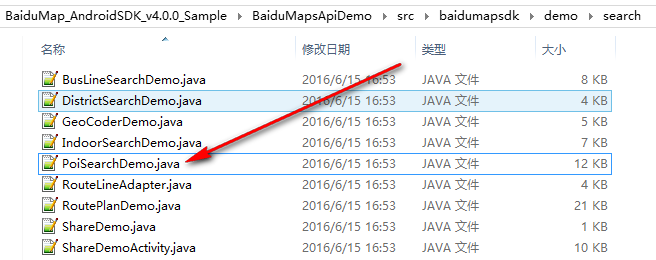
2.按照下圖位置,找到PoiSearchDemo.java,准備復制代碼
3.復制下面一段代碼到onCreate中,然後讓Activity實現OnGetPoiSearchResultListener
 // 初始化搜索模塊,注冊搜索事件監聽
    mPoiSearch = PoiSearch.newInstance();
    mPoiSearch.setOnGetPoiSearchResultListener(this);
4.實現後會重寫下面3個方法
 1  @Override
 2     public void onGetPoiResult(PoiResult poiResult) {
 3
 4     }
 5
 6     @Override
 7     public void onGetPoiDetailResult(PoiDetailResult poiDetailResult) {
 8
 9     }
10
11     @Override
12     public void onGetPoiIndoorResult(PoiIndoorResult poiIndoorResult) {
13
14     }
5.向重寫的方法onGetPoiResult中加入代碼,然後根據報錯修改代碼
 1  if (poiResult == null || poiResult.error == SearchResult.ERRORNO.RESULT_NOT_FOUND) {
 2             Toast.makeText(MainActivity.this, "未找到結果", Toast.LENGTH_LONG)
 3                     .show();
 4             return;
 5         }
 6         if (poiResult.error == SearchResult.ERRORNO.NO_ERROR) {
 7             mBaiduMap.clear();
 8             PoiOverlay overlay = new MyPoiOverlay(mBaiduMap);
 9             mBaiduMap.setOnMarkerClickListener(overlay);
10             overlay.setData(poiResult);
11             overlay.addToMap();
12             overlay.zoomToSpan();
13                     showNearbyArea(center, radius);
14
15             return;
16         }
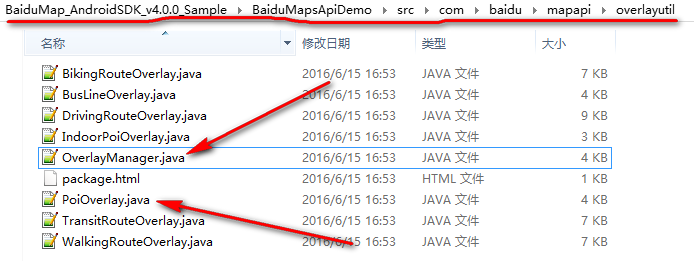
6.按照下面位置找到兩個類,復制到項目中
7.向工程中加入代碼
 1 private class MyPoiOverlay extends PoiOverlay {
 2
 3         public MyPoiOverlay(BaiduMap baiduMap) {
 4             super(baiduMap);
 5         }
 6
 7         @Override
 8         public boolean onPoiClick(int index) {
 9             super.onPoiClick(index);
10             PoiInfo poi = getPoiResult().getAllPoi().get(index);
11             // if (poi.hasCaterDetails) {
12             mPoiSearch.searchPoiDetail((new PoiDetailSearchOption())
13                     .poiUid(poi.uid));
14             // }
15             return true;
16         }
17     }
 1  /**
 2      * 對周邊檢索的范圍進行繪制
 3      * @param center
 4      * @param radius
 5      */
 6     public void showNearbyArea( LatLng center, int radius) {
 7      16     }
8.將下面兩個成員變量加入成員位置
  LatLng center = null;
  int radius = 5000;
並且,在 定位SDK監聽函數MyLocationListenner中if判斷後,實例化center,如下
 @Override
        public void onReceiveLocation(BDLocation location) {
            // map view 銷毀後不在處理新接收的位置
            if (location == null || mMapView == null) {
                return;
            }
            center = new LatLng(location.getLatitude(),location.getLongitude());
9.找到自定義的輸入框和按鈕,監聽
 1      etsearch = (EditText) findViewById(R.id.etsearch);
 2         Button btnsearch = (Button) findViewById(R.id.btnsearch);
 3         btnsearch.setOnClickListener(new View.OnClickListener() {
 4             @Override
 5             public void onClick(View v) {
 6                 PoiNearbySearchOption nearbySearchOption = new PoiNearbySearchOption().keyword(etsearch.getText()
 7                         .toString()).sortType(PoiSortType.distance_from_near_to_far).location(center)
 8                         .radius(radius).pageNum(10);
 9                 mPoiSearch.searchNearby(nearbySearchOption);
10             }
11         });
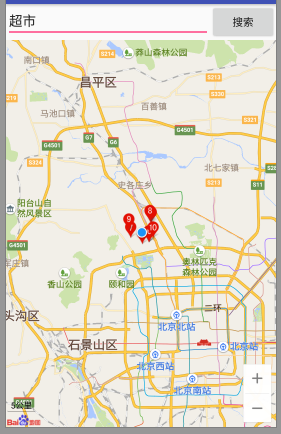
以上,即可實現搜索功能
 Android開發重點難點1:RelativeLayout(相對布局)詳解,
Android開發重點難點1:RelativeLayout(相對布局)詳解, 前言 啦啦啦~博主又推出了一個新的系列啦~ 之前的Android開發系列
 Android 手機衛士--自定義組合控件構件布局結構,android構件
Android 手機衛士--自定義組合控件構件布局結構,android構件由於設置中心條目中的布局都很類似,所以可以考慮使用自定義組合控件來簡化實現 本文地址:http
 大叔也說Xamarin~Android篇~日志的記錄,xamarinandroid
大叔也說Xamarin~Android篇~日志的記錄,xamarinandroid無論哪個平台,開始哪種應用程序,日志總是少不了的,大家在Lind.DDD裡也可以看到大叔
 Android應用開發教程之十:應用程序通信
Android 開發中在程序之間通訊的接口做的還是非常豐富的 本例主要向大家介紹程序之間是如何進行溝通,有哪幾種溝通方式 如何來實現溝通。 1.使