編輯:關於android開發
在實際開發中可能需要用到兩個Service相互監視的情況,本示例就是實現此功能以作參考。
服務A:
 1 public class ServiceA extends Service {
 2
 3
 4     private static final String TAG = ServiceA.class.getSimpleName();
 5     MyBinder mBinder;
 6     MyServiceConnection mServiceConnection;
 7     PendingIntent mPendingIntent;
 8
 9     @Override
10     public void onCreate() {
11         super.onCreate();
12
13         if(mBinder==null)
14         {
15             mBinder=new MyBinder();
16         }
17         mServiceConnection=new MyServiceConnection();
18     }
19
20     @Override
21     public int onStartCommand(Intent intent, int flags, int startId) {
22         ServiceA.this.bindService(new Intent(ServiceA.this,ServiceB.class),mServiceConnection, Context.BIND_IMPORTANT);
23         mPendingIntent=PendingIntent.getService(this,0,intent,0);
24         Notification.Builder builder=new Notification.Builder(this);
25         builder.setTicker("守護服務A啟動中")
26                 .setContentText("我是來守護服務B的")
27                 .setContentTitle("守護服務A")
28                 .setSmallIcon(R.mipmap.ic_launcher)
29                 .setContentIntent(mPendingIntent)
30                 .setWhen(System.currentTimeMillis());
31         Notification notification=builder.build();
32
33         startForeground(startId,notification);
34
35
36         return START_STICKY;
37     }
38
39     @Override
40     public IBinder onBind(Intent intent) {
41         return mBinder;
42     }
43
44     public class MyBinder extends IBridgeInterface.Stub {
45
46         @Override
47         public String getName() throws RemoteException {
48             return "name:"+TAG;
49         }
50     }
51
52     class MyServiceConnection implements ServiceConnection {
53
54         @Override
55         public void onServiceConnected(ComponentName componentName, IBinder iBinder) {
56             String name=null;
57             try {
58                 name= IBridgeInterface.Stub.asInterface(iBinder).getName();
59             } catch (RemoteException e) {
60                 e.printStackTrace();
61             }
62
63
64             Toast.makeText(ServiceA.this,name+"連接成功",Toast.LENGTH_SHORT).show();
65         }
66
67         @Override
68         public void onServiceDisconnected(ComponentName componentName) {
69             Toast.makeText(ServiceA.this,TAG+"斷開連接",Toast.LENGTH_SHORT).show();
70
71             ServiceA.this.startService(new Intent(ServiceA.this,ServiceB.class));
72
73             ServiceA.this.bindService(new Intent(ServiceA.this,ServiceB.class),mServiceConnection, Context.BIND_IMPORTANT);
74
75         }
76     }
77
78
79 }
服務B:
 1 public class ServiceB extends Service {
 2
 3     private static final String TAG = ServiceB.class.getSimpleName();
 4     private PendingIntent mPendingIntent;
 5     private MyBinder mBinder;
 6     private MyServiceConnection mServiceConnection;
 7
 8     @Override
 9     public IBinder onBind(Intent intent) {
10         return mBinder;
11     }
12
13     @Override
14     public void onCreate() {
15         super.onCreate();
16         if (mBinder == null) {
17             mBinder = new MyBinder();
18         }
19
20         mServiceConnection = new MyServiceConnection();
21     }
22
23     @Override
24     public int onStartCommand(Intent intent, int flags, int startId) {
25         this.bindService(new Intent(ServiceB.this, ServiceA.class), mServiceConnection, Context.BIND_IMPORTANT);
26         mPendingIntent = PendingIntent.getService(this, 0, intent, 0);
27         Notification.Builder builder = new Notification.Builder(this);
28
29         builder.setTicker("守護服務B啟動中")
30                 .setContentText("我是來守護服務A的")
31                 .setContentTitle("守護服務B")
32                 .setSmallIcon(R.mipmap.ic_launcher)
33                 .setContentIntent(mPendingIntent)
34                 .setWhen(System.currentTimeMillis());
35         Notification notification = builder.build();
36         startForeground(startId, notification);
37
38         return START_STICKY;
39     }
40
41     public class MyBinder extends IBridgeInterface.Stub {
42
43         @Override
44         public String getName() throws RemoteException {
45             return "name:"+TAG;
46         }
47     }
48
49     class MyServiceConnection implements ServiceConnection {
50
51         @Override
52         public void onServiceConnected(ComponentName componentName, IBinder iBinder) {
53             String name=null;
54             try {
55                 name=IBridgeInterface.Stub.asInterface(iBinder).getName();
56             } catch (RemoteException e) {
57                 e.printStackTrace();
58             }
59             Toast.makeText(ServiceB.this, name + "連接成功", Toast.LENGTH_SHORT).show();
60         }
61
62         @Override
63         public void onServiceDisconnected(ComponentName componentName) {
64             Toast.makeText(ServiceB.this, TAG + "斷開連接", Toast.LENGTH_SHORT).show();
65
66             ServiceB.this.startService(new Intent(ServiceB.this, ServiceA.class));
67             ServiceB.this.bindService(new Intent(ServiceB.this, ServiceA.class), mServiceConnection, Context.BIND_IMPORTANT);
68         }
69     }
70
71
72 }
IBridgeInterface.aidl
1 interface IBridgeInterface {
2     String getName();
3 }
界面:
 1 public class MainActivity extends Activity {
 2
 3
 4     @Override
 5     protected void onCreate(Bundle savedInstanceState) {
 6         super.onCreate(savedInstanceState);
 7         setContentView(R.layout.activity_main);
 8
 9         startService(new Intent(this, ServiceA.class));
10         startService(new Intent(this, ServiceB.class));
11     }
12
13 }
AndroidManifest.xml
1         <service android:name=".services.ServiceA" />
2         <service
3             android:name=".services.ServiceB"
4             android:process=":remote" />
由於涉及到跨進程,onServiceConnected() 方法中使用
IBridgeInterface.Stub.asInterface(iBinder).getName();
而不能直接類型轉換
((ServiceA.MyBinder)iBinder).getName();
onStartCommand
onStartCommand() 方法必須返回整型數。整型數是一個值,用於描述系統應該如何在服務終止的情況下繼續運行服務。
返回的值必須是以下常量之一:
START_NOT_STICKY
如果系統在 onStartCommand() 返回後終止服務,則除非有掛起 Intent 要傳遞,否則系統不會重建服務。
START_STICKY
如果系統在 onStartCommand() 返回後終止服務,則會重建服務並調用 onStartCommand(),但絕對不會重新傳遞最後一個 Intent。相反,除非有掛起 Intent 要啟動服務(在這種情況下,將傳遞這些 Intent ),否則系統會通過空 Intent 調用 onStartCommand()。這適用於不執行命令、但無限期運行並等待作業的媒體播放器(或類似服務)。
START_REDELIVER_INTENT
如果系統在 onStartCommand() 返回後終止服務,則會重建服務,並通過傳遞給服務的最後一個 Intent 調用 onStartCommand()。任何掛起 Intent 均依次傳遞。這適用於主動執行應該立即恢復的作業(例如下載文件)的服務。
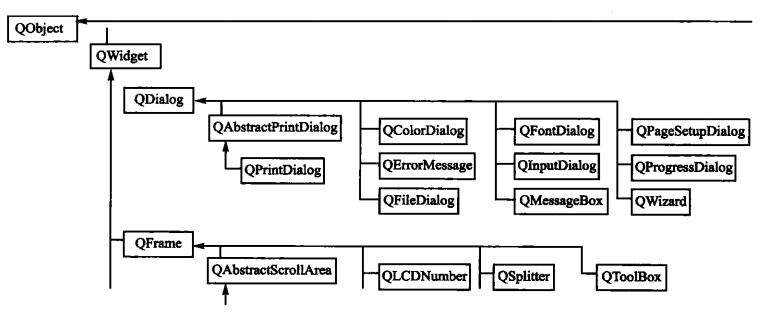 lesson3-Qt對話框
lesson3-Qt對話框一、QDialog類1、對話框的概念對話框在各種軟件中都會使用到,一般用來給用戶提示信息或者接收用戶反饋的信息,因此對話框是應用程序和用戶交互的
 git詳解,git
git詳解,gitgit詳解 git是從android出現,就作為版本管理工具。由於很多人從svn開始使用,簡單的check in & check out操作,很
 Android中使用ExpandableListView實現微信通訊錄界面(完善仿微信APP),expandablelistview
Android中使用ExpandableListView實現微信通訊錄界面(完善仿微信APP),expandablelistview之前的博文《Android中使用Exp
 安卓應用的界面編程(5),安卓界面編程
安卓應用的界面編程(5),安卓界面編程第四組UI組件:AdapterView及其子類 AdapterView組件是一組重要的組件,Adapte