編輯:關於android開發
單詞“多點觸摸”得到周圍頗有幾分拋出它並不總是很清楚什麼人是指。對一些人來說是關於硬件的能力,對其他人而言,是指特定的手勢支持的軟件。無論你決定稱呼它,今天我們來看看如何讓你的應用程序,並享有與屏幕上的多個手指表現很好。
Copy and Paste
Android提供復制和粘貼功能強大的基於剪貼板的框架。它支持簡單和復雜的數據類型,包括文本串,復雜的數據結構,文本和二進制數據流,甚至應用的資產。簡單的文本數據被直接存儲在剪貼板中,而復雜的數據被存儲作為該粘貼應用程序與內容提供商解析的引用。復制和粘貼都在應用程序中,並實現了框架的應用程序之間進行。
由於框架的一部分使用內容提供商,這個主題假定一些熟悉Android的內容提供商的API,這是在主題內容提供商描述。
剪貼板框架
當您使用剪貼板框架,你把數據轉化為剪輯對象,然後把剪輯對象在全系統剪貼板。剪輯對象可以采取三種形式:
文本
文本字符串。您可以直接把串入剪輯對象,您然後將復制到剪貼板。要粘貼字符串,將剪貼板中的剪輯對象和字符串復制到您的應用程序的存儲。
URI
代表任何形式的URI的Uri對象。這主要是用於從內容提供者復制復雜的數據。要復制的數據,你把一個Uri對象到剪輯對象,並把剪輯對象復制到剪貼板。要粘貼數據,你得到的剪輯對象,得到Uri對象,它解析為數據源,如內容提供商,以及從源頭到應用程序的存儲復制數據。
意圖
意圖。這支持復制應用程序快捷方式。要復制的數據,創建一個意圖,把它變成一個剪輯對象,並把剪輯對象復制到剪貼板。要粘貼數據,你得到的剪輯對象,然後意圖對象復制到你的應用程序的內存區域。
剪貼板只擁有一次剪輯對象。當應用程序將一個剪輯對象在剪貼板上,以前的剪輯對象消失。
如果你希望允許用戶將數據粘貼到你的應用程序,你不必處理所有類型的數據。給你的用戶將其粘貼選項之前,您可以檢查剪貼板上的數據。除了具有一定的數據格式,剪輯對象也包含了告訴你什麼MIME類型或類型可用的元數據。該元數據可以幫助你決定??是否你的應用程序可以做一些與剪貼板數據非常有用。例如,如果你有一個應用程序,主要處理可能要忽略包含URI或意圖剪輯對象的文本。
您也可以允許用戶將文本粘貼無論在剪貼板上的數據的形式。要做到這一點,您可以強制剪貼板數據轉換成文本表示,然後粘貼這個文本。這是一節中所述強制轉換剪貼板文本。
剪貼板類
本節介紹剪貼板框架使用的類。
ClipboardManager
在Android系統中,系統剪貼板是由全球ClipboardManager類表示。您不要直接實例化這個類;相反,你會得到通過調用getSystemService(CLIPBOARD_SERVICE)對它的引用。
ClipData,ClipData.Item和ClipDesc??ription
將數據添加到剪貼板中,您可以創建包含一個數據的描述和數據本身ClipData對象。剪貼板擁有在同一時間只有一個ClipData。一個ClipData包含ClipDesc??ription對象和一個或多個ClipData.Item對象。
一個ClipDesc??ription對象包含有關片段元數據。尤其是,它含有可用MIME類型的片段的數據數組。當你把一個剪輯在剪貼板,這個數組可用於粘貼的應用程序,它可以檢查它,看看他們是否可以處理任何可用的MIME類型。
一個ClipData.Item對象包含文本,URI或意向數據:
文本
一個CharSequence的。
URI
一個URI。這通常包含的內容提供者的URI,盡管任何URI被允許的。提供數據的應用程序將URI剪貼板上。希望粘貼數據的應用程序從剪貼板中得到URI並用它來訪問內容提供商(或其他數據源)和檢索數據。
意圖
意圖。此數據類型可以讓你的應用程序快捷方式復制到剪貼板。然後,用戶可以粘貼快捷方式到他們的應用程序供以後使用。
您可以到剪輯添加多個ClipData.Item對象。這允許用戶多重選擇作為一個剪輯復制和粘貼。例如,如果你有一個列表小工具,允許用戶同時選擇多個項目,可以將所有的項目一次復制到剪貼板。要做到這一點,您可以為每個項目單獨ClipData.Item,然後你ClipData.Item對象添加到ClipData對象。
ClipData方便的方法
該ClipData類為創建一個單一ClipData.Item對象和一個簡單的ClipDesc??ription對象ClipData對象的靜態便捷方法:
newPlainText(標簽,文本)
返回ClipData對象,其單ClipData.Item對象包含的文本字符串。該ClipDesc??ription對象的標簽設置標簽。在ClipDesc??ription單MIME類型是MIMETYPE_TEXT_PLAIN。
使用newPlainText()來創建一個文本字符串的剪輯。
newUri(解析器,標簽,URI)
返回ClipData對象,其單ClipData.Item對象包含一個URI。該ClipDesc??ription對象的標簽設置標簽。如果URI是內容的URI(Uri.getScheme()返回內容:),該方法使用在分解器提供的ContentResolver的目的是從內容提供商檢索可用的MIME類型,並將它們存儲在ClipDesc??ription。對於一個URI不是內容:URI,該方法將MIME類型MIMETYPE_TEXT_URILIST。
使用newUri()創建從URI,特別是內容的片段:URI。
newIntent(標簽,意圖)
返回ClipData對象,其單ClipData.Item對象包含一個意圖。該ClipDesc??ription對象的標簽設置標簽。 MIME類型設置為MIMETYPE_TEXT_INTENT。
使用newIntent()從一個Intent對象創建一個剪輯。
強迫剪貼板數據為文本
即使您的應用程序只能處理文字,你可以通過使用方法ClipData.Item.coerceToText轉換從剪貼板復制非文本數據()。
此方法轉換在ClipData.Item數據為文本,並返回一個的CharSequence。該ClipData.Item.coerceToText()返回的值是在ClipData.Item數據的形式:
文本
如果ClipData.Item是文本(的getText()不為null),coerceToText()返回文本。
URI
如果ClipData.Item是一個URI(getUri()不為null),coerceToText()試圖使用它作為一個內容URI:
如果URI是一個內容URI和提供者可以返回文本流,coerceToText()返回一個文本流。
如果URI是一個內容URI,但供應商不提供一個文本流,coerceToText()返回URI的表示。的表示是相同的,通過Uri.toString()返回。
如果URI是不是內容的URI,coerceToText()返回的URI的表示。的表示是相同的,通過Uri.toString()返回。
意圖
如果ClipData.Item是一個Intent(getIntent()不為null),coerceToText()將其轉換為一個Intent URI並返回它。的表示是相同的,通過Intent.toUri(URI_INTENT_SCHEME)返回。
剪貼板框架總結於圖1中要復制的數據,應用程序將一個ClipData對象上ClipboardManager全??局剪貼板。所述ClipData包含一個或多個ClipData.Item對象,一個ClipDesc??ription對象。要粘貼數據,應用程序獲取ClipData,從ClipDesc??ription得到它的MIME類型,並且無論是從ClipData.Item或提供程序通過ClipData.Item提到的內容獲取的數據。
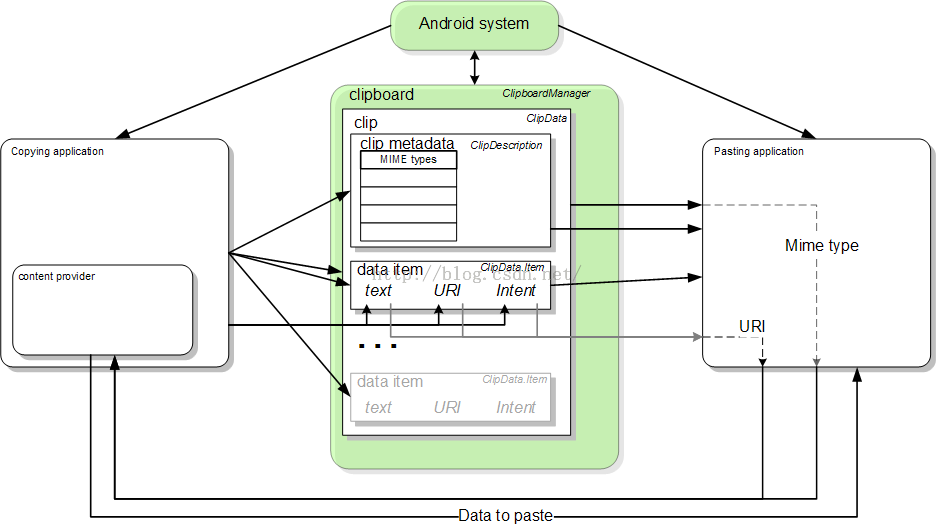
圖1. Android的剪貼板框架
復制到剪貼板
如前所述,將數據復制到剪貼板,你得到一個處理全球ClipboardManager對象,創建一個ClipData對象,添加剪輯描述以及一個或多個ClipData.Item對象給它,並添加完成ClipData反對ClipboardManager對象。這在下面詳細過程描述:
如果您使用的是內容URI復制數據,建立一個內容提供商。
該筆記本示例應用程序是使用復制和粘貼內容提供商的一個例子。記事本Provider類實現了內容提供商。記事本類定義了供應商和其他應用程序,包括支持的MIME類型之間的契約。
獲取系統剪貼板:
...

// if the user selects copy
case R.id.menu_copy:

// Gets a handle to the clipboard service.
ClipboardManager clipboard = (ClipboardManager)
    getSystemService(Context.CLIPBOARD_SERVICE);
將數據復制到一個新的ClipData對象:// Creates a new text clip to put on the clipboard
ClipData clip = ClipData.newPlainText("simple text","Hello, World!");
對於一個URI// Creates a Uri based on a base Uri and a record ID based on the contact's last name // Declares the base URI string private static final String CONTACTS = "content://com.example.contacts"; // Declares a path string for URIs that you use to copy data private static final String COPY_PATH = "/copy"; // Declares the Uri to paste to the clipboard Uri copyUri = Uri.parse(CONTACTS + COPY_PATH + "/" + lastName); ... // Creates a new URI clip object. The system uses the anonymous getContentResolver() object to // get MIME types from provider. The clip object's label is "URI", and its data is // the Uri previously created. ClipData clip = ClipData.newUri(getContentResolver(),"URI",copyUri);對於意向
// Creates the Intent
Intent appIntent = new Intent(this, com.example.demo.myapplication.class);

...

// Creates a clip object with the Intent in it. Its label is "Intent" and its data is
// the Intent object created previously
ClipData clip = ClipData.newIntent("Intent",appIntent);
將新的剪輯對象剪貼板上:// Set the clipboard's primary clip. clipboard.setPrimaryClip(clip);從剪貼板粘貼
ClipboardManager clipboard = (ClipboardManager) getSystemService(Context.CLIPBOARD_SERVICE); String pasteData = "";接下來,確定是否要啟用或禁用當前活動的“粘貼”選項。您應該驗證剪貼板中包含一個剪輯,並可以處理由剪輯表示的數據的類型:
/ Gets the ID of the "paste" menu item
MenuItem mPasteItem = menu.findItem(R.id.menu_paste);
// If the clipboard doesn't contain data, disable the paste menu item.
// If it does contain data, decide if you can handle the data.
if (!(clipboard.hasPrimaryClip())) {
mPasteItem.setEnabled(false);
} else if (!(clipboard.getPrimaryClipDescription().hasMimeType(MIMETYPE_TEXT_PLAIN))) {
// This disables the paste menu item, since the clipboard has data but it is not plain text
mPasteItem.setEnabled(false);
} else {
// This enables the paste menu item, since the clipboard contains plain text.
mPasteItem.setEnabled(true);
}
}
將數據從復制到剪貼板。如果“粘貼”菜單項啟用這一點在方案只到達,這樣你就可以假定剪貼板包含純文本。你還不知道它是否包含一個文本字符串或指向純文本的URI。下面的代碼片段測試,但它只是顯示了處理純文本格式的代碼// Responds to the user selecting "paste"
case R.id.menu_paste:
// Examines the item on the clipboard. If getText() does not return null, the clip item contains the
// text. Assumes that this application can only handle one item at a time.
ClipData.Item item = clipboard.getPrimaryClip().getItemAt(0);
// Gets the clipboard as text.
pasteData = item.getText();
// If the string contains data, then the paste operation is done
if (pasteData != null) {
return;
// The clipboard does not contain text. If it contains a URI, attempts to get data from it
} else {
Uri pasteUri = item.getUri();
// If the URI contains something, try to get text from it
if (pasteUri != null) {
// calls a routine to resolve the URI and get data from it. This routine is not
// presented here.
pasteData = resolveUri(Uri);
return;
} else {
// Something is wrong. The MIME type was plain text, but the clipboard does not contain either
// text or a Uri. Report an error.
Log.e("Clipboard contains an invalid data type");
return;
}
}
從內容URI粘貼數據// Declares a MIME type constant to match against the MIME types offered by the provider public static final String MIME_TYPE_CONTACT = "vnd.android.cursor.item/vnd.example.contact"獲得全局剪貼板。還可以得到一個ContentResolver的,所以你可以訪問內容提供商:
// Gets a handle to the Clipboard Manager ClipboardManager clipboard = (ClipboardManager) getSystemService(Context.CLIPBOARD_SERVICE); // Gets a content resolver instance ContentResolver cr = getContentResolver();獲取剪貼板中的主要片段,並獲得其內容為URI:
// Gets the clipboard data from the clipboard
ClipData clip = clipboard.getPrimaryClip();
if (clip != null) {
// Gets the first item from the clipboard data
ClipData.Item item = clip.getItemAt(0);
// Tries to get the item's contents as a URI
Uri pasteUri = item.getUri();
測試以查看該URI是一個內容URI通過調用的getType(URI)。如果URI不指向一個有效的內容提供商此方法返回null: // If the clipboard contains a URI reference
if (pasteUri != null) {
// Is this a content URI?
String uriMimeType = cr.getType(pasteUri);
測試以查看的內容提供商支持的MIME類型,目前的應用可以理解的。如果是這樣,調用ContentResolver.query()來獲取數據。返回值是一個光標:// If the return value is not null, the Uri is a content Uri
if (uriMimeType != null) {
// Does the content provider offer a MIME type that the current application can use?
if (uriMimeType.equals(MIME_TYPE_CONTACT)) {
// Get the data from the content provider.
Cursor pasteCursor = cr.query(uri, null, null, null, null);
// If the Cursor contains data, move to the first record
if (pasteCursor != null) {
if (pasteCursor.moveToFirst()) {
// get the data from the Cursor here. The code will vary according to the
// format of the data model.
}
}
// close the Cursor
pasteCursor.close();
}
}
}
}
粘貼一個Intent// Gets a handle to the Clipboard Manager
ClipboardManager clipboard = (ClipboardManager) getSystemService(Context.CLIPBOARD_SERVICE);
// Checks to see if the clip item contains an Intent, by testing to see if getIntent() returns null
Intent pasteIntent = clipboard.getPrimaryClip().getItemAt(0).getIntent();
if (pasteIntent != null) {
// handle the Intent
} else {
// ignore the clipboard, or issue an error if your application was expecting an Intent to be
// on the clipboard
}
使用內容提供商能夠復制復雜數據"content://com.example.contacts"如果你想要的名稱編碼到這個URI,你可以使用下面的代碼片段:
String uriString = "content://com.example.contacts" + "/" + "Smith" // uriString now contains content://com.example.contacts/Smith. // Generates a uri object from the string representation Uri copyUri = Uri.parse(uriString);如果您已經使用內容提供商,您可能要添加,表示URI是復制一個新的URI路徑。例如,假設你已經擁有以下URI路徑:
"content://com.example.contacts"/people "content://com.example.contacts"/people/detail "content://com.example.contacts"/people/images你可以添加另一個路徑是特定於復制的URI:
"content://com.example.contacts/copying"然後,您可以通過模式匹配檢測“復制”URI和代碼,具體的復制和粘貼處理。
// Declares the base URI string private static final String CONTACTS = "content://com.example.contacts"; // Declares a path string for URIs that you use to copy data private static final String COPY_PATH = "/copy"; // Declares a MIME type for the copied data public static final String MIME_TYPE_CONTACT = "vnd.android.cursor.item/vnd.example.contact"在從用戶拷貝數據的活動,設置代碼將數據復制到剪貼板。在回答一個副本的請求,把URI剪貼板上:
public class MyCopyActivity extends Activity {
...
// The user has selected a name and is requesting a copy.
case R.id.menu_copy:
// Appends the last name to the base URI
// The name is stored in "lastName"
uriString = CONTACTS + COPY_PATH + "/" + lastName;
// Parses the string into a URI
Uri copyUri = Uri.parse(uriString);
// Gets a handle to the clipboard service.
ClipboardManager clipboard = (ClipboardManager)
getSystemService(Context.CLIPBOARD_SERVICE);
ClipData clip = ClipData.newUri(getContentResolver(), "URI", copyUri);
// Set the clipboard's primary clip.
clipboard.setPrimaryClip(clip);
在內容提供商在全球范圍內,建立一個URI匹配,並添加一個URI模式將匹配你把剪貼板上的URI:public class MyCopyProvider extends ContentProvider {
...
// A Uri Match object that simplifies matching content URIs to patterns.
private static final UriMatcher sURIMatcher = new UriMatcher(UriMatcher.NO_MATCH);
// An integer to use in switching based on the incoming URI pattern
private static final int GET_SINGLE_CONTACT = 0;
...
// Adds a matcher for the content URI. It matches
// "content://com.example.contacts/copy/*"
sUriMatcher.addURI(CONTACTS, "names/*", GET_SINGLE_CONTACT);
設置query()方法。這種方法可以處理不同的URL模式,這取決於你如何編寫代碼,但只顯示為剪貼板復制操作模式:// Sets up your provider's query() method.
public Cursor query(Uri uri, String[] projection, String selection, String[] selectionArgs,
String sortOrder) {
...
// Switch based on the incoming content URI
switch (sUriMatcher.match(uri)) {
case GET_SINGLE_CONTACT:
// query and return the contact for the requested name. Here you would decode
// the incoming URI, query the data model based on the last name, and return the result
// as a Cursor.
...
}
設立的getType()方法返回一個適當的MIME類型復制的數據:/ Sets up your provider's getType() method.
public String getType(Uri uri) {
...
switch (sUriMatcher.match(uri)) {
case GET_SINGLE_CONTACT:
return (MIME_TYPE_CONTACT);
從內容的部分粘貼數據URI介紹了如何從剪貼板中獲取內容URI,並使用它來獲取和粘貼數據。 Android,androidstudio
Android,androidstudio當我們自定義View的時候,在給View賦值一些長度寬度的時候,一般都是在layout布局文件中進行的。,比如android:l
 Android開發通用的工具類
Android開發通用的工具類 Android開發通用的工具類 在開發中有些代碼都是重復性的,如果能把這些代碼集中的分類提取出來(比如網絡連接、數據保存等),然後再以後寫
 Android簽名機制之---簽名驗證過程詳解
Android簽名機制之---簽名驗證過程詳解 一、前言 今天是元旦,也是Single Dog的嚎叫之日,只能寫博客來祛除寂寞了,今天我們繼續來看一下Android中的簽
 Java 單例模式,Java模式
Java 單例模式,Java模式前言:昨天公司計劃把項目中的部分功能做出SDK的形式,供其他公司的產品使用,所以不得不重新研究一下單例模式。 為什麼單例 1