編輯:關於android開發
分類:C#、Android; 日期:2016-02-04
地圖控件自v2.3.5版本起,支持多實例,即開發者可以在一個頁面中建立多個地圖對象,並且針對這些對象分別操作且不會產生相互干擾。
文件名:Demo04MultiMapView.cs
簡介:介紹多MapView的使用
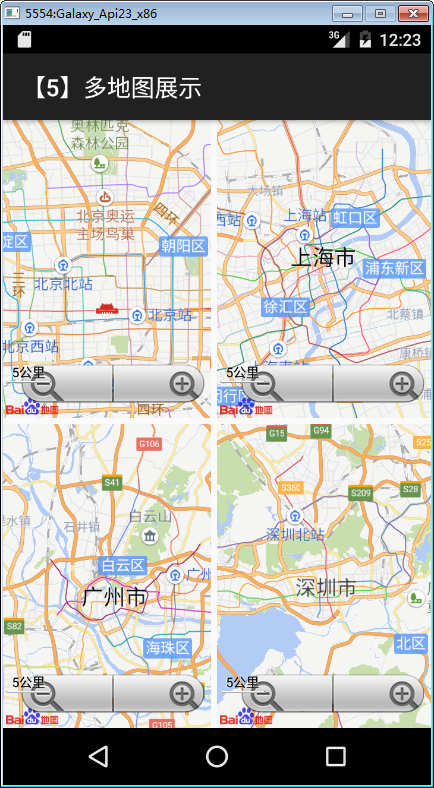
詳述:在一個界面內,同時建立四個TextureMapView控件;
1、運行截圖
在x86模擬器中的運行效果如下:
在上一節例子的基礎上,只需要再增加下面的步驟即可。
2、添加demo05_multimap.axml文件
在layout文件夾下添加該文件,將其改為下面的代碼:
<?xml version="1.0" encoding="utf-8"?>
<LinearLayout xmlns:android="http://schemas.android.com/apk/res/android"
    xmlns:map="http://schemas.android.com/apk/res-auto"
    android:layout_width="match_parent"
    android:layout_height="match_parent"
    android:orientation="vertical" >

    <LinearLayout
        android:layout_width="match_parent"
        android:layout_height="match_parent"
        android:layout_marginBottom="5dp"
        android:layout_weight="1"
        android:orientation="horizontal" >

        <fragment
            android:id="@+id/map1"
            android:layout_width="match_parent"
            android:layout_height="match_parent"
            android:layout_marginRight="5dp"
            android:layout_weight="1"
            class="com.baidu.mapapi.map.TextureMapFragment" />

        <fragment
            android:id="@+id/map2"
            android:layout_width="match_parent"
            android:layout_height="match_parent"
            android:layout_weight="1"
            class="com.baidu.mapapi.map.TextureMapFragment" />
    </LinearLayout>

    <LinearLayout
        android:layout_width="match_parent"
        android:layout_height="match_parent"
        android:layout_weight="1"
        android:orientation="horizontal" >

        <fragment
            android:id="@+id/map3"
            android:layout_width="match_parent"
            android:layout_height="match_parent"
            android:layout_marginRight="5dp"
            android:layout_weight="1"
            class="com.baidu.mapapi.map.TextureMapFragment" />

        <fragment
            android:id="@+id/map4"
            android:layout_width="match_parent"
            android:layout_height="match_parent"
            android:layout_weight="1"
            class="com.baidu.mapapi.map.TextureMapFragment" />
    </LinearLayout>

</LinearLayout>
3、添加Demo05MultiMapView.cs文件
在SdkDemos文件夾下添加該文件,然後將其內容改為下面的代碼:
using Android.App;
using Android.Content.PM;
using Android.OS;
using Com.Baidu.Mapapi.Map;
using Com.Baidu.Mapapi.Model;

namespace BdMapV371Demos.SrcSdkDemos
{
    /// <summary>
    /// 在一個Activity中展示多個地圖
    /// </summary>
    [Activity(Label = "@string/demo_name_multimap",
        ConfigurationChanges = ConfigChanges.Orientation | ConfigChanges.KeyboardHidden,
        ScreenOrientation = ScreenOrientation.Sensor)]
    public class Demo05MutiMapView : Activity
    {
        private readonly LatLng Geo_BeiJing = new LatLng(39.945, 116.404);
        private readonly LatLng Geo_ShangHai = new LatLng(31.227, 121.481);
        private readonly LatLng Geo_GuangZhou = new LatLng(23.155, 113.264);
        private readonly LatLng Geo_ShenZhen = new LatLng(22.560, 114.064);

        protected override void OnCreate(Bundle savedInstanceState)
        {
            base.OnCreate(savedInstanceState);
            SetContentView(Resource.Layout.demo05_multimap);
            InitMap();
        }

        /// <summary>
        /// 初始化Map
        /// </summary>
        private void InitMap()
        {
            MapStatusUpdate u1 = MapStatusUpdateFactory.NewLatLng(Geo_BeiJing);
            TextureMapFragment map1 = FragmentManager.FindFragmentById<TextureMapFragment>(Resource.Id.map1);
            map1.BaiduMap.SetMapStatus(u1);

            MapStatusUpdate u2 = MapStatusUpdateFactory.NewLatLng(Geo_ShangHai);
            TextureMapFragment map2 = FragmentManager.FindFragmentById<TextureMapFragment>(Resource.Id.map2);
            map2.BaiduMap.SetMapStatus(u2);

            MapStatusUpdate u3 = MapStatusUpdateFactory.NewLatLng(Geo_GuangZhou);
            TextureMapFragment map3 = FragmentManager.FindFragmentById<TextureMapFragment>(Resource.Id.map3);
            map3.BaiduMap.SetMapStatus(u3);

            MapStatusUpdate u4 = MapStatusUpdateFactory.NewLatLng(Geo_ShenZhen);
            TextureMapFragment map4 = FragmentManager.FindFragmentById<TextureMapFragment>(Resource.Id.map4);
            map4.BaiduMap.SetMapStatus(u4);
        }
    }
}
4、修改MainActivity.cs文件
在MainActivity.cs文件的demos字段定義中添加下面的代碼。
          //示例5--多地圖展示
            new DemoInfo<Activity>(Resource.String.demo_title_multimap,
                Resource.String.demo_desc_multimap,
                new Demo05MutiMapView()),
運行觀察結果。
 Activity啟動模式之SingleInstance,singleinstance模式
Activity啟動模式之SingleInstance,singleinstance模式 終於到了最後一種啟動模式了,指定為singleInstance模式的活動會啟用
 一張圖看Google MVP設計架構,googlemvp
一張圖看Google MVP設計架構,googlemvp 這段時間看了一下Google官方推出的MVP架構案例,決定把對MVP的理解用類圖的形式表述一下。MVP架構的設
 ListView + PopupWindow實現滑動刪除,popupwindowlistview
ListView + PopupWindow實現滑動刪除,popupwindowlistview 原文:ListView滑動刪除 ,仿騰訊QQ(鴻洋_) 文章
 Android 操作數據庫的框架——greenDAO的學習
Android 操作數據庫的框架——greenDAO的學習 greenDAO的使用 簡介 官網給出如下介紹: greenDAO是一個對象關系映射(ORM)的框架,能夠