編輯:關於android開發
今天給大家分享下關於修改MTK平台下系統首次開機的默認屏幕背光亮度,系統語言默認英語情況下修改日期格式,修改拍照屬性,具體修改的地方不清楚或者沒人告知的
話,請參照之前幾篇博客的方法分享,現在直接進入主題
首先我們來修改第一次開機的屏幕亮度
①修改首次開機的系統默認屏幕背光亮度,我是在該java下修改的------(把注釋的地方都去掉,因為注釋的地方都是修改了的)
packages\apps\Settings\src\com.mediatek.settings\RestoreRotationReceiver.java
//    private SharedPreferences mSharedPreferences;

    @Override
    public void onReceive(Context context, Intent intent) {
        String action = intent.getAction();
        Log.v("RestoreRotationReceiver_IPO", action);
//        mSharedPreferences = context.getSharedPreferences("walpad_first_run",Context.MODE_PRIVATE);
        if (action.equals(Intent.ACTION_BOOT_COMPLETED)
                || action.equals("android.intent.action.ACTION_BOOT_IPO")) {
            sRestoreRetore = Settings.System.getInt(context
                    .getContentResolver(),
                    Settings.System.ACCELEROMETER_ROTATION_RESTORE, 0) != 0;

            // Engineer-Jsp add Unknown sources and Usb debugging default true
            if (android.os.SystemProperties.isWalPadVersion() && !isFirstRunSettings(context)) {
                // reboot first default unkonwn sources check
                Settings.Global.putInt(context.getContentResolver(), Settings.Global.INSTALL_NON_MARKET_APPS,1);
                // reboot first default usb debugging check
                Settings.Global.putInt(context.getContentResolver(),Settings.Global.ADB_ENABLED, 1);
                // save first reboot falgs boolean
//                mSharedPreferences.edit().putString("isfirstrun", String.valueOf(true)).commit();
                // firstrun defaulr birghtness value for 100%
//                setWalpadCFirstRunDefaultBrightness(context);
            }

            if (sRestoreRetore) {
                Settings.System.putInt(context.getContentResolver(),
                        Settings.System.ACCELEROMETER_ROTATION, 1);
                Settings.System.putInt(context.getContentResolver(),
                        Settings.System.ACCELEROMETER_ROTATION_RESTORE, 0);
            }
        }
    }
    /**
     * ***- MTK-6582-8382© -***
     * isFirstRunSettings(Context context)
     * walpad c firstrun need default false
     * Engineer-Jsp add
     * */

    public boolean isFirstRunSettings(Context context){
		if (TextUtils.isEmpty(mSharedPreferences.getString("isfirstrun", ""))) {
			mSharedPreferences.edit()
					.putString("isfirstrun", String.valueOf(false))
					.commit();
		}
		return Boolean.valueOf(mSharedPreferences.getString("isfirstrun", ""));
    }

    /**
     * ***- MTK-6582-8382© -***
     * setWalpadCFirstRunDefaultBrightness(Context context)
     * walpad c firstrun need default settings brightness value for 100%
     * Engineer-Jsp add
     * */

    public void setWalpadCFirstRunDefaultBrightness(Context context){
        try{
            Uri uri = Settings.System.getUriFor(Settings.System.SCREEN_BRIGHTNESS);
            Settings.System.putInt(context.getContentResolver(), Settings.System.SCREEN_BRIGHTNESS, 255);
            context.getContentResolver().notifyChange(uri, null);
          }  catch (Exception localException){
            localException.printStackTrace();
          }
    }
我在系統代碼裡自己添加的,前面幾篇博客也有提到,這裡就不細說了,首次開機的記錄,因為我們只需要第一次開機設置100%的屏幕亮度
②日期格式修改
packages\apps\Settings\src\com\android\settings\DateTimeSettings.java
    @Override
    public void onCreate(Bundle icicle) {
        super.onCreate(icicle);

        addPreferencesFromResource(R.xml.date_time_prefs);

        initUI();

        /// M: get plug in and move roaming time setting into date and time settings @{
        mExt = UtilsExt.getDateTimeSettingsPlugin(getActivity());
        mExt.customizePreferenceScreen(getActivity(), getPreferenceScreen());
        /// @}
    }
   private void initUI() {
        boolean autoTimeEnabled = getAutoState(Settings.Global.AUTO_TIME);
        boolean autoTimeZoneEnabled = getAutoState(Settings.Global.AUTO_TIME_ZONE);

        ///M: MTK use ListPreference instead of google CheckboxPerference
......
        String [] dateFormats = getResources().getStringArray(R.array.date_format_values);
        String [] formattedDates = new String[dateFormats.length];
        String currentFormat = getDateFormat();
        // Initialize if DATE_FORMAT is not set in the system settings
        // This can happen after a factory reset (or data wipe)
        if (currentFormat == null) {
            currentFormat = "";
        }

        // Prevents duplicated values on date format selector.
        mDummyDate.set(mDummyDate.get(Calendar.YEAR), mDummyDate.DECEMBER, 31, 13, 0, 0);

        for (int i = 0; i < formattedDates.length; i++) {
            String formatted =
                    DateFormat.getDateFormatForSetting(getActivity(), dateFormats[i])
                    .format(mDummyDate.getTime());

            if (dateFormats[i].length() == 0) {
                formattedDates[i] = getResources().
                    getString(R.string.normal_date_format, formatted);
            } else {
                formattedDates[i] = formatted;
            }
        }

        mDateFormat.setEntries(formattedDates);
        mDateFormat.setEntryValues(R.array.date_format_values);
        mDateFormat.setValue(currentFormat);
......
    }
	    private String getDateFormat() {

        return Settings.System.getString(getContentResolver(),
                Settings.System.DATE_FORMAT);
    }
initUI:
   private void initUI() {
        boolean autoTimeEnabled = getAutoState(Settings.Global.AUTO_TIME);
        boolean autoTimeZoneEnabled = getAutoState(Settings.Global.AUTO_TIME_ZONE);

        ///M: MTK use ListPreference instead of google CheckboxPerference
......
        String [] dateFormats = getResources().getStringArray(R.array.date_format_values);
        String [] formattedDates = new String[dateFormats.length];
        String currentFormat = getDateFormat(dateFormats[2]);
        // Initialize if DATE_FORMAT is not set in the system settings
        // This can happen after a factory reset (or data wipe)
        if (currentFormat == null) {
            currentFormat = "";
        }

        // Prevents duplicated values on date format selector.
        mDummyDate.set(mDummyDate.get(Calendar.YEAR), mDummyDate.DECEMBER, 31, 13, 0, 0);

        for (int i = 0; i < formattedDates.length; i++) {
            String formatted =
                    DateFormat.getDateFormatForSetting(getActivity(), dateFormats[i])
                    .format(mDummyDate.getTime());

            if (dateFormats[i].length() == 0) {
                formattedDates[i] = getResources().
                    getString(R.string.normal_date_format, formatted);
            } else {
                formattedDates[i] = formatted;
            }
        }

        mDateFormat.setEntries(formattedDates);
        mDateFormat.setEntryValues(R.array.date_format_values);
        mDateFormat.setValue(currentFormat);
......
    }
    private String getDateFormat(String format) {

    	// Engineer-Jsp add walpad c default date format
    	if(android.os.SystemProperties.isWalPadVersion()){
            Settings.System.putString(getContentResolver(),
                    Settings.System.DATE_FORMAT, format);
    	}
        return Settings.System.getString(getContentResolver(),
                Settings.System.DATE_FORMAT);
    }
R.array.date_format_values:
    <string-array name="date_format_values" translatable="false">
        <!--{cke_protected}{C}%3C!%2D%2D%20The%20blank%20item%20means%20to%20use%20whatever%20the%20locale%20calls%20for.%20%2D%2D%3E-->
        <item></item>
        <item>MM-dd-yyyy</item>
        <item>dd-MM-yyyy</item>
        <item>yyyy-MM-dd</item>
        <item>EE-MMM-d-yyyy</item>
        <item>EE-d-MMM-yyyy</item>
        <item>yyyy-MMM-d-EE</item>
    </string-array>
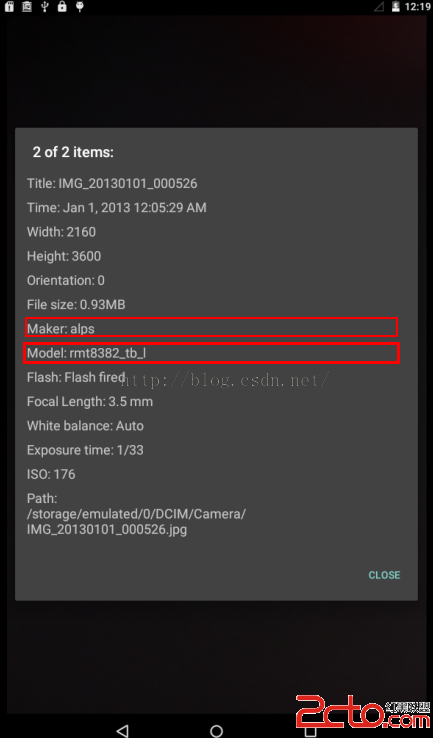
③picture makeer model ,修改 buildinfo.sh 文件,model\product 屬性
修改之前:
修改之後:
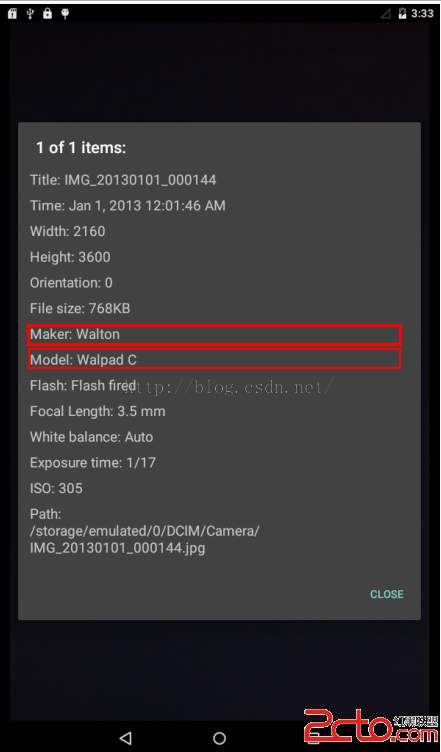
第③是編譯之後的效果圖,前面兩個的效果圖就沒有貼出來了
 【原創】StickHeaderListView的簡單實現,解決footerView問題,stickheaderlistview
【原創】StickHeaderListView的簡單實現,解決footerView問題,stickheaderlistview1、前言: 前幾天用了GitH
 阿裡巴巴開源Weex 開發教程,開源weex
阿裡巴巴開源Weex 開發教程,開源weexWeex 是什麼 Weex是阿裡發布的一款用WEB方式開發原生app的開源產品 Weex能夠完美兼顧性能與動態性,讓移動開發者
 算法—符號表,算法符號
算法—符號表,算法符號定義:符號表是一種存儲鍵值對的數據結構,支持兩種操作:插入(put),即將一組新的鍵值對存入表中;查找(get),即根據給定的鍵得到相應的值。 1
 Apache的詳細安裝教程和遇到的問題解決方案,apache解決方案
Apache的詳細安裝教程和遇到的問題解決方案,apache解決方案有時需要自己去搭建一個Web服務器,有很多服務器可供選擇,這裡我自己搭建了一個Apache服務器,Ap