編輯:Android編程入門
我們在開發Android應用中,寫每一個頁面的時候都會建一個title,不是寫一個LinearLayout就是寫一個RelativeLayout,久而久之就會覺得這樣繁瑣,尤其幾個頁面是只是標題不一樣,其他都相同的話,每個頁面的title都重復搭建會顯得代碼冗余,而且增加渲染時間。於是我前段時間就寫了一個公共title的activity,其他子Activity只要繼承我這個就可以了。這段時間我們對項目代碼進行了重構了,就利用了這個公共title(其他的同事進行了優化),確實少寫了很多代碼,用起來還是很不錯的。 我知道網上也有類似的代碼,但不是我想要的那種。廢話不多說,直接上代碼。以後還繼續優化,在我眼裡任何代碼都能再優化一點點。
 public abstract class BaseTitleActivty extends Activity implements
         OnClickListener {

     /**
      * 標題頭部的布局
      */
     protected ViewGroup title_layout;

     private LinearLayout mMianLayout;

     /**
      * 返回圖標
      */
     protected ImageView iv_common_back;

     /**
      * 返回文字
      */
     protected TextView back_text;

     /**
      * 左邊的圖片
      */
     protected ImageView left_img;

     /**
      * 中間的標題
      */
     protected TextView title_text;
     /**
      * 右邊的文字
      */
     protected TextView right_text;
     /**
      * 右邊的圖標
      */
     protected ImageView right_img;

     protected View base_title;

     @Override
     protected void onCreate(Bundle savedInstanceState) {
         super.onCreate(savedInstanceState);
         super.setContentView(R.layout.base_title_activity);
         initBaseTitle();
     }


     @Override
     public void setContentView(int layoutResID) {
         LayoutInflater inflater = (LayoutInflater) this
                 .getSystemService(Context.LAYOUT_INFLATER_SERVICE);
         View contentView = inflater.inflate(layoutResID, null);
         contentView.setLayoutParams(new FrameLayout.LayoutParams(
                 ViewGroup.LayoutParams.MATCH_PARENT,
                 ViewGroup.LayoutParams.MATCH_PARENT));
         title_layout.addView(contentView);
     }

     /**
      * 初始化方法
      */
     protected void initBaseTitle() {
         initTitleView();
         setTitle();
     }

     /**
      * 初始化公共title的view
      */
     protected void initTitleView() {
         title_layout =(ViewGroup)findViewById(R.id.title_layout);
         base_title = (View) findViewById(R.id.base_title);
         iv_common_back =(ImageView)findViewById(R.id.iv_common_back);
         back_text = (TextView) findViewById(R.id.tv_back);
         left_img = (ImageView) findViewById(R.id.left_img);
         title_text = (TextView) findViewById(R.id.title);
         right_text = (TextView) findViewById(R.id.right_text);
         right_img = (ImageView) findViewById(R.id.right_img);
         iv_common_back.setOnClickListener(this);
         back_text.setOnClickListener(this);
         right_text.setOnClickListener(this);
         right_img.setOnClickListener(this);
     }

     /**
      * 設置標題內容
      */
     protected void setTitle() {
     }

     /**
      * 僅僅含返回圖標
      */
     protected void showTitleLeftContent() {
         back_text.setText("");
     }

     /**
      * 僅僅含有返回圖標和文字
      */
     protected void showTitleLeftContent(String tv_back) {
         back_text.setText(tv_back);
     }

     /**
      * 左邊僅僅是一個圖片
      */
     protected void showTitleLeftContent(int resId) {
         iv_common_back.setVisibility(View.INVISIBLE);
         back_text.setVisibility(View.INVISIBLE);
         left_img.setVisibility(View.VISIBLE);
     left_img.setImageDrawable(getResources().getDrawable(resId));
     }

     /**
      * 設置標題和顏色
      *
      * @param text
      * @param colorId
      *            顏色
      */
     protected void showTitleText(String text, int colorId) {
         if (!TextUtils.isEmpty(text)) {
             title_text.setText(text);
         }
         if (colorId != 0) {
             title_text.setTextColor(getResources().getColor(colorId));
         }
     }

     /**
      * 只設置標題文字
      *
      * @param text
      */
     protected void showTitleText(String text) {
         showTitleText(text, 0);
     }

     /**
      * 只設置標題顏色
      *
      * @param colorId
      */
     protected void showTitleText(int colorId) {
         showTitleText("", colorId);
     }

     /**
      * 設置中間的背景圖片,沒有文字
      *
      * @param resId
      */
     @SuppressLint("NewApi")
     protected void showTitleBackground(int resId) {
         title_text.setText("");
         title_text.setBackground(getResources().getDrawable(resId));

     }

     /**
      * 設置標題右邊的內容
      *
      * @param text
      *            文字內容
      * @param colorId
      *            文字顏色
      * @param textSize
      *            文字大小
      * @param resId
      *            圖片id
      */
     protected void showTitleRightContent(String text, int colorId,
             int textSize, int resId) {
         if (!TextUtils.isEmpty(text)) {
             right_text.setVisibility(View.VISIBLE);
             right_text.setText(text);
             if (colorId != 0) {
                 right_text.setTextColor(getResources().getColor(colorId));
             }
             if (textSize != 0) {
                 right_text.setTextSize(textSize);
             }
         }

         if (resId != 0) {
             right_img.setVisibility(View.VISIBLE);
             right_img.setImageDrawable(getResources().getDrawable(resId));
         }
     }

     /**
      * 設置標題右邊的內容
      *
      * @param text
      *            文字內容
      * @param colorId
      *            文字顏色
      * @param textSize
      *            文字大小
      */
     protected void showTitleRightContent(String text, int colorId, int textSize) {
         showTitleRightContent(text, colorId, textSize, 0);
     }

     /**
      * 設置文字內容、顏色、大小
      *
      * @param text
      * @param colorId
      */
     protected void showTitleRightContent(String text, int colorId) {
         showTitleRightContent(text, colorId, 0, 0);
     }

     /**
      * 只設置文字內容
      *
      * @param text
      */
     protected void showTitleRightContent(String text) {
         showTitleRightContent(text, 0, 0, 0);
     }

     /**
      * 只設置右邊的圖片
      *
      * @param resId
      */
     protected void showTitleRightContent(int resId) {
         showTitleRightContent(null, 0, 0, resId);
     }

 }
 Android——列表視圖 ListView(二)SimpleAdapter
SimpleAdapter:可顯示文字加圖片activity_activitysimple.xml<?xml version=1.0 encoding=utf-8?
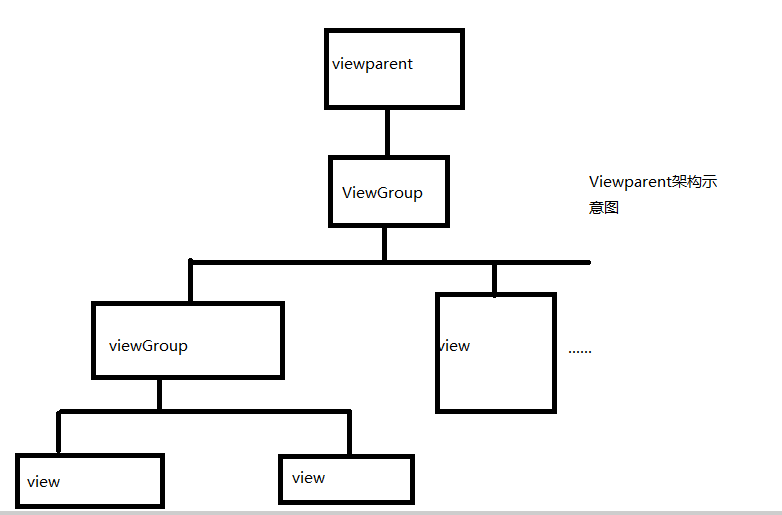 Android 控件架構
如果說Android上的app是一個有血有肉的人的話,那麼人靠衣裝馬靠鞍,那麼控件就是把app裝扮的漂漂亮亮的“衣服”。那麼安卓的控件到底是如何架
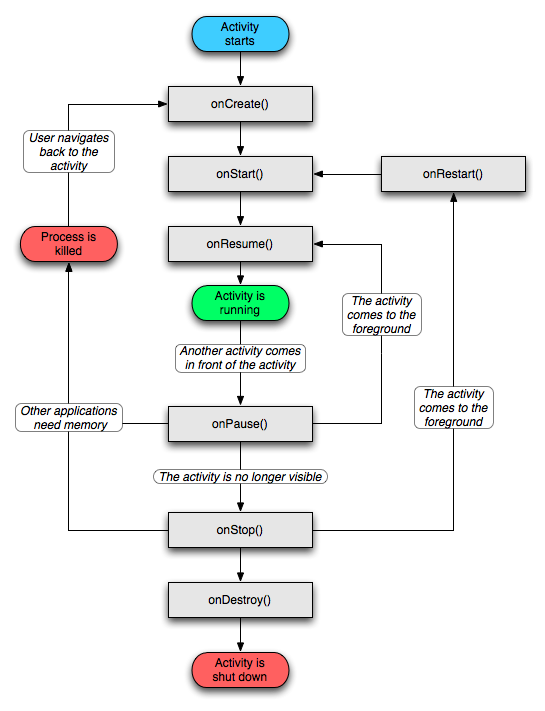 Android進階學習
一、Android四大組件1. Activity生命周期:2. Service生命周期:Service的生命周期長,沒有用戶界面,可以用來開發監控程序。Service有兩
 Android學習筆記:ActionBar使用介紹
一、基本概念最權威和官方的介紹請看google的api文檔http://developer.android.com/training/basics/actionbar/s