編輯:Android編程入門
ViewRoot是連接WindowManager與DecorView的紐帶,View的整個繪制流程的三大步(measure、layout、draw)都是通過ViewRoot完成的。當Activity對象被創建完畢後,會將DecorView添加到Window中(Window是對窗口的抽象,DecorView是一個窗口的頂級容器View,其本質是一個FrameLayout),同時會創建ViewRootImpl(ViewRoot的實現類)對象,並將ViewRootImpl與DecorView建立關聯。關於ViewRoot,我們只需要知道它是聯系GUI管理系統和GUI呈現系統的紐帶。View的繪制流程從ViewRoot的performTraversals方法開始,經過measure、layout、draw三大過程完成對一個View的繪制工作。peformTraversal方法內部會調用measure、layout、draw這三個方法,這三個方法內部又分別調用onMeasure、onLayout、onDraw方法。
在onMeasure方法中View會對其所有的子元素執行measure過程,此時measure過程就從父容器"傳遞"到了子元素中,接著子元素會遞歸的對其子元素進行measure過程,如此反復完成對整個View樹的遍歷。onLayout與onDraw過程的執行流程與此類似。
measure過程決定了View的測量寬高,這個過程結束後,就可以通過getMeasuredHeight和getMeasuredWidth獲得View的測量寬高了;
layout過程決定了View在父容器中的位置和View的最終顯示寬高,getTop等方法可獲取View的top等四個位置參數(View的左上角頂點的坐標為(left, top), 右下角頂點坐標為(right, bottom)),getWidth和getHeight可獲得View的最終顯示寬高(width = right - left;height = bottom - top)。
draw過程決定了View最終顯示出來的樣子,此過程完成後,View才會在屏幕上顯示出來。
MeasureSpec為一個32位的int值,高2位代表SpecMode,低30位代表SpecSize,前者指測量模式,後者指某種測量模式下的規格大小。在一個View的measure過程中,系統會將該View的LayoutParams結合父容器的“要求”生成一個MeasureSpec,這個MeasureSpec說明了應該怎樣測量這個View。
(1)三種 SpecMode:
UNSPECIFIED:父容器不對View作任何要求,通常用於系統內部,表示一種測量的狀態。
EXACTLY:父容器已經檢測出View所需要的精確大小,這種測量模式下View的測量值就是SpecSize的值。這個SpecMode對應於LayoutParams中的match_parent和給出具體大小這兩種模式。
AT_MOST:父容器指定了一個可用大小即SpecSize,View的大小不能大於此值,可用大小取決於不同View的具體實現。這個SpecMode對應於LayoutParams中的wrap_content。
(2)對於DecorView,它的MeasureSpec由窗口尺寸和其自身的LayoutParams共同確定;對於普通View,他的MeasureSpec由父容器的MeasureSpec和其自身的LayoutParams共同確定。
(1)measure過程
a. DecorView的measure過程
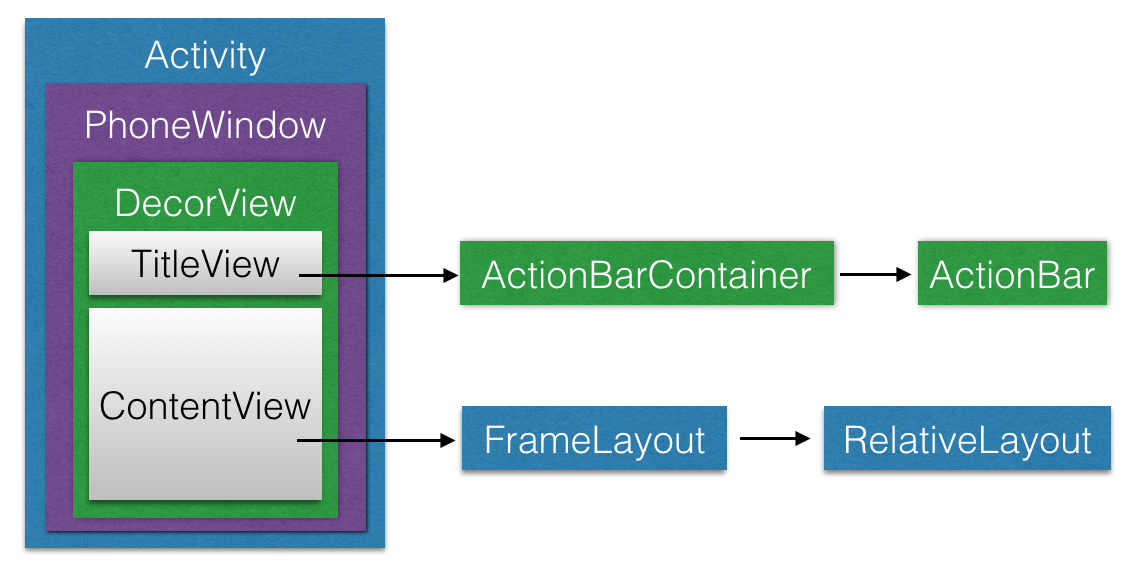
前面我們提到過,DecorView是一個應用窗口的根容器,它本質上是一個FrameLayout。DecorView有唯一一個子View,它是一個垂直LinearLayout,這個垂直線性布局管理器包含兩個子元素,一個是TitleView(ActionBar的容器),另一個是ContentView(窗口內容的容器)。關於ContentView,它是一個FrameLayout(android.R.id.content),我們平常用的setContentView就是設置它的子View。如下圖中,我們為TilteView中添加了一個ActionBar,為ContentView中添加了一個RelativeLayout(通過setContentView方法)。
前面提到,DecorView的MeasureSpec由窗口的尺寸和自身的LayoutParams共同決定。在ViewRootImpl的measureHierarchy方法中,完成了創建DecorView的MeasureSpec的過程,相應的代碼片段如下:
1 childWidthMeasureSpec = getRootMeasureSpec(desiredWindowWidth, lp.width);
childHeightMeasureSpec = getRootMeasureSpec(desiredWindowHeight, lp.height);
performMeasure(childWidthMeasureSpec, childHeightMeasureSpec);
以上代碼片段中的childXxxMeasureSpec即為DecorView的MeasureSpec,lp.width和lp.height被系統賦值為MATCH_PARENT。getRootMeasureSpec的代碼如下:
 private int getRootMeasureSpec(int windowSize, int rootDimension) {
    int measureSpec;
    switch (rootDimension) {
        case ViewGroup.LayoutParams.MATCH_PARENT:
            measureSpec = MeasureSpec.makeMeasureSpec(windowSize, MeasureSpec.EXACTLY);
            break;
        case ViewGroup.LayoutParams.WRAP_CONTENT:
            measureSpec = MeasureSpec.makeMeasureSpec(windowSize, MeasureSpec.AT_MOST);
            break;
        default:
            measureSpec = MeasureSpec.makeMeasureSpec(rootDimension, MeasureSpec.EXACTLY);
            break;
    }
    return measureSpec;
}
上述代碼中調用了makeMeasureSpec方法來獲取measureSpec,而傳入的rootDimension參數即為lp.width或lp.height,值為MATCH_PARENT,由此可得DecorView的MeasureSpec,其中SpecMode為EXACTLY,SpecSize為windowSize。
b. 普通View(非ViewGroup)的measure過程:
非ViewGroup的View的特點是不能有子元素,因此只需測量好自身就行。普通View的measure通過measure方法來完成:
1 public final void measure(int widthMeasureSpec, int heightMeasureSpec) {
    //....

    //回調onMeasure()方法
    onMeasure(widthMeasureSpec, heightMeasureSpec);

    //more
}
普通View的measure方法是由ViewGroup在measureChild方法中調用的(即完成了measure過程從ViewGroup到子View的傳遞),ViewGroup調用其子View的measure時即傳入了該子View的widthMeasureSpec和heightMeasureSpec。注意到measure是一個final方法,因此要實現自定義的measure過程,需要重寫onMeasure方法:
1 protected void onMeasure(int widthMeasureSpec, int heightMeasureSpec) {
        setMeasuredDimension(getDefaultSize(getSuggestedMinimumWidth(), widthMeasureSpec),
                getDefaultSize(getSuggestedMinimumHeight(), heightMeasureSpec));
}
setMeasureDimension方法用於設置View的測量寬高,如果不重寫此方法,默認是直接調用getDefaultSize獲取尺寸的:
 public static int getDefaultSize(int size, int measureSpec) {
    int result = size;
    int specMode = MeasureSpec.getMode(measureSpec);
    int specSize = MeasureSpec.getSize(measureSpec);
    switch (specMode) {
        case MeasureSpec.UNSPECIFIED:
            result = size;
            break;
        case MeasureSpec.AT_MOST:
        case MeasureSpec.EXACTLY:
            result = specSize;
            break;
    }
    return result;
}
由以上代碼可知,正常情況下(SpecMode為AT_MOST或EXACTLY),getDefaultSize獲取的尺寸大小即為specSize。由以上代碼還可知道,直接繼承View的自定義控件需要重寫onMeasure方法並設置wrap_content時的自身大小,否則在布局中使用wrap_content就相當於使用match_parent的效果。示例如下:
 protected void onMeasure(int widthMeasureSpec, int heightMeasureSpec) {
    super.onMeasure(widthMeasureSpec, heightMeasureSpec);
    int widthSpecMode = MeasureSpec.getMode(widthMeasureSpec);
    int widthSpecSize = MeasureSpec.getSize(widthMeasureSpec);
    int heightSpecMode = MeasureSpec.getMode(heightMeasureSpec);
    int heightSpecSize = MeasureSpec.getSize(heightMeasureSpec);
    if (widthSpecMode == MeasureSpec.AT_MOST  && heightSpecMode == MeasureSpec.AT_MOST) {
        setMeasuredDimension(mWidth, mHeight);
    } else if (widthSpecMode == MeasureSpec.AT_MOST) {
        setMeasuredDimension(mWidth, heightSpecSize);
    } else if (heightSpecMode == MeasureSpec.AT_MOST) {
        setMeasuredDimension(widthSpecSize, mHeight);
    }
}
上述示例代碼中的mWidth,mHeight是為wrap_content時設定的默認寬高。這個默認寬高可根據實際需要自行設置,比如TextView在wrap_content時的默認寬高是根據其中的所有文字的寬度來設定的,從而實現正好“包裹”文字內容的效果。
c. ViewGroup的measure過程:
ViewGroup需要先完成子View的measure過程,才能完成自身的measure過程,ViewGroup的onMeasure方法根據不同的布局管理器類(LinearLayout、RelativeLayout等等)有不同的實現,比如LinearLayout的onMeasure方法代碼如下:
1 protected void onMeasure(int widthMeasureSpec, int heightMeasureSpec) {
    if (mOriention == VERTICAL) {
        measureVertical(widthMeasureSpec, heightMeasureSpec);
    } else {
        measureHorizontal(widthMeasureSpec, heightMeasureSpec);
    }
}
measureVertical中測量子元素的主要代碼如下:
 //See how tall everyone is. Also remember max width.
for (int i = 0; i < count; ++i) {
    final View child = getVirtualChildAt(i);
    . . .
    //Determine how big this child would like to be. If this or previous children have given a weight,

       //then we allow it to use all available space (and we will shrink things later if needed).
    measureChildBeforeLayout(child, i, widthMeasureSpec, 0, heightMeasureSpec, totalHeight == 0 ? mTotalLength : 0);

    if (oldHeight != Integer.MIN_VALUE) {
        lp.height = oldHeight;
    }

    final int childLength = child.getMeasuredHeight();
    final int totalLength = mTotalLength;
    mTotalLength = Math.max(totalLength, totalLength+childHeight+lp.topMargin+lp.bottomMargin+getNextLocationOffset(child));
}
由上述代碼可以知道,在measureVertical方法中會對每個LinearLayout中的子元素進行遍歷並通過measureChildBeforeLayout方法對每個子元素執行measure過程。在measureChildBeforeLayout方法內部會調用子元素的measure方法,這樣會依次讓每個子元素進入measure過程。mTotalLength表示LinearLayout在豎直方向上的尺寸,每完成一個子元素的measure過程,它的值也會相應增加。測量完子元素後,LinearLayout會測量自身的大小。measureVertical中測量LinearLayout自身的主要代碼如下:
 //Add in our padding.
mTotalLength += mPaddingTop + mPaddingBottom;
int heightSize = mTotalLength;
//Check against our minimum height
heightSize = Math.max(heightSize, getSuggestedMinimumHeight());
//Reconcile our calculated size with the heightMeasureSpec
int heightSizeAndState = resolveSizeAndState(heightSize, heightMeasureSpec, 0);
heightSize = heightSizeAndState & MEASURED_SIZE_MASK;
. . .
setMeasuredDimension(resolveSizeAndState(maxWidth, widthMeasureSpec, childState), heightSizeAndState);
對垂直的LinearLayout來說,它在水平方向的測量過程與普通View的measure過程一樣,在豎直方向的measure過程如下:若該垂直LinearLayout的layout_height為match_parent或具體數值,它的measure過程與普通View一樣;若該垂直LinearLayout的layout_height為wrap_content,則它豎直方向的高度為所有子元素占用的高度之和,但不能超過父容器的可用空間大小,最終高度還要考慮到其豎直方向的padding,相關的代碼如下:
 public static int resolveSizeAndState(int size, int measureSpec, int childMeasuredState) {
    int result = size;
    int specMode = MeasureSpec.getMode(measureSpec);
    int specSize = MeasureSpec.getSize(measureSpec);
    switch (speczMode) {
        case MeasureSpec.UNSPECIFIED:
            result = size;
            break;
        case MeasureSpec.AT_MOST:
            if (specSize < size) {
                result = specSize | MEASURED_STATE_TOO_SMALL;
            } else {
                result = size;
            }
            break;
        case MeasureSpec.EXACTLY:
            result = specSize;
            break;
    }
    return result | (childMeasuredState & MEASURED_STATE_MASK);
}
ViewGroup主要通過其measureChildren方法完成其子View的measure過程,上面垂直LinearLayout中調用的measureChildBeforeLayout可以看做是measureChildren的一個“變種”,measureChildren方法代碼如下:
 protected void measureChildren(int widthMeasureSpec, int heightMeasureSpec) {
    final int size = mChildrenCount;
    final View[] children = mChildren;
    for (int i = 0; i < size; ++i) {
            final View child = children[i];
            if ((child.mViewFlags & VISIBILITY_MASK) != GONE) {
                measureChild(child, widthMeasureSpec, heightMeasureSpec);
            }
    }
}
其中,measureChild方法完成對子View的measure過程:
1 protected void measureChild(View child, int parentWidthMeasureSpec, int parentHeightMeasureSpec) {
    final LayoutParams lp = child.getLayoutParams();
    final int childWidthMeasureSpec = getChildMeasureSpec(parentWidthMeasureSpec,
        mPaddingLeft + mPaddingRight, lp.width);
    final int childHeightMeasureSpec = getChildMeasureSpec(parentHeightMeasureSpec,
        mPaddingTop + mPaddingBottom, lp.height);
    child.measure(childWidthMeasureSpec, childHeightMeasureSpec);
}
注意在這裡,在執行child.measure方法前,就已經通過getChildMeasureSpec獲取了子View的MeasureSpec。getChildMeasureSpec根據子View的LayoutParams和父容器的MeasureSpec來決定子View的MeasureSpec,getChildMeasureSpec的代碼如下:
 public static int getChildMeasureSpec(int spec, int padding, int childDimension) {
    //這裡傳入的spec為ViewGroup的MeasureSpec
    //specMode和specSize即為父容器的MeasureSpec
    int specMode = MeasureSpec.getMode(spec);
    int specSize = MeasureSpec.getSize(spec);
    //padding為父容器中已使用的空間大小,size為父容器可用空間大小
    int size = Math.max(0, specSize - padding);
    int resultSize = 0;
    int resultMode = 0;

    switch (specMode) {
        case MeasureSpec.EXACTLY:
            if (childDimension >= 0) {
                resultSize = childDimension;
                resultMode = MeasureSpec.EXACTLY;
            } else if (childDimension == LayoutParams.MATCH_PARENT) {
                //子View想要和父容器一樣大
                resultSize = size;
                resultMode = MeasureSpec.EXACTLY;
            } else if (childDimension == LayoutParams.WRAP_CONTENT) {
                //子View想自己決定它的大小,但不能比父容器大
                resultSize = size;
                resultMode = MeasureSpec.AT_MOST;
            }
            break;

        case MeasureSpec.AT_MOST:
            if (childDimension >= 0) {
                resultSize = childDimension;
                resultMode = MeasureSpec.EXACTLY;
            } else if (childDimension == LayoutParams.MATCH_PARENT) {
                resultSize = size;
                resultMode = MeasureSpec.AT_MOST;
            } else if (childDimension == LayoutParams.WRAP_CONTENT) {
                resultSize = size;
                resultMode = MeasureSpec.AT_MOST;
            }
            break;

        //Parent asked to see how big we want to be
        case MeasureSpec.UNSPECIFIED:
            if (childDimension >= 0) {
                resultSize = childDimension;
                resultMode = MeasureSpec.EXACTLY;
            } else (childDimension == LayoutParams.MATCH_PARENT) {
                resultSize = 0;
                resultMode = MeasureSpec.UNSPECIFIED;
            } else (childDimension == LayoutParams.WRAP_CONTENT) {
                resultSize = 0;
                resultMode = MeasureSpec.UNSPECIFIED;
            }
            break;
        }
        return MeasureSpec.makeMeasureSpec(resultSize, resultMode);
}
以上函數的工作過程可總結如下:
a. 當childLayoutParams指定為為具體的大小時:若parentSpecMode為EXACTLY,則childSpecMode為EXACTLY,childSpecSize為childSize(layout_width和layout_height中指定的具體大小);若parentSpecMode為AT_MOST,則childSpecMode和childSpecSize分別為EXACTLY和childSize。
b. 當childLayoutParams為match_parent時:若parentSpecMode為EXACTLY,則childSpecMode和childSpecSize分別為EXACTLY和parentSize(父容器中可用的大小);若parentSpecMode為AT_MOST,則childSpecMode和childSpecSize分別為AT_MOST和parentSize。
c. 當childLayoutParams為wrap_content時:若parentSpecMode為EXACTLY,則childSpecMode和childSpecSize分別為AT_MOST和parentSize;若parentSpecMode為AT_MOST,則childSpecMode和childSpecSize分別為AT_MOST和parentSize。
還有一點需要注意的是,View的measure過程和Activity生命周期的回調方法不是同步的,也就是不能保證在某個生命周期的回調方法中measure過程已經執行完畢。
(2)layout過程
layout過程用來確定View在父容器中的位置,因而是由父容器獲取子View的位置參數後,調用child.layout方法並傳入已獲取的位置參數,從而完成對子View的layout。當ViewGroup的位置被確定後,它在onLayout中會遍歷所有子元素並調用其layout方法,在layout方法中子元素的onLayout又會被調用。layout方法確定先View本身的位置,再調用onLayout方法確定所有子元素的位置。layout方法如下:
1 public void layout(int l, int t, int r, int b) {
 2     ……
    int oldL = mLeft;
    int oldT = mTop;
    int oldB = mBottom;
    int oldR = mRight;
    boolean changed = isLayoutModeOptical(mParent) ? setOpticalFrame(l, t, r, b) : set(l, t, r, b);
    if (changed || (mPrivateFlags & PFLAG_LAYOUT_REQUIRED) == PFLAG_LAYOUT_REQUIRED) {
 9         onLayout(changed, l, t, r, b);
        mPrivateFlags &= ~PFLAG_LAYOUT_REQUIRED;
        ListenerInfo li = mListenerInfo;
        if (li != null && li.mOnLayoutChangeListeners != null) {
            ArrayList<OnLayoutChangeListener> listenersCopy =
                (ArrayList<OnLayoutChangeListener>) li.mOnLayoutChangeListeners.clone();
            int numListeners = listenersCopy.size();
            for (int i = 0; i < numListeners; ++i) {
                listenersCopy.get(i).onLayoutChange(this, l, t, r, b, oldL, oldT, oldR, oldB);
18             }
19         }
20     }
    mPrivateFlags &= ~PFLAG_FORCE_LAYOUT;
    mPrivateFlags3 |= PFLAGS3_IS_LAID_OUT;
}
layout方法的大致流程:首先通過setFrame方法設定View的四個位置參數,即用傳來的l、t、r、b四個參數初始化mLeft、mTop、mRight、mBottom這四個值,從而確定了該View在父容器中的位置。若位置發生改變就調用onLayout方法,onLayout方法在View類中為空,因為對子元素布局的工作只有容器View才需要做。在ViewGroup中,onLayout是一個抽象方法,因為對於不同的布局管理器類,對子元素的布局方式是不同的。比如,LinearLayout的onLayout方法如下:
1 protected void onLayout(boolean changed, int l, int t, int r, int b) {
    if (mOriention == VERTIVAL) {
        layoutVertical(l, t, r, b);
    } else {
        layoutHorizontal(l, t, r, b);
    }
}
以上代碼會根據LinearLayout的orientation為水平或垂直調用相應的函數來完成布局過程,這裡以layoutVertical為例分析一下垂直線性布局管理器的布局過程,layoutVertical的主要代碼如下:
 void layoutVertical(int left, int top, int right, int bottom) {
    . . .
    final int count = getVirtualChildCount();
    for (int i = 0; i < count; i++) {
        final View child = getVirtualChildAt(i);
        if (child == null) {
            childTop += measureNullChild(i);
        } else if (child.getVisibility() != GONE) {
            final int childWidth = child.getMeasuredWidth();
            final int childHeight = child.getMeasuredHeight();

            final int LinearLayout.LayoutParams lp = (LinearLayout.LayoutParams) child.getLayoutParams();
            . . .
            if (hasDividerBeforeChildAt(i)) {
                childTop += mDividerHeight;
            }

            childTop += lp.topMargin;
            setChildFrame(child, childLeft, childTop + getLocationOffset(child), childWidth, childHeight);
            childTop += childHeight + lp.bottomMargin + getNextLocationOffset(child);

            i += getChildrenSkipCount(child, i);
        }
    }
}
以上代碼中,LinearLayout會遍歷它的所有子View,並調用setChildFrame方法設置子View的位置,代碼中的childTop代表當前子View的top位置參數。setChildFrame方法的代碼如下:
1 private void setChildFrame(View child, int left, int top, int width, int  height) {
    child.layout(left, top, left + width, top + height);
}
也就是說,在父容器(這裡為LinearLayout)完成了對子元素位置參數(top、left、right、bottom)的獲取後,會調用子元素的layout方法,並把獲取到的子元素位置參數傳入,從而完成對子元素的layout過程。子元素在自己的layout方法中,也會先完成對自己的布局(確定四個位置參數),再調用onLayout方法完成對其子View的布局,這樣layout過程就沿著View樹一層層傳了下去。
layout過程完成後,便可以通過getWidth和getHeight方法獲取View的最終顯示寬高,這倆方法源碼如下:
1 public final int getWidth() {
    return mRight – mLeft;
}
1 public final int getHeight() {
    return mBottom – mTop;
}
由此便可以知道,通過getMeasuredWidth/getMeasuredHeight方法獲取的測量寬高與通過getWidth/getHeight方法獲取的最終顯示寬高的區別:即最終顯示寬高是通過View的位置參數相減得到的,正常情況下應該與測量寬高相等。但如果我們重寫View的layout方法如下:
1 public void layout(int l, int t, int r, int b) {
    super.layout(l, t, r, b, r + 100, b + 100);
}
這樣就會導致最終顯示寬高比測量寬高大100。(除非你很明確的知道自己想要干啥,否則不應該這樣做)
(3)draw過程
主要分為以下六步:
a. 繪制背景;
b. 如果要視圖顯示漸變框,這裡會做一些准備工作;
c.
繪制視圖本身,即調用onDraw()函數。在View中onDraw()是個空函數,也就是說具體的視圖都要override該函數來實現自己的顯示,而對於ViewGroup則不需要實現該函數,因為作為容器是“沒有內容“的,其包含了多個子view,而子view已經實現了自己的繪制方法,因此只需要告訴子view繪制自己就可以了,也就是下面的dispatchDraw()方法;
d.
繪制子視圖,即dispatchDraw()函數。在View中這是個空函數,具體的視圖不需要實現該方法,它是專門為容器類准備的,也就是容器類必須實現該方法;
e. 如果需要, 開始繪制漸變框;
f. 繪制滾動條;
draw方法的代碼如下:
 public void draw(Canvas canvas) {
    final int privateFlags = mPrivateFlags;
    final boolean dirtyOpaque = (privateFlags & DIRTY_MASK) == DIRTY_OPAQUE &&
        (mAttachInfo == null || !mAttachInfo.mIgnoreDirtyState);
    mPrivateFlags = (privateFlags & ~PFLAG_DIRTY_MASK) | PFLAG_DRAWN;
    // Step 1, draw the background, if needed
    int saveCount;
    if (!dirtyOpaque) {
        drawBackground(canvas);
    }
    //step 2 & 5
    final int viewFlags = mViewFlags;
    boolean horizontalEdges = (viewFlags & FADING_EDGE_HORIZONTAL) != 0;
    boolean verticalEdges = (viewFlags & FADING_EDGE_VERTICAL) != 0;
    if (!verticalEdges && !horizontalEdges) {
        // Step 3, draw the content
        if (!dirtyOpaque) onDraw(canvas);
        // Step 4, draw the children
        dispatchDraw(canvas);
        // Step 6, draw decorations (scrollbars)
        onDrawScrollBars(canvas);
        if (mOverlay != null && !mOverlay.isEmpty()) {
            mOverlay.getOverlayView().dispatchDraw(canvas);
            // we're done...
            return;
        }
    }
}
View的draw過程的傳遞通過diapatchDraw來實現,dispatchDraw會遍歷調用所有子View的draw方法,這樣draw事件就一層層傳了下去。重寫View的onDraw方法可以定制View繪制出來的樣子,例如實現一些特殊的圖形和動畫。
View有個名為setWillNotDraw的方法,若一個View不需要繪制任何內容,可通過這個方法將相應標記設為true,系統會進行相應優化。ViewGroup默認開啟這個標記,View默認不開啟。
以上是我學習View的繪制流程後的簡單總結,很多地方敘述的還不夠清晰准確,如有問題歡迎大家在評論區一起討論 :)
 Android 5.0+刪除Sdcard文件
在Android5.0往後的平台上,你想通過單純的調用File.delete()或著ContentResolver.delete()來刪除Sdcard上的文件會刪除失敗。
 Android學習筆記之短信驗證碼的獲取和讀取
PS:最近很多事情都拖拖拉拉的..都什麼辦事效率啊!!! 還得吐槽一下移動運營商,驗證碼超過五次的時候,直接把我的手機號封閉.真是受夠了. 學習筆記:1.And
 Android消息機制:Looper,MessageQueue,Message與handler
Android消息機制好多人都講過,但是自己去翻源碼的時候才能明白。今天試著講一下,因為目標是講清楚整體邏輯,所以不追究細節。Message是消息機制的核心,所以從Mes
 Android 橫豎屏+碎片的應用
最終效果展示: 項目介紹:通過碎片的方式顯示標題列表和內容,其中也牽涉到橫豎屏的知識 項目代碼下載:http://files.cnblogs.com/