編輯:關於Android編程
分享一個使用較方便的日期計算類:
package com.utils.datecount;

import java.text.SimpleDateFormat;
import java.util.Date;
import java.util.GregorianCalendar;

public class DateCount {

 /**
  * datelevel 0為7天內,1為7到15天,2為15天以上
  */
 public static int datelevel = 0;
 public static int positionweek = -1;
 public static int position2week = -1;

 /**
  * 獲取與今天時間差
  * @param endTime
  * @return
  */
 public static double countDate(String startTime) {

  Date curDate = new Date(System.currentTimeMillis());// 獲取當前時間
  SimpleDateFormat simpleDateFormat = new SimpleDateFormat("yyyy-MM-dd");// 輸入日期的格式
  Date date = null;
   try {
    date = simpleDateFormat.parse(startTime);
    if (date == null) return 0;
   } catch (java.text.ParseException e) {
    return 0;
//    e.printStackTrace();
   }
  GregorianCalendar cal1 = new GregorianCalendar();
  GregorianCalendar cal2 = new GregorianCalendar();
  cal1.setTime(date);
  cal2.setTime(curDate);
  double dayCount = (cal2.getTimeInMillis() - cal1.getTimeInMillis()) / (1000 * 3600 * 24);// 從間隔毫秒變成間隔天數
  return dayCount;
 }
}
Android日期格式化工具類:
package com.utils.tools;

import java.text.ParseException;
import java.text.SimpleDateFormat;
import java.util.Calendar;
import java.util.Date;

import android.text.TextUtils;
import android.text.format.DateFormat;

/**
 * 日期格式化工具類
 *
 * @author Harryxu
 *
 */
public class DateUtil {

 public static Date convert2Date(String format, String dateStr) {
  Date date = null;
  try {
   if (TextUtils.isEmpty(format)) format = "yyyy-MM-dd HH:mm:ss";
   return new java.sql.Date(new SimpleDateFormat(format).parse(dateStr).getTime());
  } catch (IllegalArgumentException e) {
   e.printStackTrace();
  } catch (Exception e) {
   e.printStackTrace();
  }
  return date;
 }

 public static CharSequence formatDate(String format, String dateStr) {
  Date date = null;
  try {
   date = new SimpleDateFormat("yyyy-MM-dd HH:mm:ss").parse(dateStr);
  } catch (IllegalArgumentException e) {
   e.printStackTrace();
  } catch (Exception e) {
   e.printStackTrace();
  }
  if (date == null) date = new Date();
  if (TextUtils.isEmpty(format)) format = "yyyy-MM-dd";
  return DateFormat.format(format, date);
 }

 /**
  * 根據偏量值取得傳入時間的前後天數
  *
  * @param date
  * @param offset 時間偏量值
  * @return
  */
 public static Date getNextPreDay(Date date, int offset) {
  Calendar calendar = Calendar.getInstance();
  calendar.setTime(date);
  calendar.add(Calendar.DAY_OF_MONTH, offset);
  date = calendar.getTime();
  return date;
 }

 public static int getDays(Date date1, Date date2) {
  Date kaishi = date1, jieshu = date2;
  if (date1.compareTo(date2) > 0) {
   kaishi = date2;
   jieshu = date1;
  }

  long diff = jieshu.getTime() - kaishi.getTime();
  float days = diff / 24f / 60 / 60 / 1000;
  return (int) ((days - (int) days) >= 0 ? (days + 1) : days);
 }

 public static String addMinites( String time, int addminite){
  SimpleDateFormat myFormatter = new SimpleDateFormat("HH:mm");
  Calendar totime = Calendar.getInstance();
  java.util.Date date = null;
  try {
   date = myFormatter.parse(time);
  } catch (ParseException e) {
   e.printStackTrace();
  }
  if (date == null) return null;
  totime.setTime(date);
  totime.add(Calendar.MINUTE, addminite);
  date = totime.getTime();
  return myFormatter.format(date);

 }
}
以上就是本文的全部內容,希望對大家的學習有所幫助,也希望大家多多支持本站。
 Android錄制視頻,仿微信小視頻錄制(二)
簡述錄制視頻博客第一篇寫了視頻錄制控件的相關內容,這一篇裡講一下控件的具體使用。其實自己看一下控件的代碼,很容易使用的,可以根據自己的要求定制一下參數什麼的,這裡的代碼就
 android性能優化實戰理論篇
第二篇:理論通過之前前篇介紹的工具,我們知道了應該怎麼樣去獲取要分析的數據,但是也僅僅局限在於怎麼樣獲取數據,而沒有深入數據分析,這一篇主要講解的是UI刷新這塊部分and
 Android 5.0重啟恢復Task功能分析
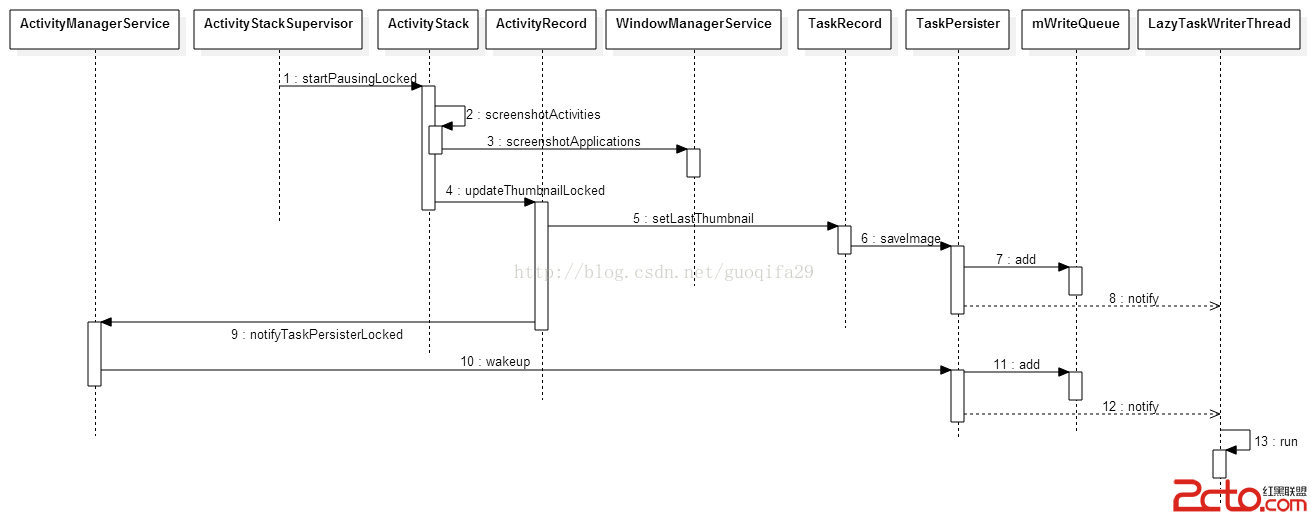
Android5.0新增了一個重啟後可恢復Task功能。在正常的Activity切換使用過程中AMS會將Task和對應截圖進行保存,重啟後會將Task和截圖恢復到最近任務
 ListView詳解之二----XListView
本次分析的是github上一個用於下拉刷新上拉加載的控件XListView,這個開源的ListView相信大家在開發的過程中會經常用到。https://github.co