編輯:關於Android編程
我們用webView去請求一個網頁鏈接的時候,如果請求網頁失敗或無網絡的情況下,它會返回給我們這樣一個頁面,如下圖所示:

上面這個頁面就是系統自帶的頁面,你覺得是不是很丑?反正小編本人覺得非常丑,很難看,於是乎小編就在想能不能自定義一個頁面,當數據請求失敗時讓系統來加載我們自定義好的頁面?上網查了很多資料,都沒有關於這個問題的解決方法(反正我是沒有找到),經過小編的不斷琢磨,今天終於實現了這個功能。以下就是本人自定義實現的數據加載失敗時的頁面:
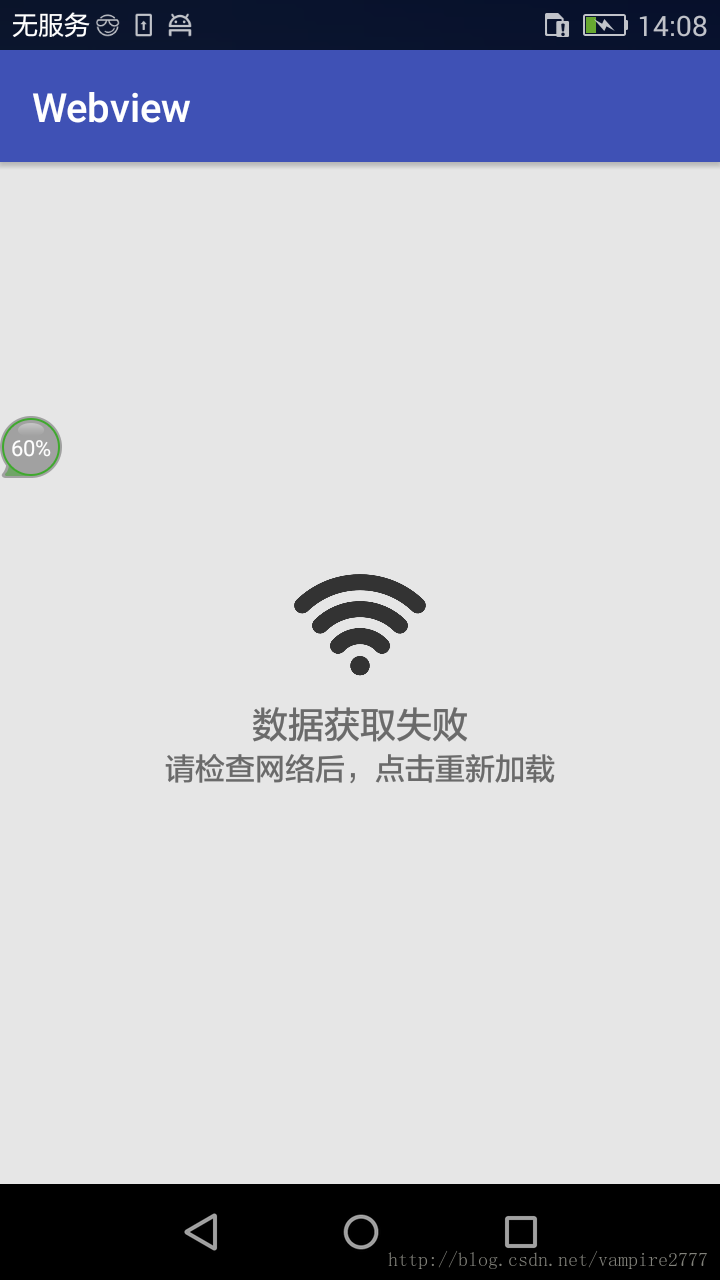
這樣看起來是不是覺得很高大尚。這和我們真正拿到數據接口做出來的效果完全一樣。對於用戶來說這樣的體驗也是很完美的。
**全部代碼:
一、主代碼:**
MainActivity.Java
package com.example.webview;
import android.support.v4.view.ViewPager;
import android.support.v7.app.AppCompatActivity;
import android.os.Bundle;
import android.view.View;
import android.webkit.WebSettings;
import android.webkit.WebView;
import android.webkit.WebViewClient;
import android.widget.LinearLayout;
import android.widget.RelativeLayout;
public class MainActivity extends AppCompatActivity {
  private WebView webview;
  private WebSettings mWebSettings;
  private View mErrorView;
  @Override
  protected void onCreate(Bundle savedInstanceState) {
    super.onCreate(savedInstanceState);
    setContentView(R.layout.activity_main);
    webview = (WebView) findViewById(R.id.main_webview);
    setUpView();
  }
  private void setUpView() {
    //加載需要顯示的網頁
    webview.loadUrl("http://www.baidu.com/");
    //設置WebView屬性,能夠執行Javascript腳本
    webview.getSettings().setJavaScriptEnabled(true);
    mWebSettings = webview.getSettings();
    mWebSettings.setJavaScriptEnabled(true);  //允許加載javascript
    mWebSettings.setSupportZoom(true);     //允許縮放
    mWebSettings.setBuiltInZoomControls(true); //原網頁基礎上縮放
    mWebSettings.setUseWideViewPort(true);   //任意比例縮放
    webview.setWebViewClient(webClient); //設置Web視圖
  }
  /***
   * 設置Web視圖的方法
   */
  WebViewClient webClient = new WebViewClient(){//處理網頁加載失敗時
    public void onReceivedError(WebView view, int errorCode, String description, String failingUrl) {
      showErrorPage();//顯示錯誤頁面
    };
  };
  boolean mIsErrorPage;
  protected void showErrorPage() {
    LinearLayout webParentView = (LinearLayout)webview.getParent();
    initErrorPage();//初始化自定義頁面
    while (webParentView.getChildCount() > 1) {
      webParentView.removeViewAt(0);
    }
    @SuppressWarnings("deprecation")
    LinearLayout.LayoutParams lp = new LinearLayout.LayoutParams(ViewPager.LayoutParams.FILL_PARENT, ViewPager.LayoutParams.FILL_PARENT);
    webParentView.addView(mErrorView, 0, lp);
    mIsErrorPage = true;
  }
  /****
   * 把系統自身請求失敗時的網頁隱藏
   */
  protected void hideErrorPage() {
    LinearLayout webParentView = (LinearLayout)webview.getParent();
    mIsErrorPage = false;
    while (webParentView.getChildCount() > 1) {
      webParentView.removeViewAt(0);
    }
  }
  /***
   * 顯示加載失敗時自定義的網頁
   */
  protected void initErrorPage() {
    if (mErrorView == null) {
      mErrorView = View.inflate(this, R.layout.activity_error, null);
      RelativeLayout layout = (RelativeLayout)mErrorView.findViewById(R.id.online_error_btn_retry);
      layout.setOnClickListener(new View.OnClickListener() {
        public void onClick(View v) {
          webview.reload();
        }
      });
      mErrorView.setOnClickListener(null);
    }
  }
}
二、XML布局代碼:
1.activity_main.xml
<?xml version="1.0" encoding="utf-8"?>
<LinearLayout xmlns:android="http://schemas.android.com/apk/res/android"
  xmlns:tools="http://schemas.android.com/tools" android:id="@+id/activity_main"
  android:layout_width="match_parent"
  android:layout_height="match_parent"
  android:orientation="vertical"
  tools:context="com.example.webview.MainActivity">
  <WebView
    android:id="@+id/main_webview"
    android:layout_width="match_parent"
    android:layout_height="match_parent">
  </WebView>
</LinearLayout>
2.activity_error.xml
<?xml version="1.0" encoding="utf-8"?>
<LinearLayout xmlns:android="http://schemas.android.com/apk/res/android"
  android:orientation="vertical"
  android:layout_width="match_parent"
  android:layout_height="match_parent">
  <RelativeLayout
    android:id="@+id/online_error_btn_retry"
    android:layout_width="match_parent"
    android:layout_height="match_parent"
    android:background="#E6E6E6"
    android:clickable="true"
    android:gravity="center" >
    <LinearLayout
      android:layout_width="match_parent"
      android:layout_height="match_parent"
      android:gravity="center"
      android:orientation="vertical"
      >
      <ImageView
        android:layout_width="70dp"
        android:layout_height="70dp"
        android:src="@drawable/wifi"
        android:id="@+id/imageView2" />
      <TextView
        android:layout_width="wrap_content"
        android:layout_height="wrap_content"
        android:textSize="18dp"
        android:text="數據獲取失敗"
        ></TextView>
      <TextView
        android:layout_width="wrap_content"
        android:layout_height="wrap_content"
        android:textSize="15dp"
        android:text="請檢查網絡後,點擊重新加載"
        />
    </LinearLayout>
  </RelativeLayout>
</LinearLayout>
以上所述是小編給大家介紹的Android中替換WebView加載網頁失敗時的頁面,希望對大家有所幫助,如果大家有任何疑問請給我留言,小編會及時回復大家的。在此也非常感謝大家對本站網站的支持!
 Android百度地圖應用之圖層展示
一、簡介 1、地圖類型 百度地圖Android SDK 3.7.1提供了兩種類型的地圖資源(普通矢量地圖和衛星圖),開發者可以利用BaiduMap中的
 實現輪轉廣告帶底部指示的自定義ViewPager控件
有許多博客和開源項目都致力於這項工作,但是他們的工作大都是為了制作類似於啟動頁的效果,ViewPager全屏顯示,或者自己可操作的屬性難以滿足要求,因此我想把ViewPa
 Android NDK學習筆記3-入門案例篇
上篇文章我們安裝了NDK系統,在NDK系統文件中包含samples文件夾,打開該文件夾,我們發現裡面有大量的案例項目,這裡我們通過Eclipse導入一個名為hello-j
 Android實現心跳的效果
最近再做一個教育類的項目。在做一些學習工具的時候,美工提出了一些要求,大致如下:其實實現過程也不難,大致就是對一個視圖控件添加一個圓形的背景,然後該視圖進行動畫處理,膨脹