編輯:關於Android編程
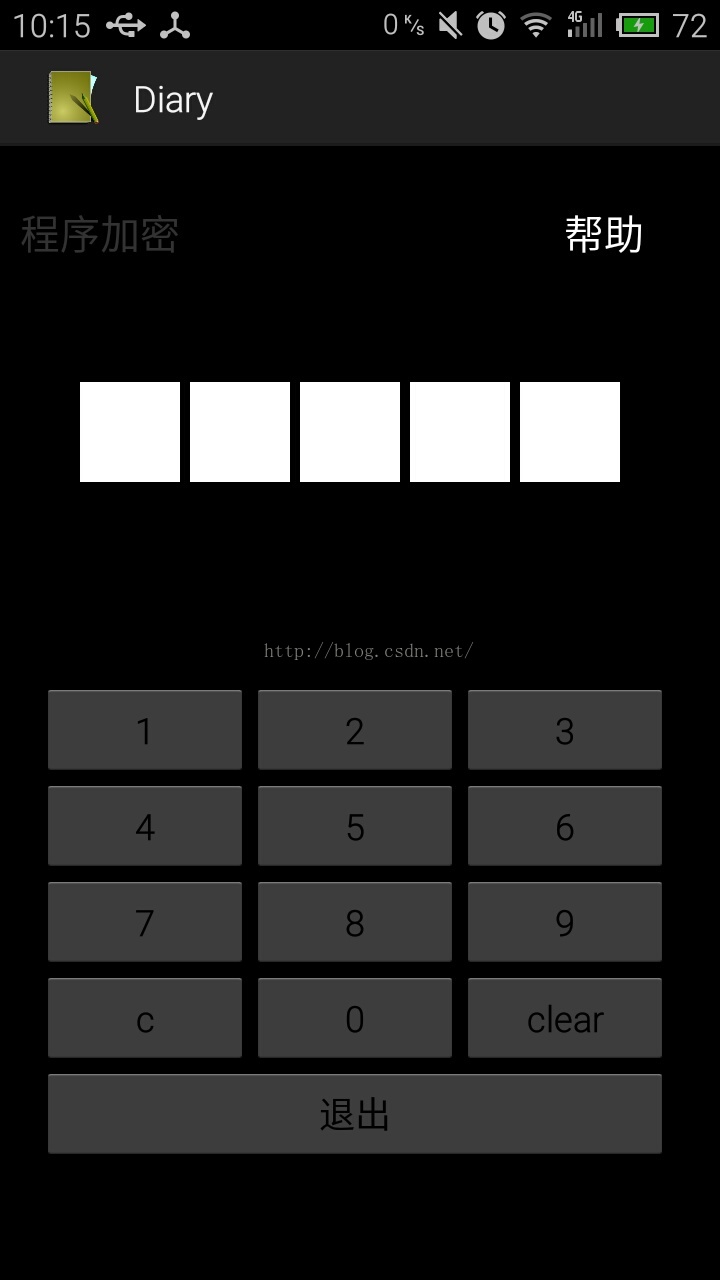
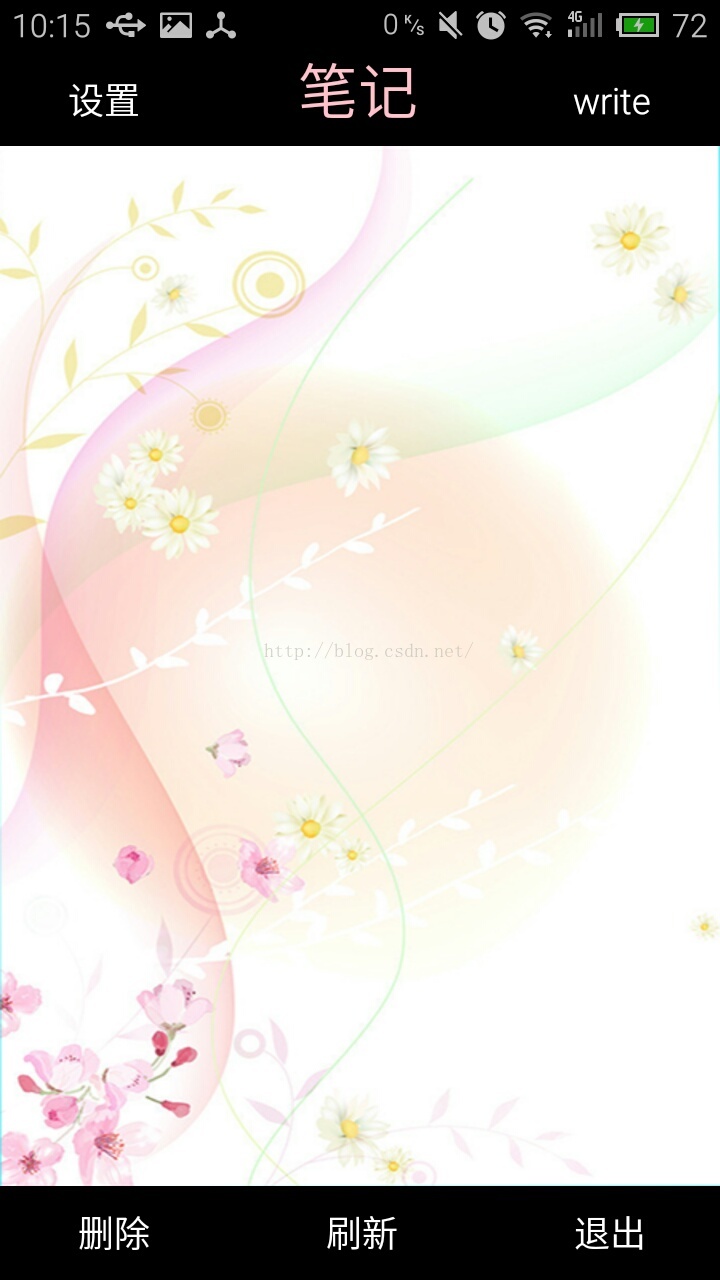
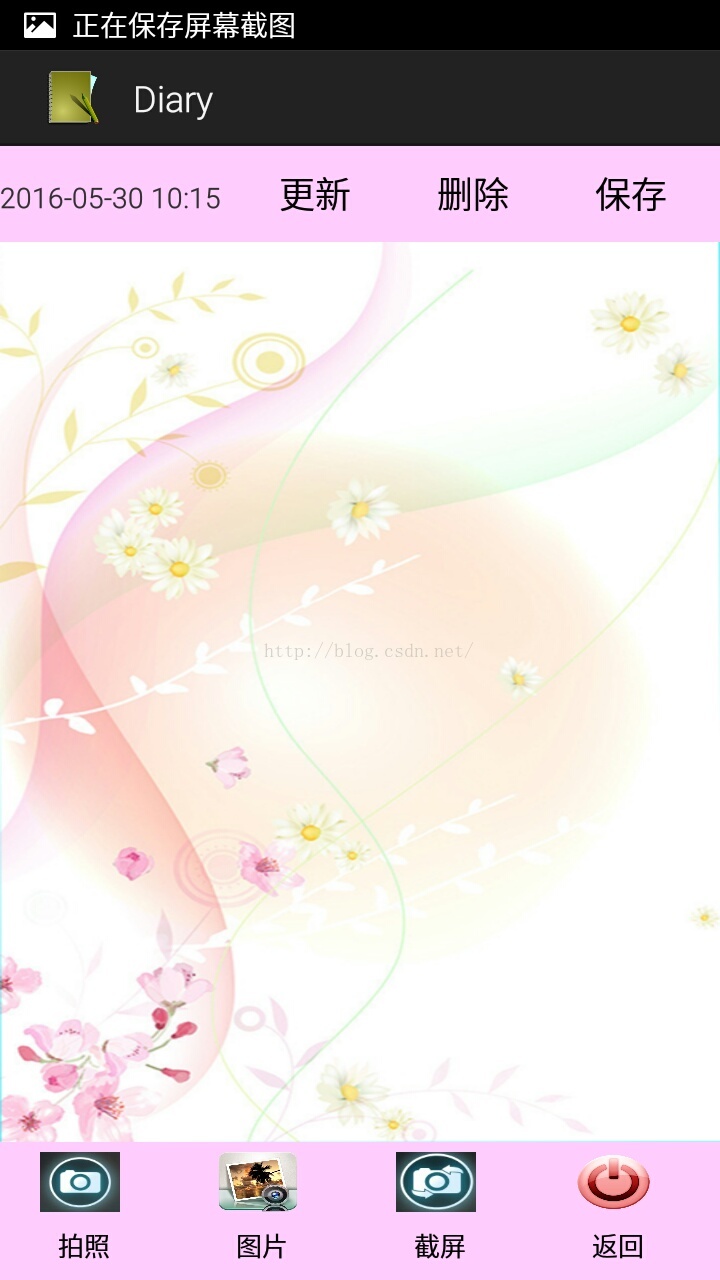
應用實現密碼登陸,記事本內容可增刪改除等操作,用listview顯示每次保存的記事內容,實現了記事本的基本功能。代碼都有詳細注解。
1、代碼的目錄
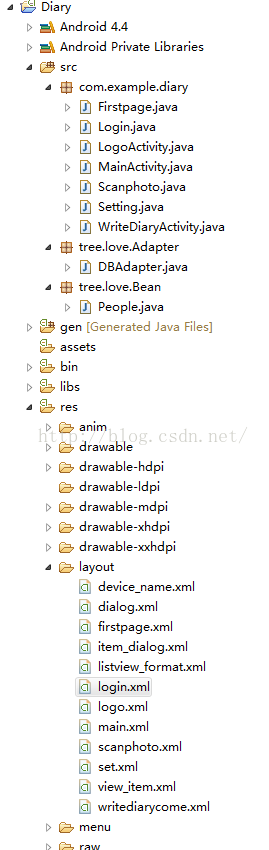
密碼登陸使用的是sharedpreferences記錄輸入的密碼,sharedPreferences簡單介紹
做軟件開發應該都知道,很多軟件會有配置文件,裡面存放這程序運行當中的各個屬性值,由於其配置信息並不多,如果采用數據庫來存放並不劃算,因為數據庫連接跟操作等耗時大大影響了程序的效率,因此我們使用鍵值這種一一對應的關系來存放這些配置信息。SharedPreferences正是Android中用於實現這中存儲方式的技術。
SharedPreferences的使用非常簡單,能夠輕松的存放數據和讀取數據。SharedPreferences只能保存簡單類型的數據,例如,String、int等。一般會將復雜類型的數據轉換成Base64編碼,然後將轉換後的數據以字符串的形式保存在XML文件中,再用SharedPreferences保存。
使用SharedPreferences保存key-value對的步驟如下:
(1)使用Activity類的getSharedPreferences方法獲得SharedPreferences對象,其中存儲key-value的文件的名稱由getSharedPreferences方法的第一個參數指定。
(2)使用SharedPreferences接口的edit獲得SharedPreferences.Editor對象。
(3)通過SharedPreferences.Editor接口的putXxx方法保存key-value對。其中Xxx表示不同的數據類型。例如:字符串類型的value需要用putString方法。
(4)通過SharedPreferences.Editor接口的commit方法保存key-value對。commit方法相當於數據庫事務中的提交(commit)操作。
//對密碼進行判斷如果任意一個為空就繼續執行
			 if((num.equals(""))||(num.equals(""))||(num.equals(""))||(num.equals(""))||(num.equals(""))){
		         SharedPreferences preferences=getSharedPreferences("softinfo",Context.MODE_WORLD_READABLE);
		         Editor edit=preferences.edit();
				 Button btn1 = (Button) v;
		         String input1 = btn1.getText().toString();
		         editNum[number1].setText(input1);
		        // Toast.makeText(getApplication(),editNum[number1].getText().toString(), Toast.LENGTH_SHORT).show();
		        // display.setText(input);
		         number1++;
		         if(number1>4){
					 number1 = 0;
					 for(int i=0;i<10;i++){
						 btnNum[i].setEnabled(false);
					 }

				 }
		        // edit.clear().commit();
		          //第一次輸入數據保存到sharedpreference
		         edit.putString("editNum[0]", editNum[0].getText().toString());
		         edit.putString("editNum[1]", editNum[1].getText().toString());
		         edit.putString("editNum[2]", editNum[2].getText().toString());
		         edit.putString("editNum[3]", editNum[3].getText().toString());
		         edit.putString("editNum[4]", editNum[4].getText().toString());
		         edit.commit();
		        // read();
		         if(number1 ==3){
		        	 Toast.makeText(getApplication(), "輸完後請再輸入一次密碼", Toast.LENGTH_SHORT).show();
		         }
			 }
完整登陸代碼:
package com.example.diary;

import java.util.regex.Pattern;

import android.app.Activity;
import android.app.AlertDialog;
import android.app.AlertDialog.Builder;
import android.content.Context;
import android.content.DialogInterface;
import android.content.Intent;
import android.content.SharedPreferences;
import android.content.SharedPreferences.Editor;
import android.os.Bundle;
import android.os.Handler;
import android.view.View;
import android.view.View.OnClickListener;
import android.widget.Button;
import android.widget.EditText;
import android.widget.TextView;
import android.widget.Toast;

/**
 * 首頁
 * @author xing
 *
 */
public class Login extends Activity implements OnClickListener {
	 Boolean flag;

	@SuppressWarnings("unused")
	private TextView display;
	 private Button c,clear,cancel,helplogin;
	 private Button[] btnNum = new Button[10];// 數值按鈕
	 private EditText[] editNum = new EditText[5];// 數值按鈕
	 int number = 0;
	 int number1 = 0;
	 int editnumber = 0;
	 String num="",num1="",num2="",num3="",num4="";//定義5個輸入密碼
	@Override
    protected void onCreate(Bundle savedInstanceState) {
        // TODO Auto-generated method stub
        super.onCreate(savedInstanceState);
        setContentView(R.layout.login);

        initUI();

	}
	/**
	 * 初始化UI
	 */
	private void initUI() {

		helplogin = (Button)findViewById(R.id.helplogin);
		helplogin.setOnClickListener(new helploginListener());

		c = (Button)findViewById(R.id.c);
		c.setOnClickListener(new cListener());

		clear = (Button)findViewById(R.id.clear);
		clear.setOnClickListener(new clearListener());

		cancel = (Button)findViewById(R.id.cancel);
		cancel.setOnClickListener(new cancelListener());

		display = (TextView)findViewById(R.id.display);

		editNum[0] = (EditText)findViewById(R.id.editone);
		editNum[1] = (EditText)findViewById(R.id.edittwo);
		editNum[2] = (EditText)findViewById(R.id.editthree);
		editNum[3] = (EditText)findViewById(R.id.editfour);
		editNum[4] = (EditText)findViewById(R.id.editfive);

		// TODO Auto-generated method stub
		btnNum[0] = (Button)findViewById(R.id.one);
        btnNum[1] = (Button)findViewById(R.id.two);
        btnNum[2] = (Button)findViewById(R.id.three);
        btnNum[3] = (Button)findViewById(R.id.four);
        btnNum[4] = (Button)findViewById(R.id.five);
        btnNum[5] = (Button)findViewById(R.id.six);
        btnNum[6] = (Button)findViewById(R.id.seven);
        btnNum[7] = (Button)findViewById(R.id.eight);
        btnNum[8] = (Button)findViewById(R.id.nine);
        btnNum[9] = (Button)findViewById(R.id.zero);
        read();
        //給全部按鈕添加監聽器
        for(int i=0;i<10;i++){
        	btnNum[i].setOnClickListener(this);
        }
//        handler.removeCallbacks(runnable);
//		handler.postDelayed(runnable,200);
	}
	//刷新線程,沒用,輸入一個密碼就會不能再輸入
	private Handler handler = new Handler();
	private Runnable runnable = new Runnable() {
         public void run () {
        	 read();
         handler.postDelayed(this,1000);
      }
    };
	/**
	 * 所有數字控件的監聽器
	 */

	@SuppressWarnings("deprecation")
	public void onClick(View v) {
	    //對密碼進行判斷如果任意一個為空就繼續執行
			 if((num.equals(""))||(num.equals(""))||(num.equals(""))||(num.equals(""))||(num.equals(""))){
		         SharedPreferences preferences=getSharedPreferences("softinfo",Context.MODE_WORLD_READABLE);
		         Editor edit=preferences.edit();
				 Button btn1 = (Button) v;
		         String input1 = btn1.getText().toString();
		         editNum[number1].setText(input1);
		        // Toast.makeText(getApplication(),editNum[number1].getText().toString(), Toast.LENGTH_SHORT).show();
		        // display.setText(input);
		         number1++;
		         if(number1>4){
					 number1 = 0;
					 for(int i=0;i<10;i++){
						 btnNum[i].setEnabled(false);
					 }

				 }
		        // edit.clear().commit();
		          //第一次輸入數據保存到sharedpreference
		         edit.putString("editNum[0]", editNum[0].getText().toString());
		         edit.putString("editNum[1]", editNum[1].getText().toString());
		         edit.putString("editNum[2]", editNum[2].getText().toString());
		         edit.putString("editNum[3]", editNum[3].getText().toString());
		         edit.putString("editNum[4]", editNum[4].getText().toString());
		         edit.commit();
		        // read();
		         if(number1 ==3){
		        	 Toast.makeText(getApplication(), "輸完後請再輸入一次密碼", Toast.LENGTH_SHORT).show();
		         }
			 }


			 //判斷輸入的密碼是否被記錄了,如果都有了就執行匹配,匹配對了就跳轉到firstpage頁面
		if(isNumeric(num)&&isNumeric(num1)&&isNumeric(num2)&&isNumeric(num3)&&isNumeric(num4)){
			 Button btn = (Button) v;
	         String input = btn.getText().toString();
	         editNum[number].setText(input);
	       //判斷如果輸入密碼與首次輸入密碼相同則跳轉到firstFage
	        // display.setText(input);
	         if((num.equals(editNum[0].getText().toString()))&&(num1.equals(editNum[1].getText().toString()))&&(num2.equals(editNum[2].getText().toString()))
	        		&&(num3.equals(editNum[3].getText().toString()))&&(num4.equals(editNum[4].getText().toString()))){

	        	 	Intent intent = new Intent(Login.this,Firstpage.class);
		        	startActivity(intent);
		     }
	        // display.setText(editNum[number].getText().toString());
	         editnumber++;
	        // Toast.makeText(getApplication(), editnumber, Toast.LENGTH_SHORT).show();
	         if(editnumber>4){
					editnumber=4;

				}
	         number++;
	         if(number>4){
				 number = 0;
				 //輸完密碼後設置控件為不可操作狀態
				 for(int i=0;i<10;i++){
					 btnNum[i].setEnabled(false);
				 }

			 }

	         //Toast.makeText(getApplication(),editNum[4].getText().toString()+":"+editNum[3].getText().toString()+":"+ editNum[2].getText().toString(), Toast.LENGTH_SHORT).show();

		 }


	 }
	/**
	 * 判斷是否是0-9數字
	 * @param str
	 * @return pattern.matcher(str).matches()
	 */
	public static boolean isNumeric(String str){
	    Pattern pattern = Pattern.compile("[0-9]*");
	    return pattern.matcher(str).matches();
	}

	/**
	 * 幫助
	 * @author xing
	 *
	 */
	public class helploginListener implements OnClickListener{

		@Override
		public void onClick(View arg0) {
			// TODO Auto-generated method stub
			dialog();
		}

	}
	/**
	 * 幫助對話框
	 */
	protected void dialog() {
		  AlertDialog.Builder builder = new Builder(this);
		  builder.setMessage(R.string.helpcontent);
		  builder.setIcon(R.drawable.ic_launcher);
		  builder.setTitle("溫馨提示");
		  builder.setPositiveButton("確認", new DialogInterface.OnClickListener() {
			  public void onClick(DialogInterface dialog, int which) {

		   }
		  });
		  builder.setNegativeButton("取消", new DialogInterface.OnClickListener() {
			  public void onClick(DialogInterface dialog, int which) {

		   }
		  });
		  builder.create().show();
		}

	 public class cListener implements OnClickListener{

		@Override
		public void onClick(View arg0) {
			// TODO Auto-generated method stub
//			SharedPreferences sp = getSharedPreferences("loginUser", Context.MODE_PRIVATE);
//			Editor editor = sp.edit();
//			editor.clear();
//			editor.commit();
//			display.setText("");
			read();
//			for(int i=0;i<5;i++){
//				editNum[i].setText("");
//			}
			btnsetEnabled();

			number--;
			if(number<0){
				number=0;
			}
			editNum[editnumber].setText("");
			//display.setText(editnumber+":"+number);
			editnumber--;
			if(editnumber<0){
				editnumber=0;
			}

		}

	 }
	 /**
	  * 清空數據監聽器
	  * @author aeon
	  *
	  */
	 public class clearListener implements OnClickListener{

		@Override
		public void onClick(View arg0) {
			// TODO Auto-generated method stub
			for(int i=0;i<5;i++){
				editNum[i].setText("");
			}
			btnsetEnabled();
			read();

		}

	 }
	 /**
	  * 退出監聽器
	  * @author aeon
	  *
	  */
	 public class cancelListener implements OnClickListener{

			@Override
			public void onClick(View arg0) {
				// TODO Auto-generated method stub
				finish();
			}

		 }
	 /**
	  * 讀取sharedpreference數據
	  */
	 public void read(){
		  SharedPreferences ferences=getSharedPreferences("softinfo",0);
          num=ferences.getString("editNum[0]", "");
          num1=ferences.getString("editNum[1]", "");
          num2=ferences.getString("editNum[2]", "");
          num3=ferences.getString("editNum[3]", "");
          num4=ferences.getString("editNum[4]", "");
        //  display.setText(num+num1+num2+num3+num4);
//          if((num.equals(""))||(num.equals(""))||(num.equals(""))||(num.equals(""))||(num.equals(""))){
//        	  flag = true;
//        	  Toast.makeText(getApplication(), "輸完後請再輸入一次密碼", Toast.LENGTH_SHORT).show();
//          }else{
//        	  flag = false;
//          }
	 }
	@Override
	protected void onDestroy() {
		// TODO Auto-generated method stub
		for(int i=0;i<10;i++){
			 btnNum[i].setEnabled(true);
		 }
		handler.removeCallbacks(runnable);//停止定時器
		super.onDestroy();

	}
	/**
	 * 設置控件可操作
	 */
	public void btnsetEnabled(){
		for(int i=0;i<10;i++){
			 btnNum[i].setEnabled(true);
		 }
	}
	/**
	 * onRestart時控件變為可操作狀態,並清空密碼顯示
	 */
	@Override
	protected void onRestart() {
		// TODO Auto-generated method stub
		super.onRestart();
		btnsetEnabled();//設置控件可操作
		//清空密碼
		for(int i=0;i<5;i++){
			editNum[i].setText("");
		}
	}


}
布局實現代碼:主要使用了線性布局
2、在寫記事本中記錄數據使用了sqlite數據庫,因為現在的主流移動設備像Android、iPhone等都使用SQLite作為復雜數據的存儲引擎,在我們為移動設備開發應用程序時,也許就要使用到SQLite來存儲我們大量的數據,所以我們就需要掌握移動設備上的SQLite開發技巧。對於Android平台來說,系統內置了豐富的API來供開發人員操作SQLite,我們可以輕松的完成對數據的存取。
	/**
	 * 保存數據監聽器
	 * @author aeon
	 *
	 */
	public class saveListener implements OnClickListener{

		@Override
		public void onClick(View arg0) {
			// TODO Auto-generated method stub
				SimpleDateFormat   sDateFormat   =   new   SimpleDateFormat("yyyy-MM-dd");
		        data   =   sDateFormat.format(new  java.util.Date());
				//if(diary!=null)
	           // {
	                //return;
		            People people = new People();
		            people.Time = data;
		            people.Diary = diarycontent.getText().toString();//獲取輸入日志內容
		            //people.Height = 1;
		            long colunm = dbAdapter.insert(people);
		            if(colunm == -1)
		            {
		                Toast.makeText(getApplication(), "添加錯誤", Toast.LENGTH_SHORT).show();
		            }
		            else
		            {
		            	Toast.makeText(getApplication(), "成功添加數據 ", Toast.LENGTH_SHORT).show();
		               // Toast.makeText(getApplication(), "成功添加數據 , ID: "+String.valueOf(colunm), Toast.LENGTH_SHORT).show();
		            }
		          //  Firstpage.displaydiary1();//當點擊保存後更新listview列表數據
		            finish();//寫完日記後結束該activity以免多次保存
		}

	}
關於記事本用到的數據庫的一些操作,更新日記
/**
	 * 修改內容監聽器
	 * @author xing
	 *
	 */
	public class changeListener implements OnClickListener{

		@Override
		public void onClick(View arg0) {
			// TODO Auto-generated method stub

			People people = new People();
            people.Diary = diarycontent.getText().toString();
            people.Time  = data;
            //people.Height = Float.parseFloat(heightEdit.getText().toString());
            Intent intent=getIntent();
            timeid=intent.getStringExtra("timeid");
            if(timeid!=null){

            	  int  id = Integer.parseInt(timeid);
                 // Toast.makeText(getApplication(),timeid, Toast.LENGTH_SHORT).show();
                  long count = dbAdapter.updateOneData(id, people);

                   if(count == -1 )
                   {
                   	Toast.makeText(getApplication(), "更新錯誤", Toast.LENGTH_SHORT).show();
                       //display.setText("");
                   }
                   else
                   {
                   	//Toast.makeText(getApplication(), "更新成功"+"更新數據第"+String.valueOf(id)+"條", Toast.LENGTH_SHORT).show();
                   	Toast.makeText(getApplication(), "更新成功", Toast.LENGTH_SHORT).show();
                   }

                   finish();
            }else{
            	Toast.makeText(getApplication(), "請點擊保存", Toast.LENGTH_SHORT).show();
            }
			//hintKb();
		}

	}
/**
	 * 刪除所有記事對話框
	 */
	public void showdeleteDialog(){
		AlertDialog.Builder builder = new AlertDialog.Builder(this);
		LayoutInflater inflater = getLayoutInflater();
	    View layout = inflater.inflate(R.layout.dialog, null);
	    builder.setView(layout);
	    builder.setIcon(R.drawable.ic_launcher);
		builder.setTitle(R.string.firstdialogtitle);
		builder.setMessage("請問您是否要刪除所有記事?");
		builder.setPositiveButton("ok", new DialogInterface.OnClickListener() {

			@Override
			public void onClick(DialogInterface arg0, int arg1) {
				// TODO Auto-generated method stub
				dbAdapter.deleteAllData();
				Diaryadapter.clear(); //刪除數據後清空listview顯示
	            Toast.makeText(getApplication(), "日志已刪除", Toast.LENGTH_SHORT).show();
			}
		});
		builder.setNegativeButton("cancel",
				new DialogInterface.OnClickListener() {
					@Override
					public void onClick(DialogInterface dialog, int which) {

					}
				});
		final AlertDialog dlg = builder.create();
		dlg.show();
	}
編輯記事本功能
/**
		 * 編輯該天事件監聽器
		 */
		Button editordialog  = (Button)layout.findViewById(R.id.editordialog);
		editordialog.setOnClickListener(new OnClickListener() {

			@Override
			public void onClick(View arg0) {
				// TODO Auto-generated method stub
				Intent intent = new Intent(Firstpage.this,WriteDiaryActivity.class);
				String spStr[] = itemdata1.split("日記內容:");//匹配字符串
				String spStr1[] = itemdata1.split(",時間");//匹配字符串
				intent.putExtra("diary", spStr[1]);  //獲取內容
				intent.putExtra("timeid", spStr1[0]);//獲取id
				//intent.putExtra("", "");
//				Bundle bundle=new Bundle();
//	            bundle.putString("result", "第一個activity的內容");
//	            bundle.putString("content",content);
//	            intent.putExtras(bundle);
				startActivity(intent);
				//finish();//跳轉後結束dialog
			}
		});
3、完整的寫記事本跟現實代碼:
package com.example.diary;

import java.io.File;
import java.io.FileNotFoundException;
import java.io.FileOutputStream;
import java.io.IOException;
import java.text.SimpleDateFormat;
import tree.love.Adapter.DBAdapter;
import tree.love.Bean.People;
import android.app.Activity;
import android.app.AlertDialog;
import android.content.Context;
import android.content.DialogInterface;
import android.content.Intent;
import android.graphics.Bitmap;
import android.graphics.Bitmap.Config;
import android.media.AudioManager;
import android.media.SoundPool;
import android.os.Bundle;
import android.os.Environment;
import android.provider.MediaStore;
import android.util.Log;
import android.view.Display;
import android.view.LayoutInflater;
import android.view.View;
import android.view.WindowManager;
import android.view.View.OnClickListener;
import android.view.inputmethod.InputMethodManager;
import android.widget.Button;
import android.widget.EditText;
import android.widget.ImageView;
import android.widget.TextView;
import android.widget.Toast;

public class WriteDiaryActivity extends Activity {

	private TextView time;
	private Button takephoto;
	private Button finish;
	private Button delete;
	private Button change;
	private EditText diarycontent;
	private Button scanphoto;
	private Button save;
	private Button autocam;
	private ImageView imageview4,imageview1,imageview2,imageview3;
	private SoundPool sp;//聲明一個SoundPool
	private int music;//定義一個整型用load();來設置suondID

	private DBAdapter dbAdapter;

	int count = 0;
	String diary;
	String data;
	String aa;
	String timeid;
   // Firstpage Firstpage = new Firstpage();
    int num=0;
    @Override
    protected void onCreate(Bundle savedInstanceState) {
        // TODO Auto-generated method stub
        super.onCreate(savedInstanceState);
      //去除標題
       // requestWindowFeature(Window.FEATURE_NO_TITLE);
        setContentView(R.layout.writediarycome);
        //初始化UI
        initUI();
        //獲得實例
        dbAdapter = new DBAdapter(this);
        //打開數據庫
        dbAdapter.open();

    }

//    /**
//     * 判斷輸入內容是否為空
//     * @return
//     */
//    boolean isRight()
//    {
//        if(diary.length() == 0)
//        {
//            Toast.makeText(getApplication(), "請輸入符合場常理的數據", Toast.LENGTH_SHORT).show();
//            return false;
//        }else
//        {
//            return true;
//        }
//    }

    /**
     * 初始化UI控件
     */
	private void initUI() {
		// TODO Auto-generated method stub
		 //獲取聲音文件
        sp= new SoundPool(10, AudioManager.STREAM_SYSTEM, 5);//第一個參數為同時播放數據流的最大個數,第二數據流類型,第三為聲音質量
        music = sp.load(this, R.raw.jie, 1); //把你的聲音素材放到res/raw裡,第2個參數即為資源文件,第3個為音樂的優先級
		autocam = (Button)findViewById(R.id.autocam);
		autocam.setOnClickListener(new autocamListener());
		imageview3 = (ImageView)findViewById(R.id.imageview3);
		imageview3.setOnClickListener(new OnClickListener() {

			@Override
			public void onClick(View arg0) {
				// TODO Auto-generated method stub
				getCurrentScreen();
				sp.play(music, 1, 1, 0, 0, 1);   //拍照聲音
			}
		});

		save = (Button)findViewById(R.id.save);
		save.setOnClickListener(new saveListener());

		change = (Button)findViewById(R.id.change);
		change.setOnClickListener(new changeListener());

		diarycontent = (EditText)findViewById(R.id.diarycontent);
		diary = diarycontent.getText().toString();

		delete = (Button)findViewById(R.id.delete);
		delete.setOnClickListener(new deleteListener());

		finish = (Button)findViewById(R.id.finish);
		finish.setOnClickListener(new finishListener());
		imageview4 = (ImageView)findViewById(R.id.imageview4);
		imageview4.setOnClickListener(new OnClickListener() {

			@Override
			public void onClick(View arg0) {
				// TODO Auto-generated method stub
				finish();
			}
		});

		takephoto = (Button)findViewById(R.id.takephoto);
		takephoto.setOnClickListener(new takephotoListener());
		imageview1 = (ImageView)findViewById(R.id.imageview1);
		imageview1.setOnClickListener(new OnClickListener() {

			@Override
			public void onClick(View arg0) {
				// TODO Auto-generated method stub
				Intent intent = new Intent(MediaStore.ACTION_IMAGE_CAPTURE);
	            startActivityForResult(intent, 1);
			}
		});

		scanphoto = (Button)findViewById(R.id.sanphoto);
		scanphoto.setOnClickListener(new scanphotoListener());
		imageview2 = (ImageView)findViewById(R.id.imageview2);
		imageview2.setOnClickListener(new OnClickListener() {

			@Override
			public void onClick(View arg0) {
				// TODO Auto-generated method stub
				Intent intent = new Intent(WriteDiaryActivity.this,Scanphoto.class);
				startActivity(intent);
			}
		});
		time = (TextView)findViewById(R.id.time);

		time();//獲取手機當前時間
		time1();//獲取手機日期,年月日
		receiveaadata();
	}
	/**
	 * 接收顯示編輯diary
	 */
	public void receiveaadata(){
		Intent intent=getIntent();
		aa=intent.getStringExtra("diary");
		diarycontent.setText(aa);
		if(aa!=null){
			save.setEnabled(false);//設置保存按鈕為不可操作狀態
		}
	}

	/**
	 * 保存數據監聽器
	 * @author aeon
	 *
	 */
	public class saveListener implements OnClickListener{

		@Override
		public void onClick(View arg0) {
			// TODO Auto-generated method stub
				SimpleDateFormat   sDateFormat   =   new   SimpleDateFormat("yyyy-MM-dd");
		        data   =   sDateFormat.format(new  java.util.Date());
				//if(diary!=null)
	           // {
	                //return;
		            People people = new People();
		            people.Time = data;
		            people.Diary = diarycontent.getText().toString();//獲取輸入日志內容
		            //people.Height = 1;
		            long colunm = dbAdapter.insert(people);
		            if(colunm == -1)
		            {
		                Toast.makeText(getApplication(), "添加錯誤", Toast.LENGTH_SHORT).show();
		            }
		            else
		            {
		            	Toast.makeText(getApplication(), "成功添加數據 ", Toast.LENGTH_SHORT).show();
		               // Toast.makeText(getApplication(), "成功添加數據 , ID: "+String.valueOf(colunm), Toast.LENGTH_SHORT).show();
		            }
		          //  Firstpage.displaydiary1();//當點擊保存後更新listview列表數據
		            finish();//寫完日記後結束該activity以免多次保存
		}

	}

	/**
	 * 修改內容監聽器
	 * @author xing
	 *
	 */
	public class changeListener implements OnClickListener{

		@Override
		public void onClick(View arg0) {
			// TODO Auto-generated method stub

			People people = new People();
            people.Diary = diarycontent.getText().toString();
            people.Time  = data;
            //people.Height = Float.parseFloat(heightEdit.getText().toString());
            Intent intent=getIntent();
            timeid=intent.getStringExtra("timeid");
            if(timeid!=null){

            	  int  id = Integer.parseInt(timeid);
                 // Toast.makeText(getApplication(),timeid, Toast.LENGTH_SHORT).show();
                  long count = dbAdapter.updateOneData(id, people);

                   if(count == -1 )
                   {
                   	Toast.makeText(getApplication(), "更新錯誤", Toast.LENGTH_SHORT).show();
                       //display.setText("");
                   }
                   else
                   {
                   	//Toast.makeText(getApplication(), "更新成功"+"更新數據第"+String.valueOf(id)+"條", Toast.LENGTH_SHORT).show();
                   	Toast.makeText(getApplication(), "更新成功", Toast.LENGTH_SHORT).show();
                   }

                   finish();
            }else{
            	Toast.makeText(getApplication(), "請點擊保存", Toast.LENGTH_SHORT).show();
            }
			//hintKb();
		}

	}
	/**
	 * 打開與關閉軟件鍵盤
	 */
	 @SuppressWarnings("unused")
	private void hintKb() {
		InputMethodManager imm = (InputMethodManager) getSystemService(Context.INPUT_METHOD_SERVICE);
		   // 得到InputMethodManager的實例
		   if (imm.isActive()) {
		    // 如果開啟
			   imm.toggleSoftInput(InputMethodManager.SHOW_IMPLICIT,
		       InputMethodManager.HIDE_NOT_ALWAYS);
		    // 關閉軟鍵盤,開啟方法相同,這個方法是切換開啟與關閉狀態的
		   }
	    }

	/**
	 * 刪除監聽器
	 * @author aeon
	 *
	 */
	public class deleteListener implements OnClickListener{

		@Override
		public void onClick(View arg0) {
			// TODO Auto-generated method stub
			showDialog();
		}

	}

	/**
	 * delete自定義對話框
	 * @author ning
	 *
	 */
	public void showDialog(){
		AlertDialog.Builder builder = new AlertDialog.Builder(this);
		LayoutInflater inflater = getLayoutInflater();
	    View layout = inflater.inflate(R.layout.dialog, null);
	    builder.setView(layout);
	    builder.setIcon(R.drawable.ic_launcher);
		builder.setTitle(R.string.dialogtitle);
		builder.setMessage("請問您是否要刪除該天記事?");
		builder.setPositiveButton("ok", new DialogInterface.OnClickListener() {

			@Override
			public void onClick(DialogInterface arg0, int arg1) {
				// TODO Auto-generated method stub

				diarycontent.setText("");
				Toast.makeText(getBaseContext(), "刪除成功", Toast.LENGTH_SHORT).show();
			}
		});
		builder.setNegativeButton("cancel",
				new DialogInterface.OnClickListener() {
					@Override
					public void onClick(DialogInterface dialog, int which) {
						//finish();
					}
				});
		final AlertDialog dlg = builder.create();
		dlg.show();
	}

	/**
	 * 退出監聽器
	 * @author aeon
	 *
	 */
	public class finishListener implements OnClickListener{

		@Override
		public void onClick(View arg0) {
			// TODO Auto-generated method stub
			//結束本頁面與logoActivity,返回到登錄頁面
//			Intent intent = new Intent();
//			intent.setClass(WriteDiaryActivity.this, MainActivity.class);
//			intent.setFlags(Intent.FLAG_ACTIVITY_CLEAR_TOP); //注意本行的FLAG設置
//			startActivity(intent);
			finish();
		}
	}
	/**
	 * takephoto監聽器
	 *
	 * */
	public class takephotoListener implements OnClickListener{

		@Override
		public void onClick(View arg0) {
			// TODO Auto-generated method stub
			Intent intent = new Intent(MediaStore.ACTION_IMAGE_CAPTURE);
            startActivityForResult(intent, 1);
		}

	}

	/*
	 * 獲取時間
	 * return null
	 * */
	public void time(){

		SimpleDateFormat   sDateFormat   =   new   SimpleDateFormat("yyyy-MM-dd hh:mm");
        String   date   =   sDateFormat.format(new  java.util.Date());
        time.setText(date);
	}
	/**
	 * 獲取手機當前年月日
	 */
	public void time1(){
		SimpleDateFormat   sDateFormat   =   new   SimpleDateFormat("yyyy-MM-dd");
        data   =   sDateFormat.format(new  java.util.Date());
	}
	/**
	 * 浏覽拍好的圖片
	 * @author aeon
	 *
	 */
	public class scanphotoListener implements OnClickListener{

		@Override
		public void onClick(View arg0) {
			// TODO Auto-generated method stub
			//scanphotodialog();
			Intent intent = new Intent(WriteDiaryActivity.this,Scanphoto.class);
			startActivity(intent);
		}

	}

	/**執行拍照
	 * (non-Javadoc)
	 * @see android.app.Activity#onActivityResult(int, int, android.content.Intent)
	 * @param requestCode \resultCode \data
	 * Exception 當不加權限的時候會報空指針
	 */
	@Override
	protected void onActivityResult(int requestCode, int resultCode, Intent data) {
		// TODO Auto-generated method stub

		if(resultCode == Activity.RESULT_OK ){
			count++;
			String sdStatus = Environment.getExternalStorageState();
            if (!sdStatus.equals(Environment.MEDIA_MOUNTED)) { // 檢測sd是否可用
                Log.i("TestFile",
                        "SD card is not avaiable/writeable right now.");
                return;
            }
            //String name = new DateFormat().format("yyyyMMdd_hhmmss",Calendar.getInstance(Locale.CHINA)) + ".jpg";

            //Toast.makeText(this, name, Toast.LENGTH_LONG).show();
            Bundle bundle = data.getExtras();
            Bitmap bitmap = (Bitmap) bundle.get("data");// 獲取相機返回的數據,並轉換為Bitmap圖片格式

            FileOutputStream b = null;
            File file = new File("/sdcard/data/");
            file.mkdirs();// 創建文件夾
           // String fileName = "/sdcard/data/"+name;
            String s = String.valueOf(count)+".jpg";

            String fileName = "/sdcard/data/"+s;

            try {
                b = new FileOutputStream(fileName);
                bitmap.compress(Bitmap.CompressFormat.JPEG, 100, b);// 把數據寫入文件
            } catch (FileNotFoundException e) {
                e.printStackTrace();
            } finally {
                try {
                    b.flush();
                    b.close();
                } catch (IOException e) {
                    e.printStackTrace();
                }
            }
           // ((ImageView) findViewById(R.id.imageview)).setImageBitmap(bitmap);// 將圖片顯示在ImageView裡
        }
		super.onActivityResult(requestCode, resultCode, data);
	}
	/**
	 * autocam監聽器
	 * @author aeon
	 *
	 */
	public class autocamListener implements OnClickListener{

		@Override
		public void onClick(View arg0) {
			// TODO Auto-generated method stub
			getCurrentScreen();
		}

	}

	/**
	 * 截屏
	 */
	@SuppressWarnings("deprecation")
	public void getCurrentScreen() {
		num++;
        // 1.構建Bitmap
        WindowManager windowManager = getWindowManager();
        Display display = windowManager.getDefaultDisplay();
        int w = display.getWidth();//w=480
        int h = display.getHeight();//h=800
        Bitmap imageBitmap = Bitmap.createBitmap(w, h, Config.ARGB_8888);//最後一個參數叫位圖結構
        //ARGB--Alpha,Red,Green,Blue.
        //ARGB為一種色彩模式,也就是RGB色彩模式附加上Alpha(透明度)通道,常見於32位位圖的存儲結構。

        // 2.獲取屏幕
        View decorview = this.getWindow().getDecorView();//decor意思是裝飾布置
        decorview.setDrawingCacheEnabled(true);
        imageBitmap = decorview.getDrawingCache();

      //  String SaveImageFilePath = getSDCardPath() + "/gameCounter";//保存圖片的文件夾路徑
        String SaveImageFilePath = getSDCardPath() + "/data";//保存圖片的文件夾路徑  data為新建文件夾

        // 3.保存Bitmap
        try {
            File path = new File(SaveImageFilePath);
           // String imagepath = SaveImageFilePath + "/data" + ".png";//保存圖片的路徑
            String imagepath = SaveImageFilePath + "/data"+num + ".png";//保存圖片的路徑
            File file = new File(imagepath);
            if (!path.exists()) {
                path.mkdirs();
            }
            if (!file.exists()) {
                file.createNewFile();
            }

            FileOutputStream fos = null;
            fos = new FileOutputStream(file);
            if (null != fos) {
                //imageBitmap.compress(format, quality, stream);
                //把位圖的壓縮信息寫入到一個指定的輸出流中
                //第一個參數format為壓縮的格式
                //第二個參數quality為圖像壓縮比的值,0-100.0 意味著小尺寸壓縮,100意味著高質量壓縮
                //第三個參數stream為輸出流
                imageBitmap.compress(Bitmap.CompressFormat.PNG, 90, fos);
                fos.flush();
                fos.close();
                Toast.makeText(this,"圖片已經已保存在手機卡data文件目錄下",Toast.LENGTH_LONG).show();
                //text.setText("圖片已經已保存至"+SaveImageFilePath);
            }

        } catch (Exception e) {
            e.printStackTrace();
        }
    }
    /**
     * 獲取SDCard的目錄路徑功能
     */
    private String getSDCardPath() {
        String SDCardPath = null;
        // 判斷SDCard是否存在
        boolean IsSDcardExist = Environment.getExternalStorageState().equals(android.os.Environment.MEDIA_MOUNTED);
        if (IsSDcardExist) {
            SDCardPath = Environment.getExternalStorageDirectory().toString();//SD卡的路徑為: /mnt/sdcard
        }
        return SDCardPath;
    }
    /**
     * 結束時關閉數據庫
     */
	@Override
	protected void onDestroy() {
		// TODO Auto-generated method stub
		super.onDestroy();
		dbAdapter.close();//關閉數據庫
	}

}
布局代碼:
實現記事本內容代碼:
package com.example.diary;

import tree.love.Adapter.DBAdapter;
import tree.love.Bean.People;
import android.app.Activity;
import android.app.AlertDialog;
import android.app.AlertDialog.Builder;
import android.content.DialogInterface;
import android.content.Intent;
import android.os.Bundle;
import android.os.Handler;
import android.util.Log;
import android.view.LayoutInflater;
import android.view.MotionEvent;
import android.view.View;
import android.view.Window;
import android.view.View.OnClickListener;
import android.view.View.OnTouchListener;
import android.widget.AdapterView;
import android.widget.AdapterView.OnItemClickListener;
import android.widget.ArrayAdapter;
import android.widget.Button;
import android.widget.CheckBox;
import android.widget.CompoundButton;
import android.widget.ListView;
import android.widget.PopupWindow;
import android.widget.Toast;

public class Firstpage extends Activity {
	private Button writediary;
	private Button set;
	private Button deletediary;
	private Button scandiary;
	private Button firstfinish;
	private ListView diarylistview;

	private PopupWindow popupwindow;
	private DBAdapter dbAdapter;


	 String result = "";
	 String itemdata,itemdata1;
	// String iddiary;
	 private ArrayAdapter Diaryadapter;
	@Override
    protected void onCreate(Bundle savedInstanceState) {
        // TODO Auto-generated method stub
        super.onCreate(savedInstanceState);
      //去除標題
        requestWindowFeature(Window.FEATURE_NO_TITLE);
        setContentView(R.layout.firstpage);
      //獲得實例
        dbAdapter = new DBAdapter(this);
        //打開數據庫
        dbAdapter.open();
        initUI();

    }
	/**
	 * 初始化UI
	 */
	private void initUI() {
		// TODO Auto-generated method stub
		 // 初使化設備存儲數組
		Diaryadapter = new ArrayAdapter(this, R.layout.listview_format);
		diarylistview = (ListView)findViewById(R.id.diaryshow);
		diarylistview.setOnItemClickListener(new diarylistviewItemListener());
		//Diaryadapter.clear();
		diarylistview.setAdapter(Diaryadapter);

		firstfinish = (Button)findViewById(R.id.firstfinish);
		firstfinish.setOnClickListener(new firstfinishListener());

		set = (Button)findViewById(R.id.set);
		set.setOnClickListener(new setListener());

		writediary = (Button)findViewById(R.id.writediary);
		writediary.setOnClickListener(new writeListener());

		deletediary = (Button)findViewById(R.id.deletediary);
		deletediary.setOnClickListener(new deletediaryListener());

		scandiary = (Button)findViewById(R.id.scandiary);
		scandiary.setOnClickListener(new scandiaryListener());
		displaydiary();//登錄進去後顯示所有日記
		photodialog();
//		handler.removeCallbacks(runnable);
//		handler.postDelayed(runnable,1000);
	}
	/**
	 * 由於更新完數據和寫完日記後listview不能自動更新,如果在writeDiaryActivity調用display()
	 * 方法會出現空指針,因此添加一個定時器定時刷新listview
	 */
	private Handler handler = new Handler();
	private Runnable runnable = new Runnable() {
         public void run () {
        	 displaydiary();
         handler.postDelayed(this,1000);
      }
    };

    /**
     * 退出
     * @author aeon
     *
     */
    public class firstfinishListener implements OnClickListener{

		@Override
		public void onClick(View arg0) {
			// TODO Auto-generated method stub
			finish();
		}

    }

	/**
	 * listview item事件監聽器,並根據listview id獲取到數據庫數據,再賦值給itemdata1
	 * @author aeon
	 *
	 */
	public class diarylistviewItemListener implements OnItemClickListener{

		@Override
		public void onItemClick(AdapterView arg0, View arg1, int arg2,
				long arg3) {
			// TODO Auto-generated method stub
			for(int i=0;i<1000;i++){
				if(arg2 ==i){
					itemdata = Diaryadapter.getItem(arg2);
					Diaryadapter.clear();
					String result1 = "";
					String c = String.valueOf(arg3);
					int cc = Integer.parseInt(c);
					 People[] peoples = dbAdapter.queryAllData();
			         for (int j = 0; j < peoples.length; j++)

			         {
			             result1 =peoples[cc].toString()+"\n";
			         }
					 itemdata1 = result1;
					showItemDialog();	//點擊listviewitem後彈出item對話框
				}
			}
		}
	}

	/**
	 * deletediary 監聽器
	 * @author aeon
	 *
	 */
	public class deletediaryListener implements OnClickListener{

		@Override
		public void onClick(View arg0) {
			// TODO Auto-generated method stub

			showdeleteDialog();		//彈出是否刪除全部數據對話框
//			dbAdapter.deleteAllData();
//			Diaryadapter.clear(); //刪除數據後清空listview顯示
//          Toast.makeText(getApplication(), "日志已刪除", Toast.LENGTH_SHORT).show();
		}

	}
	/**
	 * scandiary 監聽器
	 * @author aeon
	 *
	 */
	public class scandiaryListener implements OnClickListener{

		@Override
		public void onClick(View arg0) {
			displaydiary();
			// TODO Auto-generated method stub
//			 People[] peoples = dbAdapter.queryAllData();
//             if(peoples == null)
//             {
//                 Toast.makeText(getApplication(), "數據庫裡面沒有數據", Toast.LENGTH_SHORT).show();
//                 return;
//             }
//           //  Toast.makeText(getApplication(), "數據庫:", Toast.LENGTH_SHORT).show();
//             //String result = "";
//             //該方式會使所有數據都添加到一個item裡面去
//             for (int i = 0; i < peoples.length; i++)
//             {
//            	 result += peoples[i].toString()+"\n";
//                // result = peoples[i].toString()+"\n";
//
//             }
//             //Diaryadapter.clear();
//             Diaryadapter.add(result);
//             result = "";         //添加完後將result清空,防止下次點擊會累加
           //  scandiary.setEnabled(false);
            // display.setText(result);
		}

	}
	/**
	 * 更新listview數據並拆分數據得到id和時間後面的數據
	 */
	public void displaydiary(){
		Diaryadapter.clear();
		 People[] peoples = dbAdapter.queryAllData();
         if(peoples == null)
         {
           //  Toast.makeText(getApplication(), "數據庫裡面沒有數據", Toast.LENGTH_SHORT).show();
             return;
         }

         for (int i = 0; i < peoples.length; i++)
         {
             result = peoples[i].toString()+"\n";
             String spStrone[] = result.split(",時間:");//匹配字符串
             Diaryadapter.add(spStrone[1]);
         }
         result = "";         //添加完後將result清空,防止下次點擊會累加
	}

	/**
	 * 打開列表監聽器
	 * @author aeon
	 *
	 */
	public class setListener implements OnClickListener{

		@Override
		public void onClick(View v) {
			// TODO Auto-generated method stub
			switch (v.getId()) {
			case R.id.set:
				set.setText("設置");
				if (popupwindow != null&&popupwindow.isShowing()) {
					popupwindow.dismiss();
					return;
				} else {
					set.setText("關閉");
					initmPopupWindowView();
					popupwindow.showAsDropDown(v, 0, 5);
				}
				break;
			default:
				break;
			}
		}

	}
	/**
	 * 彈出列表method
	 */
	public void initmPopupWindowView() {

		// // 獲取自定義布局文件pop.xml的視圖
		View customView = getLayoutInflater().inflate(R.layout.view_item,
				null, false);
		// 創建PopupWindow實例,200,150分別是寬度和高度
		popupwindow = new PopupWindow(customView, 300, 300);
		// 設置動畫效果 [R.style.AnimationFade 是自己事先定義好的]
		popupwindow.setAnimationStyle(R.style.AnimationFade);
		// 自定義view添加觸摸事件
		customView.setOnTouchListener(new OnTouchListener() {

			@Override
			public boolean onTouch(View v, MotionEvent event) {
				if (popupwindow != null && popupwindow.isShowing()) {
					popupwindow.dismiss();
					popupwindow = null;
				}

				return false;
			}
		});
		//初始化view_item UI
		Button grid = (Button) customView.findViewById(R.id.grid);
		Button list = (Button) customView.findViewById(R.id.more);
		final CheckBox gridCB = (CheckBox)customView.findViewById(R.id.gridCB);
		final CheckBox listCB = (CheckBox)customView.findViewById(R.id.listCB);
		//宮格顯示監聽
		gridCB.setOnCheckedChangeListener(new CompoundButton.OnCheckedChangeListener(){

            public void onCheckedChanged(android.widget.CompoundButton compoundButton, boolean b){
            	//popupwindow.dismiss();
            	gridCB.setChecked(true);
                Toast.makeText(getApplication(),"gridCB",Toast.LENGTH_LONG).show();
            }
        });
		//列表顯示監聽
		listCB.setOnCheckedChangeListener(new CompoundButton.OnCheckedChangeListener(){

            public void onCheckedChanged(android.widget.CompoundButton compoundButton, boolean b){
            	//popupwindow.dismiss();
            	listCB.setChecked(true);
                Toast.makeText(getApplication(),"listCB",Toast.LENGTH_LONG).show();
            }
        });

		//設置
		grid.setOnClickListener(new OnClickListener() {

			@Override
			public void onClick(View arg0) {
				// TODO Auto-generated method stub
				Intent intent = new Intent(Firstpage.this,Setting.class);
				startActivity(intent);
				set.setText("設置");
				popupwindow.dismiss();
			}
		});

		//list按鈕監聽器
		list.setOnClickListener(new OnClickListener() {

			@Override
			public void onClick(View arg0) {
				//Intent intent = new Intent(Firstpage.this,Image.class);
				//startActivity(intent);
				Toast.makeText(getApplicationContext(), "沒有更多選項了", Toast.LENGTH_SHORT).show();
				set.setText("設置");
				popupwindow.dismiss();
			}
		});


	}


	/**
	 * 寫筆記監聽器
	 * @author aeon
	 *
	 */
	public class writeListener implements OnClickListener{

		@Override
		public void onClick(View arg0) {
			// TODO Auto-generated method stub
			Intent intent = new Intent(Firstpage.this,WriteDiaryActivity.class);
			startActivity(intent);
		}

	}

	/**
	 * 刪除所有記事對話框
	 */
	public void showdeleteDialog(){
		AlertDialog.Builder builder = new AlertDialog.Builder(this);
		LayoutInflater inflater = getLayoutInflater();
	    View layout = inflater.inflate(R.layout.dialog, null);
	    builder.setView(layout);
	    builder.setIcon(R.drawable.ic_launcher);
		builder.setTitle(R.string.firstdialogtitle);
		builder.setMessage("請問您是否要刪除所有記事?");
		builder.setPositiveButton("ok", new DialogInterface.OnClickListener() {

			@Override
			public void onClick(DialogInterface arg0, int arg1) {
				// TODO Auto-generated method stub
				dbAdapter.deleteAllData();
				Diaryadapter.clear(); //刪除數據後清空listview顯示
	            Toast.makeText(getApplication(), "日志已刪除", Toast.LENGTH_SHORT).show();
			}
		});
		builder.setNegativeButton("cancel",
				new DialogInterface.OnClickListener() {
					@Override
					public void onClick(DialogInterface dialog, int which) {

					}
				});
		final AlertDialog dlg = builder.create();
		dlg.show();
	}

	/**
	 * 彈出item事件處理對話框
	 */
	public void showItemDialog(){
		final AlertDialog.Builder builder = new AlertDialog.Builder(this);
		LayoutInflater inflater = getLayoutInflater();
		final View layout = inflater.inflate(R.layout.item_dialog, null);
	    builder.setView(layout);
	    builder.setIcon(R.drawable.ic_launcher);
		builder.setTitle(R.string.itemdialogtitle);
		//builder.setMessage("");
		Button deleteitem  = (Button)layout.findViewById(R.id.deleteitem);
		/**
		 * 刪除該天記事監聽器
		 */

		deleteitem.setOnClickListener(new OnClickListener() {

			@SuppressWarnings("static-access")
			@Override
			public void onClick(View arg0) {
				// TODO Auto-generated method stub
				 String spStr1[] = itemdata1.split(",時間");//匹配字符串
				 int  id = Integer.parseInt(spStr1[0]);
	             long result = dbAdapter.deleteOneData(id);
                 Log.i(dbAdapter.DB_ACTION, "delete long :"+result);
                // String msg = "刪除ID為"+id+"的數據" + (result>0?"成功":"失敗");
                 String msg = "數據刪除" + (result>0?"成功":"失敗");
			   	 Toast.makeText(getApplication(), msg, Toast.LENGTH_SHORT).show();
			   	//dlg.dismiss();
			     displaydiary();
			}
		});

		/**
		 * 編輯該天事件監聽器
		 */
		Button editordialog  = (Button)layout.findViewById(R.id.editordialog);
		editordialog.setOnClickListener(new OnClickListener() {

			@Override
			public void onClick(View arg0) {
				// TODO Auto-generated method stub
				Intent intent = new Intent(Firstpage.this,WriteDiaryActivity.class);
				String spStr[] = itemdata1.split("日記內容:");//匹配字符串
				String spStr1[] = itemdata1.split(",時間");//匹配字符串
				intent.putExtra("diary", spStr[1]);  //獲取內容
				intent.putExtra("timeid", spStr1[0]);//獲取id
				//intent.putExtra("", "");
//				Bundle bundle=new Bundle();
//	            bundle.putString("result", "第一個activity的內容");
//	            bundle.putString("content",content);
//	            intent.putExtras(bundle);
				startActivity(intent);
				//finish();//跳轉後結束dialog
			}
		});
		/**
		 * cancel
		 */
		builder.setNegativeButton("cancel",
				new DialogInterface.OnClickListener() {
					@Override
					public void onClick(DialogInterface dialog, int which) {
						//finish();
					}
				});
		final AlertDialog dlg = builder.create();
		dlg.show();

	}
	@Override
	protected void onDestroy() {
		// TODO Auto-generated method stub
		super.onDestroy();
		dbAdapter.close();
		handler.removeCallbacks(runnable);//關閉定時器
	}
	//暫停時停止定時器
	@Override
	protected void onPause() {
		// TODO Auto-generated method stub
		super.onPause();
		handler.removeCallbacks(runnable);//停止定時器
	}
	//重啟時啟動定時器,定時器一直放在初始化中一直執行太耗內存,但會出現少許延遲
	@Override
	protected void onRestart() {
		// TODO Auto-generated method stub
		super.onRestart();
		handler.removeCallbacks(runnable);
		handler.postDelayed(runnable,200);
	}
	@Override
	protected void onStop() {
		// TODO Auto-generated method stub
		super.onStop();
		handler.removeCallbacks(runnable);//停止定時器
	}
	/**
	 * 圖片對話框
	 */
	protected void photodialog() {
		  AlertDialog.Builder builder = new Builder(this);

		  builder.setIcon(R.drawable.welcome);
		  builder.setTitle("welcome");
		  //builder.setMessage("welcome");
		  builder.setPositiveButton("確認", new DialogInterface.OnClickListener() {
			  public void onClick(DialogInterface dialog, int which) {

		   }
		  });
		  builder.setNegativeButton("取消", new DialogInterface.OnClickListener() {
			  public void onClick(DialogInterface dialog, int which) {

		   }
		  });
		  builder.create().show();
		}
}
布局代碼:
數據庫各種操作方法實現類代碼:
package tree.love.Adapter;

import tree.love.Bean.People;
import android.content.ContentValues;
import android.content.Context;
import android.database.Cursor;
import android.database.sqlite.SQLiteDatabase;
import android.database.sqlite.SQLiteException;
import android.database.sqlite.SQLiteOpenHelper;
import android.database.sqlite.SQLiteDatabase.CursorFactory;
import android.util.Log;

/**
 * @author
 *
 */
public class DBAdapter
{
    public static final String DB_ACTION="db_action";//LogCat

    private static final String DB_NAME="people.db";//數據庫名
    private static final String DB_TABLE="peopleinfo";//數據庫表名
    private static final int    DB_VERSION=1;//數據庫版本號

    public static final String KEY_ID = "_id";  //表屬性ID
    public static final String KEY_NAME = "name";//表屬性name
    public static final String KEY_AGE  = "age";//表屬性age
    public static final String KEY_HEIGHT = "height";//表屬性height

    private SQLiteDatabase db ;
    private Context xContext ;
    private DBOpenHelper dbOpenHelper ;
    public DBAdapter(Context context)
    {
        xContext = context ;
    }

    /**
     * 空間不夠存儲的時候設為只讀
     * @throws SQLiteException
     */
    public void open() throws SQLiteException
    {
        dbOpenHelper = new DBOpenHelper(xContext, DB_NAME, null,DB_VERSION);
        try
        {
            db = dbOpenHelper.getWritableDatabase();
        }
        catch (SQLiteException e)
        {
            db = dbOpenHelper.getReadableDatabase();
        }
    }

    public void close()
    {
        if(db != null)
        {
            db.close();
            db = null;
        }
    }
    /**
     * 向表中添加一條數據
     * @param people
     * @return
     */
    public long insert(People people)
    {
        ContentValues newValues = new ContentValues();

        newValues.put(KEY_NAME, people.Diary);
        newValues.put(KEY_AGE, people.Time);
       // newValues.put(KEY_HEIGHT, people.Height);

        return db.insert(DB_TABLE, null, newValues);
    }

    /**
     * 刪除一條數據
     * @param id
     * @return
     */
    public long deleteOneData(long id)
    {
        return db.delete(DB_TABLE, KEY_ID+"="+id, null );
    }
    /**
     * 刪除所有數據
     * @return
     */
    public long deleteAllData()
    {
        return db.delete(DB_TABLE, null, null);
    }
    /**
     * 根據id查詢數據的代碼
     * @param id
     * @return
     */
    public People[] queryOneData(long id)
    {
        Cursor result = db.query(DB_TABLE, new String[] {KEY_ID,KEY_NAME,KEY_AGE,KEY_HEIGHT},
                KEY_ID+"="+id, null, null, null, null);
        return ConvertToPeople(result) ;
    }
    /**
     * 查詢全部數據的代碼
     * @return
     */
    public People[] queryAllData()
    {
        Cursor result = db.query(DB_TABLE, new String[] {KEY_ID,KEY_NAME,KEY_AGE,KEY_HEIGHT},
                null, null, null, null, null);
        return ConvertToPeople(result);
    }
    /**
     * 更新數據
     * @param id
     * @param people
     * @return
     */
    public long updateOneData(long id ,People people)
    {
        ContentValues newValues = new ContentValues();

        newValues.put(KEY_NAME, people.Diary);
        newValues.put(KEY_AGE, people.Time);
       // newValues.put(KEY_HEIGHT, people.Height);

        return db.update(DB_TABLE, newValues, KEY_ID+"="+id, null);
    }

    private People[] ConvertToPeople(Cursor cursor)
    {
        int resultCounts = cursor.getCount();
        if(resultCounts == 0 || !cursor.moveToFirst())
        {
            return null ;
        }
        People[] peoples = new People[resultCounts];
        Log.i(DB_ACTION, "PeoPle len:"+peoples.length);
        for (int i = 0; i < resultCounts; i++)
        {
            peoples[i] = new People();
            peoples[i].ID = cursor.getInt(0);
            peoples[i].Diary = cursor.getString(cursor.getColumnIndex(KEY_NAME));
            peoples[i].Time  = cursor.getString(cursor.getColumnIndex(KEY_AGE));
           // peoples[i].Height = cursor.getFloat(cursor.getColumnIndex(KEY_HEIGHT));
            Log.i(DB_ACTION, "people "+i+"info :"+peoples[i].toString());
            cursor.moveToNext();
        }
        return peoples;
    }


    /**
     * 靜態Helper類,用於建立、更新和打開數據庫
     */
    private static class DBOpenHelper extends SQLiteOpenHelper
    {
        /*
         * 手動建庫代碼
        CREATE TABLE peopleinfo
        (_id integer primary key autoincrement,
        name text not null,
        age integer,
        height float);*/
        private static final String DB_CREATE=
        "CREATE TABLE "+DB_TABLE
        +" ("+KEY_ID+" integer primary key autoincrement, "
        +KEY_NAME+" text not null, "
        +KEY_AGE+" integer,"+
        KEY_HEIGHT+" float);";
        public DBOpenHelper(Context context, String name,
                CursorFactory factory, int version)
        {
            super(context, name, factory, version);
        }

        @Override
        public void onCreate(SQLiteDatabase db)
        {
            db.execSQL(DB_CREATE);
            Log.i(DB_ACTION, "onCreate");
        }

        @Override
        public void onUpgrade(SQLiteDatabase _db, int oldVersion, int newVersion)
        {
            //函數在數據庫需要升級時被調用,
            //一般用來刪除舊的數據庫表,
            //並將數據轉移到新版本的數據庫表中
            _db.execSQL("DROP TABLE IF EXISTS "+DB_TABLE);
            onCreate(_db);
            Log.i(DB_ACTION, "Upgrade");
        }

    }
}
數據格式定義代碼
package tree.love.Bean;

public class People {
	public int ID = -1;
	public String Diary;
	public String Time;
	@Override
    public String toString()
    {
        String result =this.ID+","+
        		"時間:"+this.Time+","
        		+"日記內容:"+this.Diary;
        return result;
    }
}
實現效果圖
 Android Notification(通知)
通知基本用法通知的必要屬性一個通知必須包含以下三項屬性:小圖標,對應 setSmallIcon()通知標題,對應 setContentTitle()詳細信息,對應 set
 andriod 實現新浪、QQ空間、微信朋友圈、微信好友分享功能
前言:自己在學習的過程中的一些操作過程,對分享的一些理解。下面就講解一下: 首先,我們需要去ShareSdk官方網站http://shares
 接入微信分享過程的喜和淚
背景故事:4月份從公司回到學校,要開始著手做大四的畢業設計。然而畢設的其中一個功能模塊便是——心情分享模塊,在記錄心情的同時可以把心情分享到朋友圈
 Android對話框(二)ProgressDialog
main.xml custom_dialog.xml package com.example.p