編輯:關於Android編程
Android Parcel 可以序列化反序列化數據 .但上層的(Intent)卻反序列化失敗.
結論:
查看Android源代碼, Intent 的Parcel 接口代碼,也未能找出問題所在.
如下是我的測試代碼 :
非持久化測試代碼:
final Intent intent = new Intent("cn.eben.bookshelf.VIEW");
intent.addFlags(Intent.FLAG_ACTIVITY_NEW_TASK);
//
序列化前 Intent 內存
Intent { act=cn.eben.bookshelf.VIEW flg=0x10000000 }
Parcel parcel = Parcel.obtain();
intent.writeToParcel(parcel, 0);
byte[] data = parcel.marshall();
Parcel readParcel = Parcel.obtain();
readParcel.unmarshall(data, 0, data.length);
Intent readIntent = Intent.CREATOR.createFromParcel(readParcel);
// readIntent 內存狀態, Intent 反序列化失敗.
Intent { (has extras) }
null
null
null
null
null
Bundle[mParcelledData.dataSize=0]
0
null
null
null
null
context.startActivity(readIntent);// Activite 無法啟動, Intent 無效
// 持久化測試代碼 與內存狀態
final Intent intent = new Intent("cn.eben.bookshelf.VIEW");
intent.addFlags(Intent.FLAG_ACTIVITY_NEW_TASK);
查看內存:
序列化前 Intent 內存
Intent { act=cn.eben.bookshelf.VIEW flg=0x10000000 }
Parcel parcel = Parcel.obtain();
intent.writeToParcel(parcel, 0);
byte[] data = parcel.marshall();
// 查看Data內存如下:
[22, 0, 0, 0, 99, 0, 110, 0, 46, 0, 101, 0, 98, 0, 101, 0, 110, 0, 46, 0, 98, 0, 111, 0, 111, 0, 107, 0, 115, 0, 104, 0, 101, 0, 108, 0, 102, 0, 46, 0, 86, 0, 73, 0, 69, 0, 87, 0, 0, 0, 0, 0, 0, 0, 0, 0, -1, -1, -1, -1, 0, 0, 0, 16, -1, -1, -1, -1, -1, -1,
-1, -1, 0, 0, 0, 0, 0, 0, 0, 0, 0, 0, 0, 0, 0, 0, 0, 0, -1, -1, -1, -1]
///讀取
byte[] data = cursor.getBlob(cursor.getColumnIndex("intent"));
//查看讀取到的 Data內存如下: 與寫入的相同.
[22, 0, 0, 0, 99, 0, 110, 0, 46, 0, 101, 0, 98, 0, 101, 0, 110, 0, 46, 0, 98, 0, 111, 0, 111, 0, 107, 0, 115, 0, 104, 0, 101, 0, 108, 0, 102, 0, 46, 0, 86, 0, 73, 0, 69, 0, 87, 0, 0, 0, 0, 0, 0, 0, 0, 0, -1, -1, -1, -1, 0, 0, 0, 16, -1, -1, -1, -1, -1, -1, -1, -1, 0, 0, 0, 0, 0, 0, 0, 0, 0, 0, 0, 0, 0, 0, 0, 0, -1, -1, -1, -1]
if (null != data && 1 < data.length) {
Intent intent = null;
Parcel parcel = Parcel.obtain();
// 進行反序列化:
parcel.unmarshall(data, 0, data.length);
intent = Intent.CREATOR.createFromParcel(parcel);
// intent 內存狀態, Intent 反序列化失敗.
Intent { (has extras) }
null
null
null
null
null
Bundle[mParcelledData.dataSize=0]
0
null
null
null
null
}
查看Android Intnet 源代碼:
看不出來有什麼異常
    public void writeToParcel(Parcel out, int flags) {
        out.writeString(mAction);
        Uri.writeToParcel(out, mData);
        out.writeString(mType);
        out.writeInt(mFlags);
        out.writeString(mPackage);
        ComponentName.writeToParcel(mComponent, out);

        if (mSourceBounds != null) {
            out.writeInt(1);
            mSourceBounds.writeToParcel(out, flags);
        } else {
            out.writeInt(0);
        }

        if (mCategories != null) {
            out.writeInt(mCategories.size());
            for (String category : mCategories) {
                out.writeString(category);
            }
        } else {
            out.writeInt(0);
        }

        if (mSelector != null) {
            out.writeInt(1);
            mSelector.writeToParcel(out, flags);
        } else {
            out.writeInt(0);
        }

        if (mClipData != null) {
            out.writeInt(1);
            mClipData.writeToParcel(out, flags);
        } else {
            out.writeInt(0);
        }

        out.writeBundle(mExtras);
    }

    public static final Parcelable.Creator CREATOR
            = new Parcelable.Creator() {
        public Intent createFromParcel(Parcel in) {
            return new Intent(in);
        }
        public Intent[] newArray(int size) {
            return new Intent[size];
        }
    };

    /** @hide */
    protected Intent(Parcel in) {
        readFromParcel(in);
    }

    public void readFromParcel(Parcel in) {
        setAction(in.readString());
        mData = Uri.CREATOR.createFromParcel(in);
        mType = in.readString();
        mFlags = in.readInt();
        mPackage = in.readString();
        mComponent = ComponentName.readFromParcel(in);

        if (in.readInt() != 0) {
            mSourceBounds = Rect.CREATOR.createFromParcel(in);
        }

        int N = in.readInt();
        if (N > 0) {
            mCategories = new HashSet();
            int i;
            for (i=0; i
 Android開發之使用sqlite3工具操作數據庫的兩種方式
使用 sqlite3 工具操作數據庫的兩種方式 請尊重他人的勞動成果,轉載請注明出處:Android開發之使用sqlite3工具操作數據庫的兩種方式 http://bl
 iOS開發中TableView類似QQ分組的折疊與展開效果
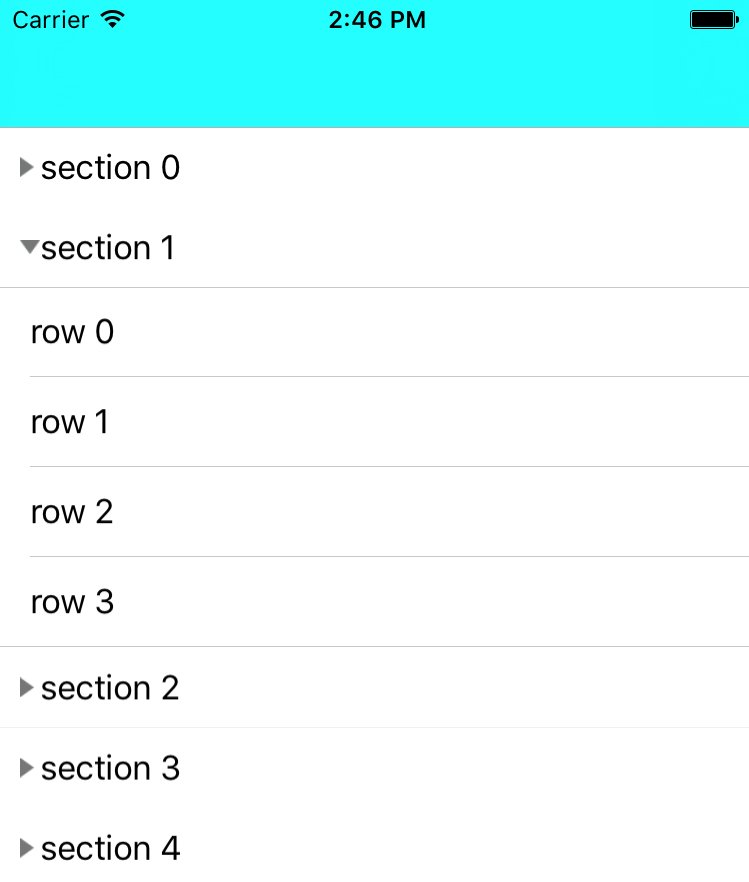
類似QQ分組的樣子,實現tableView的折疊與展開。其實要做這個效果我先想到的是在tableView中再嵌套多個tableView,這個想法實現起來就有點難了。所以還
 [搭建環境]React Native初嘗Mark筆記(Mac版+Android)
一、先在中文官網官網地址找到教案。二、Homebrew裝上(mac版本直接輸入下面的命令)。/usr/bin/ruby -e "$(curl -fsSL htt
 AIDL隨記(綁定本地和遠程service)
本文講述aidl的簡單使用首先我們來看綁定本地service的用法:第一步:創建接口和實體類public interface IController { publi