編輯:關於Android編程
前言
由於Android自帶的TextView控件沒有提供傾斜的(我暫時沒有找到),我們可以自定義控件來實現,下面首先來看我們實現的效果圖。
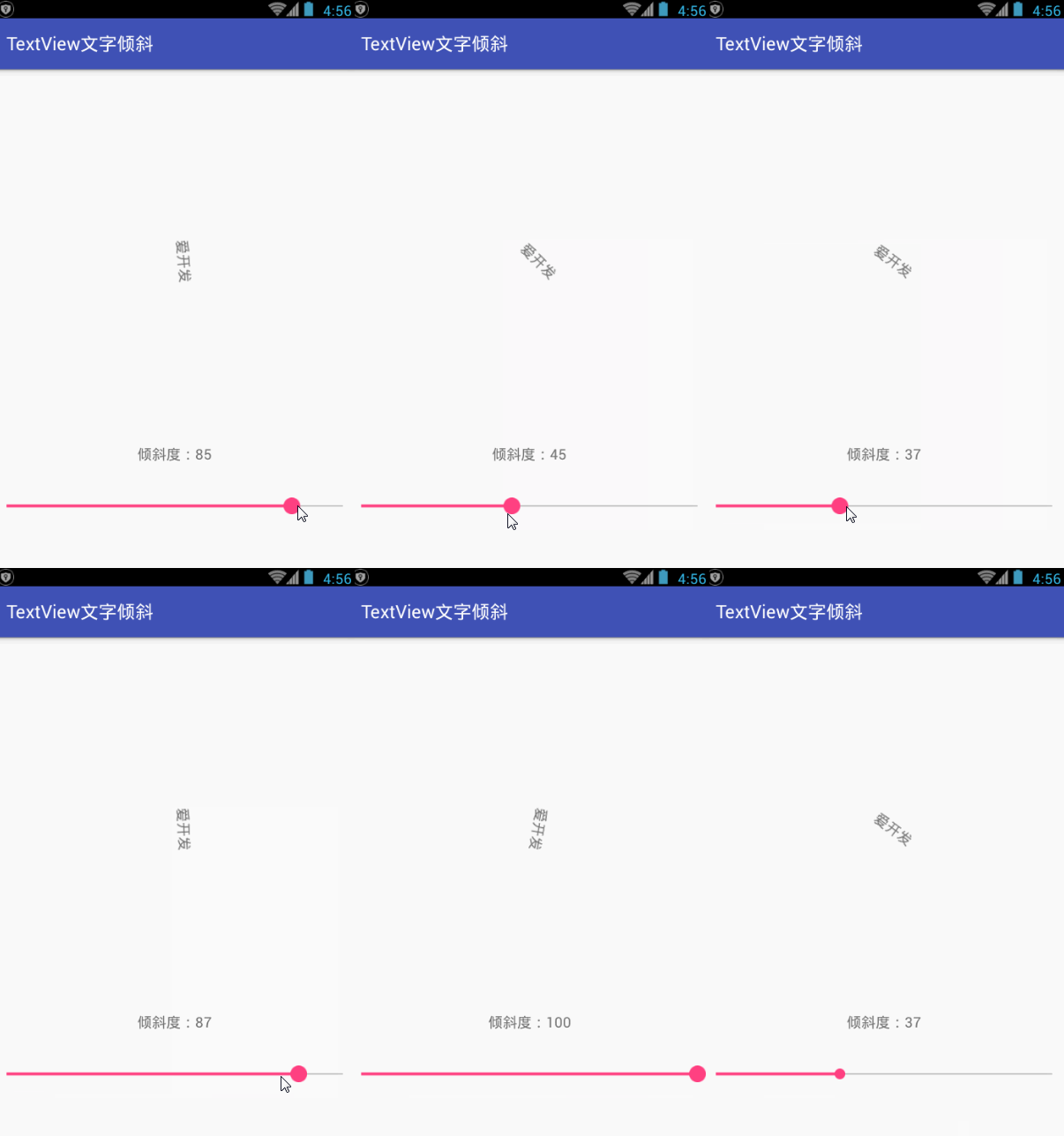
TextView文字傾斜
其實實現很簡單,下面我們來看實現步驟:
1、新建一個類 LeanTextView繼承TextView
public class LeanTextView extends TextView {
  public int getmDegrees() {
    return mDegrees;
  }

  public void setmDegrees(int mDegrees) {
    this.mDegrees = mDegrees;
    invalidate();
  }

  private int mDegrees;

  public LeanTextView(Context context) {
    super(context, null);
  }

  public LeanTextView(Context context, AttributeSet attrs) {
    super(context, attrs, android.R.attr.textViewStyle);
    this.setGravity(Gravity.CENTER);
    TypedArray a = context.obtainStyledAttributes(attrs, R.styleable.LeanTextView);
    mDegrees = a.getDimensionPixelSize(R.styleable.LeanTextView_degree, 0);
    a.recycle();
  }

  @Override
  protected void onMeasure(int widthMeasureSpec, int heightMeasureSpec) {
    super.onMeasure(widthMeasureSpec, heightMeasureSpec);
    setMeasuredDimension(getMeasuredWidth(), getMeasuredWidth());
  }

  @Override
  protected void onDraw(Canvas canvas) {
    canvas.save();
    canvas.translate(getCompoundPaddingLeft(), getExtendedPaddingTop());
    canvas.rotate(mDegrees, this.getWidth() / 2f, this.getHeight() / 2f);
    super.onDraw(canvas);
    canvas.restore();
  }
}
2、在values文件中新建styleable.xml
<?xml version="1.0" encoding="utf-8"?>
<resources>
  <declare-styleable name="LeanTextView">
    <attr name="degree" format="dimension" />
  </declare-styleable>
</resources>
3、頁面布局,引用自定義控件
  <com.aikaifa.LeanTextView
    android:id="@+id/lean"
    android:layout_width="match_parent"
    android:layout_height="wrap_content"
    android:padding="10dp"
    android:text="愛開發" />
這裡我們用TextView記錄傾斜的角度,用SeekBar動態改變角度
  <com.aikaifa.LeanTextView
    android:id="@+id/lean"
    android:layout_width="match_parent"
    android:layout_height="wrap_content"
    android:padding="10dp"
    android:text="愛開發" />

  <TextView
    android:id="@+id/degrees"
    android:layout_width="match_parent"
    android:layout_height="wrap_content"
    android:padding="10dp"
    android:gravity="center"/>

  <SeekBar
    android:id="@+id/sb_lean"
    android:layout_width="match_parent"
    android:layout_marginTop="20dp"
    android:layout_height="wrap_content"
    android:max="100"
    android:progress="30" />
java代碼
    mText= (LeanTextView) findViewById (R.id.lean);
    degrees= (TextView) findViewById (R.id.degrees);
    SeekBar sbLean = (SeekBar) findViewById(R.id.sb_lean);
    sbLean.setOnSeekBarChangeListener(new SeekBar.OnSeekBarChangeListener() {
      @Override
      public void onProgressChanged(SeekBar seekBar, int progress, boolean fromUser) {
        mText.setmDegrees(progress);
        degrees.setText("傾斜度:"+progress);
      }

      @Override
      public void onStartTrackingTouch(SeekBar seekBar) {

      }

      @Override
      public void onStopTrackingTouch(SeekBar seekBar) {

      }
    });
這樣關於TextView 文字傾斜的自定義控件就算基本完成了,是不是很簡單。
項目結構圖:
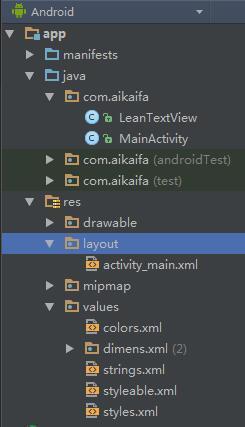
TextView文字傾斜項目結構圖
總結
以上就是這篇文章的全部內容了,希望本文的內容對各位Android開發者們能有所幫助,如果有疑問大家可以留言交流。
 Android Ubuntu平台下ADB驅動的安裝
1. 確保設備已經連接正常 首先需要取得root權限,這個沒啥說的。然後用lsusb命令列一下所有USB設備,如下圖所示: 這裡可以比較清楚的看到有一個設
 Android實現批量照片上傳至服務器,拍照或者從相冊選擇
最近由於項目需求,需要完成批量照片上傳,折騰了一段時間,終於完成了,達到了如下效果 package com.qian.pos;
 Android自定義控件實現底部菜單(下)
在app中經常會用到底部菜單的控件,每次都需要寫好多代碼,今天我們用到了前幾篇博客裡的控件來進一步封裝底部菜單。先看效果圖:主要包括以下功能: 1 設置icon以及點擊之
 android項目 之 記事本(13) ----- 查看圖片及播放錄音
本文是自己學習所做筆記,歡迎轉載,但請注明出處:http://blog.csdn.net/jesson20121020 今天就來實現下查看圖片及