編輯:關於Android編程
本文實例講述了Android實現有道辭典查詢功能的方法。分享給大家供大家參考,具體如下:
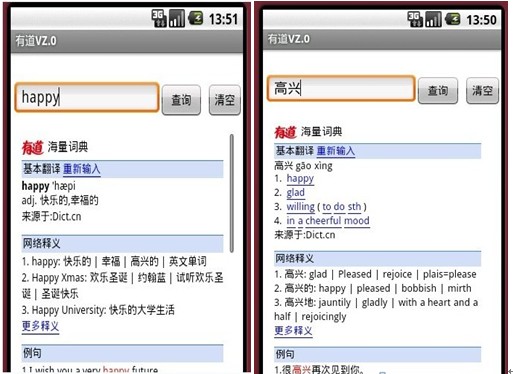
這是我做的一個簡單的有道Android的DEMO,只是簡單的雛形。界面設計也有點丑陋呵呵~ 看看下面的效果圖:
第一步:思路解析
從界面看一共用了三個控件EditText,Button,WebView。其實是四個,是當我們查詢內容為空的時候用來提示的Toast控件。
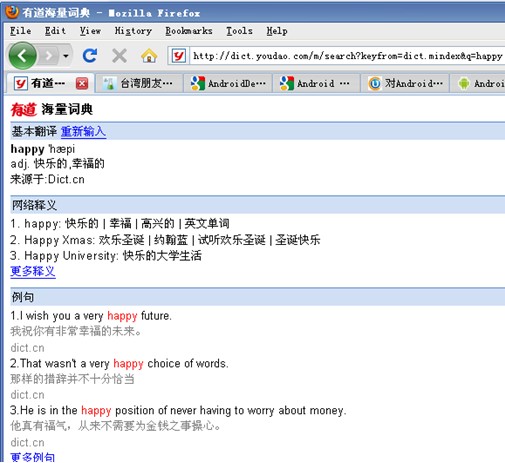
我們在EditText輸入查詢內容,這裡包括中文,英文。然後通過參數的形式,從http://dict.youdao.com/m取出數據把結果
存放在WebView裡。
如下圖所示:
第二步:入手程序
首先是布局界面main.xml
<?xml version="1.0" encoding="utf-8"?>
<AbsoluteLayout
 xmlns:android="http://schemas.android.com/apk/res/android"
 android:orientation="vertical"
 android:layout_width="fill_parent"
 android:layout_height="fill_parent"
 >
 <!-- 建立一個EditText -->
 <EditText
 android:id="@+id/myEditText1"
 android:layout_width="200px"
 android:layout_height="40px"
 android:textSize="18sp"
 android:layout_x="5px"
 android:layout_y="32px"
 />
 <!-- 建立一個Button -->
 <Button
 android:id="@+id/myButton01"
 android:layout_width="60px"
 android:layout_height="40px"
 android:text="查詢"
 android:layout_x="205px"
 android:layout_y="35px"
 />
<Button
  android:id="@+id/myButton02"
  android:layout_height="40px"
  android:layout_width="50px"
  android:text="清空"
  android:layout_y="35px"
  android:layout_x="270px"
 />
 <!-- 建立一個WebView -->
 <WebView
 android:id="@+id/myWebView1"
 android:layout_height="330px"
 android:layout_width="300px"
 android:layout_x="7px"
 android:layout_y="90px"
 android:background="@drawable/black"
 android:focusable="false"
 />
</AbsoluteLayout>
其次是主類YouDao.Java
package AndroidApplication.Instance;
import android.app.Activity;
import android.os.Bundle;
import android.view.View;
import android.webkit.WebView;
import android.widget.Button;
import android.widget.EditText;
import android.widget.Toast;
public class YouDao extends Activity
{
 //查詢按鈕申明
 private Button myButton01;
 //清空按鈕申明
 private Button myButton02;
 //輸入框申明
 private EditText mEditText1;
 //加載數據的WebView申明
 private WebView mWebView1;
 public void onCreate(Bundle savedInstanceState)
 {
  super.onCreate(savedInstanceState);
  setContentView(R.layout.main);
  //獲得布局的幾個控件
  myButton01 = (Button)findViewById(R.id.myButton01);
  myButton02 = (Button) findViewById(R.id.myButton02);
  mEditText1 = (EditText) findViewById(R.id.myEditText1);
  mWebView1 = (WebView) findViewById(R.id.myWebView1);
  //查詢按鈕添加事件
  myButton01.setOnClickListener(new Button.OnClickListener()
  {
   public void onClick(View arg0)
    {
     String strURI = (mEditText1.getText().toString());
     strURI = strURI.trim();
     //如果查詢內容為空提示
     if (strURI.length() == 0)
     {
      Toast.makeText(YouDao.this, "查詢內容不能為空!", Toast.LENGTH_LONG)
        .show();
     }
     //否則則以參數的形式從http://dict.youdao.com/m取得數據,加載到WebView裡.
     else
     {
      String strURL = "http://dict.youdao.com/m/search?keyfrom=dict.mindex&q="
        + strURI;
      mWebView1.loadUrl(strURL);
     }
    }
  });
  //清空按鈕添加事件,將EditText置空
  myButton02.setOnClickListener(new Button.OnClickListener()
  {
   public void onClick(View v)
   {
    mEditText1.setText("");
   }
  });
 }
}
程序大功告成。其實大家會發現,這個應用相當簡單,只是你們沒有想到而已,Narcissism一下呵呵~。
更多關於Android相關內容感興趣的讀者可查看本站專題:《Android開發入門與進階教程》、《Android視圖View技巧總結》、《Android編程之activity操作技巧總結》、《Android操作SQLite數據庫技巧總結》、《Android操作json格式數據技巧總結》、《Android數據庫操作技巧總結》、《Android文件操作技巧匯總》、《Android編程開發之SD卡操作方法匯總》、《Android資源操作技巧匯總》及《Android控件用法總結》
希望本文所述對大家Android程序設計有所幫助。
 [Android]給EditText添加圖文hint
原因:有時候我們需要當沒有文字的時候背景顯示一個圖文混合的背景提示,這時候如果采用控件疊加的做法效率會很低,所以我們可以采用重載View的onDraw方法解決方案:這個是
 【造輪子系列】轉輪選擇工具——WheelView的改進
滑動的性能和流暢性有待提高,特別是快速滑動時的效果 沒有實現循環滾動的效果經過這一段時間的不斷改進,現在基本上已經比較完美了,接近ios鬧鐘的滾輪時間選擇器的效果了。下面
 android 自定義控件實現流式布局
什麼是流式布局呢?也不知道哪個高手把它稱之為流失布局,叫什麼不重要,重要的是要知道怎麼實現,今天就實現下這個功能,先看下圖什麼就知道是什麼是流式布局了,做過電商的app或
 Android Studio初體驗之啟動AVD模擬器異常:cannot set up guest memory 'pc.ram'
啟動AVD模擬器異常:Cannot set up guest memory ‘pc.ram’ 錯誤信息: HAX is working and emulator ru