編輯:關於Android編程
本文實例講述了Android TextView實現垂直滾動效果的方法。分享給大家供大家參考,具體如下:
在TextView中,如果文本很長,可能需要實現垂直滾動顯示文本的效果。這裡需要在XML布局文件中為TextView設置如下幾個屬性。
Android:scrollbars="vertical"
android:scrollbar
其中X為outsideOverlay或insideOverlay。
android:scrollbarFadeDuration="X"
其中X表示滾動條從出現到消失的時間,單位是毫秒。
下面是一個完整的XML代碼例子。
<?xml version="1.0" encoding="utf-8"?>
<LinearLayout xmlns:android="http://schemas.android.com/apk/res/android"
  android:orientation="vertical" android:layout_width="fill_parent"
  android:layout_height="fill_parent">
  <TextView
    android:id="@+id/textview"
    android:layout_width="fill_parent"
    android:layout_height="wrap_content"
    android:singleLine="false"
    android:maxLines="8"
    android:background="#FFF"
    android:textColor="#000"
    android:textSize="20dp"
    android:layout_margin="10dp"
    android:scrollbars="vertical"
    android:text="@string/big_text"
    android:scrollbar
    android:padding="10dp"
    android:scrollbarFadeDuration="2000" />
</LinearLayout>
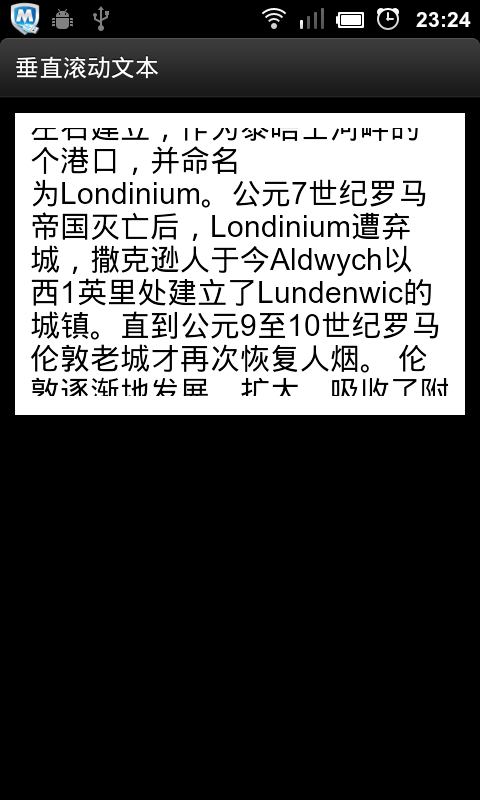
運行效果如下圖。
更多關於Android相關內容感興趣的讀者可查看本站專題:《Android滾動條與滾動操作技巧總結》、《Android圖形與圖像處理技巧總結》、《Android開發入門與進階教程》、《Android調試技巧與常見問題解決方法匯總》、《Android多媒體操作技巧匯總(音頻,視頻,錄音等)》、《Android基本組件用法總結》、《Android視圖View技巧總結》、《Android布局layout技巧總結》及《Android控件用法總結》
希望本文所述對大家Android程序設計有所幫助。
 Android 全局異常錯誤或崩潰捕捉
當出現崩潰,軟件不會閃退,會出現彈出一個對話框,異常錯誤信息會自動保存在sd卡crash這個文件夾下。後續需要還可以發送到服務器的。看效果圖。1、實現效果圖2、全局異常捕
 Android Sqlite數據庫常用操作
很久前也寫過一篇Android數據庫操作相關內容。在正式項目中,我們通常會使用數據庫開源框架如GreenDao來對數據庫進行操作。感覺很久沒有直接使用Sql語句了,這幾天
 安卓(Android)手機拔號盤你所不知道的功能
如果大家有過維修手機的經歷,就會發現,維修師傅經常會在手機的拔號盤裡輸入一串數字字母,然後屏幕就會出現你以前從來都沒有見過的菜單,大家這時不必驚訝,其實那不
 ScrollView嵌套ListView滑動沖突的解決方法
ScrollView和ListView這兩個控件想必大家都不會陌生,但是這兩者嵌套使用的時候就會出現麻煩。比如,我們如果想在ListView下面添加其他的布局或者控件,然