編輯:關於Android編程
本文實例講述了Android編程開發之RadioGroup用法。分享給大家供大家參考,具體如下:
RadioGroup 有時候比較有用.主要特征是給用戶提供多選一機制。
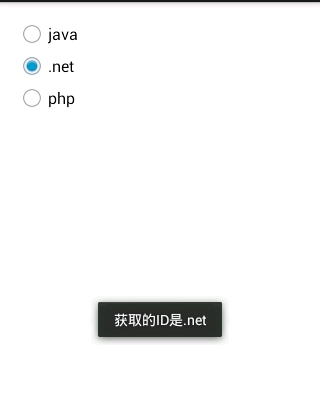
MainActivity.java
package com.example.lesson16_radio;
import android.app.Activity;
import android.os.Bundle;
import android.widget.RadioButton;
import android.widget.RadioGroup;
import android.widget.Toast;
public class MainActivity extends Activity {
 private RadioGroup group_temo;
 private RadioButton checkRadioButton;
 @Override
 protected void onCreate(Bundle savedInstanceState) {
  super.onCreate(savedInstanceState);
  setContentView(R.layout.activity_main);
  group_temo = (RadioGroup) findViewById(R.id.radioGroup1);
  // 改變默認選項
  group_temo.check(R.id.radio1);
  // 獲取默認被被選中值
  checkRadioButton = (RadioButton) group_temo.findViewById(group_temo
    .getCheckedRadioButtonId());
  Toast.makeText(this, "默認的選項的值是:" + checkRadioButton.getText(),
    Toast.LENGTH_LONG).show();
  // 注冊事件
  group_temo
    .setOnCheckedChangeListener(new RadioGroup.OnCheckedChangeListener() {
     @Override
     public void onCheckedChanged(RadioGroup group, int checkedId) {
      // 點擊事件獲取的選擇對象
      checkRadioButton = (RadioButton) group_temo
        .findViewById(checkedId);
      Toast.makeText(getApplicationContext(),
        "獲取的ID是" + checkRadioButton.getText(),
        Toast.LENGTH_LONG).show();
     }
    });
 }
}
布局文件
<RelativeLayout xmlns:android="http://schemas.android.com/apk/res/android"
 xmlns:tools="http://schemas.android.com/tools"
 android:layout_width="match_parent"
 android:layout_height="match_parent"
 android:paddingBottom="@dimen/activity_vertical_margin"
 android:paddingLeft="@dimen/activity_horizontal_margin"
 android:paddingRight="@dimen/activity_horizontal_margin"
 android:paddingTop="@dimen/activity_vertical_margin"
 tools:context=".MainActivity" >
 <RadioGroup
  android:id="@+id/radioGroup1"
  android:layout_width="wrap_content"
  android:layout_height="wrap_content"
  android:layout_alignParentLeft="true"
  android:layout_alignParentRight="true"
  android:layout_alignParentTop="true" >
  <RadioButton
   android:id="@+id/radio0"
   android:layout_width="wrap_content"
   android:layout_height="wrap_content"
   android:checked="true"
   android:text="@string/text_java" />
  <RadioButton
   android:id="@+id/radio1"
   android:layout_width="wrap_content"
   android:layout_height="wrap_content"
   android:text="@string/text_net" />
  <RadioButton
   android:id="@+id/radio2"
   android:layout_width="wrap_content"
   android:layout_height="wrap_content"
   android:text="@string/text_php" />
 </RadioGroup>
</RelativeLayout>
希望本文所述對大家Android程序設計有所幫助。
 Android打造屬於自己的時間鐘表
1、概述本文主要講解的是如何自定義一個時間鐘表,通過簡單的練習可以簡單學習Android當中自定義view的一些常用繪圖技巧,優化android繪圖操作。言歸正傳,首先看
 Android利用異步任務AsyncTask發送post請求獲取json數據
AsyncTask,是android提供的輕量級的異步類,可以直接繼承AsyncTask,在類中實現異步操作,並提供接口反饋當前異步執行的程度(可以通過接口實現UI進度更
 android自定義View實現圖片上傳進度顯示(仿手機QQ上傳效果)
首先看下我們想要實現的效果如下圖(qq聊天中發送圖片時的效果):再看一下我實現的效果: 1、效果已經看見了,下面我們來實現它。首先我創建一個android工程P
 調試 Android* x86 應用程序的方法以及要使用的工具
1.簡介 眾所周知,Android* 開發人員頭頂許多稱呼:設計員、程序猿等,並且通常會不可避免地被稱為故障檢修工。代碼中的錯誤無法避免,因此