編輯:關於Android編程
本文實例為大家分享了Android普通購物車制作過程,供大家參考,具體內容如下
1.最新項目新增了類似購物車功能,如下圖所示:

當時剛看到此頁面的時候,第一反應是利用 ListView嵌套Listview,經過一番操作最終也實現了此功能。當時也沒有考慮性能問題,只考慮能寫出來。後來嵌套數據,當數據量較大時,滑動Listview可以明顯感覺到卡頓,這對用戶來說是很難忍受的,所以才有了找到替代方案的想法,看到網上主流的是用ExpandableListView來實現此功能,所以我也用此方案來寫一下。
2.成型後的Demo,如下圖所示:
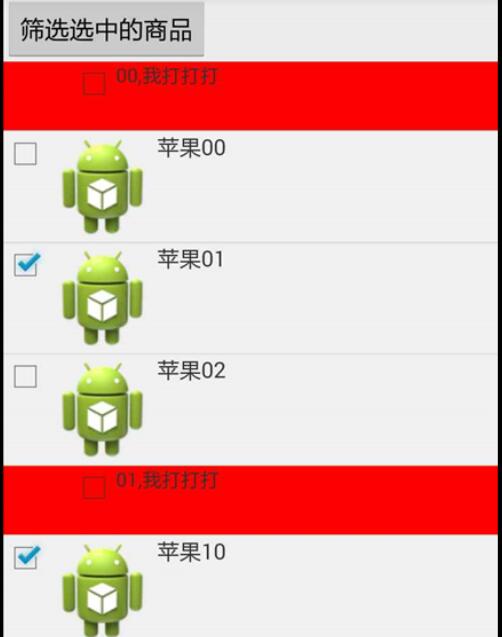
3.思路:
1).選用ExpandableListView作為控件
2).給每個數據源添加一個選中標志,isChecked,根據ischecked,控制checkbox的狀態;
ExpandableListView相關普及
#1.首先看下ExpandableListView的adapter,與普通的ListView adapter不同
public class MyExpandAdapter extends BaseExpandableListAdapter {
//紅色部分的數據源
List<OrderDetailsEntity> group_head = new ArrayList();
//內層部分數據源
List<List<ProductDetails>> child = new ArrayList();
Context context;
LayoutInflater inflater;

public MyExpandAdapter(Context content) {
 // 初始化組、子列表項
 group_head = new ArrayList<OrderDetailsEntity>();
 child = new ArrayList<List<ProductDetails>>();
 inflater = LayoutInflater.from(context);
}

public MyExpandAdapter(Context context, List<OrderDetailsEntity> group_head, List<List<ProductDetails>> child) {
 this.context = context;
 // 初始化組、子列表項
 this.group_head = group_head;
 this.child = child;
 inflater = LayoutInflater.from(context);
}
/****************************跟普通adapter一樣******************************/
@Override
public int getGroupCount() {
 return this.group_head.size();
}

@Override
public int getChildrenCount(int position) {
 if (position < 0 || position >= this.child.size())
 return 0;
 return child.get(position).size();
}

@Override
public OrderDetailsEntity getGroup(int groupPosition) {
 return group_head.get(groupPosition);
}

@Override
public ProductDetails getChild(int groupPosition, int childPosition) {

 return child.get(groupPosition).get(childPosition);
}

@Override
public long getGroupId(int groupPosition) {
 return groupPosition;
}

@Override
public long getChildId(int groupPosition, int childPosition) {
 return childPosition;
}
/**************************************************************************/
@Override
public boolean hasStableIds() {
//分組和子選項是否持有穩定的ID, 就是說底層數據的改變會不會影響到它們
 return true;
}

private boolean isSelectAll(OrderDetailsEntity entity) {
 int count = 0;
 for (ProductDetails p : entity.getProductDetails()) {
 if (p.isChecked()) {
 count++;
 }
 }

 return entity.getProductDetails().size() == count;
}

/*************************與普通adapter的getView方法一樣**********************/
@Override
public View getGroupView(int groupPosition, boolean isExpanded, View convertView, ViewGroup parent) {
 ViewHolderGroup group;
 if (convertView == null) {
 convertView = inflater.inflate(R.layout.item, parent, false);
 group = new ViewHolderGroup();
 group.cb_all = (CheckBox) convertView.findViewById(R.id.cb_checkAll);
 group.tv_name = (TextView) convertView.findViewById(R.id.tv_name);
 convertView.setTag(group);
 } else {
 group = (ViewHolderGroup) convertView.getTag();
 }
 group.tv_name.setText(
 group_head.get(groupPosition).getMemberId() + "," + group_head.get(groupPosition).getShopName());
 group.cb_all.setChecked(isSelectAll(getGroup(groupPosition)));
 return convertView;
}

@Override
public View getChildView(int groupPosition, int childPosition, boolean isLastChild, View convertView,
 ViewGroup parent) {
 ViewHolderChild childV;
 if (convertView == null) {
 convertView = inflater.inflate(R.layout.item_inner, parent, false);
 childV = new ViewHolderChild();
 childV.cb = (CheckBox) convertView.findViewById(R.id.cb_check);
 childV.iv = (ImageView) convertView.findViewById(R.id.iv_img);
 childV.name = (TextView) convertView.findViewById(R.id.name);
 convertView.setTag(childV);
 } else {
 childV = (ViewHolderChild) convertView.getTag();
 }

 childV.name.setText(getChild(groupPosition, childPosition).getProductName());
 childV.cb.setChecked(getChild(groupPosition, childPosition).isChecked());

 return convertView;
}

/****************************************************************************/

@Override
public boolean isChildSelectable(int groupPosition, int childPosition) {
 //// 指定位置的子視圖是否可選擇。
 // 調用Activity裡的ChildSelect方法
 // Toast.makeText(context, "gp="+groupPosition+",cp="+childPosition,
 // Toast.LENGTH_LONG).show();
 return true;
}

static class ViewHolderGroup {
 CheckBox cb_all;
 TextView tv_name;
}

static class ViewHolderChild {
 CheckBox cb;
 ImageView iv;
 TextView name;
}
}
#2.ExpandableListView 展開
for (int i = 0; i < adapter.getGroupCount(); i++) {
sp_date_list.expandGroup(i);
}
3).ExpandableListView 去掉默認圖標
sp_date_list.setGroupIndicator(null);
4).ExpandableListView itemClick事件處理
1. setOnChildClickListener
2. setOnGroupClickListener
3. setOnGroupCollapseListener
4. setOnGroupExpandListener
通過方法名我們就能知道各自的用途,它們分別設置單擊子選項、單擊分組項、分組合並、分組展開的監聽器。
// 設置分組項的點擊監聽事件
expandableListView.setOnGroupClickListener(new ExpandableListView.OnGroupClickListener() {
@Override
public boolean onGroupClick(ExpandableListView expandableListView, View view, int i, long l) {
 Toast.makeText(getApplicationContext(), groupStrings[i], Toast.LENGTH_SHORT).show();
 //如果處理事件,return true,默認return false
 return false;
}
// 設置子選項點擊監聽事件
expandableListView.setOnChildClickListener(new ExpandableListView.OnChildClickListener() {
@Override
public boolean onChildClick(ExpandableListView parent, View v, int groupPosition, int childPosition, long id) {
 Toast.makeText(getApplicationContext(), childStrings[groupPosition][childPosition], Toast.LENGTHshow();
 return true;
}
});
以上就是本文的全部內容,希望對大家的學習有所幫助,也希望大家多多支持本站。
 Android應用中使用ViewPager實現類似QQ的界面切換效果
這幾天在研究ViewPager,簡單的寫一下如何使用ViewPager實現類似於QQ的“最近聯系人、好友、群組”的界面切換(不知道他們是不是用這個方法實現的)。ViewP
 Android與設計模式——觀察者(Observer)模式
在閻宏博士的《JAVA與模式》一書中開頭是這樣描述觀察者(Observer)模式的: 觀察者模式是對象的行為模式,又叫發布-訂閱(Publish/Subscribe
 Android隨手筆記44之JSON數據解析
JSON(JavaScript Object Notation)是一種輕量級的數據交換格式,采用完全獨立於語言的文本格式,為Web應用開發提供了一種理想的數據交換格式。
 20.5 語音合成(百度2016年2月29日發布的tts引擎)
一、簡介編寫手機App時,有時需要使用文字轉語音(Text to Speech)的功能,比如開車時閱讀收到的短信、導航語音提示、界面中比較重要的信息通過語音強調、……等。