編輯:關於Android編程
一、簡介
編寫手機App時,有時需要使用文字轉語音(Text to Speech)的功能,比如開車時閱讀收到的短信、導航語音提示、界面中比較重要的信息通過語音強調、……等。
由於Android自帶的Pico TTS並不支持中文,所以要既能閱讀中文文本,還能閱讀英文文本,必須下載第三方提供的能說中文的語音包。
二、申請百度tts授權
本節以百度2016年2月29日發布的“離在線融合語音合成SDK_Android 2.2.3版”為例說明用C#實現語音合成的基本用法。之所以選擇百度語音合成來實現,是因為據百度官網聲明,該開發包是“永久免費”的。網址如下:
http://yuyin.baidu.com/tts/
由於原來已經申請過MyDemos的授權,所以再繼續申請tts授權就比較簡單了,申請和設置步驟如下。
1、申請授權
進入 http://yuyin.baidu.com/tts/ 的首頁:
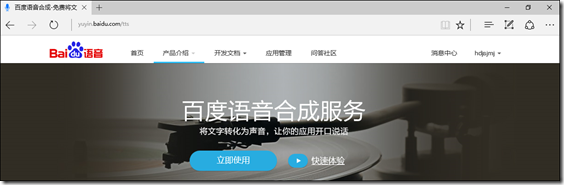
單擊【立即使用】,進入“開通語音合成服務”的頁面:
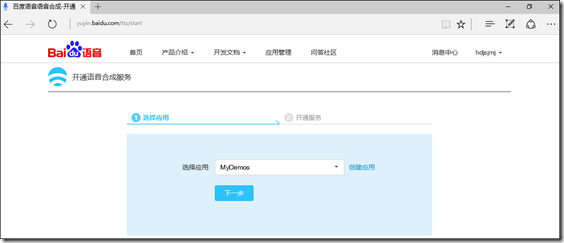
在下拉框中選擇原來已經申請的某個應用,單擊【下一步】,然後按提示操作,開通離線服務即可。
2、在BdMapV371BindingLib項目中轉換JAR文件
先通過 http://yuyin.baidu.com/tts/ 首頁中的【相關下載】下載對應的開發包,然後再按下面的步驟操作。
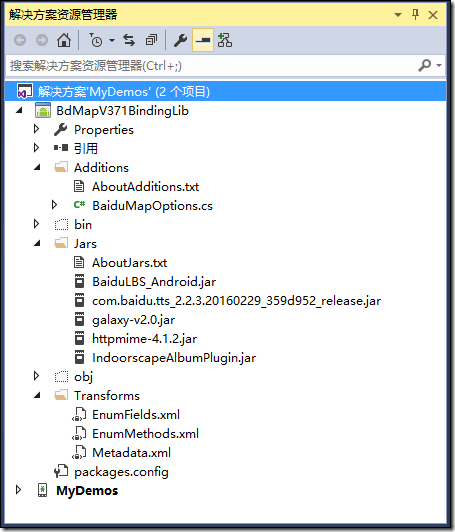
1、將示例中的com.baidu.tts_2.2.3.20160229_359d952_release.jar、galaxy-v2.0.jar添加到Jars文件夾下,如下圖所示,然後將其【生成操作】屬性全部設置為“EmbeddedJar”。
2、在Metadata.xml文件中添加下面的語句:
<remove-node path="/api/package[@name='com.baidu.tts.aop']/interface[@name='IProxyFactory']/method[@name='createProxied' and count(parameter)=0]" />
3、重新生成項目,此時應該無錯誤。
經過這3個步驟,就完成了tts的Jar包導入和轉換為.cs文件的過程。
3、在MyDemos項目中添加.so文件
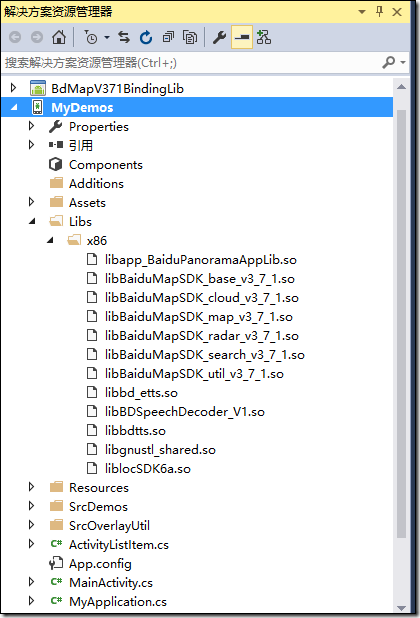
將tts相關的4個.so文件添加到MyDemos項目的x86文件夾下,如下圖所示,然後將其【生成操作】屬性全部設置為“AndroidNativeLibrary”。
4、將.dat文件添加到sd卡的BaiduTTS文件夾下
具體添加辦法見【常見問題解答】,這裡不再截圖。
也可以先將這些文件添加到Assets文件夾下,然後通過代碼將其復制到sd卡的文件夾下。為簡化起見,這裡通過手工直接復制了。
OK,經過上面這4步,以後就可以在MyDemos項目中的任何模塊中輕松利用百度tts實現語音閱讀的功能了
三、示例
1、運行截圖
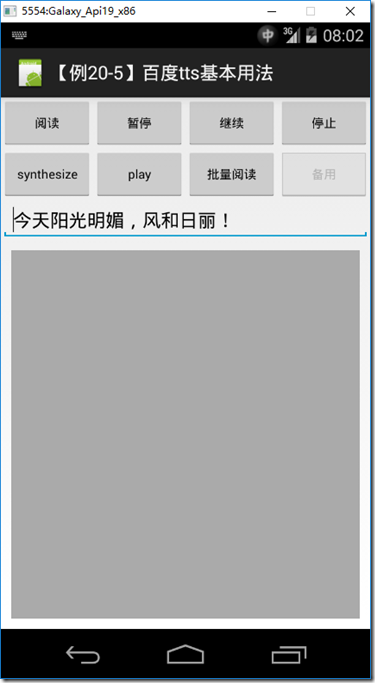
單擊【閱讀】,就會自動用女音朗讀文本框中的內容,單擊【批量閱讀】,就會依次朗讀隊列中添加的文字段(主要是為了演示閱讀各種不同的中英文短句)。
2、設計步驟
(1)添加ch2005Main.axml
<?xml version="1.0" encoding="utf-8"?>
<LinearLayout xmlns:android="http://schemas.android.com/apk/res/android"
android:layout_width="match_parent"
android:layout_height="match_parent"
android:orientation="vertical">
<LinearLayout
android:layout_width="fill_parent"
android:layout_height="50dp"
android:orientation="horizontal"
android:weightSum="4">
<Button
android:id="@+id/speak"
android:layout_width="fill_parent"
android:layout_height="fill_parent"
android:layout_weight="1"
android:lines="2"
android:text="閱讀"
android:textSize="12dp" />
<Button
android:id="@+id/pause"
android:layout_width="fill_parent"
android:layout_height="fill_parent"
android:layout_weight="1"
android:lines="2"
android:text="暫停"
android:textSize="12dp" />
<Button
android:id="@+id/resume"
android:layout_width="fill_parent"
android:layout_height="fill_parent"
android:layout_weight="1"
android:lines="2"
android:text="繼續"
android:textSize="12dp" />
<Button
android:id="@+id/stop"
android:layout_width="fill_parent"
android:layout_height="fill_parent"
android:layout_weight="1"
android:lines="2"
android:text="停止"
android:textSize="12dp" />
</LinearLayout>
<LinearLayout
android:layout_width="fill_parent"
android:layout_height="50dp"
android:orientation="horizontal"
android:weightSum="4">
<Button
android:id="@+id/synthesize"
android:layout_width="fill_parent"
android:layout_height="fill_parent"
android:layout_weight="1"
android:lines="2"
android:text="synthesize"
android:textSize="12dp" />
<Button
android:id="@+id/play"
android:layout_width="fill_parent"
android:layout_height="fill_parent"
android:layout_weight="1"
android:lines="2"
android:text="play"
android:textSize="12dp" />
<Button
android:id="@+id/batchSpeak"
android:layout_width="fill_parent"
android:layout_height="fill_parent"
android:layout_weight="1"
android:lines="2"
android:text="批量閱讀"
android:textSize="12dp" />
<Button
android:id="@+id/nextActivity"
android:layout_width="fill_parent"
android:layout_height="fill_parent"
android:layout_weight="1"
android:lines="2"
android:enabled="false"
android:text="備用"
android:textSize="12dp" />
</LinearLayout>
<EditText
android:id="@+id/input"
android:layout_width="fill_parent"
android:layout_height="wrap_content"
android:hint="input" />
<TextView
android:id="@+id/showText"
android:layout_width="fill_parent"
android:layout_height="fill_parent"
android:layout_margin="10dp"
android:background="@android:color/darker_gray"
android:minLines="3"
android:scrollbars="vertical" />
</LinearLayout>
2、添加ch2005MainActivity.cs
using System;
using System.Collections.Generic;
using System.Linq;
using System.Text;
using Android.App;
using Android.OS;
using Android.Widget;
using Com.Baidu.Tts.Client;
using Com.Baidu.Tts.Answer.Auth;
namespace MyDemos.SrcDemos
{
[Activity(Label = "【例20-5】百度tts基本用法")]
public class ch2005MainActivity : Activity, ISpeechSynthesizerListener
{
private EditText mInput;
private TextView mShowText;
private SpeechSynthesizer mSpeechSynthesizer;
/// <summary>
/// sd卡上保存百度tts文件的路徑
/// </summary>
private string mSampleDirPath;
private const string SpeechFemaleModelName = "bd_etts_speech_female.dat";
private const string SpeechMaleModelName = "bd_etts_speech_male.dat";
private const string TextModelName = "bd_etts_text.dat";
private const string EnglishSpeechFemaleModelName = "bd_etts_speech_female_en.dat";
private const string EnglishSpeechMaleModelName = "bd_etts_speech_male_en.dat";
private const string EnglishTextModelName = "bd_etts_text_en.dat";
protected override void OnCreate(Bundle savedInstanceState)
{
base.OnCreate(savedInstanceState);
SetContentView(Resource.Layout.ch2005Main);
mSampleDirPath = Android.OS.Environment.ExternalStorageDirectory.Path + "/baiduTTS";
Console.WriteLine("mSampleDirPath=" + mSampleDirPath);
initialView();
initialTts();
}
private void initialTts()
{
mSpeechSynthesizer = SpeechSynthesizer.Instance;
mSpeechSynthesizer.SetContext(this);
mSpeechSynthesizer.SetSpeechSynthesizerListener(this);
// 文本模型文件路徑 (離線引擎使用)
mSpeechSynthesizer.SetParam(SpeechSynthesizer.ParamTtsTextModelFile,
mSampleDirPath + "/" + TextModelName);
// 聲學模型文件路徑 (離線引擎使用)
mSpeechSynthesizer.SetParam(SpeechSynthesizer.ParamTtsSpeechModelFile,
mSampleDirPath + "/" + SpeechFemaleModelName);
// 請替換為語音開發者平台上注冊應用得到的App ID (離線授權)
//mSpeechSynthesizer.SetAppId("your_app_id");
mSpeechSynthesizer.SetAppId(ch.TtsAppID);
// 請替換為語音開發者平台注冊應用得到的apikey和secretkey (在線授權)
//this.mSpeechSynthesizer.SetApiKey("your_api_key", "your_secret_key");
this.mSpeechSynthesizer.SetApiKey(ch.TtsApiKey, ch.TtsSecretKey);
// 發音人(在線引擎),可用參數為0,1,2,3。。。(服務器端會動態增加,各值含義參考文檔,以文檔說明為准。0--普通女聲,1--普通男聲,2--特別男聲,3--情感男聲。。。)
mSpeechSynthesizer.SetParam(SpeechSynthesizer.ParamSpeaker, "0");
// 設置Mix模式的合成策略
mSpeechSynthesizer.SetParam(SpeechSynthesizer.ParamMixMode, SpeechSynthesizer.MixModeDefault);
// 授權檢測接口(可以不使用,只是驗證授權是否成功)
AuthInfo authInfo = this.mSpeechSynthesizer.Auth(TtsMode.Mix);
if (authInfo.IsSuccess)
{
Console.WriteLine("授權檢測--授權成功(auth success)。");
}
else
{
string errorMsg = authInfo.TtsError.DetailMessage;
Console.WriteLine("授權檢測--授權失敗(auth failed),errorMsg=" + errorMsg);
}
// 初始化tts
mSpeechSynthesizer.InitTts(TtsMode.Mix);
// 加載離線英文資源(提供離線英文合成功能)
int result = mSpeechSynthesizer.LoadEnglishModel(
mSampleDirPath +
"/" + EnglishTextModelName, mSampleDirPath +
"/" + EnglishSpeechFemaleModelName);
}
private void initialView()
{
mInput = FindViewById<EditText>(Resource.Id.input);
mInput.Text = "今天陽光明媚,風和日麗!";
mShowText = FindViewById<TextView>(Resource.Id.showText);
var speak = FindViewById<Button>(Resource.Id.speak);
speak.Click += delegate
{
string text = this.mInput.Text;
int result = this.mSpeechSynthesizer.Speak(text);
if (result < 0)
{
System.Diagnostics.Debug.WriteLine("出錯了,錯誤碼:{0},請檢查百度tts文檔中對應錯誤碼的含義。", result);
}
};
var pause = FindViewById<Button>(Resource.Id.pause);
pause.Click += delegate
{
mSpeechSynthesizer.Pause();
};
var resume = FindViewById<Button>(Resource.Id.resume);
resume.Click += delegate
{
mSpeechSynthesizer.Resume();
};
var stop = FindViewById<Button>(Resource.Id.stop);
stop.Click += delegate
{
mSpeechSynthesizer.Stop();
};
var synthesize = FindViewById<Button>(Resource.Id.synthesize);
synthesize.Click += delegate
{
string text = this.mInput.Text;
int result = this.mSpeechSynthesizer.Synthesize(text);
if (result < 0)
{
System.Diagnostics.Debug.WriteLine("error,please look up error code in doc or URL:http://yuyin.baidu.com/docs/tts/122 ");
}
};
var play = FindViewById<Button>(Resource.Id.play);
play.Click += delegate { };
var batchSpeak = FindViewById<Button>(Resource.Id.batchSpeak);
batchSpeak.Click += delegate
{
List<SpeechSynthesizeBag> bags = new List<SpeechSynthesizeBag>();
bags.Add(GetSpeechSynthesizeBag("123456", "0"));
bags.Add(GetSpeechSynthesizeBag("你好", "1"));
bags.Add(GetSpeechSynthesizeBag("使用百度語音合成SDK", "2"));
bags.Add(GetSpeechSynthesizeBag("hello", "3"));
bags.Add(GetSpeechSynthesizeBag("這是一個demo工程", "4"));
int result = this.mSpeechSynthesizer.BatchSpeak(bags);
if (result < 0)
{
System.Diagnostics.Debug.WriteLine("error({0}),please look up error code in doc or URL:http://yuyin.baidu.com/docs/tts/122 ", result);
}
};
}
protected override void OnDestroy()
{
base.OnDestroy();
}
private SpeechSynthesizeBag GetSpeechSynthesizeBag(string text, string utteranceId)
{
SpeechSynthesizeBag speechSynthesizeBag = new SpeechSynthesizeBag();
speechSynthesizeBag.SetText(text);
speechSynthesizeBag.UtteranceId = utteranceId;
return speechSynthesizeBag;
}
public void OnError(string utteranceId, SpeechError error)
{
Console.WriteLine("onError error=" + error.Description + "--utteranceId=" + utteranceId);
}
public void OnSpeechFinish(string utteranceId)
{
Console.WriteLine("onSpeechFinish utteranceId=" + utteranceId);
}
public void OnSpeechProgressChanged(string p0, int p1)
{
//Console.WriteLine("onSpeechProgressChanged");
}
public void OnSpeechStart(string utteranceId)
{
Console.WriteLine("onSpeechStart utteranceId=" + utteranceId);
}
public void OnSynthesizeDataArrived(string utteranceId, byte[] data, int progress)
{
Console.WriteLine("onSynthesizeDataArrived");
}
public void OnSynthesizeFinish(string utteranceId)
{
Console.WriteLine("onSpeechFinish utteranceId=" + utteranceId);
}
public void OnSynthesizeStart(string utteranceId)
{
Console.WriteLine("onSynthesizeStart utteranceId=" + utteranceId);
}
}
}
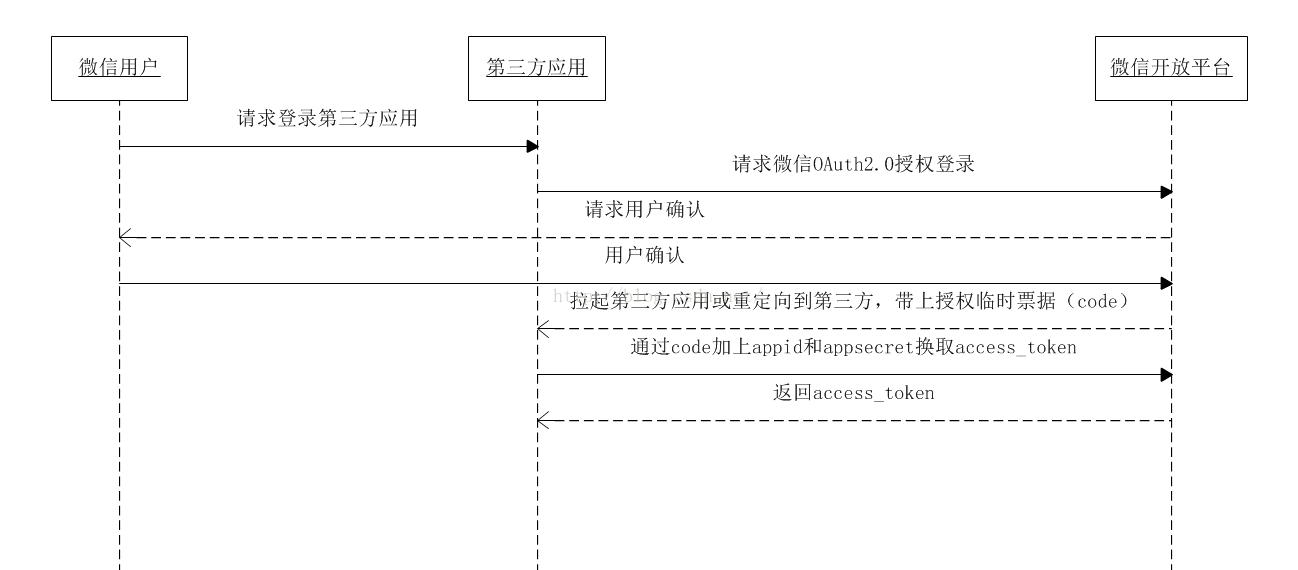 微信第三方登錄Android實現代碼
記錄一下微信第三方實現登錄的方法。還是比較簡單。一、必要的准備工作1.首先需要注冊並被審核通過的微信開放平台帳號,然後創建一個移動應用,也需要被審核;2.然後到資源中心下
 Android中屏幕密度和圖片大小的關系分析
前言 Android中支持許多資源,包括圖片(Bitmap),對應於bitmap的文件夾是drawable,除了drawable,還有drawable-ld
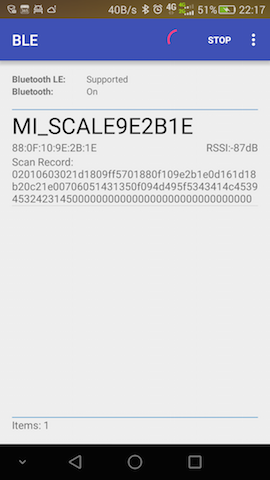 Android BLE基礎框架使用詳解
前言研究了一段時間的藍牙使用,發現網上相關的資料比較貧乏,不像其他Android相關資料那麼齊全,基本上大部分資料都是在藍牙聯盟SIG提供的官網https://www.b
 《Android源碼設計模式解析與實戰》讀書筆記(二十二)
第二十二章、享元模式 享元模式是結構型設計模式之一,是對對象池的一種實現。就像它的名字一樣,共享對象,避免重復的創建。我們常用的String 就是使用了共享模式,所以St