編輯:關於Android編程
前言
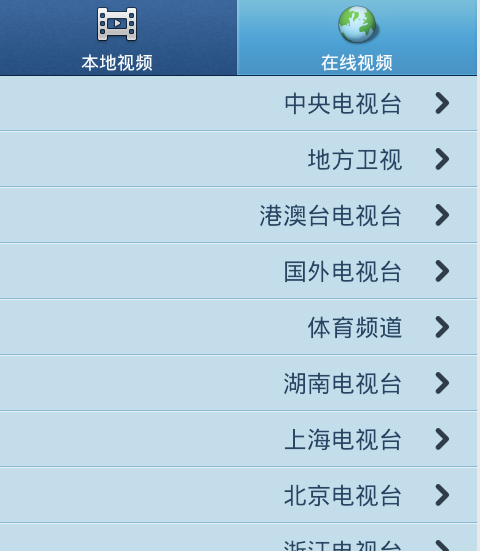
如果不想自己去找視頻看,以傳統方式看電視也不錯,比如CCTV、湖南衛視等。本章從網絡收集幾百個電視台的地址,采用多級分類方式呈現,極大豐富在線播放部分的內容。
系列
1、Android 使用Vitamio打造自己的萬能播放器(1)——准備
2、Android 使用Vitamio打造自己的萬能播放器(2)—— 手勢控制亮度、音量、縮放
3、Android 使用Vitamio打造自己的萬能播放器(3)——本地播放(主界面、視頻列表)
4、Android 使用Vitamio打造自己的萬能播放器(4)——本地播放(快捷搜索、數據存儲)
5、Android 使用Vitamio打造自己的萬能播放器(5)——在線播放(播放優酷視頻)
6、Android 使用Vitamio打造自己的萬能播放器(6)——在線播放(播放列表)
7、Android 使用Vitamio打造自己的萬能播放器(7)——在線播放(下載視頻)
8、Android 使用Vitamio打造自己的萬能播放器(8)——細節優化
正文
一、目標
以多級目錄分類方式在在線視頻欄目下添加電視台。

二、主要代碼
電視台的地址目前是存在XML文件裡,那麼本文代碼主要就是解析XML的數據了。
package com.nmbb.oplayer.ui.helper;

import java.io.IOException;
import java.util.ArrayList;

import javax.xml.parsers.DocumentBuilder;
import javax.xml.parsers.DocumentBuilderFactory;
import javax.xml.parsers.ParserConfigurationException;

import org.w3c.dom.Document;
import org.w3c.dom.Element;
import org.w3c.dom.NamedNodeMap;
import org.w3c.dom.Node;
import org.w3c.dom.NodeList;
import org.xml.sax.SAXException;

import android.content.Context;

import com.nmbb.oplayer.po.OnlineVideo;

/** 從XML讀取電視台節目 */
public class XmlReaderHelper {

  /** 獲取所有電視分類 */
  public static ArrayList<OnlineVideo> getAllCategory(final Context context) {
    ArrayList<OnlineVideo> result = new ArrayList<OnlineVideo>();
    DocumentBuilderFactory docBuilderFactory = null;
    DocumentBuilder docBuilder = null;
    Document doc = null;
    try {
      docBuilderFactory = DocumentBuilderFactory.newInstance();
      docBuilder = docBuilderFactory.newDocumentBuilder();
      // xml file 放到 assets目錄中的
      doc = docBuilder.parse(context.getResources().getAssets()
          .open("online.xml"));
      // root element
      Element root = doc.getDocumentElement();
      NodeList nodeList = root.getElementsByTagName("category");
      for (int i = 0; i < nodeList.getLength(); i++) {
        Node node = nodeList.item(i);// category
        OnlineVideo ov = new OnlineVideo();
        NamedNodeMap attr = node.getAttributes();
        ov.title = attr.getNamedItem("name").getNodeValue();
        ov.id = attr.getNamedItem("id").getNodeValue();
        ov.category = 1;
        ov.level = 2;
        ov.is_category = true;
        result.add(ov);
        // Read Node
      }
    } catch (IOException e) {
    } catch (SAXException e) {
    } catch (ParserConfigurationException e) {
    } finally {
      doc = null;
      docBuilder = null;
      docBuilderFactory = null;
    }
    return result;
  }

  /** 讀取分類下所有電視地址 */
  public static ArrayList<OnlineVideo> getVideos(final Context context,
      String categoryId) {
    ArrayList<OnlineVideo> result = new ArrayList<OnlineVideo>();
    DocumentBuilderFactory docBuilderFactory = null;
    DocumentBuilder docBuilder = null;
    Document doc = null;
    try {
      docBuilderFactory = DocumentBuilderFactory.newInstance();
      docBuilder = docBuilderFactory.newDocumentBuilder();
      // xml file 放到 assets目錄中的
      doc = docBuilder.parse(context.getResources().getAssets()
          .open("online.xml"));
      // root element
      Element root = doc.getElementById(categoryId);
      if (root != null) {
        NodeList nodeList = root.getChildNodes();
        for (int i = 0, j = nodeList.getLength(); i < j; i++) {
          Node baseNode = nodeList.item(i);

          if (!"item".equals(baseNode.getNodeName()))
            continue;
          String id = baseNode.getFirstChild().getNodeValue();
          if (id == null)
            continue;
          OnlineVideo ov = new OnlineVideo();
          ov.id = id;

          Element el = doc.getElementById(ov.id);
          if (el != null) {
            ov.title = el.getAttribute("title");
            ov.icon_url = el.getAttribute("image");
            ov.level = 3;
            ov.category = 1;
            NodeList nodes = el.getChildNodes();
            for (int m = 0, n = nodes.getLength(); m < n; m++) {
              Node node = nodes.item(m);
              if (!"ref".equals(node.getNodeName()))
                continue;
              String href = node.getAttributes()
                  .getNamedItem("href").getNodeValue();
              if (ov.url == null) {
                ov.url = href;
              } else {
                if (ov.backup_url == null)
                  ov.backup_url = new ArrayList<String>();
                ov.backup_url.add(href);
              }
            }
            if (ov.url != null)
              result.add(ov);
          }
        }
      }
    } catch (IOException e) {
      e.printStackTrace();
    } catch (SAXException e) {
      e.printStackTrace();
    } catch (ParserConfigurationException e) {
      e.printStackTrace();
    } finally {
      doc = null;
      docBuilder = null;
      docBuilderFactory = null;
    }
    return result;
  }
}
三、下載
請移步#Taocode(SVN):
項目地址:http://code.taobao.org/p/oplayer
SVN地址:http://code.taobao.org/svn/oplayer/
四、參考
Android讀寫XML(上)——package說明
各大電視台直播地址
網絡電視直播地址收集
結束
本文是新入手Macbook Pro上寫的第一篇文章,諸多不習慣,仍然在一天內成功丟棄鼠標,離IOS又近一步了:) 系列文章並不強調用某種技術,但盡可能涉及到多種技術,只有充分了解各種技術才能在適當的時候使用合適的技術。先實現後優化,不必一步到位糾結於每個細節。
以上就是對Android Vitamio 開發播放在線電視相關資料,後續繼續補充。
 React Native調試方法
訪問App內的開發菜單你可以通過搖晃你的設備或者選擇iOS模擬器的Hardware菜單中的“Shake Gesture”來打開開發者菜單。你還可以
 Android設計模式之代理模式 Proxy
一.概述代理模式也是平時比較常用的設計模式之一,代理模式其實就是提供了一個新的對象,實現了對真實對象的操作,或成為真實對象的替身.在日常生活中也是很常見的.例如A要租房,
 chromium for android v34 2dcanvas硬件渲染實現分析
這篇接著上一篇2dcanvas硬件繪制,分析保存繪制結果的texture被合成到on screen framebuffer上的過程。 1.webkit為canvas元素對
 Android 在不同Actitity之間數據傳遞
本文實現一個簡易的人品計算器來實踐在不同Actitity之間數據傳遞intent的數據傳遞從A界面打開B界面 把A界面的數據傳遞給B界面1. intent.setData