編輯:關於Android編程
Android 實現tab視圖有2種方法,一種是在布局頁面中定義<tabhost>標簽,另一種就是繼承tabactivity.但是我比較喜歡第二種方式,應為如果頁面比較復雜的話你的XML文件會寫得比較龐大,用第二種方式XML頁面相對要簡潔得多。
下面是我的XML源碼:
<FrameLayout
 xmlns:android="http://schemas.android.com/apk/res/android"
 android:orientation="vertical"
 android:layout_width="fill_parent"
 android:layout_height="fill_parent"
 >
 <ListView
   android:id="@+id/journals_list_one"
   android:layout_width="fill_parent"
   android:layout_height="fill_parent"
   android:cacheColorHint="#FFFFFFFF"
   android:scrollbars="vertical"
   android:paddingTop="5dip"
   android:paddingBottom="5dip"
   android:paddingRight="5dip"
   android:background="#FFFFFFFF"
   android:listSelector="@drawable/list_item_selecter"
   />
 <ListView
   android:id="@+id/journals_list_two"
   android:layout_width="fill_parent"
   android:layout_height="fill_parent"
   android:cacheColorHint="#FFFFFFFF"
   android:scrollbars="vertical"
   android:paddingTop="5dip"
   android:paddingBottom="5dip"
   android:paddingRight="5dip"
   android:background="#FFFFFFFF"
   />
 <ListView
   android:id="@+id/journals_list_three"
   android:layout_width="fill_parent"
   android:layout_height="fill_parent"
   android:cacheColorHint="#FFFFFFFF"
   android:scrollbars="vertical"
   android:paddingTop="5dip"
   android:paddingBottom="5dip"
   android:paddingRight="5dip"
   android:background="#FFFFFFFF"
   />
 <ListView
   android:id="@+id/journals_list_end"
   android:layout_width="fill_parent"
   android:layout_height="fill_parent"
   android:cacheColorHint="#FFFFFFFF"
   android:scrollbars="vertical"
   android:paddingTop="5dip"
   android:paddingBottom="5dip"
   android:paddingRight="5dip"
   android:background="#FFFFFFFF"
   />
</FrameLayout>
這是JAVA源碼:
private TabHost tabHost;
private ListView listView;
private MyListAdapter adapter;
private View footerView;
private List<Map<String, String>> data = new ArrayList<Map<String, String>>();
/** Called when the activity is first created. */
@Override
public void onCreate(Bundle savedInstanceState) {
 super.onCreate(savedInstanceState);
 tabHost = this.getTabHost();

 LayoutInflater.from(this).inflate(R.layout.main,
   tabHost.getTabContentView(), true);

 tabHost.addTab(tabHost.newTabSpec("tab1").setIndicator("",
   getResources().getDrawable(R.drawable.home)).setContent(
   R.id.journals_list_one));
 tabHost.addTab(tabHost.newTabSpec("tab2").setIndicator("",
   getResources().getDrawable(R.drawable.activity)).setContent(
   R.id.journals_list_two));
 tabHost.addTab(tabHost.newTabSpec("tab3").setIndicator("",
   getResources().getDrawable(R.drawable.community)).setContent(
   R.id.journals_list_three));
 tabHost.addTab(tabHost.newTabSpec("tab4").setIndicator("",
   getResources().getDrawable(R.drawable.shop)).setContent(
   R.id.journals_list_end));

 tabHost.setCurrentTab(0);
 setContentView(tabHost);
 tabHost.setOnTabChangedListener(tabChangeListener);

 showContent();

}
讓自己的類繼承TabActivity,然後通過調用getTabHost()方法得到tabhost對象,然後把自己寫好的數據展示的布局文件加載到tabhost中,就可以實現了。最後是通過調用addTab()方法添加標簽的相關屬性(如:標簽名稱,標簽圖片,標簽內容布局)。
而如果通過XML文件配置tabHost則需要注意的是,framelayout,tabwidge標簽的id都必須引用系統的id(@android:id/tabcontent,@android:id/tabs),不然會報異常.在程序用使用findViewById()加載tabhost,然後調用tabhost.setup()方法初始化tabhost,後面的步驟則和上面一種一樣,就不在說明。
以上就是本文的全部內容,希望對大家的學習有所幫助,也希望大家多多支持本站。
 Android自學筆記-6-簡單短信發送器
簡單實現的短信發送器,效果截圖如下: 其中的java代碼如下:package com.mxy.smssend; import java.util.ArrayList;
 Android動態加載框架DL的架構與基本原理解析
轉載請注明出處,本文來自【 Mr.Simple的博客 】。 我正在參加博客之星,點擊這裡投我一票吧,謝謝~ 前言 最近這一兩年,Android App使用插件化技術
 Android新手入門2016(10)--GridView
GridView跟ListView一樣是多控件布局。實現九宮圖是最方便的。還是先看看圖,沒圖說個雞雞是不是如上圖,是一種應用方式,在每個格子裡面,放入應用圖標,和顯示應用
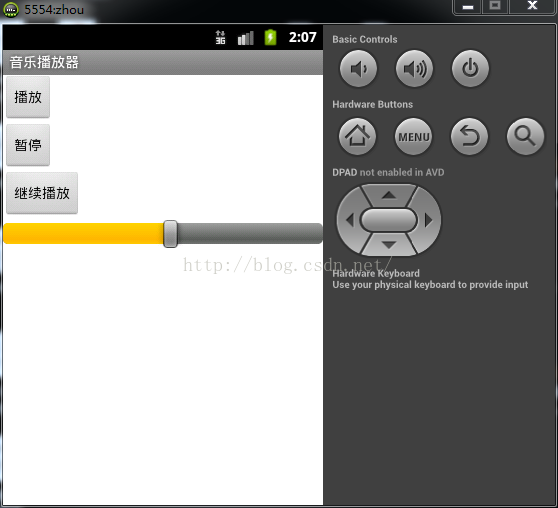 音樂播放器
音樂播放器
一、---框架---(1)新建布局,包括三個按鈕:播放、暫停、繼續播放,還有一個進度條(2)建立一個Service,其中有播放、暫停、繼續播放的方法(3)因為有進度條,所
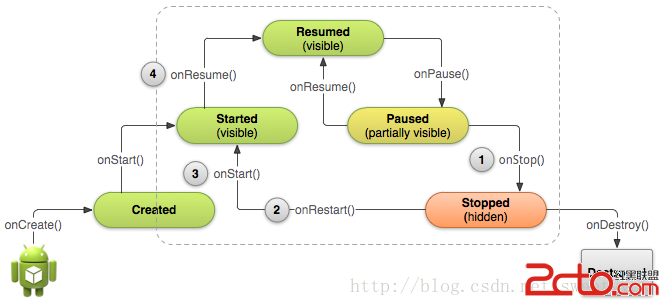 Android學習路線(十四)Activity生命周期——停止和重啟(Stopping and Restarting)一個Activity
先占個位置,下次翻譯~ :p Properly stopping a