編輯:關於Android編程
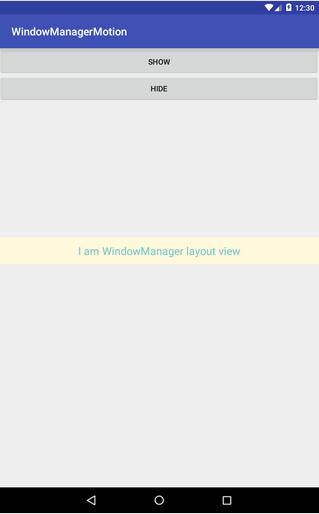
一般在android顯示一個View都是通過Activity的setContentView設置的,但是還有一種方法,可以直接使用WindowManager在整個應用的最上層繪制我們需要顯示的view,總體的效果類似於AlertDialog的彈出效果。
使用WindowManager構造這樣的一個懸浮View也比較簡單,直接通過windowmanager.addView()方法即可。
package com.gearmotion.app.windowmanagermotion;

import android.content.Context;
import android.graphics.PixelFormat;
import android.graphics.Rect;
import android.support.v7.app.AppCompatActivity;
import android.os.Bundle;
import android.view.Gravity;
import android.view.LayoutInflater;
import android.view.MotionEvent;
import android.view.View;
import android.view.ViewGroup;
import android.view.WindowManager;
import android.widget.Button;

public class MainActivity extends AppCompatActivity implements View.OnClickListener, View.OnTouchListener {

 Button mShowBtn;
 Button mHideBtn;
 WindowManager mWm;
 LayoutInflater mLayoutInflater;
 View mWindowView;

 @Override
 protected void onCreate(Bundle savedInstanceState) {
  super.onCreate(savedInstanceState);
  setContentView(R.layout.activity_main);
  mShowBtn = (Button) this.findViewById(R.id.showbtn);
  mHideBtn = (Button) this.findViewById(R.id.hidebtn);
  mShowBtn.setOnClickListener(this);
  mHideBtn.setOnClickListener(this);
  init();
 }

 private void init() {
  mWm = (WindowManager) this.getApplicationContext().getSystemService(Context.WINDOW_SERVICE);
  mLayoutInflater = LayoutInflater.from(this);
 }

 @Override
 public void onClick(View v) {
  if (mShowBtn.hashCode() == v.hashCode()) { //顯示WindowManager
   show();
  }
  if (mHideBtn.hashCode() == v.hashCode()) { //隱藏windowmanager
   hide();
  }
 }

 private void show() {
  mWindowView = mLayoutInflater.inflate(R.layout.item_layout, null);
  View popView = mWindowView.findViewById(R.id.root);
  //設置popView的觸摸事件,以便點擊空白區域的時候使懸浮view消失
  popView.setOnTouchListener(this);
  WindowManager.LayoutParams lp = new WindowManager.LayoutParams();
  //窗口類型同系統彈出框
  lp.type = WindowManager.LayoutParams.TYPE_SYSTEM_ALERT;
  //響應輸入法
  //lp.flags = WindowManager.LayoutParams.FLAG_ALT_FOCUSABLE_IM;
  //透明層
  lp.format = PixelFormat.TRANSPARENT;
  lp.width = WindowManager.LayoutParams.MATCH_PARENT;
  lp.height = WindowManager.LayoutParams.MATCH_PARENT;
  lp.gravity = Gravity.CENTER_VERTICAL;
  mWm.addView(mWindowView, lp);
 }

 private void hide() {
  if (mWindowView != null && mWindowView.getParent() != null) {
   mWm.removeView(mWindowView);
  }
 }

 @Override
 public boolean onTouch(View v, MotionEvent event) {
  int x = (int) event.getX();
  int y = (int) event.getY();
  //獲取主view的可視區域
  Rect globalRect = new Rect();
  //獲取懸浮view的可視區域
  Rect tmpRect = new Rect();
  v.getGlobalVisibleRect(globalRect);
  View child = ((ViewGroup) v).getChildAt(0);
  child.getHitRect(tmpRect);
  if (!tmpRect.contains(x, y) && globalRect.contains(x, y)) {
   hide();
  }
  return true;
 }
}
activity_main.xml:
<?xml version="1.0" encoding="utf-8"?>
<LinearLayout xmlns:android="http://schemas.android.com/apk/res/android"
 xmlns:tools="http://schemas.android.com/tools"
 android:layout_width="match_parent"
 android:layout_height="match_parent"
 android:orientation="vertical"
 tools:context=".MainActivity">

 <Button
  android:id="@+id/showbtn"
  android:layout_width="match_parent"
  android:layout_height="50dp"
  android:gravity="center"
  android:text="show" />

 <Button
  android:id="@+id/hidebtn"
  android:layout_width="match_parent"
  android:layout_height="50dp"
  android:gravity="center"
  android:text="hide" />
</LinearLayout>
item_layout.xml:
<?xml version="1.0" encoding="utf-8"?>
<LinearLayout xmlns:android="http://schemas.android.com/apk/res/android"
 android:layout_width="match_parent"
 android:layout_height="wrap_content"
 android:gravity="center"
 android:id="@+id/root"
 android:orientation="vertical">

 <TextView
  android:layout_width="match_parent"
  android:layout_height="50dp"
  android:text="I am WindowManager layout view"
  android:textSize="20sp"
  android:gravity="center"
  android:layout_gravity="center"
  android:background="#FFF8DC"
  android:textColor="#7AC5CD"/>
</LinearLayout>
實現效果如下:
以上就是本文的全部內容,希望對大家學習Android有所幫助,也希望大家多多支持本站。
 android studio文件工程夾過大,generated文件夾過大解決方法
用android studio創建文件隨便寫了個demo,項目文件就90多M,感覺沒干什麼就導致文件這麼大了,瞬間頭皮發麻。。。為什麼呢?帶著疑惑,打開android s
 Android之多線程下載及斷點續傳
今天我們來接觸一下多線程下載,當然也包括斷點續傳,我們可以看到很多下載器,當開通會員的時候下載東西的速度就變得快了許多,這是為什麼呢?這就是跟今天講的多線程有關系了,其實
 側拉新聞菜單
功能描述菜單分左右兩側,整體可以滑動,效果如下功能分析widthMeasureSpec:期望值組成: 32位的010101010101011010101組成 頭2位:代表
 Buzz桌面教程-添加文字到桌面
有些童鞋想在Buzz桌面上弄點小浪漫、小驚喜、小文藝啥的,添加文字到桌面上是必不可少的,Buzzz桌面就能很方便的在桌面上添加文字,比如“Hon