編輯:關於Android編程
在設計應用的時候,我們應該熱愛極簡主義,簡單就是好的,對於很多用戶來說,復雜的東西並不受歡迎。
我要實現的是根據不同的情況去顯示不同的加載效果,隨用隨調,效果是借鑒於某一項目的效果,我認為有必要提取出來改善封裝一下,供以後使用。情況大致分為:加載中、無網絡、無數據、加載失敗等,這些僅僅就需要一個View 就可以搞定啦!
預覽下效果圖:
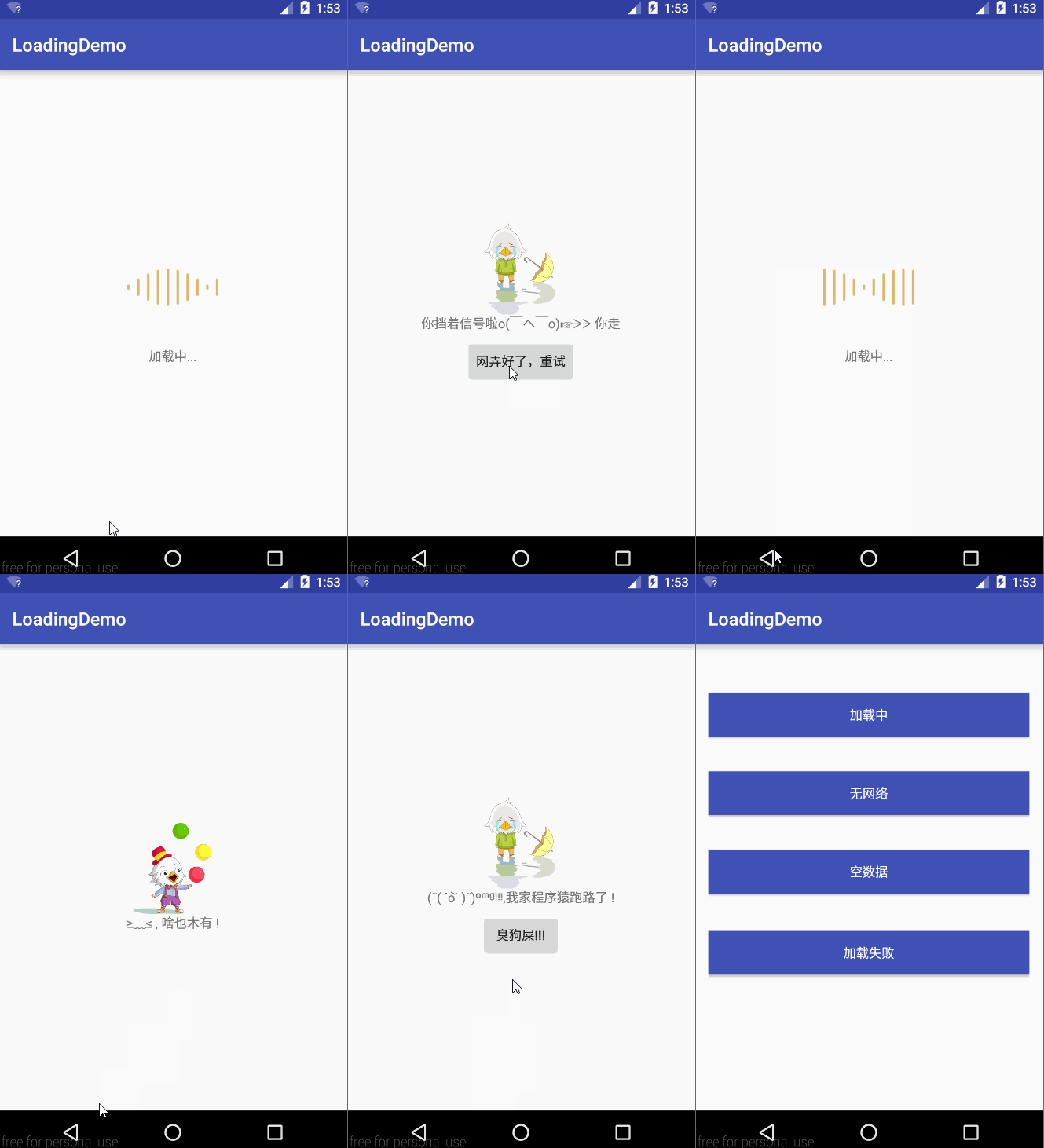
我們怎麼實現這種效果呢
view_loading.xml的布局如下:
<?xml version="1.0" encoding="utf-8"?>
<FrameLayout xmlns:android="http://schemas.android.com/apk/res/android"
 android:layout_width="match_parent"
 android:layout_height="match_parent">

 <LinearLayout
  android:id="@+id/lin_loading"
  android:layout_width="wrap_content"
  android:layout_height="wrap_content"
  android:layout_gravity="center"
  android:visibility="gone"
  android:orientation="vertical">

  <ImageView
   android:id="@+id/img_loading"
   android:layout_width="100dp"
   android:layout_height="100dp"
   android:src="@drawable/loading_animation" />

  <TextView
   android:id="@+id/tv_loading"
   android:layout_width="wrap_content"
   android:layout_height="wrap_content"
   android:layout_marginTop="16dp"
   android:layout_gravity="center_horizontal"
   android:textSize="14sp" />

 </LinearLayout>


 <LinearLayout
  android:id="@+id/lin_load"
  android:layout_width="wrap_content"
  android:layout_height="wrap_content"
  android:layout_gravity="center"
  android:gravity="center"
  android:orientation="vertical"
  android:visibility="visible"

  >

  <ImageView
   android:id="@+id/iv_load"
   android:layout_width="100dp"
   android:layout_height="100dp"
   android:src="@mipmap/ic_launcher" />

  <TextView
   android:id="@+id/tv_load"
   android:layout_width="wrap_content"
   android:layout_gravity="center_horizontal"
   android:layout_height="wrap_content" />


  <Button
   android:id="@+id/btn_load"
   android:layout_width="wrap_content"
   android:layout_height="wrap_content"
   android:layout_marginTop="8dp"
   android:layout_gravity="center_horizontal"
   android:textSize="14sp" />

 </LinearLayout>

</FrameLayout>
從布局來看,我分了兩個部分,一個是加載中,另外一個是帶有ImagView、文字和按鈕的布局,有人看到這,就會說,哇靠,這不是很簡單嗎?根據不同的情況去設置Visibility的值就好了啊,沒錯,原理就是這樣。
XHLoadingView.java的代碼如下:
package com.woyou.loadingdemo.widget;

import android.content.Context;
import android.graphics.drawable.AnimationDrawable;
import android.util.AttributeSet;
import android.view.LayoutInflater;
import android.view.View;
import android.widget.Button;
import android.widget.FrameLayout;
import android.widget.ImageView;
import android.widget.LinearLayout;
import android.widget.TextView;

import com.woyou.loadingdemo.LoadingState;
import com.woyou.loadingdemo.R;


/**
 * Created by Xiho on 11:21.
 */
public class XHLoadingView extends FrameLayout {

 private Context mContext;
 // 加載中的布局
 private LinearLayout mLinearLoad;
 //其他加載的布局
 private LinearLayout mLinearLoading;

 private TextView mTvLoading;

 private TextView mTvLoad;

 private ImageView mIvLoading;

 private ImageView mIvLoad;

 private Button mBtnLoad;

 private LoadingState mState;

 private AnimationDrawable animation;


 public XHLoadingView(Context context) {
  super(context);
  mContext = context;
 }

 public XHLoadingView(Context context, AttributeSet attrs) {
  super(context, attrs);
  mContext = context;
 }

 public XHLoadingView(Context context, AttributeSet attrs, int defStyleAttr) {
  super(context, attrs, defStyleAttr);
  mContext = context;
 }

 public XHLoadingView(Context context, AttributeSet attrs, int defStyleAttr, int defStyleRes) {
  super(context, attrs, defStyleAttr, defStyleRes);
  mContext = context;

 }
 public void build(){
  LayoutInflater.from(mContext).inflate(R.layout.view_loading, this, true);

  mLinearLoading = (LinearLayout) findViewById(R.id.lin_loading);

  mLinearLoad = (LinearLayout) findViewById(R.id.lin_load);

  mIvLoading = (ImageView) findViewById(R.id.img_loading);

  mIvLoad = (ImageView) findViewById(R.id.iv_load);

  mTvLoading = (TextView) findViewById(R.id.tv_loading);

  mTvLoad = (TextView) findViewById(R.id.tv_load);

  mBtnLoad = (Button) findViewById(R.id.btn_load);

  mBtnLoad.setOnClickListener(new OnClickListener() {
   @Override
   public void onClick(View v) {
    setState(LoadingState.STATE_LOADING);
    mOnRetryListener.onRetry();
   }
  });

 }


 @Override
 public void setVisibility(int visibility) {
  super.setVisibility(visibility);
  if(View.GONE==visibility && mState==LoadingState.STATE_LOADING && animation!=null&&animation.isRunning()){
   animation.stop();
  }
 }

 /**
  * 加載中提示文字
  */
 private String mLoadingText;
 private int mLoadingIcon;
 public XHLoadingView withLoadingIcon(int resId){
  mLoadingIcon = resId;
  return this;
 }

 /**
  * 加載數據為空提示文字
  */
 private String mLoadEmptyText;
 private int mLoadEmptyIcon;
 public XHLoadingView withEmptyIcon(int resId){
  mLoadEmptyIcon = resId;
  return this;
 }

 /**
  * 無網絡提示
  */
 private String mLoadNoNetworkText;
 private int mNoNetworkIcon;
 public XHLoadingView withNoNetIcon(int resId){
  mNoNetworkIcon = resId;
  return this;
 }

 private OnRetryListener mOnRetryListener;

 /**
  * 定義重試的的接口
  */
 public interface OnRetryListener {
  void onRetry();
 }

 public XHLoadingView withOnRetryListener(OnRetryListener mOnRetryListener){
  this.mOnRetryListener = mOnRetryListener;
  return this;
 }

 /**
  * 設置加載的狀態
  * @param state
  */
 public void setState(LoadingState state){
  if(mState==state){
   return;
  }else if(state==LoadingState.STATE_LOADING){
   mLinearLoading.setVisibility(VISIBLE);
   mLinearLoad.setVisibility(GONE);
  }else if(state!=LoadingState.STATE_LOADING){
   mLinearLoading.setVisibility(GONE);
   mLinearLoad.setVisibility(VISIBLE);
   if(animation!=null && mState==LoadingState.STATE_LOADING)
    animation.stop();
  }
  changeState(state);
 }


 public boolean btnEmptyEnable = true;
 public boolean btnErrorEnable = true;
 public boolean btnNoNetworkEnable = true;

 public XHLoadingView withBtnNoNetEnnable(boolean ennable) {
  btnNoNetworkEnable = ennable;
  return this;
 }

 public XHLoadingView withBtnErrorEnnable(boolean ennable) {
  btnErrorEnable = ennable;
  return this;
 }


 public XHLoadingView withBtnEmptyEnnable(boolean ennable) {
  btnEmptyEnable = ennable;
  return this;
 }

 /**
  * 改變狀態
  * @param state
  */
 private void changeState(LoadingState state) {
  switch (state) {
   //加載中
   case STATE_LOADING:
    mState = LoadingState.STATE_LOADING;
    mIvLoading.setImageResource(mLoadingIcon);
    mTvLoading.setText(mLoadingText);
    if (animation == null) {
     animation = (AnimationDrawable) mIvLoading.getDrawable();
    }
    if (animation != null)
     animation.start();
    break;
   //數據為空
   case STATE_EMPTY:
    mState = LoadingState.STATE_EMPTY;
    mIvLoad.setImageResource(mLoadEmptyIcon);
    mTvLoad.setText(mLoadEmptyText);
    if (btnEmptyEnable) {
     mBtnLoad.setVisibility(VISIBLE);
     mBtnLoad.setText(btn_empty_text);
    } else {
     mBtnLoad.setVisibility(GONE);
    }
    break;
   //加載失敗
   case STATE_ERROR:
    mState = LoadingState.STATE_ERROR;
    mIvLoad.setImageResource(mErrorIco);
    mTvLoad.setText(mLoadErrorText);
    if (btnErrorEnable) {
     mBtnLoad.setVisibility(VISIBLE);
     mBtnLoad.setText(btn_error_text);
    } else {
     mBtnLoad.setVisibility(GONE);
    }
    break;
   //無網絡
   case STATE_NO_NET:
    mState = LoadingState.STATE_NO_NET;
    mIvLoad.setImageResource(mNoNetworkIcon);
    mTvLoad.setText(mLoadNoNetworkText);
    if (btnNoNetworkEnable) {
     mBtnLoad.setVisibility(VISIBLE);
     mBtnLoad.setText(btn_nonet_text);
    } else {
     mBtnLoad.setVisibility(GONE);
    }
    break;
  }

 }


 /**
  * 後台或者本地出現錯誤提示
  */
 private String mLoadErrorText;
 private int mErrorIco;

 public XHLoadingView withErrorIco(int resId) {
  mErrorIco = resId;
  return this;
 }

 /**
  * 加載空數據
  * @param resId
  * @return
  */
 public XHLoadingView withLoadEmptyText(int resId) {
  mLoadEmptyText = getResources().getString(resId);
  return this;
 }

 public XHLoadingView withLoadEmptyText(String mLoadEmptyText) {
  this.mLoadEmptyText = mLoadEmptyText;
  return this;
 }

 /**
  * 無網絡時候加載文字
  * @param resId
  * @return
  */
 public XHLoadingView withLoadNoNetworkText(int resId) {
  mLoadNoNetworkText = getResources().getString(resId);
  return this;
 }

 public String btn_empty_text = "重試";
 public String btn_error_text = "重試";
 public String btn_nonet_text = "重試";

 /**
  * 數據為空的Button的文字提示
  * @param text
  * @return
  */
 public XHLoadingView withBtnEmptyText(String text) {
  this.btn_empty_text = text;
  return this;
 }

 /**
  * 加載錯誤的Button的文字提示
  * @param text
  * @return
  */
 public XHLoadingView withBtnErrorText(String text) {
  this.btn_error_text = text;
  return this;
 }

 /**
  * 加載錯誤的文字提示
  * @param resId
  * @return
  */
 public XHLoadingView withLoadErrorText(int resId) {
  this.mLoadErrorText = getResources().getString(resId);
  return this;
 }
 public XHLoadingView withLoadErrorText(String mLoadedErrorText) {
  this.mLoadErrorText = mLoadedErrorText;
  return this;
 }

 /**
  * 加載無網絡的Button的文字提示
  * @param text
  * @return
  */
 public XHLoadingView withBtnNoNetText(String text) {
  this.btn_nonet_text = text;
  return this;
 }

 /**
  * 加載沒有網路的文字提示
  * @param mLoadedNoNetText
  * @return
  */
 public XHLoadingView withLoadNoNetworkText(String mLoadedNoNetText) {
  this.mLoadNoNetworkText = mLoadedNoNetText;
  return this;
 }

 public XHLoadingView withLoadingText(int resId) {
  this.mLoadingText = getResources().getString(resId);
  return this;
 }

 public XHLoadingView withLoadingText(String mLoadingText) {
  this.mLoadingText = mLoadingText;
  return this;
 }

}
針對不同的情況作了不同的處理,然後我們在需要的Activity調用。
 private XHLoadingView mLoadingView;

 @Override
 protected void onCreate(Bundle savedInstanceState) {
  super.onCreate(savedInstanceState);
  setContentView(R.layout.activity_display);
  mLoadingView = (XHLoadingView) findViewById(R.id.lv_loading);
  mLoadingView.withLoadEmptyText("≥﹏≤ , 啥也木有 !").withEmptyIcon(R.drawable.disk_file_no_data).withBtnEmptyEnnable(false)
     .withErrorIco(R.drawable.ic_chat_empty).withLoadErrorText("(῀( ˙᷄ỏ˙᷅ )῀)ᵒᵐᵍᵎᵎᵎ,我家程序猿跑路了 !").withBtnErrorText("臭狗屎!!!")
     .withLoadNoNetworkText("你擋著信號啦o( ̄ヘ ̄o)☞ᗒᗒ 你走").withNoNetIcon(R.drawable.ic_chat_empty).withBtnNoNetText("網弄好了,重試")
     .withLoadingIcon(R.drawable.loading_animation).withLoadingText("加載中...").withOnRetryListener(new XHLoadingView.OnRetryListener() {
    @Override
    public void onRetry() {
     SnackbarUtil.show(mLoadingView,"已經在努力重試了",0);
    }
   }).build();
  }

........

 //加載中
  mLoadingView.setVisibility(View.VISIBLE);
  mLoadingView.setState(LoadingState.STATE_LOADING);

 //空數據
  mLoadingView.setVisibility(View.VISIBLE);
  mLoadingView.setState(LoadingState.STATE_EMPTY)
 //無網絡
  mLoadingView.setVisibility(View.VISIBLE);
  mLoadingView.setState(LoadingState.STATE_NO_NET);

 //加載錯誤
  mLoadingView.setVisibility(View.VISIBLE);
  mLoadingView.setState(LoadingState.STATE_ERROR);

.......


 }
上面我是為了展示不同的效果,所以寫了幾個點擊事件呢,實際中不是這樣的,初始化過後,在需要的地方調用OK, 源碼中注釋詳細,就不用再做過多的解釋了吧!
完整代碼:XHLoadingView
作者:xuhao
QQ:504105930
轉載請注明出處:http://blog.csdn.net/u011974987/article/details/51455333
以上就是本文的全部內容,希望對大家學習Android軟件編程有所幫助。
 android_文件下載
android 在網絡上下載文件步驟 : 1.使用HTTP協議下載文件- 創建一個HttpURLConnection對象 : HttpURLConnection urlC
 Android自定義VIew實現衛星菜單效果淺析
一 概述:最近一直致力於Android自定義VIew的學習,主要在看《android群英傳》,還有CSDN博客鴻洋大神和wing大神的一些文章,寫的很詳細,自
 android - Volley源碼分析
我有一篇文章很不負責的,沒有頭緒的分析了一些Volley的源碼。我自己回頭去看了一下,於是就把他刪掉了,於是就有了今天的這篇文章。Volley的使用步驟創建一個Reque
 fastlane 教程: 入門
激動人心的時刻到來了:你花了幾天和幾周時間(甚至是幾個月)制作了一個精彩的 App,准備發布到全世界。剩下來的事情就是將 App 提交到蘋果商店了,但是 —&