編輯:關於Android編程
如何避開在ListView等AdapterView上動態添加刪除項的陷阱,下面就為大家分享,具體內容如下
首先,定義如下array資源,作為列表的加載內容:
<resources>
 <string name="app_name">MyListView</string>
 <string-array name="language">
 <item>Java</item>
 <item>C</item>
 <item>C++</item>
 <item>PHP</item>
 </string-array>
然後簡單地寫下布局文件,由於我需要不管列表有多長,始終在底部顯示編輯框和按鈕,所以將ListView中的layout_weight設為1。
<?xml version="1.0" encoding="utf-8"?>
<LinearLayout
 xmlns:android="http://schemas.android.com/apk/res/android"
 android:layout_width="match_parent"
 android:layout_height="match_parent"
 android:orientation="vertical">
 <ListView
 android:id="@android:id/list"
 android:layout_width="fill_parent"
 android:layout_height="0dip"
 android:layout_weight="1" />
 <LinearLayout
 android:layout_width="wrap_content"
 android:layout_height="wrap_content"
 android:orientation="horizontal">
 <EditText
  android:id="@+id/addLangEdit"
  android:layout_width="200px"
  android:layout_height="wrap_content" />
 <Button
  android:id="@+id/addButton"
  android:layout_width="wrap_content"
  android:layout_height="wrap_content"
  android:text="添加" />
 </LinearLayout>
</LinearLayout>
最後添上Activity的代碼,似乎沒什麼問題了,運行一下。
public class MyListView extends ListActivity {
 private ArrayAdapter<CharSequence> mAdapter;
 private ListView mListView;
 private EditText mLanguageText;
 private Button mAddButton;

 /** Called when the activity is first created. */
 @Override
 public void onCreate(Bundle savedInstanceState) {
 super.onCreate(savedInstanceState);
 setContentView(R.layout.mylist1);

 //get the view
 mListView = getListView();
 mLanguageText = (EditText) findViewById(R.id.addLangEdit);
 mAddButton = (Button) findViewById(R.id.addButton);

 //array adapter created from string array resources
 mAdapter = ArrayAdapter.createFromResource(
  this,
  R.array.language,
  android.R.layout.simple_list_item_1);
 //set the adapter
 mListView.setAdapter(mAdapter);

 //add listener
 mAddButton.setOnClickListener(mOnClickListener);
 }

 private OnClickListener mOnClickListener = new View.OnClickListener() {
 @Override
 public void onClick(View v) {
  String text = mLanguageText.getText().toString();
  if(null == text || "".equals(text.trim())) {
  Toast.makeText(MyListView.this, "輸入不能為空", Toast.LENGTH_SHORT).show();
  }else {
  mAdapter.add(text);
  mAdapter.notifyDataSetChanged();
  mLanguageText.setText("");
  }
 }
 };
}
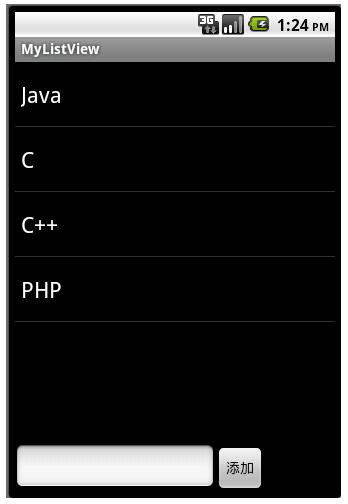
界面成功顯示,可是每次點擊“添加”,就會拋出java.lang.UnsupportedOperationException,這看似很匪夷所思,因為按照android的api文檔,確實能通過adapter上的add、remove等方法在運行時增刪列表項啊,那問題到底出在哪裡呢?
借助google的幫助,找到如下解答:
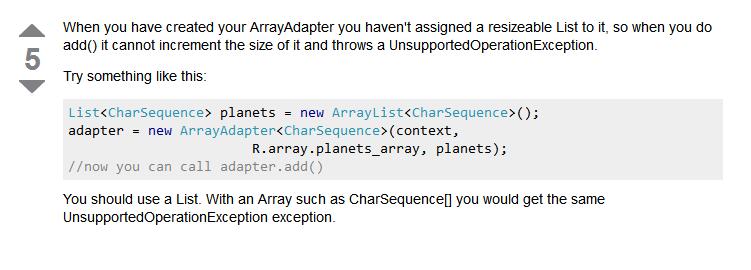
這裡說到,如果要動態的改變列表的大小,必須使用一個可變大小的List(如ArrayList),而不能使用固定長度的array,否則將會得到UnsupportedOperationException。也就是說,由於需要從資源文件中加載內容,所以我自然就想到調用ArrayAdapter.createFromResource(Context context, int textArrayResId, int textViewResId)方法來構造adapter,而此方法導致ArrayAdapter中維護的是一個定長數組!對數組進行add,當然就會出錯了。看到這裡我不禁感慨,好一個陷阱!!!真相仿佛離我越來越近了,讓我們再進入ArrayAdapter源碼探個究竟。
public class ArrayAdapter<T> extends BaseAdapter implements Filterable {
   // 代表ArrayAdapter中的數據
 private List<T> mObjects;
 // 其他fields

 public ArrayAdapter(Context context, int textViewResourceId, List<T> objects) {
 init(context, textViewResourceId, 0, objects);
 }

 public ArrayAdapter(Context context, int textViewResourceId, T[] objects) {
 // 注意這裡的Arrays.asList(...)方法!!!
 init(context, textViewResourceId, 0, Arrays.asList(objects));
 }

 public static ArrayAdapter<CharSequence> createFromResource(Context context,
  int textArrayResId, int textViewResId) {
 CharSequence[] strings = context.getResources().getTextArray(textArrayResId);
 return new ArrayAdapter<CharSequence>(context, textViewResId, strings);
 }

 private void init(Context context, int resource, int textViewResourceId, List<T> objects) {
 mContext = context;
 mInflater = (LayoutInflater)context.getSystemService(Context.LAYOUT_INFLATER_SERVICE);
 mResource = mDropDownResource = resource;
 mObjects = objects;
 mFieldId = textViewResourceId;
 }

 public void add(T object) {
 if (mOriginalValues != null) {
  synchronized (mLock) {
  mOriginalValues.add(object);
  if (mNotifyOnChange) notifyDataSetChanged();
  }
 } else {
  mObjects.add(object); // 若該mObjects為固定長度List,此處將拋異常!!!
  if (mNotifyOnChange) notifyDataSetChanged();
 }
 }
 // 其他方法
}
通過源碼可以發現,我上面的思考還是有誤的。ArrayAdapter並沒有單獨維護array類型的數據,而是統一轉換成了List,並存在了mObjects對象中。
createFromResource(...)調用了ArrayAdapter(Context context, int textViewResourceId, T[] objects)構造方法,而在該方法的內部實現中,android使用Arrays的靜態方法asList(...)將一個數組轉換為List。熟悉Java的程序員都知道,Arrays.asList(...)方法所返回的並不是一個java.util.ArrayList,而是一個Arrays類的內部類,該List實現是不能進行增刪操作的!!(見jdk文檔),對該List進行add將拋出UnsupportedOperationException!
哈哈,這下終於真相大白了,這樣一來稍微改動一下原來的代碼即可成功運行:D
FInal Solution:
/**
 *
 * @author CodingMyWorld
 * 2011-7-31 下午04:43:48
 */
public class MyListView extends ListActivity {
 private ArrayAdapter<CharSequence> mAdapter;
 private ListView mListView;
 private EditText mLanguageText;
 private Button mAddButton;

 /** Called when the activity is first created. */
 @Override
 public void onCreate(Bundle savedInstanceState) {
 super.onCreate(savedInstanceState);
 setContentView(R.layout.mylist1);

 //get the view
 mListView = getListView();
 mLanguageText = (EditText) findViewById(R.id.addLangEdit);
 mAddButton = (Button) findViewById(R.id.addButton);

 //array adapter created from string array resources
 List<CharSequence> objects = new ArrayList<CharSequence>(
  Arrays.asList(getResources().getTextArray(R.array.language)));
 mAdapter = new ArrayAdapter<CharSequence>(
  this,
  android.R.layout.simple_list_item_1,
  objects);
 //set the adapter
 mListView.setAdapter(mAdapter);

 //add listener
 mAddButton.setOnClickListener(mOnClickListener);
 }

 private OnClickListener mOnClickListener = new View.OnClickListener() {
 @Override
 public void onClick(View v) {
  String text = mLanguageText.getText().toString();
  if(null == text || "".equals(text.trim())) {
  Toast.makeText(MyListView.this, "輸入不能為空", Toast.LENGTH_SHORT).show();
  }else {
  mAdapter.add(text);
  mAdapter.notifyDataSetChanged(); //not required
  mLanguageText.setText("");
  }
 }
 };
}
以上就是關於Android Listview相關內容介紹,希望對大家的學習有所幫助。
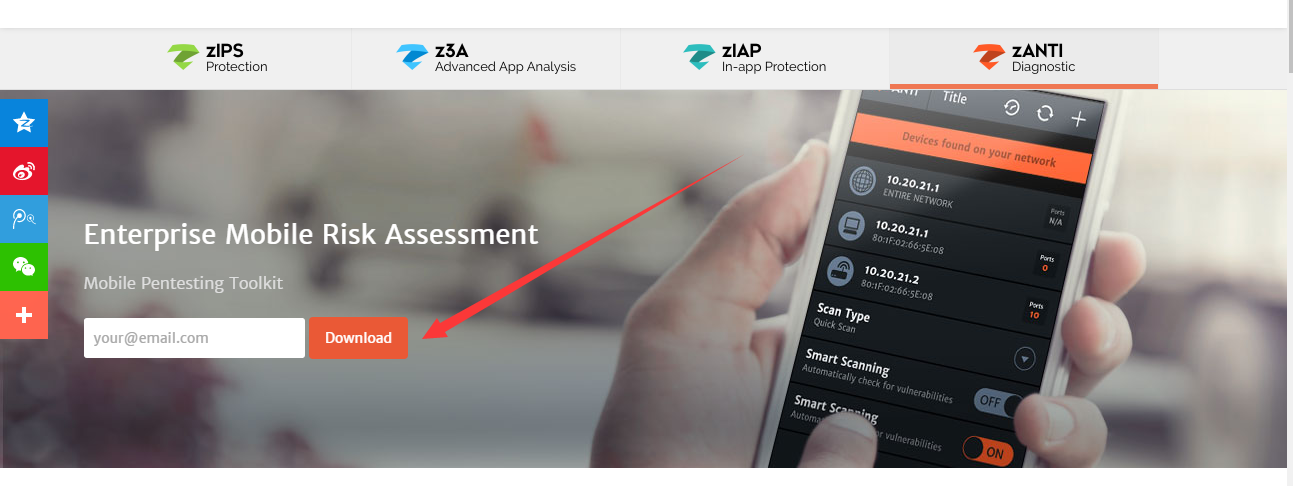 Android平台滲透測試套件--zANTI2.5
0x00 前言zANTI是一款Android平台下的滲透測試工具,支持嗅探已連接的網絡、支持中間人攻擊測試、端口掃描、Cookie獲取及路由安全測試等操作。該工具是由以色
 android將圖片轉換存到數據庫再從數據庫讀取轉換成圖片實現代碼
首先,我們要把圖片存入到數據庫中,首先要創建一個數據庫, 如下所示:復制代碼 代碼如下:package com.android.test;import java.io.B
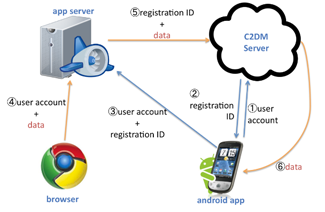 Android實現幾種推送方式解決方案
本文介紹在Android中實現推送方式的基礎知識及相關解決方案。推送功能在手機開發中應用的場景是越來起來了,不說別的,就我們手機上的新聞客戶端就時不j時的推送過來新的消息
 android Parcelable完全解析
title: android.os.Parcelable文檔自譯 date: 2014-12-05 09:16:06 tags: android.os.Parcelabl