編輯:關於Android編程
本文實例講述了Android利用jsoup解析HTML頁面的方法。分享給大家供大家參考,具體如下:
這節主要是講解jsoup解析HTML頁面。由於在android開發過程中,不可避免的涉及到web頁面的抓取,解析,展示等等,所以,在這裡我主要展示下利用jsoup jar包來抓取cnbeta.com網站的話題分類的實例。
下面是主要的代碼,由於使用及其簡單,我這裡就不再多說了:
package com.android.web;
import java.io.BufferedInputStream;
import java.io.IOException;
import java.io.InputStream;
import java.net.MalformedURLException;
import java.net.URL;
import java.net.URLConnection;
import java.util.ArrayList;
import java.util.HashMap;
import java.util.List;
import java.util.Map;
import org.apache.http.util.ByteArrayBuffer;
import org.apache.http.util.EncodingUtils;
import org.jsoup.Jsoup;
import org.jsoup.nodes.Document;
import org.jsoup.nodes.Element;
import org.jsoup.select.Elements;
import android.app.Activity;
import android.os.Bundle;
import android.view.View;
import android.view.View.OnClickListener;
import android.widget.ListView;
import android.widget.SimpleAdapter;
public class _GetWebResoureActivity extends Activity {
  Document doc;
  @Override
  public void onCreate(Bundle savedInstanceState) {
    super.onCreate(savedInstanceState);
    setContentView(R.layout.main);
    findViewById(R.id.button1).setOnClickListener(new OnClickListener() {
      @Override
      public void onClick(View v) {
        load();
      }
    });
  }
  protected void load() {
    try {
      doc = Jsoup.parse(new URL("http://www.cnbeta.com"), 5000);
    } catch (MalformedURLException e1) {
      e1.printStackTrace();
    } catch (IOException e1) {
      e1.printStackTrace();
    }
    List<Map<String, String>> list = new ArrayList<Map<String, String>>();
    Elements es = doc.getElementsByClass("main_navi");
    for (Element e : es) {
      Map<String, String> map = new HashMap<String, String>();
      map.put("title", e.getElementsByTag("a").text());
      map.put("href", "http://www.cnbeta.com"
          + e.getElementsByTag("a").attr("href"));
      list.add(map);
    }
    ListView listView = (ListView) findViewById(R.id.listView1);
    listView.setAdapter(new SimpleAdapter(this, list, android.R.layout.simple_list_item_2,
        new String[] { "title","href" }, new int[] {
        android.R.id.text1,android.R.id.text2
    }));
  }
  /**
   * @param urlString
   * @return
   */
  public String getHtmlString(String urlString) {
    try {
      URL url = null;
      url = new URL(urlString);
      URLConnection ucon = null;
      ucon = url.openConnection();
      InputStream instr = null;
      instr = ucon.getInputStream();
      BufferedInputStream bis = new BufferedInputStream(instr);
      ByteArrayBuffer baf = new ByteArrayBuffer(500);
      int current = 0;
      while ((current = bis.read()) != -1) {
        baf.append((byte) current);
      }
      return EncodingUtils.getString(baf.toByteArray(), "gbk");
    } catch (Exception e) {
      return "";
    }
  }
}
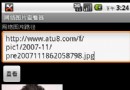
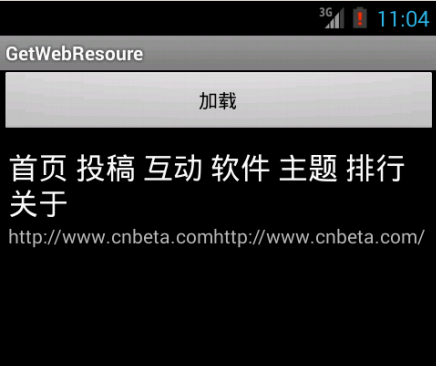
注意代碼:Elements es = doc.getElementsByClass("main_navi");一定要找對位置,才能得到正確的結果。下面就是主要的預覽效果:
更多關於Android相關內容感興趣的讀者可查看本站專題:《Android調試技巧與常見問題解決方法匯總》、《Android開發入門與進階教程》、《Android多媒體操作技巧匯總(音頻,視頻,錄音等)》、《Android基本組件用法總結》、《Android視圖View技巧總結》、《Android布局layout技巧總結》及《Android控件用法總結》
希望本文所述對大家Android程序設計有所幫助。
 Android仿微信清理內存圖表動畫(解決surfaceView屏幕閃爍問題)demo實例詳解
最近接了一個項目其中有功能要實現一個清理內存,要求和微信的效果一樣。於是想到用surfaceView而不是繼承view。下面小編給大家解析下實現思路。surfaceVie
 Android四大組件之Service的介紹
Service的基本認識Service是一個可以在後台執行長時間運行操作而不使用用戶界面的應用組件.Service可由其他應用組件啟動,而且即使用戶切換到其他應用,Ser
 Android設備間實現藍牙(Bluetooth)共享上網
Android設備之間可以除了通過wifi熱點共享上網,還可以通過藍牙共享上網,後面這個功能很少人使用,但適合某台設備沒有wifi卻有藍牙的情況。一、設置WT19i,系統
 Android Studio使用教程(一):下載與安裝及創建HelloWorld項目
背景相信大家對Android Studio已經不陌生了,Android Studio是Google於2013 I/O大會針對Android開發推出的新的開發工具,目前很多