編輯:關於Android編程
前提:考慮到自己每次在敲代碼或者打游戲的時候總是會不注意時間,一不留神就對著電腦連續3個小時以上,對眼睛的傷害還是挺大的,重度近視了可是會遺傳給將來的孩子的呀,可能老婆都跟別人跑了。
於是,為了保護眼睛,便做了個如下的應用:
打開後效果:
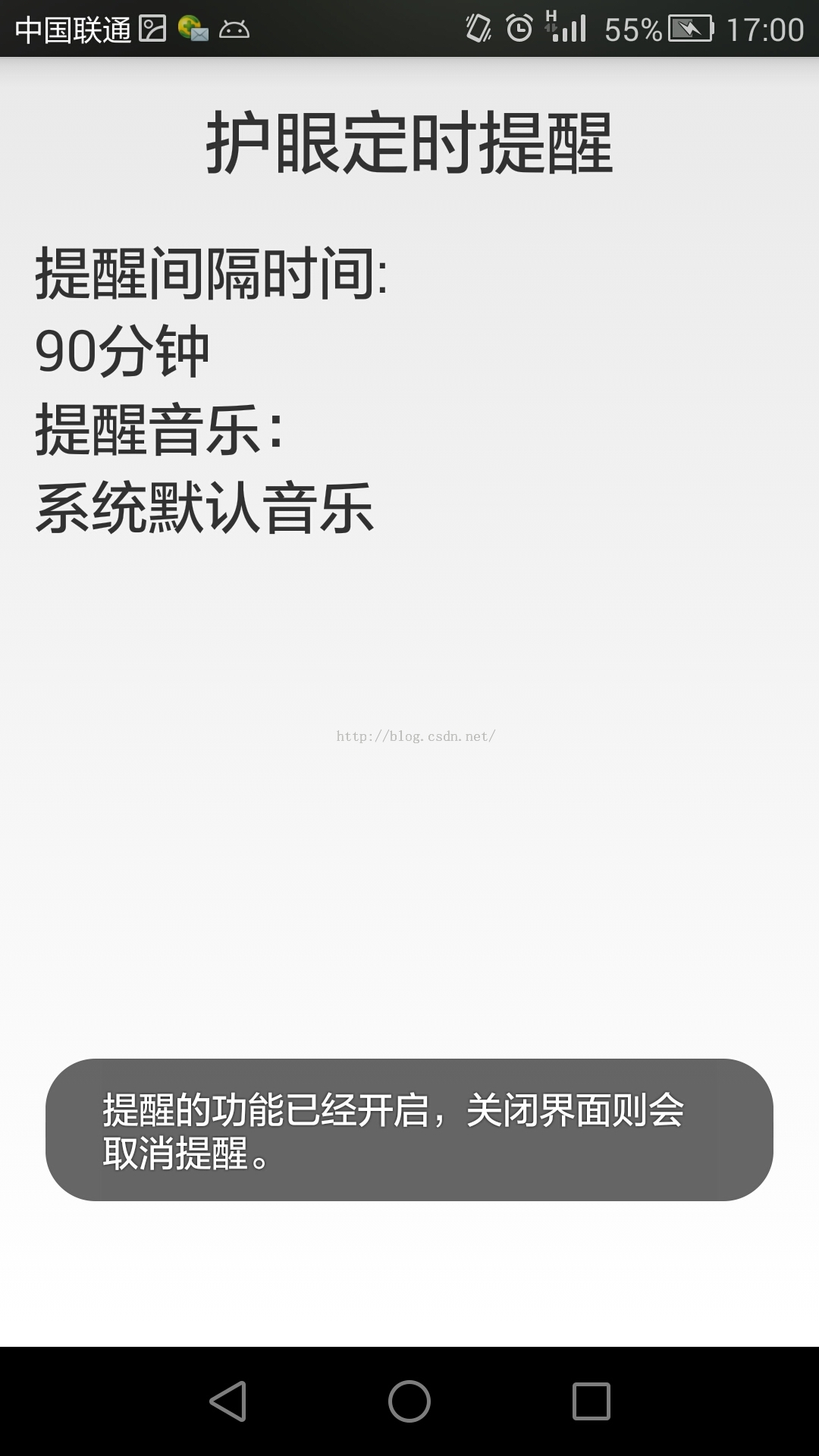
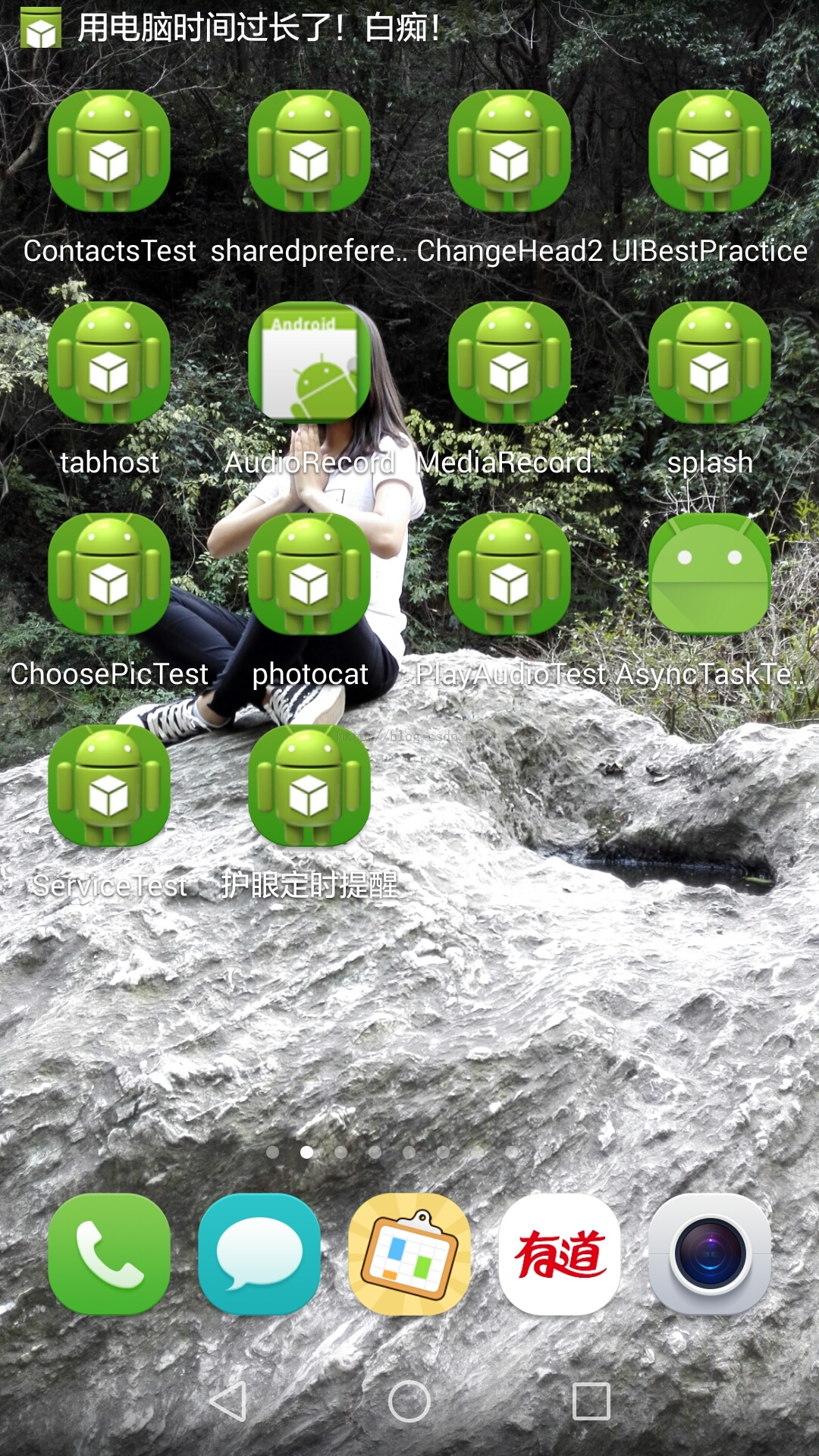
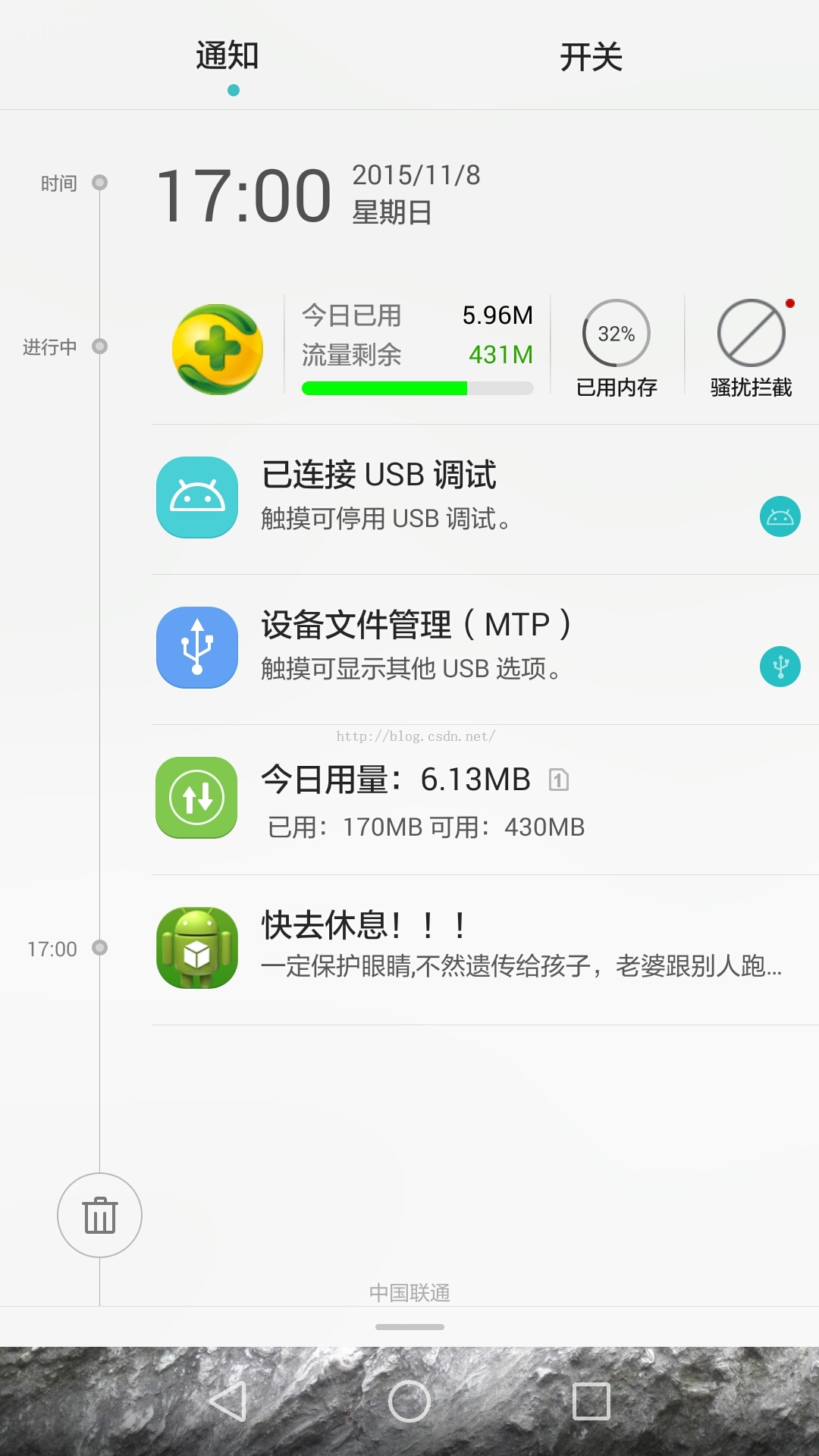
時間到之後有後台提醒:
好了,接下來說一下做這樣一個APP主要涉及到的知識點:
Service:使用service,便可以在程序即使後台運行的時候,也能夠做出相應的提醒,並且不影響手機進行其他工作。
AlarmManager:此知識點主要是用來計時,具體的在代碼的注釋中寫的很詳細。
notification:此知識點就是用作通知的顯示了,具體的可以參考另一篇文章:
MainActivity:
import android.app.Activity;
import android.content.Intent;
import android.os.Bundle;
import android.view.Window;
import android.widget.Toast;

public class MainActivity extends Activity {

 private Intent intent;
 @Override
 protected void onCreate(Bundle savedInstanceState) {
  super.onCreate(savedInstanceState);
  //取消標題欄
  requestWindowFeature(Window.FEATURE_NO_TITLE);
  //由於主要是用於測試,並且便於新手理解,所以activity_main布局寫的很簡單
  setContentView(R.layout.activity_main);
  intent = new Intent(this, LongRunningService.class);
  //開啟關閉Service
  startService(intent);

  //設置一個Toast來提醒使用者提醒的功能已經開始
  Toast.makeText(MainActivity.this,"提醒的功能已經開啟,關閉界面則會取消提醒。",Toast.LENGTH_LONG).show();
 }

 @Override
 protected void onDestroy() {
  super.onDestroy();
  //在Activity被關閉後,關閉Service
  stopService(intent);
 }
}
LongRunningService:
import android.app.AlarmManager;
import android.app.PendingIntent;
import android.app.Service;
import android.content.Intent;
import android.os.IBinder;
import android.os.SystemClock;

public class LongRunningService extends Service {


 @Override
 public IBinder onBind(Intent intent) {
  return null;
 }

 @Override
 public int onStartCommand(Intent intent, int flags, int startId) {

  AlarmManager manager = (AlarmManager) getSystemService(ALARM_SERVICE);
  //讀者可以修改此處的Minutes從而改變提醒間隔時間
  //此處是設置每隔90分鐘啟動一次
  //這是90分鐘的毫秒數
  int Minutes = 90*60*1000;
  //SystemClock.elapsedRealtime()表示1970年1月1日0點至今所經歷的時間
  long triggerAtTime = SystemClock.elapsedRealtime() + Minutes;
  //此處設置開啟AlarmReceiver這個Service
  Intent i = new Intent(this, AlarmReceiver.class);
  PendingIntent pi = PendingIntent.getBroadcast(this, 0, i, 0);
  //ELAPSED_REALTIME_WAKEUP表示讓定時任務的出發時間從系統開機算起,並且會喚醒CPU。
  manager.set(AlarmManager.ELAPSED_REALTIME_WAKEUP, triggerAtTime, pi);
  return super.onStartCommand(intent, flags, startId);
 }

 @Override
 public void onDestroy() {
  super.onDestroy();

  //在Service結束後關閉AlarmManager
  AlarmManager manager = (AlarmManager) getSystemService(ALARM_SERVICE);
  Intent i = new Intent(this, AlarmReceiver.class);
  PendingIntent pi = PendingIntent.getBroadcast(this, 0, i, 0);
  manager.cancel(pi);

 }
}
AlarmReceiver:
import android.app.Notification;
import android.app.NotificationManager;
import android.content.BroadcastReceiver;
import android.content.Context;
import android.content.Intent;

public class AlarmReceiver extends BroadcastReceiver {

 @Override
 public void onReceive(Context context, Intent intent) {
  //設置通知內容並在onReceive()這個函數執行時開啟
  NotificationManager manager = (NotificationManager) context.getSystemService(Context.NOTIFICATION_SERVICE);
  Notification notification=new Notification(R.drawable.ic_launcher,"用電腦時間過長了!白癡!"
  ,System.currentTimeMillis());
  notification.setLatestEventInfo(context, "快去休息!!!",
    "一定保護眼睛,不然遺傳給孩子,老婆跟別人跑啊。", null);
  notification.defaults = Notification.DEFAULT_ALL;
  manager.notify(1, notification);


  //再次開啟LongRunningService這個服務,從而可以
  Intent i = new Intent(context, LongRunningService.class);
  context.startService(i);
 }


}
activity_main:
<LinearLayout xmlns:android="http://schemas.android.com/apk/res/android"
 android:layout_width="match_parent"
 android:layout_height="match_parent"
 android:padding="15dp"
 android:orientation="vertical"
 >

 <TextView
  android:layout_marginBottom="20dp"
  android:layout_width="match_parent"
  android:layout_height="wrap_content"
  android:text="護眼定時提醒"
  android:textSize="30sp"
  android:gravity="center_horizontal"
  />


 <TextView
  android:layout_width="match_parent"
  android:layout_height="wrap_content"
  android:text="提醒間隔時間:"
  android:textSize="25sp"
  />

 <TextView
  android:layout_width="match_parent"
  android:layout_height="wrap_content"
  android:text="90分鐘"
  android:textSize="25sp"
  />

 <TextView
  android:layout_width="match_parent"
  android:layout_height="wrap_content"
  android:text="提醒音樂:"
  android:textSize="25sp"
  />
 <TextView
  android:layout_width="match_parent"
  android:layout_height="wrap_content"
  android:text="系統默認音樂"
  android:textSize="25sp"
  />
</LinearLayout>
千萬不要忘了在AndroidManifest中注冊Service!
AndroidManifest:
<?xml version="1.0" encoding="utf-8"?>
<manifest xmlns:android="http://schemas.android.com/apk/res/android"
 package="com.example.servicebestpractice"
 android:versionCode="1"
 android:versionName="1.0" >

 <uses-sdk
  android:minSdkVersion="14"
  android:targetSdkVersion="17" />

 <application
  android:allowBackup="true"
  android:icon="@drawable/ic_launcher"
  android:label="@string/app_name"
  android:theme="@style/AppTheme" >
  <activity
   android:name="com.example.servicebestpractice.MainActivity"
   android:label="@string/app_name" >
   <intent-filter>
    <action android:name="android.intent.action.MAIN" />

    <category android:name="android.intent.category.LAUNCHER" />
   </intent-filter>
  </activity>

  <service android:name=".LongRunningService" >
  </service>

  <receiver android:name=".AlarmReceiver" >
  </receiver>
 </application>

</manifest>
此處有個不得不提的注意點,筆者原來的代碼是在Activity開啟的時候自動開啟Service,在Activity摧毀的時候自動摧毀Service,看上去好像可以運行,沒有什麼錯誤,並且在10分鐘內的提醒基本都能夠正常運行。
但是倘若在比較長的時間提醒的時候就會出現不提醒的問題了!為什麼呢?
因為android為了優化內存,減少耗電,是會自動清理內存的,會把後台的Service給清理掉。
以上就是本文的全部內容,希望對大家的學習有所幫助。
 Android 音樂播放器的開發實例詳解
本文將引導大家做一個音樂播放器,在做這個Android開發實例的過程中,能夠幫助大家進一步熟悉和掌握學過的ListView和其他一些組件。為了有
 紅米3S和紅米3有什麼區別?紅米3S和紅米3哪個好?紅米3S和紅米3對比分析
時隔5個月時間,即6月14日,紅米3S作為紅米3的升級版,配備了高通骁龍430八核處理器,配備4100毫安時電池,定價699元起。紅米3S相對於紅米3的售價
 Android自定義Chronometer實現短信驗證碼秒表倒計時功能
本文實例為大家分享了Chronometer實現倒計時功能,Android提供了實現按照秒計時的API,供大家參考,具體內容如下一、自定義ChronometerView 繼
 Android四大組件之BroadcastReceiver
廣播機制簡介Android中的廣播主要可以分為兩種類型,標准廣播和有序廣播。標准廣播(Normal broadcasts)是一種完全異步執行的廣播,在廣播發出之後,所有的