編輯:關於Android編程
開始我以為懸浮窗口,可以用Android中得PopupWindow 來實現,雖然也實現了,但局限性非常大。比如PopupWindow必須要有載體View,也就是說,必須要指定在那個View的上面來實現。以該View為相對位置,來顯示PopupWindow。這就局限了其智能在用戶交互的窗口上,相對的顯示。而無法自由的拖動位置和在桌面顯示。
於是查閱了一些資料,有兩種實現方法。一種是自定義Toast,Toast是運行於所有界面之上的,也就是說沒有界面可以覆蓋它。另一種是Android中得CompatModeWrapper類,ConmpatModeWrapper是基類,實現大部分功能的是它的內部類WindowManagerImpl。該對象可以通過getApplication().getSystemService(Context.WINDOW_SERVICE)得到。(注:如果是通過activity.getSystemService(Context.WINDOW_SERVICE)得到的只是屬於Activity的LocalWindowManager)。
簡單的介紹之後,我們直接來看代碼實現,注釋已經寫在代碼中。
MainActivity.java
package com.example.floatviewdemo;
import com.example.floatviewdemo.service.FloatViewService;
import android.app.Activity;
import android.content.Intent;
import android.os.Bundle;
public class MainActivity extends Activity {
  @Override
  protected void onCreate(Bundle savedInstanceState) {
    super.onCreate(savedInstanceState);
    setContentView(R.layout.activity_main);
  }
  @Override
 protected void onStart() {
  Intent intent = new Intent(MainActivity.this, FloatViewService.class);
     //啟動FloatViewService
     startService(intent);
 super.onStart();
 }

 @Override
 protected void onStop() {
 // 銷毀懸浮窗
 Intent intent = new Intent(MainActivity.this, FloatViewService.class);
    //終止FloatViewService
    stopService(intent);
    super.onStop();
 }
}
activity_main.xml
<RelativeLayout xmlns:android="http://schemas.android.com/apk/res/android"
  xmlns:tools="http://schemas.android.com/tools"
  android:layout_width="match_parent"
  android:layout_height="match_parent"
  android:background="#fff"
  android:paddingBottom="@dimen/activity_vertical_margin"
  android:paddingLeft="@dimen/activity_horizontal_margin"
  android:paddingRight="@dimen/activity_horizontal_margin"
  android:paddingTop="@dimen/activity_vertical_margin"
  tools:context="com.example.floatviewdemo.MainActivity" >
  <TextView
    android:layout_width="wrap_content"
    android:layout_height="wrap_content"
    android:text="@string/hello_world" />
</RelativeLayout>
實現懸浮窗功能的service類
package com.example.floatviewdemo.service;
import com.example.floatviewdemo.R;
import android.annotation.SuppressLint;
import android.app.Service;
import android.content.Intent;
import android.graphics.PixelFormat;
import android.os.IBinder;
import android.util.Log;
import android.view.Gravity;
import android.view.LayoutInflater;
import android.view.MotionEvent;
import android.view.View;
import android.view.View.OnClickListener;
import android.view.View.OnTouchListener;
import android.view.WindowManager;
import android.view.WindowManager.LayoutParams;
import android.widget.ImageButton;
import android.widget.LinearLayout;
import android.widget.Toast;
public class FloatViewService extends Service
{
 private static final String TAG = "FloatViewService";
  //定義浮動窗口布局
  private LinearLayout mFloatLayout;
  private WindowManager.LayoutParams wmParams;
  //創建浮動窗口設置布局參數的對象
  private WindowManager mWindowManager;
  private ImageButton mFloatView;
  @Override
  public void onCreate()
  {
    super.onCreate();
    Log.i(TAG, "onCreate");
    createFloatView();
  }
  @SuppressWarnings("static-access")
 @SuppressLint("InflateParams") private void createFloatView()
  {
    wmParams = new WindowManager.LayoutParams();
    //通過getApplication獲取的是WindowManagerImpl.CompatModeWrapper
    mWindowManager = (WindowManager)getApplication().getSystemService(getApplication().WINDOW_SERVICE);
    //設置window type
    wmParams.type = LayoutParams.TYPE_PHONE;
    //設置圖片格式,效果為背景透明
    wmParams.format = PixelFormat.RGBA_8888;
    //設置浮動窗口不可聚焦(實現操作除浮動窗口外的其他可見窗口的操作)
    wmParams.flags = LayoutParams.FLAG_NOT_FOCUSABLE;
    //調整懸浮窗顯示的停靠位置為左側置頂
    wmParams.gravity = Gravity.LEFT | Gravity.TOP;
    // 以屏幕左上角為原點,設置x、y初始值,相對於gravity
    wmParams.x = 0;
    wmParams.y = 152;
    //設置懸浮窗口長寬數據
    wmParams.width = WindowManager.LayoutParams.WRAP_CONTENT;
    wmParams.height = WindowManager.LayoutParams.WRAP_CONTENT;
    LayoutInflater inflater = LayoutInflater.from(getApplication());
    //獲取浮動窗口視圖所在布局
    mFloatLayout = (LinearLayout) inflater.inflate(R.layout.alert_window_menu, null);
    //添加mFloatLayout
    mWindowManager.addView(mFloatLayout, wmParams);
    //浮動窗口按鈕
    mFloatView = (ImageButton) mFloatLayout.findViewById(R.id.alert_window_imagebtn);
    mFloatLayout.measure(View.MeasureSpec.makeMeasureSpec(0,
        View.MeasureSpec.UNSPECIFIED), View.MeasureSpec
        .makeMeasureSpec(0, View.MeasureSpec.UNSPECIFIED));
    //設置監聽浮動窗口的觸摸移動
    mFloatView.setOnTouchListener(new OnTouchListener()
    {
     boolean isClick;
  @SuppressLint("ClickableViewAccessibility") @Override
  public boolean onTouch(View v, MotionEvent event) {
  switch (event.getAction()) {
  case MotionEvent.ACTION_DOWN:
   mFloatView.setBackgroundResource(R.drawable.circle_red);
   isClick = false;
   break;
  case MotionEvent.ACTION_MOVE:
   isClick = true;
   // getRawX是觸摸位置相對於屏幕的坐標,getX是相對於按鈕的坐標
   wmParams.x = (int) event.getRawX()
    - mFloatView.getMeasuredWidth() / 2;
   // 減25為狀態欄的高度
   wmParams.y = (int) event.getRawY()
    - mFloatView.getMeasuredHeight() / 2 - 75;
   // 刷新
   mWindowManager.updateViewLayout(mFloatLayout, wmParams);
   return true;
  case MotionEvent.ACTION_UP:
   mFloatView.setBackgroundResource(R.drawable.circle_cyan);
   return isClick;// 此處返回false則屬於移動事件,返回true則釋放事件,可以出發點擊否。
  default:
   break;
  }
  return false;
  }
    });
    mFloatView.setOnClickListener(new OnClickListener()
    {
      @Override
      public void onClick(View v)
      {
        Toast.makeText(FloatViewService.this, "一百塊都不給我!", Toast.LENGTH_SHORT).show();
      }
    });
  }
  @Override
  public void onDestroy()
  {
    super.onDestroy();
    if(mFloatLayout != null)
    {
      //移除懸浮窗口
      mWindowManager.removeView(mFloatLayout);
    }
  }
 @Override
 public IBinder onBind(Intent intent) {
 return null;
 }
}
懸浮窗的xml文件
alert_window_menu.xml
<?xml version="1.0" encoding="utf-8"?>
<LinearLayout xmlns:android="http://schemas.android.com/apk/res/android"
  android:layout_width="wrap_content"
  android:layout_height="wrap_content"
  android:orientation="vertical" >
  <ImageButton
    android:id="@+id/alert_window_imagebtn"
    android:layout_width="50dp"
    android:layout_height="50dp"
    android:background="@drawable/float_window_menu"
    android:contentDescription="@null"
    />
</LinearLayout>
以上內容是實現Android 全界面懸浮按鈕的全部敘述,希望大家喜歡。
 Android 命令:實現啟動一個apk
1、產生背景: 為了調試方便,常常希望通過知道apk的路徑,直接去啟動它,所以就寫了這個命令 2、使用方法: adb push launch /data/ adb pus
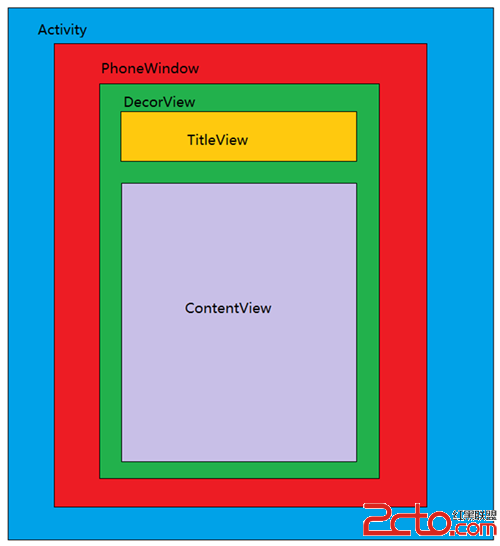 Android View體系(六)從源碼解析Activity的構成
相關文章Android View體系(一)視圖坐標系Android View體系(二)實現View滑動的六種方法Android View體系(三)屬性動畫Android
 Android中自定義一個View的方法詳解
本文實例講述了Android中自定義一個View的方法。分享給大家供大家參考,具體如下:Android中自定義View的實現比較簡單,無非就是繼承父類,然後重載方法,即便
 Android中SurfaceView和view畫出觸摸軌跡
一、引言 想實現一個空白的畫板,上面可以畫出手滑動的軌跡,就這麼一個小需求