編輯:關於Android編程
本文實例講述了android從系統圖庫中取圖片的實現方法。分享給大家供大家參考。具體如下:
在自己應用中,從系統圖庫中取圖片,然後截取其中一部分,再返回到自己應用中。這是很多有關圖片的應用需要的功能。
寫了一個示例,上來就是個大按鈕,連布局都不要了。最終,用選取圖片中的一部分作為按鈕的背景。
這裡需要注意幾點:
① 從圖庫中選取出來保存的圖片剪輯,需要保存在sd卡目錄,不能保存在應用自己的在內存的目錄,因為是系統圖庫來保存這個文件,它沒有訪問你應用的權限;
② intent.putExtra("crop", "true")才能出剪輯的小方框,不然沒有剪輯功能,只能選取圖片;
③ intent.putExtra("aspectX", 1),是剪輯方框的比例,可用於強制圖片的長寬比。
效果圖如下:
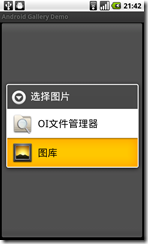
Java代碼如下:
package com.easymorse.gallery;
import java.io.File;
import android.app.Activity;
import android.content.Intent;
import android.graphics.drawable.Drawable;
import android.net.Uri;
import android.os.Bundle;
import android.view.View;
import android.view.View.OnClickListener;
import android.widget.Button;
public class GalleryActivity extends Activity {
 private static int SELECT_PICTURE;
 private File tempFile;
 Button button;
 /** Called when the activity is first created. */
 @Override
 public void onCreate(Bundle savedInstanceState) {
  super.onCreate(savedInstanceState);
  this.tempFile=new File("/sdcard/a.jpg");
  button = new Button(this);
  button.setText("獲取圖片");
  button.setOnClickListener(new OnClickListener() {
   @Override
   public void onClick(View v) {
    Intent intent = new Intent(Intent.ACTION_GET_CONTENT);
    intent.setType("image/*");
    intent.putExtra("crop", "true");
    // intent.putExtra("aspectX", 1);
    // intent.putExtra("aspectY", 2);
    intent.putExtra("output", Uri.fromFile(tempFile));
    intent.putExtra("outputFormat", "JPEG");
    startActivityForResult(Intent.createChooser(intent, "選擇圖片"),
      SELECT_PICTURE);
   }
  });
  setContentView(button);
 }
 @Override
 protected void onActivityResult(int requestCode, int resultCode, Intent data) {
  if (resultCode == RESULT_OK) {
   if (requestCode == SELECT_PICTURE) {
    button.setBackgroundDrawable(Drawable.createFromPath(tempFile
      .getAbsolutePath()));
   }
  }
 }
}
希望本文所述對大家的Android程序設計有所幫助。
 Android Service的啟動過程
剛開始學習Service的時候以為它是一個線程的封裝,也可以執行耗時操作。其實不然,Service是運行在主線程的。直接執行耗時操作是會阻塞主線程的。長時間就直接ANR了
 android sqlite另類用法(對象存取)
在andorid端使用sqlite數據庫是經常的事,通常來說都是對每個屬性對應一個字段,然後分字段的來讀取,但是今天我要說的不是這樣的。我們通過對象序列化來存取。因為一個
 Android 增量更新完全解析 是增量不是熱修復
一、概述最近一直關注熱修復的東西,偶爾聊天談到了增量更新,當然了兩個完全不是一個東西。借此找了一些資料,收集整理了一下,本來是不想寫博客的,因為主要都是工具的實現,但是昨
 我的Android進階之旅------)Android實現音樂示波器、均衡器、重低音和音場功能
本實例來自於《瘋狂Android講義》,要實現具體的功能,需要了解以下API: MediaPlayer 媒體播放器Visualizer 頻譜Equalizer 均衡器Ba