編輯:關於Android編程
服務端:
主頁xml:
主頁代碼:
import android.app.Activity;
import android.content.Context;
import android.net.wifi.WifiInfo;
import android.net.wifi.WifiManager;
import android.os.Handler;
import android.os.Message;
import android.support.v7.app.ActionBarActivity;
import android.os.Bundle;
import android.view.Menu;
import android.view.MenuItem;
import android.view.Window;
import android.widget.TextView;

import org.json.JSONArray;
import org.json.JSONException;
import org.json.JSONObject;

import java.io.BufferedReader;
import java.io.IOException;
import java.io.InputStreamReader;
import java.io.OutputStream;
import java.net.InetAddress;
import java.net.NetworkInterface;
import java.net.ServerSocket;
import java.net.Socket;
import java.net.SocketException;
import java.util.Enumeration;

public class MainActivity extends Activity {

    public static ServerSocket serverSocket = null;
    public static TextView mTextView, textView1;
    private String IP = "";
    String buffer = "";
    public static Handler mHandler = new Handler() {
        @Override
        public void handleMessage(Message msg) {
            if (msg.what == 0x11) {
                Bundle bundle = msg.getData();
                mTextView.append("客戶端:" + bundle.getString("msg") + "\n");
            }
        }
    };

    @Override
    protected void onCreate(Bundle savedInstanceState) {
        super.onCreate(savedInstanceState);
        setContentView(R.layout.activity_test);
        mTextView = (TextView) findViewById(R.id.textsss);
        textView1 = (TextView) findViewById(R.id.textView1);
        mTextView.append("\n");
        IP = getIp();
        textView1.setText("IP addresss:" + IP);
        new Thread() {
            public void run() {
                Bundle bundle = new Bundle();
                bundle.clear();
                OutputStream output;
                String str = "通信成功";
                try {
                    serverSocket = new ServerSocket(30000);
                    while (true) {
                        Message msg = new Message();
                        msg.what = 0x11;
                        try {
                            Socket socket = serverSocket.accept();
                            output = socket.getOutputStream();
//                          ps:注意數據流類型,避免亂碼
//                          output.write(str.getBytes("UTF-8"));//客戶端的數據流為UTF-8
//                          output.write(str.getBytes("gbk"));//客戶端的數據流為gbk
                            output.write(str.getBytes());//服務端和客戶端 數據流類型一致時
                            output.flush();
                            socket.shutdownOutput();
                            BufferedReader bff = new BufferedReader(new InputStreamReader(socket.getInputStream()));
                            String line = null;
                            buffer = "";
                            while ((line = bff.readLine()) != null) {
                                if (!parseJsonMulti(line).equals(""))
                                    line = parseJsonMulti(line);
                                buffer = line + buffer;
                            }
                            bundle.putString("msg", buffer.toString());
                            msg.setData(bundle);
                            mHandler.sendMessage(msg);
                            bff.close();
                            output.close();
                            socket.close();
                        } catch (IOException e) {
                            e.printStackTrace();
                        }
                    }
                } catch (IOException e1) {
                    // TODO Auto-generated catch block
                    e1.printStackTrace();
                }
            }
        }.start();
    }

    private String parseJsonMulti(final String strResult) {
        String result = "";
        try {
            //解析JSON字符串
            //1.若字符串為JSON數組,則轉為JSON數組,若不是,則轉為JSON對象
            //2.根據JSON裡數據的名稱和類型,來獲取想對應的值
            //JSON裡數據,可能為單個JSON對象,JSON數組,或兩者嵌套的
            //遇到嵌套時,只需對應JSON轉換,再進行獲取

            //獲取字符串並轉為JSONObject
            JSONObject json_data = new JSONObject(strResult);
            // 獲取此次的數據類型。
            String Type = json_data.getString("Type");
            if (Type.equals("單個數據")) {
               /*{\"Type\":\"單個數據\"}*/
                result = Type;
            } else if (Type.equals("多個數據")) {
                /*{\"Type\":\"多個數據\",\"NUM\":\"號碼\"}*/
                String NUM = json_data.getString("NUM");
                result = Type + "  " + NUM;
            } else if (Type.equals("嵌套JSON數組")) {
               /*{\"Type\":\"嵌套JSON數組\",\"Array\":[{\"one\":3},{\"two\":8}]}*/
                //獲取JSON數組
                JSONArray Array = json_data.getJSONArray("Array");
                //獲取JSON數組的JSON對象
//                JSONObject OneObject = (JSONObject) Array.opt(0);
//                JSONObject OneObject = Array.optJSONObject(0);
                //若有很多JSON對象 ,只需把0改為對象所屬下標
                JSONObject OneObject = Array.getJSONObject(0);
                JSONObject TwoObject = Array.getJSONObject(1);
                int one = OneObject.getInt("one");
                int two = TwoObject.getInt("two");
                result = one + "  參數  " + two;
            }

        } catch (final JSONException e) {
            e.printStackTrace();
        } catch (final Exception e) {
            e.printStackTrace();
        }
        return result;
    }

    /**
     * 當Server為本機時,獲取本機IP(Wifi或非Wifi均適用)
     */
    public String getIp() {
        WifiManager wifiManager = (WifiManager) getSystemService(Context.WIFI_SERVICE);
        //判斷wifi是否開啟
        if (!wifiManager.isWifiEnabled()) {
            return getLocalIpAddress();
        } else
            return intToIp(wifi_ip(wifiManager));
    }

    //Wifi
    private int wifi_ip(WifiManager wifiManager) {
        WifiInfo wifiInfo = wifiManager.getConnectionInfo();
        int ipAddress = wifiInfo.getIpAddress();
        return ipAddress;
    }

    //非Wifi
    public String getLocalIpAddress() {
        try {
            for (Enumeration en = NetworkInterface
                    .getNetworkInterfaces();
                 en.hasMoreElements(); ) {
                NetworkInterface intf = en.nextElement();
                for (Enumeration enumIpAddr = intf
                        .getInetAddresses();
                     enumIpAddr.hasMoreElements(); ) {
                    InetAddress inetAddress = enumIpAddr.nextElement();
                    if (!inetAddress.isLoopbackAddress()) {
                        return inetAddress.getHostAddress().toString();
                    }
                }
            }
        } catch (SocketException ex) {
            return "";
        }
        return "";
    }

    /**
     * 轉化獲取的(16進制)IP地址
     */
    private String intToIp(int i) {
        return (i & 0xFF) + "." +
                ((i >> 8) & 0xFF) + "." +
                ((i >> 16) & 0xFF) + "." +
                (i >> 24 & 0xFF);
    }

}
客戶端:
主頁xml:
主頁代碼:
import android.app.Activity;
import android.content.Context;
import android.net.wifi.WifiInfo;
import android.net.wifi.WifiManager;
import android.os.Bundle;
import android.os.Handler;
import android.os.Message;
import android.view.View;
import android.view.View.OnClickListener;
import android.widget.Button;
import android.widget.EditText;
import android.widget.TextView;
import android.widget.Toast;

import org.json.JSONArray;
import org.json.JSONException;
import org.json.JSONObject;

import java.io.BufferedReader;
import java.io.IOException;
import java.io.InputStreamReader;
import java.io.OutputStream;
import java.net.InetAddress;
import java.net.InetSocketAddress;
import java.net.NetworkInterface;
import java.net.Socket;
import java.net.SocketException;
import java.net.SocketTimeoutException;
import java.util.Enumeration;

public class MainActivity extends Activity implements OnClickListener {

    Socket socket = null;
    String buffer = "";
    TextView Msg;
    Button send, single, multiple, nested;
    EditText ed_msg;
    /**
     * 發送或接受的字符串
     */
    String io_msg;
    public Handler myHandler = new Handler() {
        @Override
        public void handleMessage(Message msg) {
            if (msg.what == 0x11) {
                Bundle bundle = msg.getData();
                Msg.append("server:" + bundle.getString("msg") + "\n");
            }
        }
    };

    @Override
    protected void onCreate(Bundle savedInstanceState) {
        super.onCreate(savedInstanceState);
        setContentView(R.layout.activity_main);

        Msg = (TextView) findViewById(R.id.msg);
        send = (Button) findViewById(R.id.send);
        single = (Button) findViewById(R.id.single);
        multiple = (Button) findViewById(R.id.multiple);
        nested = (Button) findViewById(R.id.nested);
        ed_msg = (EditText) findViewById(R.id.ed_msg);

        new SendThread("建立連接", getIp()).start();

        send.setOnClickListener(new OnClickListener() {
            @Override
            public void onClick(View v) {
                String ip = getIp();
                if (!ip.equals("")) {
                    io_msg = ed_msg.getText().toString();
                    Msg.append("client:" + io_msg + "\n");
                    // 向服務器發送和接收信息
                    new SendThread(io_msg, ip).start();
                } else {
                    Toast.makeText(MainActivity.this, "ip地址獲取出錯!", Toast.LENGTH_SHORT).show();
                }
            }
        });

        single.setOnClickListener(this);
        multiple.setOnClickListener(this);
        nested.setOnClickListener(this);
    }

    private void Sendmsg(String json) {
        String ip = getIp();
        if (!ip.equals("")) {
            Msg.append("client:" + json + "\n");
            // 向服務器發送和接收信息
            new SendThread(json, ip).start();
        } else {
            Toast.makeText(MainActivity.this, "ip地址獲取出錯!", Toast.LENGTH_SHORT).show();
        }
    }

    @Override
    public void onClick(View v) {
        switch (v.getId()) {
            case R.id.single:
                try {
                    JSONObject jsonObject = new JSONObject();
                    jsonObject.put("Type", "單個數據");
                    Sendmsg(jsonObject.toString());
                } catch (JSONException e) {
                    Toast.makeText(this, "發送失敗!JSON異常", Toast.LENGTH_SHORT).show();
                }
                break;
            case R.id.multiple:
                try {
                    JSONObject jsonObject = new JSONObject();
                    jsonObject.put("Type", "多個數據");
                    jsonObject.put("NUM", "號碼");
                    Sendmsg(jsonObject.toString());
                } catch (JSONException e) {
                    Toast.makeText(this, "發送失敗!JSON異常", Toast.LENGTH_SHORT).show();
                }
                break;
            case R.id.nested:
                try {
                    JSONObject OneObject = new JSONObject();
                    OneObject.put("one", "3");

                    JSONObject TwoObject = new JSONObject();
                    TwoObject.put("two", "8");

                    JSONArray jsonArray = new JSONArray();
                    jsonArray.put(OneObject);
                    jsonArray.put(TwoObject);

                    JSONObject jsonObject = new JSONObject();
                    jsonObject.put("Type", "嵌套JSON數組");
                    jsonObject.put("Array", jsonArray);

                    Sendmsg(jsonObject.toString());
                } catch (JSONException e) {
                    Toast.makeText(this, "發送失敗!JSON異常", Toast.LENGTH_SHORT).show();
                }
                break;
        }
    }

    class SendThread extends Thread {
        public String Ip;
        public String str;

        public SendThread(String _str, String _Ip) {
            str = _str;
            Ip = _Ip;
        }

        @Override
        public void run() {
            // 定義消息
            Message msg = new Message();
            msg.what = 0x11;
            Bundle bundle = new Bundle();
            bundle.clear();
            try {
                // 連接服務器 並設置連接超時為5秒
                socket = new Socket();
                socket.connect(new InetSocketAddress(Ip, 30000), 5000);
                // 獲取輸入輸出流
                OutputStream ou = socket.getOutputStream();
                BufferedReader bff = new BufferedReader(new InputStreamReader(socket.getInputStream()));
                // 讀取發來服務器信息
                String line = null;
                buffer = "";
                while ((line = bff.readLine()) != null) {
                    buffer = line + buffer;
                }
                // 向服務器發送信息
                // ps:注意數據流類型,避免亂碼
                //ou.write(str.getBytes("UTF-8"));//服務端的數據流為UTF-8
                //ou.write(str.getBytes("gbk"));//服務端的數據流為gbk
//                ou.write(str.getBytes());//服務端和客戶端 數據流類型一致時
                ou.write(str.getBytes());
                ou.flush();
                bundle.putString("msg", buffer.toString());
                msg.setData(bundle);
                // 發送消息 修改UI線程中的組件
                myHandler.sendMessage(msg);
                // 關閉各種輸入輸出流
                bff.close();
                ou.close();
                socket.close();
            } catch (SocketTimeoutException aa) {
                // 連接超時 在UI界面顯示消息
                bundle.putString("msg", "服務器連接失敗!請檢查網絡是否打開");
                msg.setData(bundle);
                // 發送消息 修改UI線程中的組件
                myHandler.sendMessage(msg);
            } catch (IOException e) {
                e.printStackTrace();
            }
        }
    }

    /**
     * 當Server為本機時,獲取本機IP(Wifi或非Wifi均適用)
     */
    public String getIp() {
        WifiManager wifiManager = (WifiManager) getSystemService(Context.WIFI_SERVICE);
        //判斷wifi是否開啟
        if (!wifiManager.isWifiEnabled()) {
            return getLocalIpAddress();
        } else
            return intToIp(wifi_ip(wifiManager));
    }

    //Wifi
    private int wifi_ip(WifiManager wifiManager) {
        WifiInfo wifiInfo = wifiManager.getConnectionInfo();
        int ipAddress = wifiInfo.getIpAddress();
        return ipAddress;
    }

    //非Wifi
    public String getLocalIpAddress() {
        try {
            for (Enumeration en = NetworkInterface
                    .getNetworkInterfaces();
                 en.hasMoreElements(); ) {
                NetworkInterface intf = en.nextElement();
                for (Enumeration enumIpAddr = intf
                        .getInetAddresses();
                     enumIpAddr.hasMoreElements(); ) {
                    InetAddress inetAddress = enumIpAddr.nextElement();
                    if (!inetAddress.isLoopbackAddress()) {
                        return inetAddress.getHostAddress().toString();
                    }
                }
            }
        } catch (SocketException ex) {
            return "";
        }
        return "";
    }

    /**
     * 轉化獲取的(16進制)IP地址
     */
    private String intToIp(int i) {
        return (i & 0xFF) + "." +
                ((i >> 8) & 0xFF) + "." +
                ((i >> 16) & 0xFF) + "." +
                (i >> 24 & 0xFF);
    }

}
 Android ProgressBar進度條使用詳解
ProgressBar進度條,分為旋轉進度條和水平進度條,進度條的樣式根據需要自定義,之前一直不明白進度條如何在實際項目中使用,網上演示進度條的案例大多都是通過Butto
 Android ViewPager多頁面滑動切換以及動畫效果
一、首先,我們來看一下效果圖,這是新浪微博的Tab滑動效果。我們可以手勢滑動,也可以點擊上面的頭標進行切換。與此同方式, 白色橫條會移動到相應的頁卡頭標下。這是一個動
 Android實現短信加密功能(發送加密短信、解密本地短信)
短信加密此類功能由於新手學習的需求量較小,所以在網上很少有一些簡單的demo供新手參考。小編做到此處也是花了比較多的時間自我構思,具體的過程也是不過多描述了,講一下dem
 智能廚房重構-MVP架構
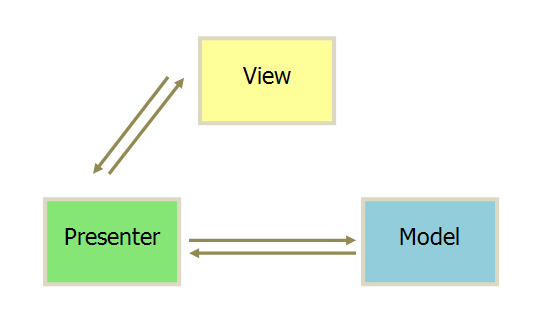
上一篇博客,我們介紹了項目分包的結構,這一篇我們重點來介紹一下MVP架構在項目中的應用,MVP可以說是MVC模式的一種升級,在MVP出現之前,一般都是用MVC,但是使用M
 Android 依賴注入:Dagger--A fast dependency injector for Android and Java 實例講解
Dagger 是一種android平台的依賴注入框架,是有一家專注於移動