編輯:關於Android編程
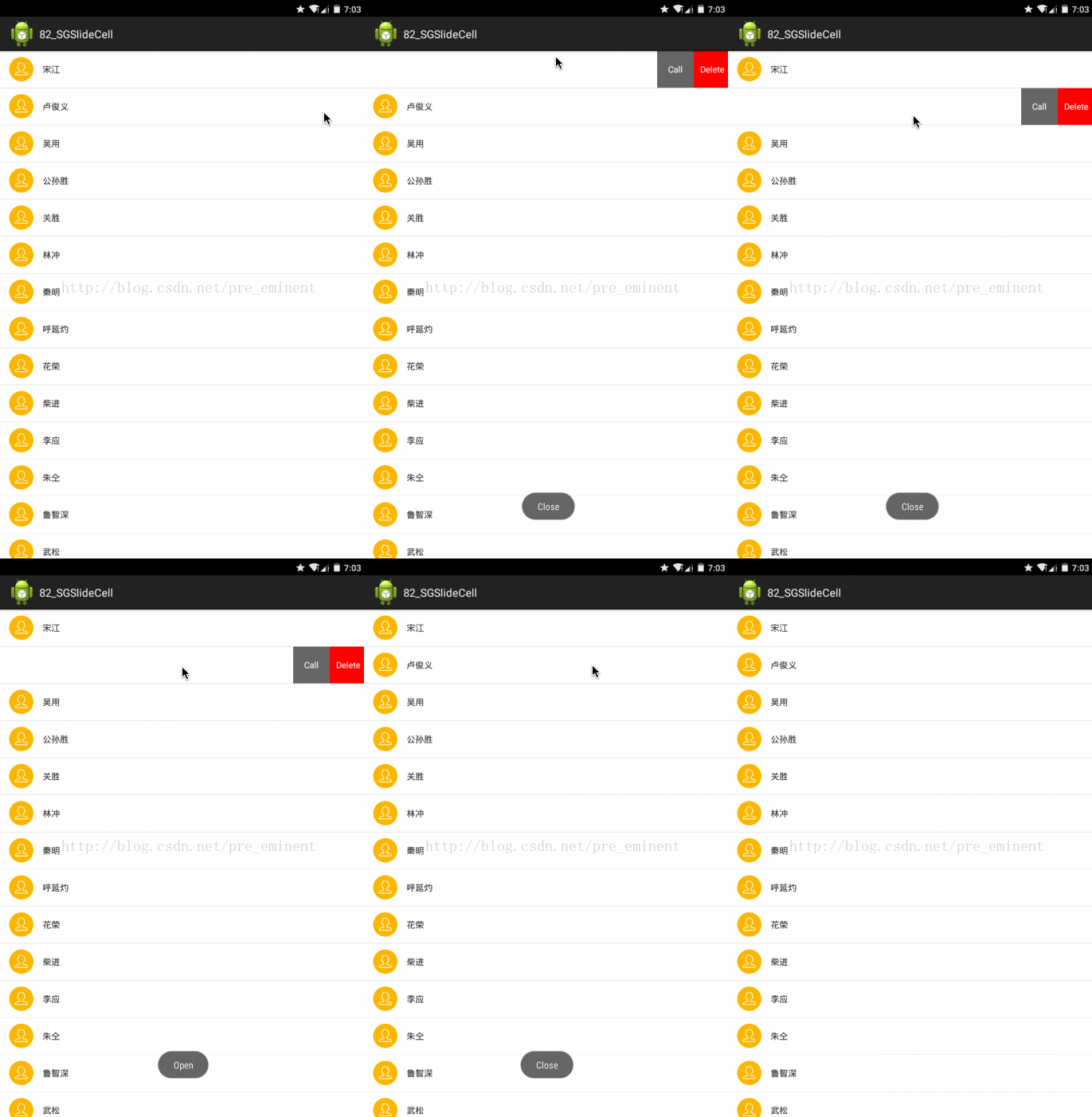
效果:
靜態導入

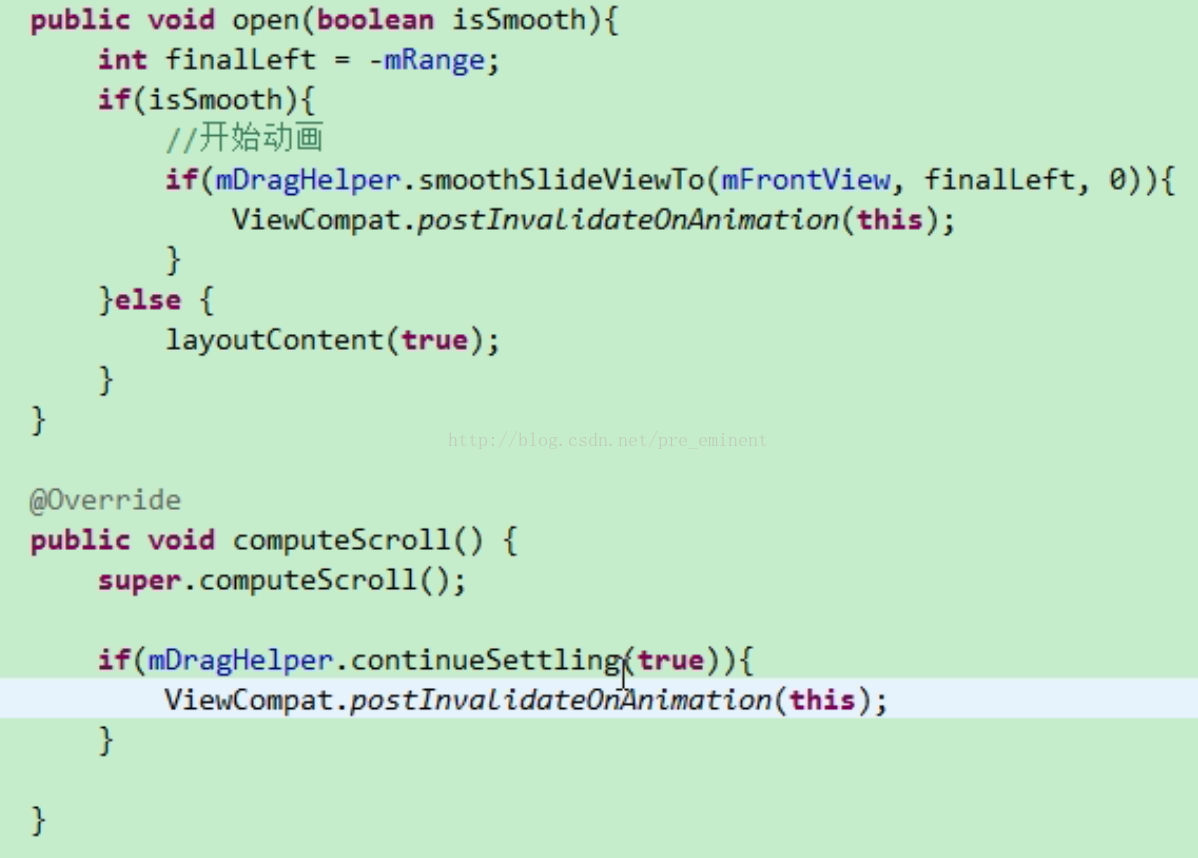
平滑移動到指定位置的模板代碼
布局:
activity_main
item_list
主控制器
package com.sg31.sgslidecell;

import android.support.v7.app.ActionBarActivity;
import android.os.Bundle;
import android.view.Menu;
import android.view.MenuItem;
import android.widget.ListView;


public class MainActivity extends ActionBarActivity {

    @Override
    protected void onCreate(Bundle savedInstanceState) {
        super.onCreate(savedInstanceState);
        setContentView(R.layout.activity_main);


        ListView mList = (ListView) findViewById(R.id.lv);
		mList.setAdapter(new SGAdapter(MainActivity.this));

    }
}
工具類
package com.sg31.sgslidecell;

import android.content.Context;
import android.graphics.Rect;
import android.support.v4.view.MotionEventCompat;
import android.util.DisplayMetrics;
import android.util.TypedValue;
import android.view.MotionEvent;
import android.view.View;
import android.widget.Toast;

public class Utils {

	public static Toast mToast;

	public static void showToast(Context mContext, String msg) {
		if (mToast == null) {
			mToast = Toast.makeText(mContext, "", Toast.LENGTH_SHORT);
		}
		mToast.setText(msg);
		mToast.show();
	}

	/**
	 * dip 轉換成 px
	 *
	 * @param dip
	 * @param context
	 * @return
	 */
	public static float dip2Dimension(float dip, Context context) {
		DisplayMetrics displayMetrics = context.getResources()
				.getDisplayMetrics();
		return TypedValue.applyDimension(TypedValue.COMPLEX_UNIT_DIP, dip,
				displayMetrics);
	}

	/**
	 * @param dip
	 * @param context
	 * @param complexUnit
	 *            {@link TypedValue#COMPLEX_UNIT_DIP}
	 *            {@link TypedValue#COMPLEX_UNIT_SP}
	 * @return
	 */
	public static float toDimension(float dip, Context context, int complexUnit) {
		DisplayMetrics displayMetrics = context.getResources()
				.getDisplayMetrics();
		return TypedValue.applyDimension(complexUnit, dip, displayMetrics);
	}

	/**
	 * 獲取狀態欄高度
	 *
	 * @param v
	 * @return
	 */
	public static int getStatusBarHeight(View v) {
		if (v == null) {
			return 0;
		}
		Rect frame = new Rect();
		v.getWindowVisibleDisplayFrame(frame);
		return frame.top;
	}

	public static String getActionName(MotionEvent event) {
		String action = "unknow";
		switch (MotionEventCompat.getActionMasked(event)) {
		case MotionEvent.ACTION_DOWN:
			action = "ACTION_DOWN";
			break;
		case MotionEvent.ACTION_MOVE:
			action = "ACTION_MOVE";
			break;
		case MotionEvent.ACTION_UP:
			action = "ACTION_UP";
			break;
		case MotionEvent.ACTION_CANCEL:
			action = "ACTION_CANCEL";
			break;
		case MotionEvent.ACTION_SCROLL:
			action = "ACTION_SCROLL";
			break;
		case MotionEvent.ACTION_OUTSIDE:
			action = "ACTION_SCROLL";
			break;
		default:
			break;
		}
		return action;
	}
}
package com.sg31.sgslidecell;
public class Cheeses {


	public static final String[] NAMES = new String[] { "宋江", "盧俊義", "吳用",
			"公孫勝", "關勝", "林沖", "秦明", "呼延灼", "花榮", "柴進", "李應", "朱仝", "魯智深",
			"武松", "董平", "張清", "楊志", "徐寧", "索超", "戴宗", "劉唐", "李逵", "史進", "穆弘",
			"雷橫", "李俊", "阮小二", "張橫", "阮小五", " 張順", "阮小七", "楊雄", "石秀", "解珍",
			" 解寶", "燕青", "朱武", "黃信", "孫立", "宣贊", "郝思文", "韓滔", "彭玘", "單廷珪",
			"魏定國", "蕭讓", "裴宣", "歐鵬", "鄧飛", " 燕順", "楊林", "凌振", "蔣敬", "呂方",
			"郭 盛", "安道全", "皇甫端", "王英", "扈三娘", "鮑旭", "樊瑞", "孔明", "孔亮", "項充",
			"李衮", "金大堅", "馬麟", "童威", "童猛", "孟康", "侯健", "陳達", "楊春", "鄭天壽",
			"陶宗旺", "宋清", "樂和", "龔旺", "丁得孫", "穆春", "曹正", "宋萬", "杜遷", "薛永", "施恩",
			"周通", "李忠", "杜興", "湯隆", "鄒淵", "鄒潤", "朱富", "朱貴", "蔡福", "蔡慶", "李立",
			"李雲", "焦挺", "石勇", "孫新", "顧大嫂", "張青", "孫二娘", " 王定六", "郁保四", "白勝",
			"時遷", "段景柱" };

}
適配器
package com.sg31.sgslidecell;

import static com.sg31.sgslidecell.Cheeses.NAMES;
import java.util.ArrayList;

import com.sg31.sgslidecell.SGSlideCellLayout.OnSlideCellLayoutStateChangeListener;

import android.content.Context;
import android.util.Log;
import android.view.View;
import android.view.ViewGroup;
import android.widget.BaseAdapter;
import android.widget.TextView;

public class SGAdapter extends BaseAdapter {

	protected static final String TAG = "TAG";


	public SGAdapter(Context context) {
		super();
		this.context = context;

		opendItems = new ArrayList();
	}

	private Context context;
	private ArrayList opendItems;

	@Override
	public int getCount() {
		return NAMES.length;
	}

	@Override
	public Object getItem(int position) {
		return NAMES[position];
	}

	@Override
	public long getItemId(int position) {
		return position;
	}

	@Override
	public View getView(int position, View convertView, ViewGroup parent) {

		View view = convertView;
		if(convertView == null){
			view = View.inflate(context, R.layout.item_list, null);

		}
		ViewHolder mHolder = ViewHolder.getHolder(view);
		mHolder.tv_name.setText(NAMES[position]);
		SGSlideCellLayout sl = (SGSlideCellLayout)view;
		sl.setSwipeLayoutListener(new OnSlideCellLayoutStateChangeListener() {
			@Override
			public void onStartOpen(SGSlideCellLayout mSwipeLayout) {
				Log.d(TAG, "onStartOpen");
				// 要去開啟時,先遍歷所有已打開條目, 逐個關閉
				for (SGSlideCellLayout layout : opendItems) {
					layout.close();
				}
				opendItems.clear();
			}

			@Override
			public void onStartClose(SGSlideCellLayout mSwipeLayout) {
				Log.d(TAG, "onStartClose");
			}

			@Override
			public void onOpen(SGSlideCellLayout mSwipeLayout) {
				Log.d(TAG, "onOpen");
				// 添加進集合
				 opendItems.add(mSwipeLayout);
			}
			@Override
			public void onDraging(SGSlideCellLayout mSwipeLayout) {
			}

			@Override
			public void onClose(SGSlideCellLayout mSwipeLayout) {
				Log.d(TAG, "onClose");
				// 移除集合
				 opendItems.remove(mSwipeLayout);
			}
		});
		return view;
	}

	static class ViewHolder {
		TextView tv_name;

		TextView tv_call;
		TextView tv_del;

		public static ViewHolder getHolder(View view) {
			Object tag = view.getTag();
			if(tag == null){
				ViewHolder viewHolder = new ViewHolder();
				viewHolder.tv_name = (TextView)view.findViewById(R.id.tv_name);
				viewHolder.tv_call = (TextView)view.findViewById(R.id.tv_call);
				viewHolder.tv_del = (TextView)view.findViewById(R.id.tv_del);
				tag = viewHolder;
				view.setTag(tag);
			}
			return (ViewHolder)tag;
		}
	}

}
自定義Layout
package com.sg31.sgslidecell;

import android.content.Context;
import android.graphics.Rect;
import android.support.v4.view.ViewCompat;
import android.support.v4.widget.ViewDragHelper;
import android.util.AttributeSet;
import android.view.MotionEvent;
import android.view.View;
import android.widget.FrameLayout;

/**
 * 側拉刪除控件
 * @author poplar
 *
 */
public class SGSlideCellLayout extends FrameLayout {
	private Status status = Status.Close;
	private OnSlideCellLayoutStateChangeListener swipeLayoutListener;

	public Status getStatus() {
		return status;
	}

	public void setStatus(Status status) {
		this.status = status;
	}

	public OnSlideCellLayoutStateChangeListener getSwipeLayoutListener() {
		return swipeLayoutListener;
	}

	public void setSwipeLayoutListener(OnSlideCellLayoutStateChangeListener swipeLayoutListener) {
		this.swipeLayoutListener = swipeLayoutListener;
	}

	public static enum Status{
		Close, Open, Draging
	}
	public static interface OnSlideCellLayoutStateChangeListener {

		void onClose(SGSlideCellLayout mSwipeLayout);
		void onOpen(SGSlideCellLayout mSwipeLayout);
		void onDraging(SGSlideCellLayout mSwipeLayout);
		// 要去關閉
		void onStartClose(SGSlideCellLayout mSwipeLayout);
		// 要去開啟
		void onStartOpen(SGSlideCellLayout mSwipeLayout);
	}

	public SGSlideCellLayout(Context context) {
		this(context, null);
	}

	public SGSlideCellLayout(Context context, AttributeSet attrs) {
		this(context, attrs, 0);
	}

	public SGSlideCellLayout(Context context, AttributeSet attrs, int defStyle) {
		super(context, attrs, defStyle);

		mDragHelper = ViewDragHelper.create(this, 1.0f, mCallback);
	}
	ViewDragHelper.Callback mCallback = new ViewDragHelper.Callback() {
		// c. 重寫監聽
		public boolean tryCaptureView(View view, int id) {
			return true;
		}

		// 限定移動范圍
		public int clampViewPositionHorizontal(View child, int left, int dx) {

			// left
			if(child == mFrontView){
				if(left > 0){
					return 0;
				}else if(left < -mRange){
					return -mRange;
				}
			}else if (child == mBackView) {
				if(left > mWidth){
					return mWidth;
				}else if (left < mWidth - mRange) {
					return mWidth - mRange;
				}
			}
			return left;
		};

		public void onViewPositionChanged(View changedView, int left, int top, int dx, int dy) {

			// 傳遞事件
			if(changedView == mFrontView){
				mBackView.offsetLeftAndRight(dx);
			}else if (changedView == mBackView) {
				mFrontView.offsetLeftAndRight(dx);
			}

			dispatchSwipeEvent();

			// 兼容老版本
			invalidate();

		};

		public void onViewReleased(View releasedChild, float xvel, float yvel) {

			if (xvel == 0 && mFrontView.getLeft() < -mRange / 2.0f) {
				open();
			}else if (xvel < 0) {
				open();
			}else {
				close();
			}

		};

	};
	private ViewDragHelper mDragHelper;
	private View mBackView;
	private View mFrontView;
	private int mHeight;
	private int mWidth;
	private int mRange;

	// b. 傳遞觸摸事件
	@Override
	public boolean onInterceptTouchEvent(android.view.MotionEvent ev) {
		return mDragHelper.shouldInterceptTouchEvent(ev);
	};

	protected void dispatchSwipeEvent() {

		if(swipeLayoutListener != null){
			swipeLayoutListener.onDraging(this);
		}

		// 記錄上一次的狀態
		Status preStatus = status;
		// 更新當前狀態
		status = updateStatus();
		if (preStatus != status && swipeLayoutListener != null) {
			if (status == Status.Close) {
				swipeLayoutListener.onClose(this);
			} else if (status == Status.Open) {
				swipeLayoutListener.onOpen(this);
			} else if (status == Status.Draging) {
				if(preStatus == Status.Close){
					swipeLayoutListener.onStartOpen(this);
				}else if (preStatus == Status.Open) {
					swipeLayoutListener.onStartClose(this);
				}
			}
		}
	}

	private Status updateStatus() {

		int left = mFrontView.getLeft();
		if(left == 0){
			return Status.Close;
		}else if (left == -mRange) {
			return Status.Open;
		}
		return Status.Draging;
	}

	public void close() {
		Utils.showToast(getContext(), "Close");
		close(true);
	}
	public void close(boolean isSmooth){
		int finalLeft = 0;
		if(isSmooth){
			//開始動畫
			if(mDragHelper.smoothSlideViewTo(mFrontView, finalLeft, 0)){
				ViewCompat.postInvalidateOnAnimation(this);
			}
		}else {
			layoutContent(false);
		}
	}

	public void open() {
		Utils.showToast(getContext(), "Open");
		open(true);
	}
	public void open(boolean isSmooth){
		int finalLeft = -mRange;
		if(isSmooth){
			//開始動畫
			if(mDragHelper.smoothSlideViewTo(mFrontView, finalLeft, 0)){
				ViewCompat.postInvalidateOnAnimation(this);
			}
		}else {
			layoutContent(true);
		}
	}

	public void computeScroll() {
		super.computeScroll();

		if(mDragHelper.continueSettling(true)){
			ViewCompat.postInvalidateOnAnimation(this);
		}

	}

	public boolean onTouchEvent(MotionEvent event) {

		try {
			mDragHelper.processTouchEvent(event);
		} catch (Exception e) {
			e.printStackTrace();
		}

		return true;
	}

	protected void onLayout(boolean changed, int left, int top, int right,
			int bottom) {
		super.onLayout(changed, left, top, right, bottom);
		// 擺放位置
		layoutContent(false);
	}

	private void layoutContent(boolean isOpen) {
		// 擺放前View
		Rect frontRect = computeFrontViewRect(isOpen);
		mFrontView.layout(frontRect.left, frontRect.top, frontRect.right, frontRect.bottom);
		// 擺放後View
		Rect backRect = computeBackViewViaFront(frontRect);
		mBackView.layout(backRect.left, backRect.top, backRect.right, backRect.bottom);

		// 調整順序, 把mFrontView前置
		bringChildToFront(mFrontView);
	}

	private Rect computeBackViewViaFront(Rect frontRect) {
		int left = frontRect.right;
		return new Rect(left, 0, left + mRange, 0 + mHeight);
	}

	private Rect computeFrontViewRect(boolean isOpen) {
		int left = 0;
		if(isOpen){
			left = -mRange;
		}
		return new Rect(left, 0, left + mWidth, 0 + mHeight);
	}

	protected void onFinishInflate() {
		super.onFinishInflate();
		// 當xml被填充完畢時調用
		mBackView = getChildAt(0);
		mFrontView = getChildAt(1);
	}

	protected void onSizeChanged(int w, int h, int oldw, int oldh) {
		super.onSizeChanged(w, h, oldw, oldh);

		mHeight = mFrontView.getMeasuredHeight();
		mWidth = mFrontView.getMeasuredWidth();

		mRange = mBackView.getMeasuredWidth();

	}

}
 Android應用程序內存洩漏介紹
Android應用程序內存洩漏介紹內存洩漏和內存溢出的區別內存溢出(out of memory)是指程序在申請內存時,沒有足夠的內存空間供其使用,出現out of mem
 Android開發:LocationManager獲取經緯度及定位過程(附demo)
在Android開發當中,經常需要用到定位功能,尤其是依賴於地理位置功能的應用,很多人喜歡使用百度地圖,高德地圖提供的sdk,開放API,但是在僅僅需要經緯度,或者城市,
 怎樣防止App在後台運行,點擊應用桌面圖標重新啟動?
在項目中,遇到一個問題百思不得其解,那就是:我在app使用過程中,點擊了home鍵,然後去看看微信之類的其他應用,這個時候再點擊app桌面的圖標,這個時候app是重新啟動
 Android開發之自定義圓角矩形進度對話框
方式一:自定義對話框 public class ProgersssDialog extends Dialog { private ImageView img;