編輯:關於Android編程
通過這片文章可以回答以下兩個問題
1、為啥EventBus的事件處理方法必須申明為Public?但是我用protected也是OK的
2、粘性事件的原理,為啥發送多次Event,只有最新的event能夠得到處理?
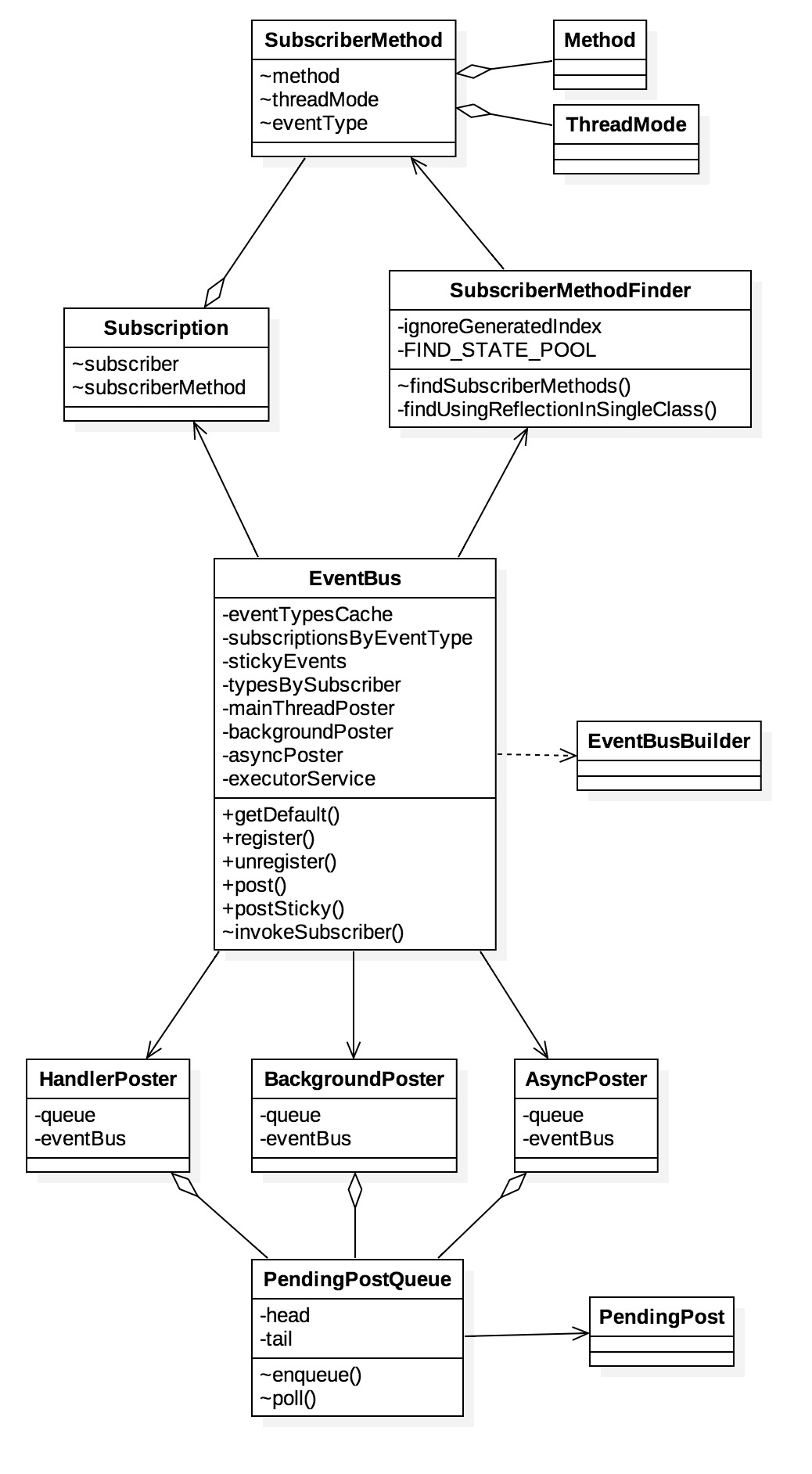 vc+88rWloaPG5NbQ1+66y9DEtcTA4M6qRXZlbnRCdXO6zVN1YnNjcmliZXJNZXRob2RGSW5kZXKjrEV2ZW50QnVzzeqzycHLvvi087K/t9ajqNeisuGhoreisryhoru6tOahoreiyeS199PD16Ky4dXft723qLXIo6m1xMLfvK25psTco6xTdWJzY3JpYmVyTWV0aG9kRkluZGVy1PLTw9PasunV0teisuHA4LXEysK8/re9t6iho7jDwODNvEV2ZW50QnVzyc+3vbXEwODW99Kq08PT2s3qs8lFdmVudEJ1c7XE16Ky4bmk1/ejrLb4z8K3vbXEveG5+1Bvc3RlctTy08PT2kV2ZW50QnVztcTKwrz+t6KyvKGjPC9wPg0KPGgyIGlkPQ=="eventbus流程圖">EventBus流程圖


1)EventBus的注冊過程中, 通過反射的方式找到注冊類中所有的事件處理方法(@Subscriber標注的public方法),再將注冊類的信息保存在HashMap中。如果發現注冊類中的某個方法是sticky的,那麼將會直接進入事件發布的流程
2)EventBus的事件發布過程中,不管采用哪一種線程模型,最重都會調用EventBus類中的invokeSubscriber()方法。如果客戶端發送的是一個Sticky事件,EventBus將event事件存入到粘性事件緩存stickyEvents中,然後回到普通事件的處理流程上
getDefault()方法,獲得默認的EventBus實例
//默認情況下,采用單例模式,線程安全。
//也可以不用單例模式,EventBus的構造方法是public的,因此初始化自己的EventBus對象
public static EventBus getDefault() {
    if (defaultInstance == null) {
        synchronized (EventBus.class) {
            if (defaultInstance == null) {
                defaultInstance = new EventBus();
            }
        }
    }
    return defaultInstance;
}
register()方法,訂閱者注冊
//subscriber就是訂閱發布 模式中的訂閱著,如我們的Activity
public void register(Object subscriber) {
    Class subscriberClass = subscriber.getClass();//獲取訂閱者的Class類對象
    List subscriberMethods = subscriberMethodFinder.findSubscriberMethods(subscriberClass);//獲取該類中的事件方法(@subscribe標簽),SubscriberMethod類包含了注冊者的類、方法、sticky、線程模式等信息
    synchronized (this) {
        for (SubscriberMethod subscriberMethod : subscriberMethods) {
            subscribe(subscriber, subscriberMethod);//緩存注冊者信息
        }
    }
}
findSubscriberMethods()方法,獲得訂閱者中@Subscribe標識的方法
ListfindSubscriberMethods(Class subscriberClass) { List subscriberMethods = METHOD_CACHE.get(subscriberClass);//從緩存中找 if (subscriberMethods != null) { return subscriberMethods;//緩存命中,直接返回 } //ignoreGeneratedIndex默認情況為false,但都會走到findUsingReflectionInSingleClass方法中,通過反射來找到@Subscribe標識的方法 if (ignoreGeneratedIndex) { subscriberMethods = findUsingReflection(subscriberClass); } else { subscriberMethods = findUsingInfo(subscriberClass); } if (subscriberMethods.isEmpty()) { throw new EventBusException("Subscriber " + subscriberClass + " and its super classes have no public methods with the @Subscribe annotation"); } else { METHOD_CACHE.put(subscriberClass, subscriberMethods);//存到緩存中 return subscriberMethods; } } //通過反射來處理,找到訂閱者中@Subscribe標識的方法 private void findUsingReflectionInSingleClass(FindState findState) { Method[] methods; try { // 獲取注冊類的所有申明方法(非繼承方法),該方法的效率比getMehtods()高 methods = findState.clazz.getDeclaredMethods(); } catch (Throwable th) { methods = findState.clazz.getMethods(); findState.skipSuperClasses = true; } for (Method method : methods) { int modifiers = method.getModifiers();//方法的修飾符:public //找到public修飾的方法,這裡奇怪的是,protected的方法通過反射得到的方法修飾符也是public,這就是為什麼protected修飾的方法也能使用的原因!! if ((modifiers & Modifier.PUBLIC) != 0 && (modifiers & MODIFIERS_IGNORE) == 0) { //找到參數個數為1的方法 Class[] parameterTypes = method.getParameterTypes(); if (parameterTypes.length == 1) { //找到注解@Subscribe標識的方法 Subscribe subscribeAnnotation = method.getAnnotation(Subscribe.class); if (subscribeAnnotation != null) { Class eventType = parameterTypes[0];//獲取參數 if (findState.checkAdd(method, eventType)) { ThreadMode threadMode = subscribeAnnotation.threadMode();//從注解獲取線程模型 findState.subscriberMethods.add(new SubscriberMethod(method, eventType, threadMode, subscribeAnnotation.priority(), subscribeAnnotation.sticky())); } } } else if (strictMethodVerification && method.isAnnotationPresent(Subscribe.class)) { String methodName = method.getDeclaringClass().getName() + "." + method.getName(); throw new EventBusException("@Subscribe method " + methodName + "must have exactly 1 parameter but has " + parameterTypes.length); } } else if (strictMethodVerification && method.isAnnotationPresent(Subscribe.class)) { String methodName = method.getDeclaringClass().getName() + "." + method.getName(); throw new EventBusException(methodName + " is a illegal @Subscribe method: must be public, non-static, and non-abstract"); } } }
subscribe()方法,在找到注冊類的方法後,就需要對這些方法也注冊,存入緩存中
private void subscribe(Object subscriber, SubscriberMethod subscriberMethod) {
    Class eventType = subscriberMethod.eventType;//消息事件的類型
    Subscription newSubscription = new Subscription(subscriber, subscriberMethod);//Subscription類封裝了注冊者和它的一個方法
    CopyOnWriteArrayList subscriptions = subscriptionsByEventType.get(eventType);//從緩存,是否已經注冊過
    if (subscriptions == null) {
        subscriptions = new CopyOnWriteArrayList<>();
        subscriptionsByEventType.put(eventType, subscriptions);
    } else {
        //緩存命中,無序重新注冊,拋出異常。
        if (subscriptions.contains(newSubscription)) {
            throw new EventBusException("Subscriber " + subscriber.getClass() + " already registered to event "
                    + eventType);
        }
    }

    int size = subscriptions.size();
    for (int i = 0; i <= size; i++) {
        //優先級排序
        if (i == size || subscriberMethod.priority > subscriptions.get(i).subscriberMethod.priority) {
            subscriptions.add(i, newSubscription);
            break;
        }
    }

    //向緩存中添加subscriber所對應的Event。感覺typesBySubscriber沒啥用?
    List> subscribedEvents = typesBySubscriber.get(subscriber);
    if (subscribedEvents == null) {
        subscribedEvents = new ArrayList<>();
        typesBySubscriber.put(subscriber, subscribedEvents);
    }
    subscribedEvents.add(eventType);

    //注冊粘性事件
    if (subscriberMethod.sticky) {
        if (eventInheritance) {
            // Existing sticky events of all subclasses of eventType have to be considered.
            // Note: Iterating over all events may be inefficient with lots of sticky events,
            // thus data structure should be changed to allow a more efficient lookup
            // (e.g. an additional map storing sub classes of super classes: Class -> List).
            Set, Object>> entries = stickyEvents.entrySet();
            for (Map.Entry, Object> entry : entries) {
                Class candidateEventType = entry.getKey();
                if (eventType.isAssignableFrom(candidateEventType)) {
                    Object stickyEvent = entry.getValue();
                    checkPostStickyEventToSubscription(newSubscription, stickyEvent);
                }
            }
        } else {
            Object stickyEvent = stickyEvents.get(eventType);
            checkPostStickyEventToSubscription(newSubscription, stickyEvent);//該方法將會直接跳轉到事件發布歷程中執行
        }
    }
}
post()方法,發布者發布消息事件
//currentPostingThreadState是一個ThredLocal變量,線程內部共享數據,線程間安全 private final ThreadLocalcurrentPostingThreadState = new ThreadLocal () { @Override protected PostingThreadState initialValue() { return new PostingThreadState(); } }; //發布event粘性事件 public void postSticky(Object event) { synchronized (stickyEvents) { //stickyEvents是ConcurrentHashMap,每次往map中put鍵值對,會覆蓋具有相同event.getClass()的值,因此導致即使發布多次粘性事件,也只會處理最新的那一個 //換句話即:同一個event類,在緩存中只會保存一個粘性事件! stickyEvents.put(event.getClass(), event); } post(event); } //發布event事件 public void post(Object event) { PostingThreadState postingState = currentPostingThreadState.get(); List
AsyncPoster類,實現了Runnable接口
class AsyncPoster implements Runnable {
    private final PendingPostQueue queue;
    private final EventBus eventBus;

    AsyncPoster(EventBus eventBus) {
        this.eventBus = eventBus;
        queue = new PendingPostQueue();
    }

    public void enqueue(Subscription subscription, Object event) {
        PendingPost pendingPost = PendingPost.obtainPendingPost(subscription, event);
        queue.enqueue(pendingPost);//加入隊列中
        eventBus.getExecutorService().execute(this);//調用線程池執行,並發執行
    }

    @Override
    public void run() {
        PendingPost pendingPost = queue.poll();
        if(pendingPost == null) {
            throw new IllegalStateException("No pending post available");
        }
        eventBus.invokeSubscriber(pendingPost);//調用EventBus的反射方法
    }

}
BackgroundPoster類,雖然也實現了Runnable接口,雖然也在子線程中執行EventBus的反射回調方法。但是與AsyncPoster類不同的是:
1)AsyncPoster類每次任務都會新建一個線程,並發執行隊列中的任務
2)而BackgroundPoster類只會新建一個子線程,隊列中的任務,只會順序執行。
final class BackgroundPoster implements Runnable {

    private final PendingPostQueue queue;
    private final EventBus eventBus;

    private volatile boolean executorRunning;

    BackgroundPoster(EventBus eventBus) {
        this.eventBus = eventBus;
        queue = new PendingPostQueue();
    }

    public void enqueue(Subscription subscription, Object event) {
        PendingPost pendingPost = PendingPost.obtainPendingPost(subscription, event);
        synchronized (this) {
            queue.enqueue(pendingPost);
            if (!executorRunning) {
                executorRunning = true;
                eventBus.getExecutorService().execute(this);
            }
        }
    }

    @Override
    public void run() {
        try {
            try {
                while (true) {
                    PendingPost pendingPost = queue.poll(1000);
                    if (pendingPost == null) {
                        synchronized (this) {
                            // Check again, this time in synchronized
                            pendingPost = queue.poll();
                            if (pendingPost == null) {
                                executorRunning = false;
                                return;
                            }
                        }
                    }
                    eventBus.invokeSubscriber(pendingPost);
                }
            } catch (InterruptedException e) {
                Log.w("Event", Thread.currentThread().getName() + " was interruppted", e);
            }
        } finally {
            executorRunning = false;
        }
    }

}
mainThreadPoster是HandlerPoster變量,他繼承Handler,不難猜出,他通過Handler+Looper機制,來實現主線程調用
mainThreadPoster = new HandlerPoster(this, Looper.getMainLooper(), 10);//綁定主線程的Looper


final class HandlerPoster extends Handler {

    private final PendingPostQueue queue;
    private final int maxMillisInsideHandleMessage;
    private final EventBus eventBus;
    private boolean handlerActive;

    HandlerPoster(EventBus eventBus, Looper looper, int maxMillisInsideHandleMessage) {
        super(looper);//綁定主線程的Looper
        this.eventBus = eventBus;
        this.maxMillisInsideHandleMessage = maxMillisInsideHandleMessage;
        queue = new PendingPostQueue();
    }

    void enqueue(Subscription subscription, Object event) {
        PendingPost pendingPost = PendingPost.obtainPendingPost(subscription, event);
        synchronized (this) {
            queue.enqueue(pendingPost);
            if (!handlerActive) {
                handlerActive = true;
                if (!sendMessage(obtainMessage())) {
                    throw new EventBusException("Could not send handler message");
                }
            }
        }
    }

    //處理event事件,調用EventBus的invokeSubscriber反射回調
    public void handleMessage(Message msg) {
        boolean rescheduled = false;
        try {
            long started = SystemClock.uptimeMillis();
            while (true) {
                PendingPost pendingPost = queue.poll();
                if (pendingPost == null) {
                    synchronized (this) {
                        // 雙重判0,線程安全
                        pendingPost = queue.poll();
                        if (pendingPost == null) {
                            handlerActive = false;
                            return;
                        }
                    }
                }
                eventBus.invokeSubscriber(pendingPost);//調用EventBus的反射方法
                long timeInMethod = SystemClock.uptimeMillis() - started;
                if (timeInMethod >= maxMillisInsideHandleMessage) {
                    if (!sendMessage(obtainMessage())) {
                        throw new EventBusException("Could not send handler message");
                    }
                    rescheduled = true;
                    return;
                }
            }
        } finally {
            handlerActive = rescheduled;
        }
    }
}
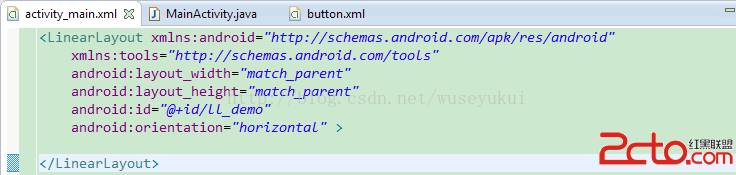 android——如何理解控件的寬高及layout_grivaty與grivaty的區別
關於Layout_width/height引發的寬高思考方式一: 結果不符合預期。運行結果: 方式二:
 Android實現左右滑動效果的方法詳解
本示例演示在Android中實現圖片左右滑動效果。關於滑動效果,在Android中用得比較多,本示例實現的滑動效果是使用ViewFlipper來實現的,當然也可以使用其它
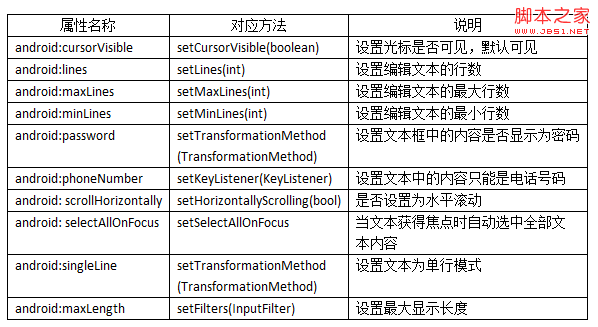 Android控件之EditView常用屬性及應用方法
EditView類繼承自TextView類,EditView與TextView最大的不同就是用戶可以對EditView控件進行編輯,
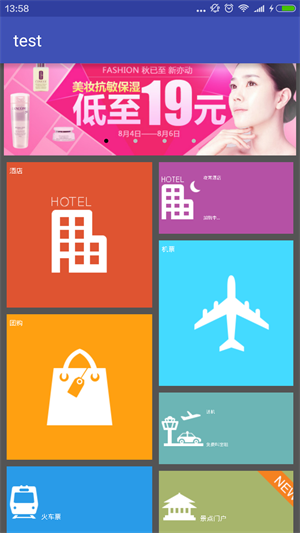 android 仿去哪兒首頁效果
首先上效果圖 第一張圖是進入該界面的效果,頂部是一個viewpager,下面每個塊都是自定義的view HomeButton,第二張圖是點擊右邊第一個方塊的效果,點擊時方