編輯:關於Android編程
主線程之所以可以接收Handler消息,是因為主線程在啟動時,已經創建了Looper對象。
/*** ActivityThread.java ***/
public static void main(String[] args) {
    Looper.prepareMainLooper();

    ActivityThread thread = new ActivityThread();
    thread.attach(false);

    if (sMainThreadHandler == null) {
        sMainThreadHandler = thread.getHandler();
    }
    Looper.loop();
}
而我們如果直接創建一個線程,是無法接收Handler的消息的,需要為該線程創建一個Looper對象才可以。
創建帶有Looper的線程的方法如下:
class LooperThread extends Thread {
    public Handler mHandler;

    public void run() {
        Looper.prepare();

        mHandler = new Handler() {
            public void handleMessage(Message msg) {
                // process incoming messages here
            }
        };

        Looper.loop();
    }
}
實際上,主線程的Looper創建,和上面的過程是一樣一樣的。
Android應用程序是通過消息來驅動的,每一個擁有Looper的線程(如主線程),都有一個消息隊列,其他線程向消息隊列裡放入消息,Looper線程不斷循環地從消息隊列裡取出消息並處理。沒有消息可處理時,Looper線程就進入阻塞狀態,直到有新的消息需要處理時被喚醒。
基於Android6.0的代碼
涉及到的類的代碼位置
frameworks/base/core/java/android/os/Handler.java
frameworks/base/core/java/android/os/Message.java
frameworks/base/core/java/android/os/MessageQueue.java
frameworks/base/core/java/android/os/Looper.java

frameworks/base/core/jni/android_os_MessageQueue.cpp

system/core/libutils/Looper.cpp
package android.os;

public final class Looper {

    //為每一個線程維護一個Looper
    static final ThreadLocal sThreadLocal = new ThreadLocal();
    //主線程Looper,每個進程只有一個
    private static Looper sMainLooper;
    //Looper的消息隊列
    final MessageQueue mQueue;
    //Looper所在的線程
    final Thread mThread;

    public static void prepare() {
        prepare(true);
    }

    private static void prepare(boolean quitAllowed) {
        //同一個線程不能重復創建Looper
        if (sThreadLocal.get() != null) {
            throw new RuntimeException("Only one Looper may be created per thread");
        }
        sThreadLocal.set(new Looper(quitAllowed));
    }

    //創建主線程Looper,由系統調用
    public static void prepareMainLooper() {
        prepare(false);
        synchronized (Looper.class) {
            if (sMainLooper != null) {
                throw new IllegalStateException("The main Looper has already been prepared.");
            }
            sMainLooper = myLooper();
        }
    }

    /**
     * Returns the application's main looper, which lives in the main thread of the application.
     */
    public static Looper getMainLooper() {
        synchronized (Looper.class) {
            return sMainLooper;
        }
    }

    /**
     * Run the message queue in this thread. Be sure to call
     * {@link #quit()} to end the loop.
     */
    public static void loop() {
        final Looper me = myLooper();
        if (me == null) {
            throw new RuntimeException("No Looper; Looper.prepare() wasn't called on this thread.");
        }
        final MessageQueue queue = me.mQueue;

        for (;;) {
            Message msg = queue.next(); // might block
            if (msg == null) {
                // No message indicates that the message queue is quitting.
                return;
            }

            msg.target.dispatchMessage(msg);

            msg.recycleUnchecked();
        }
    }

    /**
     * Return the Looper object associated with the current thread.  Returns
     * null if the calling thread is not associated with a Looper.
     */
    public static @Nullable Looper myLooper() {
        return sThreadLocal.get();
    }

    /**
     * Return the {@link MessageQueue} object associated with the current
     * thread.  This must be called from a thread running a Looper, or a
     * NullPointerException will be thrown.
     */
    public static @NonNull MessageQueue myQueue() {
        return myLooper().mQueue;
    }

    private Looper(boolean quitAllowed) {
        mQueue = new MessageQueue(quitAllowed);
        mThread = Thread.currentThread();
    }

    //直接退出,回收消息隊列裡所有的消息
    public void quit() {
        mQueue.quit(false);
    }

    //處理完當前的消息,回收消息隊列裡要在將來某個時刻處理的消息
    public void quitSafely() {
        mQueue.quit(true);
    }

    /**
     * Gets the Thread associated with this Looper.
     *
     * @return The looper's thread.
     */
    public @NonNull Thread getThread() {
        return mThread;
    }

    /**
     * Gets this looper's message queue.
     *
     * @return The looper's message queue.
     */
    public @NonNull MessageQueue getQueue() {
        return mQueue;
    }
}
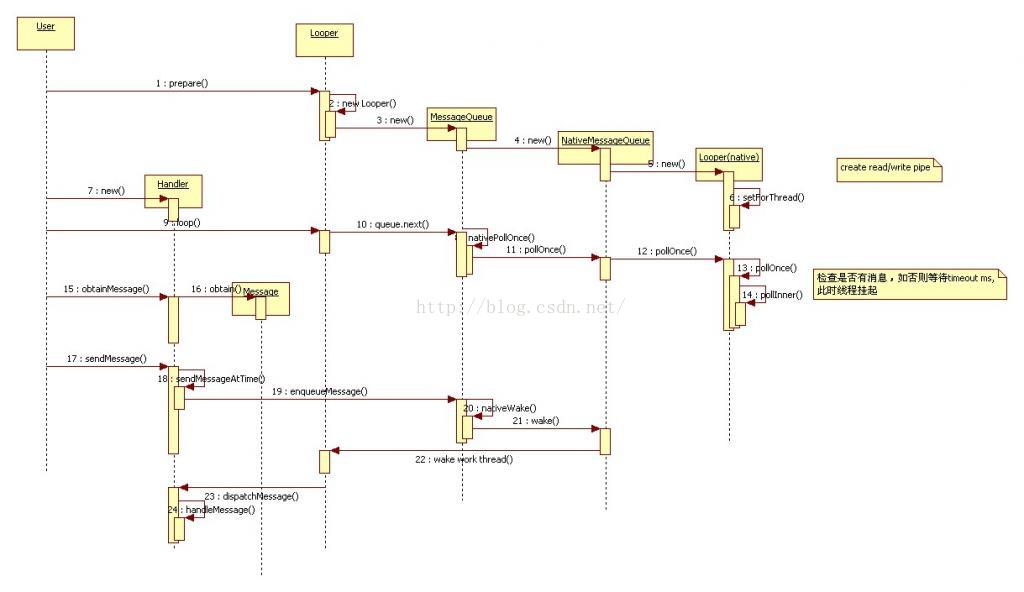
調用Looper.prepare()會new一個Looper對象,Looper的構造函數中,又會new一個消息隊列MessageQueue。
/*** MessageQueue.java ***/
MessageQueue(boolean quitAllowed) {
    mQuitAllowed = quitAllowed;
    mPtr = nativeInit();
}
通過JNI機制,MessageQueue調用nativeInit()函數,在JNI層創建一個NativeMessageQueue對象,並將該對象的句柄保存在mPtr變量中。代碼如下
/*** android_os_MessageQueue.cpp ***/
static jlong android_os_MessageQueue_nativeInit(JNIEnv* env, jclass clazz) {
    NativeMessageQueue* nativeMessageQueue = new NativeMessageQueue();
    if (!nativeMessageQueue) {
        jniThrowRuntimeException(env, "Unable to allocate native queue");
        return 0;
    }

    nativeMessageQueue->incStrong(env);
    return reinterpret_cast(nativeMessageQueue);
}
NativeMessageQueue初始化時又會創建一個native層的Looper對象。
/*** android_os_MessageQueue.cpp ***/
NativeMessageQueue::NativeMessageQueue() :
        mPollEnv(NULL), mPollObj(NULL), mExceptionObj(NULL) {
    mLooper = Looper::getForThread();
    if (mLooper == NULL) {
        mLooper = new Looper(false);
        Looper::setForThread(mLooper);
    }
}
native層的Looper和java層的Looper是對應的,主要負責喚醒java層的Looper,後面會講到喚醒原理。
Handler有多個構造方法,主要分為兩類,一類帶有Looper參數,構造時可以直接把Looper對象傳進去;另一類不帶Looper參數,這一類構造會調用到下面這個隱藏的構造方法。
/*** Handler.java ***/
public Handler(Callback callback, boolean async) {
    mLooper = Looper.myLooper();
    if (mLooper == null) {
        throw new RuntimeException(
            "Can't create handler inside thread that has not called Looper.prepare()");
    }
    mQueue = mLooper.mQueue;
    mCallback = callback;
    mAsynchronous = async;
}
由上面的代碼可知,
調用Looper.loop()開啟消息循環。loop()的主要邏輯如下
/*** Looper.java ***/
public static void loop() {
    //獲取當前線程的Looper對象
    final Looper me = myLooper();
    //獲取Looper對象的消息隊列
    final MessageQueue queue = me.mQueue;

    for (;;) {
        //循環從消息隊列中獲取消息
        //消息隊列中沒有消息,或者都是若干時間後才要處理的消息,就會阻塞在這裡
        //等有新的需要馬上處理的消息或者到時間後,就會取出消息繼續執行。
        Message msg = queue.next();

        //從消息隊列取出消息後分發處理
        msg.target.dispatchMessage(msg);

        //處理完消息後回收消息對象
        msg.recycleUnchecked();
    }
}
可以看出,Looper.loop()是一個循環,其後面的代碼一般不會執行,除非調用了Looper的quit方法退出消息循環。
/*** MessageQueue.java ***/
Message next() {
    //mPtr指向NativeMessageQueue對象
    final long ptr = mPtr;
    if (ptr == 0) {
        return null;
    }

    int nextPollTimeoutMillis = 0;
    for (;;) {
        if (nextPollTimeoutMillis != 0) {
            //不知道是干啥的
            Binder.flushPendingCommands();
        }

        nativePollOnce(ptr, nextPollTimeoutMillis);

        synchronized (this) {
            final long now = SystemClock.uptimeMillis();
            Message prevMsg = null;
            Message msg = mMessages;
            if (msg != null) {
                if (now < msg.when) {
                    //下個消息還沒有准備好,需要延時處理
                    nextPollTimeoutMillis = (int) Math.min(msg.when - now, Integer.MAX_VALUE);
                } else {
                    // Got a message.
                    if (prevMsg != null) {
                        prevMsg.next = msg.next;
                    } else {
                        mMessages = msg.next;
                    }
                    msg.next = null;
                    if (DEBUG) Log.v(TAG, "Returning message: " + msg);
                    msg.markInUse();
                    //取出消息,並從消息隊列移除
                    return msg;
                }
            } else {
                // No more messages.
                nextPollTimeoutMillis = -1;
            }

            // Process the quit message now that all pending messages have been handled.
            if (mQuitting) {
                dispose();
                return null;
            }
        }

        // Run the idle handlers.
        // 省略了 idle handlers 的相關處理

        // While calling an idle handler, a new message could have been delivered
        // so go back and look again for a pending message without waiting.
        nextPollTimeoutMillis = 0;
    }
}
nativePollOnce(ptr, nextPollTimeoutMillis);這個函數最終會調用到native Looper的pollnce()函數
/*** Looper.cpp ***/
Looper::pollOnce(int timeoutMillis, int* outFd, int* outEvents, void** outData) {
    int result = 0;
    for (;;) {
        //...
        if (result != 0) {
            //...
            return result;
        }

        result = pollInner(timeoutMillis);
    }
}
pollInner這個函數比較長,而且涉及到了Linux的epoll系統調用接口和管道等概念,這裡不做介紹,只截取了部分代碼,如下
/*** Looper.cpp ***/
int Looper::pollInner(int timeoutMillis) {
    //這裡就是等待消息,真正阻塞的地方!!!
    int eventCount = epoll_wait(mEpollFd, eventItems, EPOLL_MAX_EVENTS, timeoutMillis);

    //some error
    if (eventCount < 0) {
        result = POLL_ERROR;
        goto Done;
    }

    //沒有新消息,超時喚醒。
    //說明消息隊列裡有delay的消息到時間該處理了。
    if (eventCount == 0) {
        result = POLL_TIMEOUT;
        goto Done;
    }

    for (int i = 0; i < eventCount; i++) {
        int fd = eventItems[i].data.fd;
        uint32_t epollEvents = eventItems[i].events;
        if (fd == mWakeEventFd) {
            if (epollEvents & EPOLLIN) {
                awoken();
            } else {
                ALOGW("Ignoring unexpected epoll events 0x%x on wake event fd.", epollEvents);
            }
        } else {
            //......
        }
    }
}
總之,有新消息到來或超時喚醒時,都會從這個函數中返回到MessageQueue.next()函數中的nativePollOnce(ptr, nextPollTimeoutMillis)處,繼續往下執行。
上面說了,有新消息到來或超時時間到時,epoll_wait(mEpollFd, eventItems, EPOLL_MAX_EVENTS, timeoutMillis)可以被喚醒。
有超時時間,說明已經有延時消息被發過來了,只是沒有馬上處理。那麼什麼時候會有消息發過來呢?
先來看一下java層消息的發送流程。
發送消息有以下幾種方法:
1.使用Message的sendToTarget():會調用Handler的sendMessage(Message msg)方法
2.使用Handler的sendXXX系列和postXXX系列:
sendMessage(Message msg)
sendMessageDelayed(Message msg, long delayMillis)
sendMessageAtTime(Message msg, long uptimeMillis)

sendEmptyMessage(int what)
sendEmptyMessageDelayed(int what, long delayMillis)
sendEmptyMessageAtTime(int what, long uptimeMillis)

post(Runnable r)
postDelayed(Runnable r, long delayMillis)
postAtTime(Runnable r, long uptimeMillis)

//下面兩個方法會將Message插入到消息隊列的最前端
sendMessageAtFrontOfQueue(Message msg)
postAtFrontOfQueue(Runnable r)
以上函數最終都會調用到下面的函數,將Message放到消息隊列裡去。
/*** Handler.java ***/
private boolean enqueueMessage(MessageQueue queue, Message msg, long uptimeMillis) {
    msg.target = this;
    if (mAsynchronous) {
        msg.setAsynchronous(true);
    }
    return queue.enqueueMessage(msg, uptimeMillis);
}
/*** MessageQueue.java ***/
boolean enqueueMessage(Message msg, long when) {
    synchronized (this) {
        msg.markInUse();
        msg.when = when;
        Message p = mMessages;
        boolean needWake;
        //如果隊列為空||插入到隊首||消息處理時間早於隊首消息處理時間
        if (p == null || when == 0 || when < p.when) {
            // New head, wake up the event queue if blocked.
            msg.next = p;
            mMessages = msg;
            needWake = mBlocked;
        } else {
            needWake = mBlocked && p.target == null && msg.isAsynchronous();
            Message prev;
            //循環遍歷隊列裡的消息,按處理時間先後順序,將新消息插入到合適位置
            for (;;) {
                prev = p;
                p = p.next;
                if (p == null || when < p.when) {
                    break;
                }
                if (needWake && p.isAsynchronous()) {
                    needWake = false;
                }
            }
            msg.next = p;
            prev.next = msg;
        }
        //注意了注意了 wake wake
        if (needWake) {
            nativeWake(mPtr);
        }
    }
    return true;
}
需要說明的是,msg.when變量表示該消息在什麼時間點(系統啟動時間 SystemClock.uptimeMillis())處理。
首先來了解一下什麼是synchronization barrier。
(見MessageQueue的postSyncBarrier()方法和removeSyncBarrier(int token)方法。)
在Message中有同步消息和異步消息之分。
(見Message的setAsynchronous(boolean async)方法和isAsynchronous()方法)
同步分割欄也是一個Message類型的對象,只不過它的target為空,如上面代碼中p.target == null就代表p是一個同步分割欄。
簡單的說,如果消息隊列裡沒有同步分割欄,同步和異步消息是沒有區別的。
如果隊列裡有同步分割欄,則其後面的同步消息,即使時間到了,也不會被執行,除非同步分割欄被移除。而異步消息則不會受此限制。
把消息插入到消息隊列時,以下兩種情況才需要喚醒。
一種情況是,新消息插入隊首。
另一種情況是,隊首是一個同步分割欄,而新插入的消息之前沒有異步消息。
其他情況說明消息隊列中的消息正在被處理,或者新消息前有等待處理的消息,新消息的處理時間還沒到,則不需要喚醒。
/*** MessageQueue.java ***/
nativeWake(mPtr);
/*** android_os_MessageQueue.cpp ***/
static void android_os_MessageQueue_nativeWake(JNIEnv* env, jclass clazz, jlong ptr) {
    NativeMessageQueue* nativeMessageQueue = reinterpret_cast(ptr);
    nativeMessageQueue->wake();
}
/*** android_os_MessageQueue.cpp ***/
void NativeMessageQueue::wake() {
    mLooper->wake();
}
/*** Looper.cpp ***/
void Looper::wake() {
    uint64_t inc = 1;
    ssize_t nWrite = TEMP_FAILURE_RETRY(write(mWakeEventFd, &inc, sizeof(uint64_t)));
    if (nWrite != sizeof(uint64_t)) {
        if (errno != EAGAIN) {
            ALOGW("Could not write wake signal, errno=%d", errno);
        }
    }
}
涉及到了Linux的epoll系統調用接口和管道等概念,不做介紹,有興趣可以自行查閱資料。
Looper線程喚醒後,從消息隊列取出消息,然後進行分發處理。
msg.target.dispatchMessage(msg);Message的成員變量target就是要處理該Message的目標Handler,消息分發函數如下
/*** Handler.java ***/
public void dispatchMessage(Message msg) {
    if (msg.callback != null) {
        handleCallback(msg);
    } else {
        if (mCallback != null) {
            if (mCallback.handleMessage(msg)) {
                return;
            }
        }
        handleMessage(msg);
    }
}
前面說了,發送消息使用Handler的sendXXX方法和postXXX方法。
簡單總結一下:java層和native層各有一個Looper。
java層Looper:維護一個消息隊列,不斷循環從消息隊列中取消息並處理。隊列中沒有消息時等待,其他線程將消息插入消息隊列後,Looper並不是馬上取出消息處理,而是等待喚醒。
native層Looper:與java層的對應,使用Linux的epoll系統調用,監聽事件發生(文件有內容寫入),喚醒java層Looper。
消息隊列:中的消息是按處理時間排序。
其他線程將消息插入到消息隊列中,然後根據需要,調用native接口喚醒java層Looper處理消息。
對於延時消息,由MessageQueue計算延時時間,利用epoll_wait的超時機制,超時喚醒。
 深入理解Android事件分發機制
Android事件分發,參考了網上的很多資料。基本基於android2.2的源碼來分析,因為即使是新的版本,裡面的原理思想也沒有改變。有了大神的肩膀,我在理解了其原理的基
 Android應用開發中自定義ViewGroup的究極攻略
支持margin,gravity以及水平,垂直排列最近在學習android的view部分,於是動手實現了一個類似ViewPager的可上下或者左右拖動的ViewGroup
 手機qq能拉黑好友嗎 手機qq怎麼拉黑好友
手機qq用了那麼久,好友成千上萬,總有一些不想聊的人,怎麼把他加入黑名單呢?下面小編就來教教大家手機qq怎麼拉黑好友。在手機qq上是不能設置黑名單的,但我們
 Android程序crash處理
在實際項目開發中,會出現很多的異常直接導致程序crash掉,在開發中我們可以通過logcat查看錯誤日志,Debug出現的異常,讓程序安全的運行,但是在開發