編輯:關於Android編程
用到的知識點:
1.Http 協議字段"Range", "bytes="+start+"-"+end
2.RandomAccessFile設置寫入的位置
3.開啟線程發送網絡請求以及線程池操作
首先,在服務器端放一張圖片,如下在WebRoot下放置了一張lufei.jpg圖片
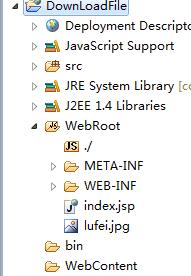
跟訪問網頁一樣通過url直接訪問:http://pc-20141102midc:8080/DownLoadFile/lufei.jpg
然後在Android端寫多線程下載的代碼:
為了防止遺忘現在配置文件中聲明權限:
布局文件:
下載類:
DownLoad.java
package com.example.download_file;

import java.io.File;
import java.io.IOException;
import java.io.InputStream;
import java.io.RandomAccessFile;
import java.net.HttpURLConnection;
import java.net.MalformedURLException;
import java.net.URL;
import java.util.concurrent.Executor;
import java.util.concurrent.Executors;

import android.os.Environment;
import android.os.Handler;
import android.os.Message;

/**
 * 多線程下載例子
 * @author weichongchong
 *
 */
public class DownLoad {
	private Handler mHandler;
	public DownLoad(Handler handle){
		this.mHandler= handle;
	}

	//通過線程池下載,創建線程池對象
	private Executor threadPool = Executors.newFixedThreadPool(3);//創建三個線程池

	static class DownLoadRunnable implements Runnable{
		private String url;
		private String fileName;
		private long start;
		private long end;
		private Handler handler;
		public DownLoadRunnable(String url ,String fileName,long start,long end,Handler handler ){
			this.url=url;
			this.fileName = fileName;
			this.start = start;
			this.end = end;
			this.handler= handler;
		}
		@Override
		public void run() {
			// TODO Auto-generated method stub

			try {
				URL httpUrl = new URL(url);
				HttpURLConnection conn = (HttpURLConnection) httpUrl.openConnection();
				conn.setReadTimeout(5000);
				conn.setRequestProperty("Range", "bytes="+start+"-"+end);//指定長度

				conn.setRequestMethod("GET");
				//創建隨機讀取流進行讀取
				RandomAccessFile access = new RandomAccessFile(new File(fileName), "rwd");//第二個參數代表可讀,可寫,可執行
				access.seek(start);
				InputStream in = conn.getInputStream();
				byte[] b = new byte[1024*4];
				int len=0;
				while((len = in.read())!=-1){
					access.write(b,0,len);
				}
				if(access!=null){
					access.close();
				}
				if(in!=null){
					in.close();
				}
				//下載完成通知更新UI
				Message message = new  Message();
				message.what=1;
				handler.sendMessage(message);
				//				int count = conn.getContentLength();//拿到下載對象的長度
				//				int block = count/3;//平均到每個線程池
			} catch (MalformedURLException e) {
				// TODO Auto-generated catch block
				e.printStackTrace();
			} catch (IOException e) {
				// TODO Auto-generated catch block
				e.printStackTrace();
			}


		}
	}
	public void downLoadFile(String url){


		try {
			URL httpUrl = new URL(url);
			HttpURLConnection conn = (HttpURLConnection) httpUrl.openConnection();
			conn.setReadTimeout(5000);
			conn.setRequestMethod("GET");
			int count = conn.getContentLength();//拿到下載對象的長度
			int block = count/3;//平均到每個線程池
			String fileName = getFileName(url);
//			File parent = Environment.getExternalStorageDirectory();
//			File fileDownLoad = new File(parent,fileName);
			File fileDownLoad  = new File(Environment.getExternalStoragePublicDirectory(Environment.DIRECTORY_PICTURES),fileName);
			/**
			 * 11/3  3
			 * 第一個線程0-2
			 * 第二個3-5
			 * 第三個6-10
			 */

			for(int i=0;i<3;i++){
				long start = i*block;
				long end = (i+1)*block-1;
				if(i==2){
					end=count;
				}
				DownLoadRunnable runnable = new DownLoadRunnable(url,fileDownLoad.getAbsolutePath(),start,end,mHandler);
				threadPool.execute(runnable);//通過線程池提交任務
			}
		} catch (MalformedURLException e) {
			// TODO Auto-generated catch block
			e.printStackTrace();
		} catch (IOException e) {
			// TODO Auto-generated catch block
			e.printStackTrace();
		}


	}
	/**
	 *
	 * @return
	 * 得到url後綴名,即文件名
	 */
	public String getFileName(String url){
		return url.substring(url.lastIndexOf("/")+1);
	}
}
package com.example.download_file;

import android.app.Activity;
import android.os.Bundle;
import android.os.Handler;
import android.view.Menu;
import android.view.MenuItem;
import android.view.View;
import android.view.View.OnClickListener;
import android.widget.Button;
import android.widget.TextView;
import android.widget.Toast;


public class MainActivity extends Activity {

	private Button start_download_bt;
	private TextView mytv;
	private int count = 0;

	private Handler mHandler = new Handler(){
		public void handleMessage(android.os.Message msg) {
			int result = msg.what;
			count+=result;//如果三個線程都下載完成,都返回一個1,相加為3
			if(count==3){
				mytv.setText("下載完成");
				start_download_bt.setText("下載完成");
			}
		};
	};
	@Override
	protected void onCreate(Bundle savedInstanceState) {
		super.onCreate(savedInstanceState);
		setContentView(R.layout.activity_main);
		start_download_bt = (Button) findViewById(R.id.start_download_bt);
		mytv = (TextView) findViewById(R.id.my_tv);

		start_download_bt.setOnClickListener(new OnClickListener() {

			@Override
			public void onClick(View v) {
				// TODO Auto-generated method stub

				start_download_bt.setText("正在下載");
				Toast.makeText(MainActivity.this, "正在下載", 0).show();


				new Thread(){
					@Override
					public void run() {
						// TODO Auto-generated method stub

						DownLoad mDownLoad  = new DownLoad(mHandler);
						mDownLoad.downLoadFile("http://192.168.1.105:8080/DownLoadFile/lufei.jpg");
					}
				}.start();

			}
		});
	}
}
 [Android基礎]Activity的生命周期
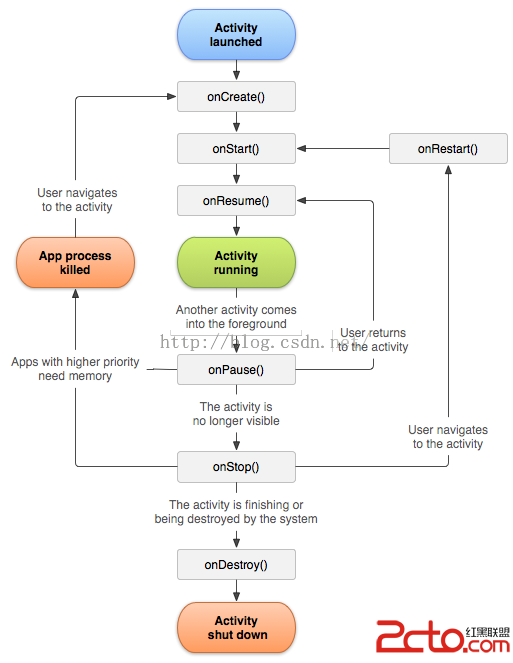
今天面試被問及了一個問題:Activity A、Activity B,Activity A 被B覆蓋的時候,Activity生命周期中哪幾個方法被調用了?Activity
 Android多媒體-人臉識別
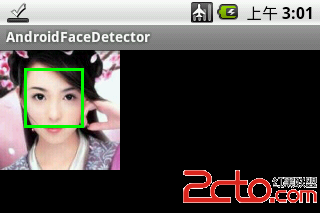
1. 相關背景 Google 於2006年8月收購Neven Vision 公司 (該公司擁有 10 多項應用於移動設備領域的圖像識別的專利),以此獲得了圖像識別的技術
 Android 布局優化工具Hierarchy Viewer的使用
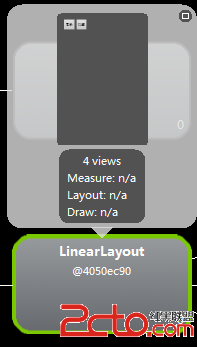
網上已經有很多關於Hierarchy Viewer如何使用的文章,這裡就不一步步的演示具體怎樣使用了,ddna兄的《【Android工具】被忽
 退出應用的第N+1種方法-一行代碼退出應用
前N種方法之前有在網上了解過退出應用的方法,其中包括在每個activity中注冊關閉界面的廣播接受者,當想推出應用時發一條廣播關閉所有的界面,最常用的使用list去模擬任
 Android,底部導航+viewpager+fragment+drawerlayout+toolbar+recyclerview
將自己的編程經歷寫出來是個好習慣先來效果圖:項目結構:1、底部導航底部導