編輯:關於Android編程
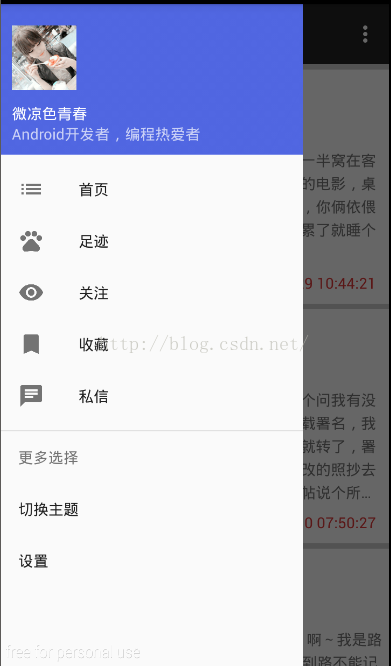
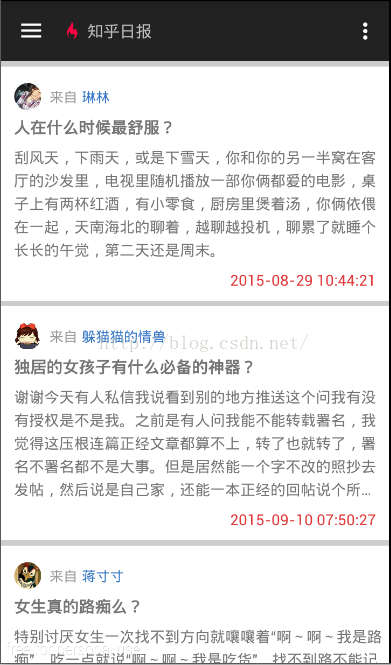
前幾天心血來潮,打算根據看知乎的API自己做一個小知乎,定制的過程遇到ListView的優化問題及圖片未緩存重加載等等許多問題,解決了以後打算和博友分享一下。
接口數據:http://api.kanzhihu.com/getpostanswers/20150925/archive
首先,Json數據太常用,相信每一位開發者Json的解析都是必備的。我們要准備以下知識:
JavaBean,枚舉你需要的元素,用來存儲數據。
異步加載網絡內容的必備途徑,多線程加載+AsyncTask兩種方式。
Json解析的常見方法,JsonObject和JsonArray;
ListView優化,使用Viewholder
下面上代碼,側邊欄這裡就不說了,相信大家都會。
layout_main.xml
<android.support.v4.widget.swiperefreshlayout android:layout_width="match_parent" android:layout_height="match_parent" android:id="@+id/refreshLayout" xmlns:android="http://schemas.android.com/apk/res/android">
<scrollview android:layout_width="match_parent" android:layout_height="match_parent" android:background="#fff" xmlns:android="http://schemas.android.com/apk/res/android">
    <linearlayout android:layout_width="match_parent" android:layout_height="match_parent" android:orientation="vertical">
        <linearlayout android:layout_width="match_parent" android:layout_height="5dp" android:background="#CCCCCC">
        <com.ynu.commando.classrewrite.commentlistview android:layout_width="match_parent" android:layout_height="match_parent" android:dividerheight="5dp" android:divider="#ccc" android:id="@+id/id_listView">
    </com.ynu.commando.classrewrite.commentlistview></linearlayout>
</linearlayout></scrollview>
</android.support.v4.widget.swiperefreshlayout>
圖文混排ListView的item文件:
item_id_listview.xml
<linearlayout xmlns:android="http://schemas.android.com/apk/res/android" android:orientation="vertical" android:layout_width="match_parent" android:layout_height="match_parent">
    <linearlayout android:layout_width="match_parent" android:layout_height="wrap_content" android:layout_marginleft="12dp" android:layout_margintop="15dp" android:orientation="horizontal">
        <com.ynu.commando.classrewrite.roundimageview android:layout_width="25dp" android:layout_height="25dp" android:src="@mipmap/smile_two" android:id="@+id/img">
        <textview android:layout_width="wrap_content" android:layout_height="wrap_content" android:layout_marginleft="8dp" android:layout_margintop="4dp" android:textsize="13dp" android:textcolor="#999999" android:text="來自">
        <textview android:layout_width="wrap_content" android:layout_height="wrap_content" android:layout_margintop="4dp" android:layout_marginleft="4dp" android:textcolor="#3374c4" android:textsize="13dp" android:id="@+id/name" android:text="熱門回答">
    </textview></textview></com.ynu.commando.classrewrite.roundimageview></linearlayout>
    <linearlayout android:layout_width="match_parent" android:layout_height="wrap_content" android:layout_marginleft="12dp">
        <textview android:layout_width="match_parent" android:layout_height="wrap_content" android:id="@+id/title" android:layout_margintop="6dp" android:maxheight="150dp" android:textstyle="bold" android:linespacingextra="2dp" android:textsize="15dp" android:text="為什麼北斗衛星導航系統需要35顆衛星才能覆蓋全球?">
    </textview></linearlayout>
    <linearlayout android:layout_width="match_parent" android:layout_height="wrap_content" android:layout_marginleft="12dp">
        <textview android:layout_width="fill_parent" android:layout_height="wrap_content" android:id="@+id/body" android:maxems="50" android:layout_margintop="6dp" android:linespacingextra="5dp" android:ellipsize="end" android:textsize="14dp" android:text="筆者個人看法,RecyclerView只是一個對ListView的升級版,這個升級的主要目的是為了讓這個view的效率更高,並且使用更加方便。我們知道,ListView通過使用ViewHolder來提升性能。ViewHolder通過保存item中使用到的控件的引用來減少findViewById的調用,以此使ListView滑動得更加順暢。">
    </textview></linearlayout>
    <linearlayout android:layout_width="match_parent" android:layout_height="wrap_content" android:layout_margintop="4dp" android:layout_marginright="12dp" android:layout_marginbottom="10dp" android:gravity="right">
        <textview android:layout_width="wrap_content" android:layout_height="wrap_content" android:id="@+id/time" android:textcolor="#e13939" android:text="2016-4-25 00:54:00">
    </textview></linearlayout>
</linearlayout>
JsonBean.java 這兒是javabean,用來存儲需要的數據對象
public class JsonBean {
    public String name;
    public String title;
    public String body;
    public String time;
    public String url;
}
CommentListView.java 重寫ListView禁止滑動,避免與ScrollView發生沖突:
public class CommentListView extends ListView {
    public CommentListView(Context context) {
        super(context);
    }

    public CommentListView(Context context, AttributeSet attrs) {
        super(context, attrs);
    }

    public CommentListView(Context context, AttributeSet attrs, int defStyleAttr) {
        super(context, attrs, defStyleAttr);
    }

    @TargetApi(Build.VERSION_CODES.LOLLIPOP)
    public CommentListView(Context context, AttributeSet attrs, int defStyleAttr, int defStyleRes) {
        super(context, attrs, defStyleAttr, defStyleRes);
    }

    public void onMeasure(int widthMeasureSpec, int heightMeasureSpec){
        int mExpandSpec = MeasureSpec.makeMeasureSpec(Integer.MAX_VALUE >> 2, MeasureSpec.AT_MOST);
        super.onMeasure(widthMeasureSpec, mExpandSpec);
    }
}
ListAdapter.java
import android.content.Context;
import android.content.Intent;
import android.util.Log;
import android.view.LayoutInflater;
import android.view.View;
import android.view.ViewGroup;
import android.widget.BaseAdapter;
import android.widget.ImageView;
import android.widget.TextView;
import com.ynu.commando.Imageloader;
import com.ynu.commando.JavaBean.JsonBean;
import com.ynu.commando.R;
import com.ynu.commando.UsingTest;

import java.util.List;

/**
 * Created by 江樹金 on 2016/4/23.
 */
public class ListAdapter extends BaseAdapter {

    private List mlist;//JsonBean的list
    private LayoutInflater mInflater;
    private Imageloader mImageloader;
    private Context context;

    public void setContext(Context context) {
        this.context = context;
    }

    //將數據映射過來
    public ListAdapter(Context context, List data){
        mlist=data;
        mInflater= LayoutInflater.from(context);
        mImageloader=new Imageloader();
        this.context=context;
    }

    @Override
    public int getCount() {
        return mlist.size();
    }

    @Override
    public Object getItem(int position) {
        return mlist.get(position);
    }

    @Override
    public long getItemId(int position) {
        return position;
    }

    @Override
    public View getView(int position, View convertView, ViewGroup parent) {
        ViewHolder viewHolder=null;
        if (viewHolder==null){
            viewHolder=new ViewHolder();
            convertView=mInflater.inflate(R.layout.item_id_listview,null);
            viewHolder.img= (ImageView) convertView.findViewById(R.id.img);
            viewHolder.img.setOnClickListener(new View.OnClickListener() {
                @Override
                public void onClick(View v) {
                    Log.i("========點擊了頭像========", "點擊事件啟動-------------- ");
                    context.startActivity(new Intent(context, UsingTest.class));
                }
            });
            viewHolder.title= (TextView) convertView.findViewById(R.id.title);
            viewHolder.body= (TextView) convertView.findViewById(R.id.body);
            viewHolder.name= (TextView) convertView.findViewById(R.id.name);
            viewHolder.time= (TextView) convertView.findViewById(R.id.time);
            convertView.setTag(viewHolder);
        }else {
            viewHolder= (ViewHolder) convertView.getTag();
        }
        String url=mlist.get(position).url;
        viewHolder.img.setTag(url);//進行綁定,為了在imageLoader中的語句,
        /*
        * @二選一進行圖片加載
        * */
        /*mImageloader.showImagerByThread(viewHolder.img,mlist.get(position).url);//使用多線程的方法加載圖片*/
        mImageloader.showImageByAsyncTask(viewHolder.img,url);//使用AsyncTask的方式加載
        viewHolder.title.setText(mlist.get(position).title);//從JsonBean中取出元素設置給viewholder的元素
        viewHolder.body.setText(mlist.get(position).body);
        viewHolder.name.setText(mlist.get(position).name);
        viewHolder.time.setText(mlist.get(position).time);
        return  convertView;
    }

    class ViewHolder{
        public TextView title;
        public TextView body;
        public TextView name;
        public TextView time;
        public ImageView img;
    }
}
Imageloader.java
import android.graphics.Bitmap;
import android.graphics.BitmapFactory;
import android.nfc.Tag;
import android.os.AsyncTask;
import android.os.Handler;
import android.os.Message;
import android.util.Log;
import android.util.LruCache;
import android.widget.ImageView;

import java.io.BufferedInputStream;
import java.io.IOException;
import java.io.InputStream;
import java.net.HttpURLConnection;
import java.net.MalformedURLException;
import java.net.URL;

/**
 * Created by 江樹金 on 2016/4/23.
 */
public class Imageloader {
    //注:異步加載圖片可以使用①多線程加載 或者 ②AsyncTask去加載。[個人感覺多線程的加載速度大於AsyncTask]
    private ImageView mimageView;
    private String mUrl;
    //創建cache
    private LruCache mCache;

    public void showImagerByThread(ImageView imageView, final String url){
        mimageView=imageView;
        mUrl=url;
        new Thread(new Runnable() {//多線程加載
            @Override
            public void run() {
                Bitmap bitmap=getBitmapFromUrl(url);
                Message msg=Message.obtain();
                msg.obj=bitmap;
                handler.sendMessage(msg);
            }
        }).start();
    }

    Handler handler=new Handler(){
        @Override
        public void handleMessage(Message msg) {
            super.handleMessage(msg);
            //在handler中處理UI
           //避免緩存的圖片對正確圖片的影響,viewholder會重新加載設定圖片
            if (mimageView.getTag().equals(mUrl)){
                mimageView.setImageBitmap((Bitmap) msg.obj);//避免影響之後再去加載bitmap
            }
        }
    };

    /*
    * 公用方法 獲取URL並存為bitMap類型 進行加載時可選擇多線程或者AsyncTask進行加載
    * */
    public Bitmap getBitmapFromUrl(String UrlString){
        Bitmap bitmap;
        InputStream is;
        try {
            URL url=new URL(UrlString);
            HttpURLConnection connection= (HttpURLConnection) url.openConnection();
            is=new BufferedInputStream(connection.getInputStream());//獲取InputStream對象
            bitmap= BitmapFactory.decodeStream(is);
            //資源釋放,優化作用
            connection.disconnect();
            return bitmap;
        } catch (MalformedURLException e) {
            e.printStackTrace();
        } catch (IOException e) {
            e.printStackTrace();
        }
        return null;
    }

    public void showImageByAsyncTask(ImageView imageView,String url){
        //從緩存中取出對應的圖片
        Bitmap bitmap=getBitmapFromCache(url);
        if (bitmap==null){
            //說明內存中沒有該圖片 只能從網絡中獲取圖片
            new newAsyncTask(imageView,url).execute(url);//將url傳遞到newAsyncTask中處理。
        }else {
            //如果有就直接使用該圖片
            imageView.setImageBitmap(bitmap);
        }
    }

    private class newAsyncTask extends AsyncTask{

        private ImageView mImageView;
        private String murl;

        @Override
        protected Bitmap doInBackground(String... params) {//完成異步加載任務
            //先進行下載,在判斷緩存中有沒有
            String url=params[0];
            Bitmap bitmap=getBitmapFromUrl(url);
            if (bitmap!=null){
                //加入緩存
                addBitmapToCache(url,bitmap);
            }
            return bitmap;
        }

        public newAsyncTask(ImageView imageView,String url){
            mImageView=imageView;
            murl=url;
        }

        @Override
        protected void onPostExecute(Bitmap bitmap) {
            super.onPostExecute(bitmap);
            if (mImageView.getTag().equals(murl)){
                mImageView.setImageBitmap(bitmap);
            }
        }
    }

    public Imageloader(){
        /*
        *設定一部分內存轉化為我們的緩存空間.Lru算法
        * */
        int MaxMemory= (int) Runtime.getRuntime().maxMemory();
        int cacheSize=MaxMemory/4;
        mCache=new LruCache(cacheSize){
            @Override
            protected int sizeOf(String key, Bitmap value) {
                //返回實際大小
                return value.getByteCount();//在每次存入緩存的時候調用該方法,告訴當前系統存入的對象有多大
            }
        };
    }

    /*
    * 將url增加到緩存
    * 在增加之前校驗緩存是否存在
    * */
    public void addBitmapToCache(String url,Bitmap bitmap){
        if (getBitmapFromCache(url)==null){
            mCache.put(url,bitmap);
        }
    }

    public Bitmap getBitmapFromCache(String url){//通過url去返回指定的cache
        return mCache.get(url);//LruCache 本質上就是map  可以直接獲得
    }
}
MainActivity.java
public class MainActivity extends AppCompatActivity
        implements NavigationView.OnNavigationItemSelectedListener {

    private CommentListView mlistView;
    private String url="http://api.kanzhihu.com/getpostanswers/20150925/archive";//知乎API [ answers ]
    private SwipeRefreshLayout refreshLayout;
    private ListAdapter listAdapter;
    List mjsonBeen;

    @Override
    protected void onCreate(Bundle savedInstanceState) {
        super.onCreate(savedInstanceState);
        setContentView(R.layout.activity_main);
        Toolbar toolbar = (Toolbar) findViewById(R.id.toolbar);
        toolbar.setTitle("");
        setSupportActionBar(toolbar);

        FloatingActionButton fab = (FloatingActionButton) findViewById(R.id.fab);
        fab.setOnClickListener(new View.OnClickListener() {
            @Override
            public void onClick(View view) {
                Snackbar.make(view, "Replace with your own action", Snackbar.LENGTH_LONG)
                        .setAction("Action", null).show();
            }
        });

        DrawerLayout drawer = (DrawerLayout) findViewById(R.id.drawer_layout);
        ActionBarDrawerToggle toggle = new ActionBarDrawerToggle(
                this, drawer, toolbar, R.string.navigation_drawer_open, R.string.navigation_drawer_close);
        drawer.setDrawerListener(toggle);
        toggle.syncState();

        NavigationView navigationView = (NavigationView) findViewById(R.id.nav_view);
        navigationView.setNavigationItemSelectedListener(this);

        initView();
        mlistView.setOnItemClickListener(new AdapterView.OnItemClickListener() {
            @Override
            public void onItemClick(AdapterView parent, View view, int position, long id) {
                switch (position){
                    case 0:
                        startActivity(new Intent(MainActivity.this,UsingTest.class));
                        break;
                }
            }
        });
        new asyncTask().execute(url);
        refreshLayout.setColorSchemeResources(R.color.swipeRefreshLayout,
                R.color.swipeRefreshLayout,
                R.color.swipeRefreshLayout,
                R.color.swipeRefreshLayout);
        refreshLayout.setProgressViewEndTarget(true, 100);
        refreshLayout.setProgressBackgroundColor(R.color.bg);
        refreshLayout.setOnRefreshListener(new SwipeRefreshLayout.OnRefreshListener() {
            @Override
            public void onRefresh() {
                new Thread(new Runnable() {
                    @Override
                    public void run() {
                        try {
                            Thread.sleep(2000);
                            Message msg=Message.obtain();
                            msg.what=1;
                            handler.sendMessage(msg);
                        } catch (InterruptedException e) {
                            e.printStackTrace();
                        }
                    }
                }).start();
            }
        });
    }

    private void initView() {
        mlistView= (CommentListView) findViewById(R.id.id_listView);
        refreshLayout= (SwipeRefreshLayout) findViewById(R.id.refreshLayout);
    }

    Handler handler=new Handler(){
        @Override
        public void handleMessage(Message msg) {
            super.handleMessage(msg);
            if (msg.what==1){
                Toast.makeText(MainActivity.this, "刷新馬上就好,請稍等哒~", Toast.LENGTH_SHORT).show();
                refreshLayout.setRefreshing(false);
            }
        }
    };

    @SuppressWarnings("StatementWithEmptyBody")
    @Override
    public boolean onNavigationItemSelected(MenuItem item) {
        // Handle navigation view item clicks here.
        int id = item.getItemId();
        /*
        * 側邊欄點擊事件
        * */
        DrawerLayout drawer = (DrawerLayout) findViewById(R.id.drawer_layout);
        drawer.closeDrawer(GravityCompat.START);
        return true;
    }

    /*
    * 實現網絡的異步訪問
    * */
    class  asyncTask extends AsyncTask>{

        @Override
        protected List doInBackground(String... params) {
            return getJsonData(params[0]);
        }

        @Override
        protected void onPostExecute(List jsonBeen) {
            super.onPostExecute(jsonBeen);
            listAdapter=new ListAdapter(MainActivity.this,jsonBeen);
            mlistView.setAdapter(listAdapter);
        }
    }

    /*
    * 將Url對應的json格式數據轉化為我們所封裝的JsonBean的對象
    * */
    private List getJsonData(String url) {//通過url獲取data
        List jsonList=new ArrayList<>();
        try {
            String jsonString=readStream(new URL(url).openStream());//打開json的字符串接收
            JSONObject jsonObject;
            JsonBean jsonBean;
            jsonObject=new JSONObject(jsonString);//將獲取到的json數據傳入jsonObject;
            JSONArray jsonArray=jsonObject.getJSONArray("answers");//去除data
            for (int i=0;i還差許多xml文件,博主沒有貼上去,大部分是一些自定的樣式和側邊欄。本篇博客旨在讓博友們看懂如何進行異步處理網絡數據和Lrucache是如何操作的。 Demo是Android Studio的,能夠直接跑起來,最重要的是讀者能夠自己寫一遍我相信肯定能掌握,編程在於多動手。
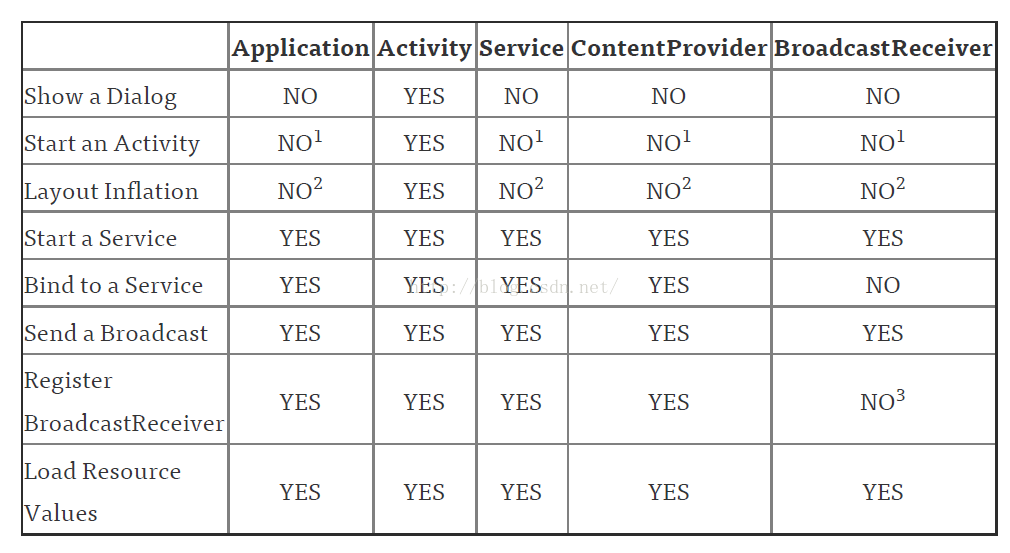 android中Context的應用總結
概述作為一名Android開發人員,每天使用最多的類中,恐怕Context可以排的上一號了。因為Context對象在我們的項目中實在是太常見了,我們在加載資源,啟動Act
 [Android Studio] *.jar 與 *.aar 的生成與*.aar導入項目方法
主要講解Android Studio中生成aar文件以及本地方式使用aar文件的方法。 在Android Studio中對一個自己庫進行生成操作時將會同時生成*.jar與
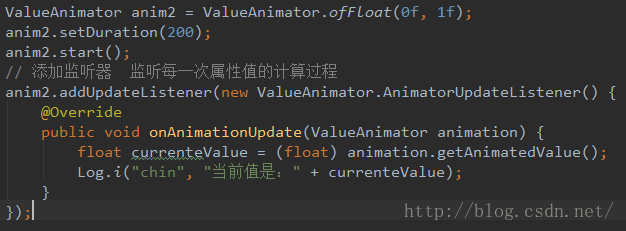 Android動畫3-屬性動畫(PropertyAnimation)
屬性動畫是為了彌補之前兩種動畫模式的不足之處產生的(Android3.0之後才有的),特點是 真實對view的屬性進行改動,並且能支持自定義屬性動畫, 基本上能實現所有能
 Android帶清除功能的輸入框控件EditTextWithDel
記錄下一個很實用的小控件EditTextWithDel,就是在Android系統的輸入框右邊加入一個小圖標,點擊小圖標可以清除輸入框裡面的內容,由於Android原生Ed