編輯:關於Android編程
Android自身可以實現代碼的混淆功能,Android集成了代碼混淆的功能,這些功能在Android SDK的tools有個proguard目錄,這個目錄下就是提供了Andoid代碼的混淆功能,我們只需要在Android項目中進行簡單的配置即可。最初的配置文件為proguard.cfg文件,後來adt升級以後,文件改為了proguard-project.txt,所以,這裡,我們以兩種方式來講解如何進行代碼混淆
創建Android項目之後,在Android項目根目錄下有個proguard.cfg文件,這個文件中就是描述了Android的混淆配置。
具體如下:
-optimizationpasses 5
-dontusemixedcaseclassnames
-dontskipnonpubliclibraryclasses
-dontpreverify
-verbose
-optimizations !code/simplification/arithmetic,!field/*,!class/merging/*

-keep public class * extends android.app.Activity
-keep public class * extends android.app.Application
-keep public class * extends android.app.Service
-keep public class * extends android.content.BroadcastReceiver
-keep public class * extends android.content.ContentProvider
-keep public class * extends android.app.backup.BackupAgentHelper
-keep public class * extends android.preference.Preference
-keep public class com.android.vending.licensing.ILicensingService

-keepclasseswithmembernames class * {
    native ;
}

-keepclasseswithmembers class * {
    public (android.content.Context, android.util.AttributeSet);
}

-keepclasseswithmembers class * {
    public (android.content.Context, android.util.AttributeSet, int);
}

-keepclassmembers class * extends android.app.Activity {
   public void *(android.view.View);
}

-keepclassmembers enum * {
    public static **[] values();
    public static ** valueOf(java.lang.String);
}

-keep class * implements android.os.Parcelable {
  public static final android.os.Parcelable$Creator *;
}
這個文件是整個項目的環境配置文件,我們只需要在這個文件中指定代碼混淆的配置即可。只需要在代碼中加入一行配置
proguard.config=proguard.cfg如下圖:
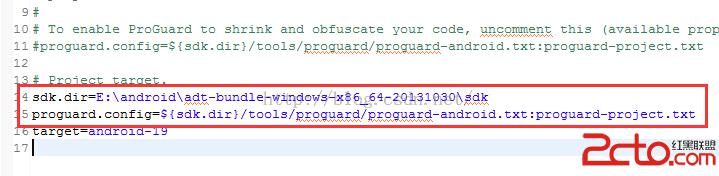
這樣就實現了代碼的混淆功能
這個時候,項目生成的是proguard-project.txt
如下代碼所示:
# To enable ProGuard in your project, edit project.properties
# to define the proguard.config property as described in that file.
#
# Add project specific ProGuard rules here.
# By default, the flags in this file are appended to flags specified
# in ${sdk.dir}/tools/proguard/proguard-android.txt
# You can edit the include path and order by changing the ProGuard
# include property in project.properties.
#
# For more details, see
#   http://developer.android.com/guide/developing/tools/proguard.html

# Add any project specific keep options here:

# If your project uses WebView with JS, uncomment the following
# and specify the fully qualified class name to the JavaScript interface
# class:
#-keepclassmembers class fqcn.of.javascript.interface.for.webview {
#   public *;
#}
在這個文件中需要我們指定sdk的安裝路徑sdk.dir,然後再指定proguard的配置proguard.config,我自己sdk的目錄是E:androidadt-bundle-windows-x86_64-20131030sdk,
所以,我在project.properties文件中新增的兩項配置是
sdk.dir=E:androidadt-bundle-windows-x86_64-20131030sdk
proguard.config=${sdk.dir}/tools/proguard/proguard-android.txt:proguard-project.txt
具體如下圖所示:
好了,這樣就完成了代碼混淆的配置
兩種方式都只是通過配置project.properties文件實現代碼混淆的。
 Android仿京東首頁輪播文字(又名垂直跑馬燈)
京東客戶端的輪播文字效果: 本次要實現的只是後面滾動的文字(前面的用ImageView或者TextView實現即可),看一下實現的效果 實
 android-wheel控件實現三級聯動效果
本文實例為大家分享了android wheel省市縣三級聯動效果,供大家參考,具體內容如下在github上面有一個叫做 Android-wheel 的開源控件, 代碼地址
 再談STM32的CAN過濾器-bxCAN的過濾器的4種工作模式以及使用方法總結
1. 前言bxCAN是STM32系列最穩定的IP核之一,無論有哪個新型號出來,這個IP核基本未變,可見這個IP核的設計是相當成熟的。本文所講述的內容屬於這個IP核的一部分
 Android中WebView常見問題及解決方案匯總
Android WebView常見問題解決方案匯總:就目前而言,如何應對版本的頻繁更新呢,又如何靈活多變地展示我們的界面呢,這又涉及到了web app與native ap